


A smooth connection can mean the difference between victory and defeat in World of Warcraft (WoW), especially in high-stakes PvP or mythic raids.
High ping, also known as latency, can cause delay between your actions and their appearance in-game, creating a frustrating experience. Whether you're dueling in Warsong Gulch or trying to avoid a deadly AoE in Castle Nathria, reducing your ping will improve both your performance and enjoyment.
Here’s a detailed guide to help you lower your ping in World of Warcraft and get the most out of your adventures in Azeroth.
What is Ping
Ping refers to the time it takes for data to travel from your device to the game server and back, measured in milliseconds (ms). In WoW, a lower ping (ideally under 50ms) provides faster response times. If your ping is consistently over 100ms, you may start to notice ability lag or movement delay, especially in crowded or competitive scenarios.
You can check your current ping in-game by hovering over the computer icon on the bottom right of the screen or using the command /console ShowNetStats 1.
How to Check Your Ping
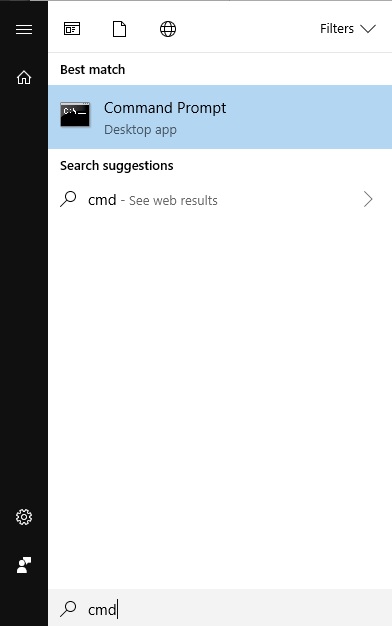
1. Open the Windows Start menu and type “cmd”
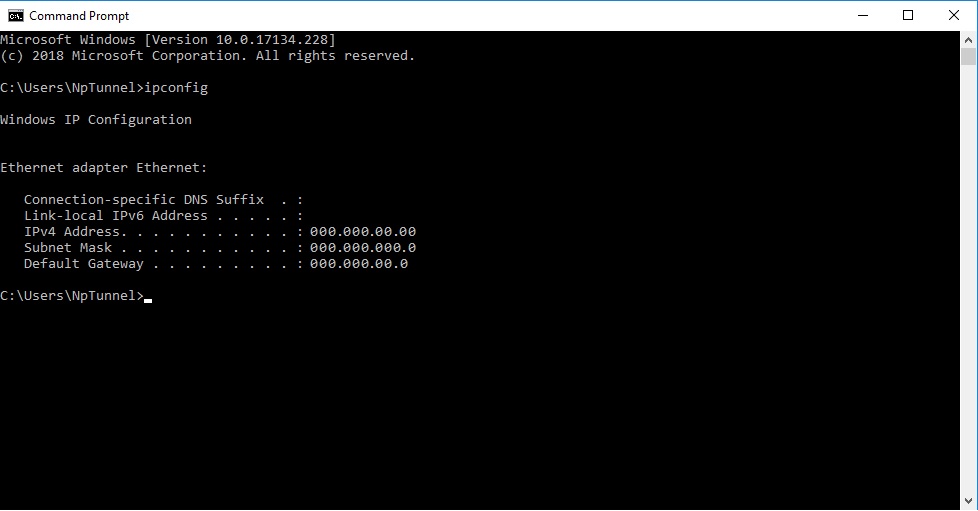
2. Type “ipconfig” and then press enter.
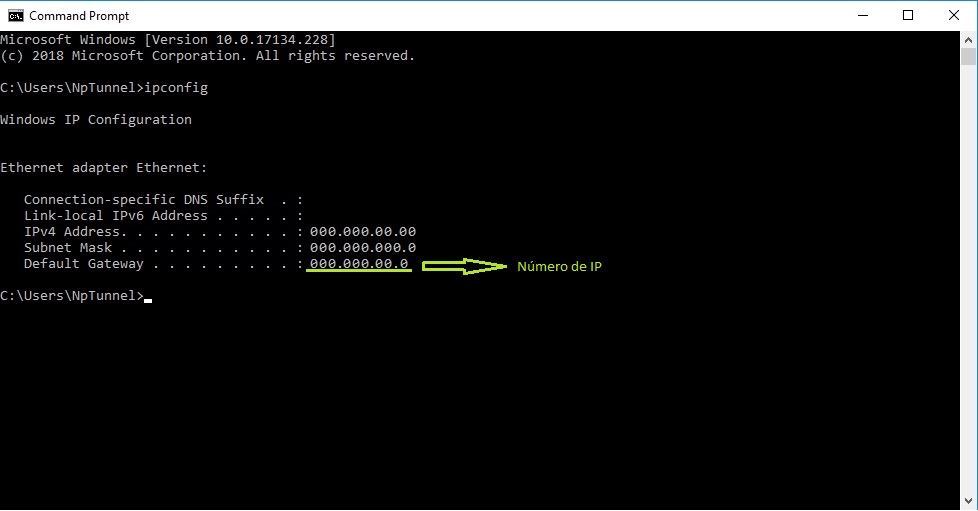
3. Then save the IP number
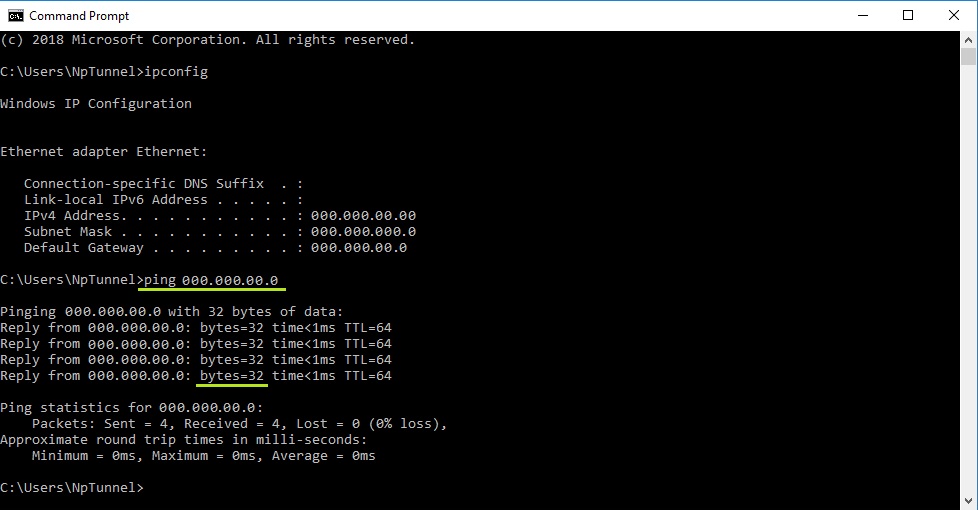
4. Then type in the next cmd “ping” + your IP number
10 Ways to Reduce Your Ping in World of Warcraft
1. Choose the Right Server
If you're playing on a server located far from your physical location, latency is naturally higher. For example, if you're in Europe but playing on a US server, expect a ping of 100ms or more.
How to fix it:
- Choose a realm (server) in your region (e.g., NA, EU, OCE).
- If you're already invested in a character on a distant server, consider transferring to a local server.
2. Use a Wired Ethernet Connection
Wi-Fi is convenient but prone to interference and packet loss, which can spike your ping.
What to do:
- Connect your computer directly to your router using an Ethernet cable.
- This ensures a more stable and faster connection with lower latency.
3. Close Background Applications
Background apps, especially those that use the internet (e.g., streaming services, torrents, cloud backups), can consume bandwidth and increase ping.
Tips:
- Close unused browser tabs and programs.
- Pause any large downloads or updates.
- Use Task Manager (Windows) or Activity Monitor (Mac) to spot bandwidth-heavy applications.
4. Optimize Your Network Settings
Sometimes, small network tweaks can make a big difference.
Suggestions:
- Restart your modem/router to refresh your connection.
- Enable QoS (Quality of Service) on your router settings to prioritize gaming traffic.
- Set your DNS server to a faster, more reliable option like Google DNS (8.8.8.8) or Cloudflare (1.1.1.1).
5. Use NoPing
NoPing is a service designed to optimize your route to World of Warcraft’s servers. Sometimes, the normal path your internet provider uses isn’t the fastest — NoPing reroutes your data through a better, more direct path.
Here’s how to use NoPing to reduce your ping in World of Warcraft:
- Sign-up through the website and download NoPing (you can try it for free)
- Open NoPing and search for World of Warcraft inside the software

- Once you find World of Warcraft, click on it and, on the next screen, select “Choose automatic” or “Choose manual” and click “Continue”. We recommend choosing automatic, as NoPing’s technology analyzes all routes on a global scale and automatically selects the best option for you.

- On the next screen, click on “Optimize Game”.

- And that’s it, you can start playing World of Warcraft with optimized ping!
You can test different servers within NoPing to see which gives you the lowest latency.
6. Adjust WoW’s In-Game Settings
While most ping issues are related to your connection, certain in-game settings can indirectly affect performance and perceived lag.
Suggestions:
- Lower your view distance and reduce add-on usage in crowded zones.
- Disable "Network Optimizations" in Settings if you're having issues—it doesn’t help every player.
- Use lightweight add-ons and disable those you don’t need, especially during raids or battlegrounds.

Source: Logical Increments
7. Keep Your System Updated
Outdated network drivers, firmware, or even system software can lead to connectivity issues.
Make sure to:
- Update your network adapter drivers.
- Check for firmware updates for your router.
- Install the latest OS updates.
8. Contact Your ISP
If your ping is still consistently high despite these steps, the issue may lie with your internet service provider (ISP).
What to ask:
- Is there congestion in your area?
- Can they offer a gaming-optimized plan?
- Are you receiving the speeds you’re paying for?
Sometimes a simple plan upgrade or router replacement from your ISP can improve your ping significantly.
9. Play During Off-Peak Hours
Latency can increase during peak usage times (e.g., evenings and weekends) due to higher traffic on your ISP’s network or even Blizzard’s servers.
Try to:
- Schedule important raids or competitive play during off-peak hours when the network is less congested.
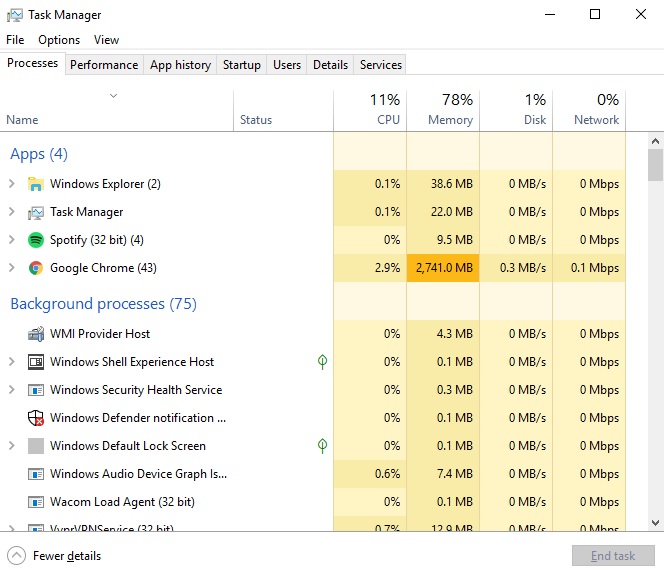
10. Close Programs That Are Consuming RAM Memory
If there are too many open programs on your computer, this can lead to poor game performance. Take a look at the Task Manager and review the applications that are consuming your computer's RAM. Close any programs that are running unnecessarily.
What Causes High Ping in World of Warcraft?
Several factors can contribute to high ping in World of Warcraft, each introducing delay in the data sent between your device and Blizzard's servers:
- Geographical distance: If you're playing on a server located far from your physical location (e.g., a North American player on a European server), your data must travel farther, naturally increasing latency.
- Poor ISP routing: Sometimes your Internet Service Provider uses inefficient or overloaded routes to connect to WoW servers, leading to unnecessary delays. This is often outside your control unless you're using a service that optimizes routing paths.
- Network congestion: High traffic on your local network (like streaming, downloads, or other online games) or on your ISP’s infrastructure during peak hours can slow down your connection.
- Wi-Fi instability: Wireless connections are more susceptible to packet loss, interference from other devices, and signal degradation—especially if you're far from the router or surrounded by thick walls.
- Background applications: Cloud backups, updates, torrent clients, or even browser tabs running in the background can consume bandwidth and increase ping.
- Server-side issues: On rare occasions, high ping is due to Blizzard’s own server problems, especially during major content launches, maintenance windows, or DDoS attacks.
Identifying the source of your latency is essential for applying the right solution and improving your gameplay experience.
Why Is It Important to Reduce Your Ping in World of Warcraft?
Reducing ping in World of Warcraft is vital for maintaining competitive performance and a smooth gameplay experience, especially in scenarios where timing and coordination are crucial:
- PvP responsiveness: In arena or battlegrounds, high ping can make your interrupts land late, your movement feel delayed, and your defensive cooldowns trigger too slowly, putting you at a disadvantage against faster players.
- Raid and dungeon timing: In PvE content, especially in mythic+ dungeons or heroic raids, poor latency can make it harder to avoid mechanics, react to enemy abilities, or sync with your group’s strategies.
- Global cooldown delays: Even small delays in your rotation due to high ping can lower your DPS or HPS output, reducing your effectiveness in raids or competitive content.
- Communication issues: High ping can affect voice communication if you're using services like Discord while playing, especially if your bandwidth is limited.
- Overall frustration: When your actions don't register properly or the game feels laggy, it breaks immersion and leads to a frustrating experience—especially in endgame content where precision matters.
For casual and hardcore players alike, lower ping means better control, more accurate gameplay, and a more enjoyable time in Azeroth.
Download NoPing now and play World of Warcraft without any lag! Test it for free!

