


ARC Raiders is a PvPvE extraction shooter from Embark Studios built on Unreal Engine 5. For players in the United States, connection quality can vary depending on server region, ISP routing, congestion, jitter and packet loss.
This guide explains what new US players should know about ARC Raiders servers, latency, connection stability, anti-cheat compatibility and network optimization with NoPing.
ARC Raiders Server Regions for US Players
ARC Raiders uses regional server infrastructure to connect players across different parts of the world. For players in the United States, North American server regions are generally the most appropriate starting point.
NA-East or NA-West: Which ARC Raiders Server Should You Choose?
As a general guideline:
- NA-East: typically better suited to players on the East Coast and parts of the Midwest.
- NA-West: typically better suited to players on the West Coast.
- Cross-region connections: may increase latency depending on distance and ISP routing.
Geographic distance is not the only factor that determines ping. Your ISP's route to the selected ARC Raiders server can significantly affect latency, jitter and packet loss.
The best approach is to test the available regions and compare actual connection quality rather than choosing exclusively based on geographic distance.
Why Is My Ping High in ARC Raiders?
High ping in ARC Raiders does not necessarily mean your internet connection is slow.
A high-speed connection can still experience poor gaming performance when network traffic takes an inefficient or congested route to the game server.
Common causes of high ping include:
- Inefficient ISP routing
- Poor network peering
- Peak-hour congestion
- Long-distance server connections
- Wi-Fi interference
- Packet loss
- High jitter
- Sudden routing changes
- Game server congestion
Does Faster Internet Automatically Mean Lower Ping?
No. Internet bandwidth and latency measure different aspects of your connection.
A fast fiber connection can still experience high latency when the route to the ARC Raiders server is inefficient. A slower connection with better routing may sometimes deliver more stable gameplay.
For online gaming, players should evaluate ping, jitter and packet loss together.
How Latency Affects ARC Raiders Gameplay
ARC Raiders combines PvP encounters, AI-controlled enemies, exploration, looting and extraction mechanics.
Because successful sessions depend heavily on timing and responsiveness, unstable connections can become particularly noticeable during combat and extraction attempts.
Common Signs of Network Instability
Players may experience:
- Delayed hit registration
- Sudden ping spikes
- Movement inconsistencies
- Delayed enemy reactions
- Audio and visual desynchronization
- Rubberbanding
- Network-related freezes
- Delayed interactions
- Problems during time-sensitive extraction attempts
A stable connection can be more important than simply achieving the lowest possible average ping.
A consistent 50–60 ms connection, for example, can provide a better experience than one that frequently jumps between 25 ms and 120 ms.
Ping vs Jitter vs Packet Loss in ARC Raiders
Ping, jitter and packet loss measure different aspects of your network connection.
What Is Ping?
Ping measures how long network data takes to travel between your device and the game server.
Lower latency generally means faster communication with the server.
What Is Jitter?
Jitter measures how much your latency changes over time.
For example, a connection constantly fluctuating between 30 ms, 70 ms and 120 ms can feel significantly less stable than one consistently running around 60 ms.
What Is Packet Loss?
Packet loss occurs when network packets fail to reach their destination.
Even relatively small amounts of packet loss can cause noticeable issues during online gameplay, particularly during combat or other timing-sensitive situations.
How NoPing Works With ARC Raiders
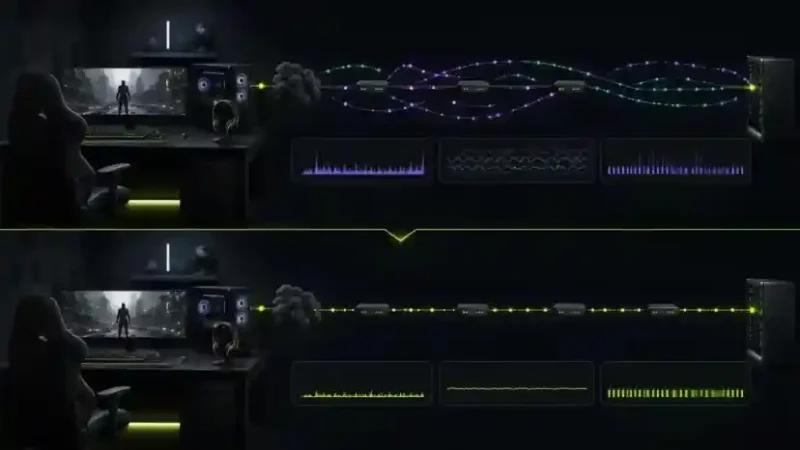
NoPing is designed to optimize the network path between the player's internet connection and the ARC Raiders server.
Instead of relying exclusively on the ISP's default route, players can test alternative network paths and determine whether another route provides better performance.
Multi Connection
NoPing's Multi Connection technology can work with up to five network routes, providing additional routing options between the player's connection and the ARC Raiders server.
Depending on the player's ISP, location, selected server and current network conditions, alternative routing may help reduce instability caused by inefficient or congested paths.
Results vary by connection, so players should compare performance under similar conditions before and after enabling route optimization.
Multi Internet
Multi Internet can use multiple available internet connections simultaneously.
This can be particularly useful when one connection experiences congestion, jitter or temporary instability.
Depending on the user's setup, available connections may include:
- Fiber internet
- Cable broadband
- Secondary broadband
- Mobile internet
- Other compatible connections
Performance depends on the stability and quality of each available connection.
Boost FPS
Boost FPS focuses on local PC performance rather than internet routing.
ARC Raiders runs on Unreal Engine 5, meaning CPU, GPU, memory and background system activity can influence gameplay smoothness.
The distinction is important:
Route optimization addresses network-path problems, while Boost FPS addresses local system performance.

ARC Raiders on Comcast Xfinity, Spectrum, AT&T Fiber and Other US ISPs
Different US internet providers can use different routes to reach the same ARC Raiders infrastructure.
Connection quality may also vary by city, region and time of day.
Comcast Xfinity
Players should monitor evening congestion, cross-country routes, packet loss and latency spikes.
Testing alternative routes can help determine whether the ISP's default path is contributing to instability.
Spectrum
Network congestion can vary according to local infrastructure and time of day.
Compare ping and jitter during normal periods and peak evening gaming hours.
AT&T Fiber
Fiber connections can provide excellent local performance, but the external route between the ISP and the game server still matters.
Test actual latency and stability rather than assuming bandwidth alone determines performance.
Verizon Fios
Players on the East Coast may have relatively direct routes to nearby server infrastructure, while cross-region connections can behave differently.
Compare available server regions before choosing one permanently.
T-Mobile Home Internet
5G fixed wireless connections can experience latency variation depending on signal quality, tower congestion and local conditions.
Players should pay particular attention to jitter and latency spikes rather than average ping alone.
CenturyLink / Quantum Fiber, Cox and Optimum
Routing varies by region and local market.
Test ARC Raiders during your normal gaming hours and compare ping, jitter and packet loss before and after changing network routes.
How to Reduce Ping and Connection Instability in ARC Raiders
Before changing your network configuration, establish a baseline so you can accurately measure whether an adjustment improves your connection.
Step 1: Use Ethernet When Possible
A wired Ethernet connection removes many variables associated with Wi-Fi interference, signal strength and wireless congestion.
Step 2: Close Unnecessary Downloads and Uploads
Cloud backups, downloads, video streaming and other devices using significant bandwidth can contribute to network congestion.
Step 3: Choose the Appropriate ARC Raiders Server Region
Compare NA-East and NA-West based on actual connection performance.
The geographically closest region is not always guaranteed to provide the best route.
Step 4: Monitor More Than Average Ping
Measure:
- Average ping
- Latency spikes
- Jitter
- Packet loss
- Overall connection consistency
Step 5: Test an Alternative Route
Use NoPing to determine whether an alternative route to the ARC Raiders server performs better than your ISP's default network path.
Step 6: Compare Under Similar Conditions
Test at approximately the same time of day, on the same server region and under similar network conditions.
This makes the comparison significantly more reliable.
How to A/B Test NoPing With ARC Raiders
Controlled testing is the most useful way to determine whether route optimization improves your specific connection.
ARC Raiders Connection Test
Run approximately 5–10 sessions without NoPing and monitor:
- Average ping
- Jitter
- Packet loss
- Major latency spikes
- Overall connection stability
Then enable NoPing, keep the same ARC Raiders server region and repeat the test under similar conditions.
Compare several sessions rather than drawing conclusions from a single match.
Testing during peak evening hours can also reveal routing or congestion problems that may not appear during quieter periods.
ARC Raiders and Anti-Cheat Compatibility
ARC Raiders uses anti-cheat systems designed to protect online gameplay.
Network optimization should focus on routing traffic without modifying game files, manipulating gameplay or attempting to bypass security systems.
NoPing functions as a network optimization tool rather than a gameplay modification.
Players should always use supported software versions and keep ARC Raiders and its security components updated.
ARC Raiders FPS Problems vs Network Problems
Low FPS and high ping are different problems and should be diagnosed separately.
Signs of a Network Problem
Typical network-related symptoms include:
- Ping spikes
- Packet loss
- Rubberbanding
- Delayed server responses
- Connection interruptions
- High jitter
Signs of a PC Performance Problem
Typical local performance symptoms include:
- Low FPS
- Frame-time spikes
- GPU bottlenecks
- CPU bottlenecks
- Stuttering during graphically demanding scenes
Network route optimization cannot fix an overloaded CPU, insufficient GPU performance or poor local Wi-Fi conditions.
Likewise, upgrading PC hardware does not fix inefficient ISP routing.
Local Routing and ARC Raiders Servers in the United States
For US players, the route between the ISP and the selected ARC Raiders server can sometimes have a greater impact on latency than raw internet speed.
Two players with similar broadband plans may experience very different results because their providers use different upstream networks, routes and peering arrangements.
This is why troubleshooting should consider the complete path between the player's network and the game server rather than focusing exclusively on download speed.
How to Test ARC Raiders Routing With NoPing
Players experiencing unstable connections can test NoPing under their normal gaming conditions.
NoPing offers a 1-day free trial and supports 3,000+ games, including ARC Raiders.
For a useful comparison:
- Select your normal ARC Raiders server region.
- Play several sessions without route optimization.
- Record ping, jitter and packet loss.
- Enable NoPing.
- Repeat the test on the same server region.
- Compare connection stability under similar conditions.
Actual results depend on the player's ISP, location, server region, time of day and existing network route.
Frequently Asked Questions About ARC Raiders
Is ARC Raiders Worth Playing in 2026?
For players who enjoy PvPvE extraction shooters, ARC Raiders combines Unreal Engine 5 visuals, gunplay, exploration, looting and extraction mechanics.
Whether it is worth playing ultimately depends on how much you enjoy competitive extraction-based gameplay.
Which ARC Raiders Server Should US Players Use?
NA-East is generally the logical starting point for East Coast players and parts of the Midwest, while NA-West is typically better suited to West Coast players.
Actual routing can vary, so testing both regions can help determine which provides the better connection.
Does Internet Speed Determine ARC Raiders Ping?
No.
Bandwidth is only one component of internet performance. Server distance, routing, ISP peering, congestion, jitter and packet loss can all influence your experience.
Can NoPing Guarantee Lower Ping in ARC Raiders?
No.
Results depend on the player's ISP, location, selected server, existing route and current network conditions.
The best approach is to measure performance before and after changing routes.
How Should I Test NoPing for ARC Raiders?
Use the same ARC Raiders server region at approximately the same time of day.
Compare multiple sessions with and without NoPing while monitoring ping, jitter, packet loss and connection stability.
What Should I Monitor Besides Ping?
Monitor:
- Jitter
- Packet loss
- Latency spikes
- Route stability
- Connection consistency
Average ping alone does not provide a complete picture of network performance.
Is ARC Raiders Playable on T-Mobile Home Internet?
It can be, but performance depends on local 5G coverage, signal quality, tower congestion and network conditions.
Players should monitor jitter and latency spikes during their usual gaming hours.
When Should I Test a Different Route?
Consider testing another route after:
- ISP instability
- Server maintenance
- Major ARC Raiders updates
- Unexpected increases in latency
- Persistent packet loss
- Increased jitter
- Changes in ISP routing
Can NoPing Fix Low FPS in ARC Raiders?
Network optimization and FPS optimization address different performance issues.
Network routing features target latency, jitter and packet-loss-related problems, while Boost FPS focuses on local system resource usage.
Hardware limitations may still require graphics adjustments or hardware upgrades.
Does Anti-Cheat Prevent Network Route Optimization?
Network route optimization should not modify ARC Raiders game files or bypass its anti-cheat protections.
Players should use supported optimization tools and avoid software that manipulates game processes or attempts to interfere with security systems.
What Is the Best Way to Improve ARC Raiders Connection Stability?
Start by identifying the source of the problem.
Use Ethernet when possible, eliminate unnecessary network traffic, select the appropriate server region and monitor ping, jitter and packet loss.
If the problem appears to involve ISP routing, test an alternative network route and compare results under the same conditions.