01
Start the free trial
Create your account and try NoPing free, with no credit card.
Start free trial
Guided installation
Install NoPing Game Booster, choose your game and activate optimized routes, Multi Internet, Boost FPS and monitoring to reduce ping, jitter and packet loss.
Create your account and try NoPing free, with no credit card.
Start free trialInstall the game booster on Windows 10+ and get the client ready to optimize online games.
Download NoPingChoose from +3.000 games to apply optimized routes to the right server.
Browse gamesActivate 5 simultaneous routes, Multi Internet, Boost FPS and monitoring of ping, FPS and packet loss.
Windows checklist
Basic installation
To download, install and open the NoPing client on Windows.
Best experience
To play, monitor and optimize with more headroom during the match.
After opening the app
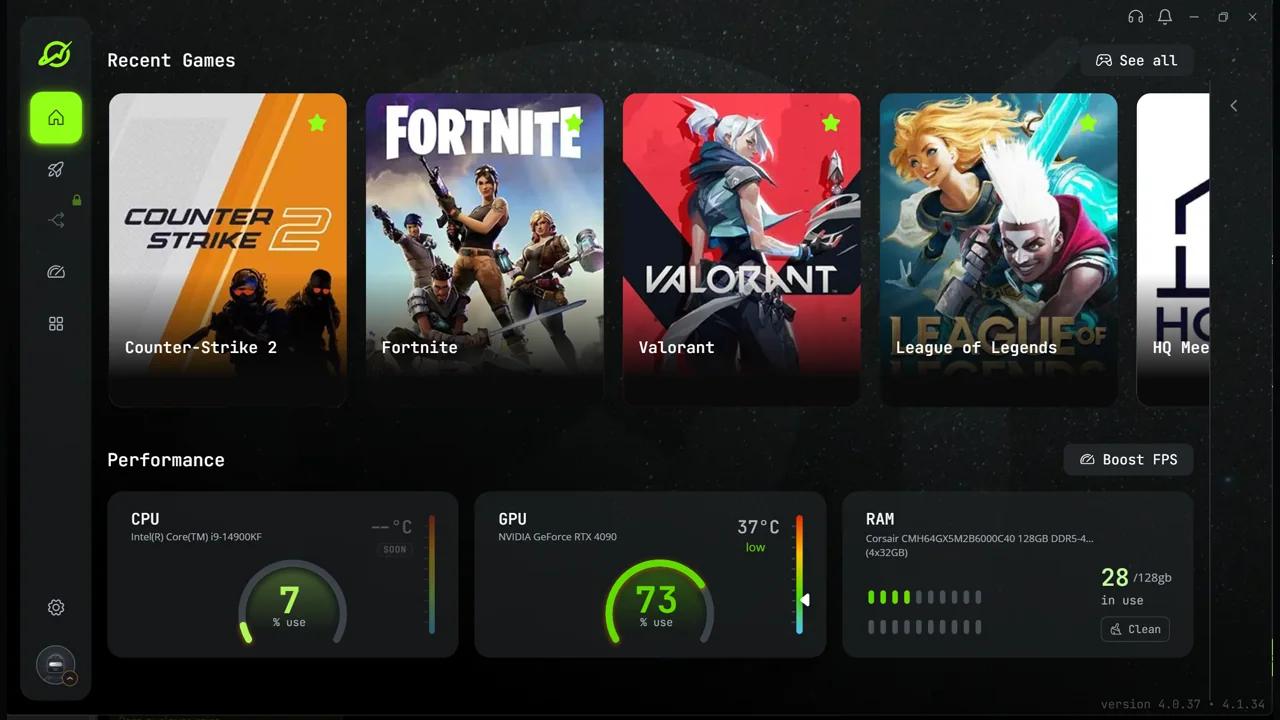
After installing, choose your game and turn on the layers that protect your match: 5 simultaneous routes for the game traffic, Multi Internet to combine connections, Boost FPS and real-time monitoring.
NoPing picks better paths to the game server and keeps 5 simultaneous routes to reduce jitter and packet loss.
If you have more than one internet connection available, NoPing combines up to 6 connections to keep the match steady when one of them fluctuates.
Prioritizes PC resources to reduce freezing, stutter and FPS drops during matches.
Track ping, FPS, CPU, GPU and packet loss in real time to separate network issues from performance issues.
Platforms
From desktop to mobile, NoPing covers the platforms that are part of the gamer routine, with a desktop client, official mobile apps and an experience focused on routing, stability and performance.
Desktop
Use NoPing on your computer to reduce ping, stabilize the route and track performance while you play.
Mobile
Use the official iOS and Android apps and take your NoPing account to mobile matches.


Trust
App signing, SSL certificate and global cloud presented in the same block, without hiding the origin of the client.
Verified download
Signing, SSL and cloud badges sit next to the download to confirm the origin before installation.
Microsoft
Signing for installation on Windows.

DigiCert
SSL certificate for protected traffic.

Google Cloud
Trusted cloud to distribute the client.
Before installing
The answers that matter so you can start the trial with no doubts and no card.
Before the download
No card, no hidden setup and the right focus: game routing, FPS and stability.
Click Download for Windows, install the client and sign in to your account. NoPing works on Windows 10 or newer.
No. The free trial can be started without a credit card.
No. VPNs focus on privacy and traffic tunneling; NoPing is a game booster focused on routing, ping, packet loss, FPS and gaming tools.
Next match
Download NoPing, activate the free trial with no card and compare ping, FPS and packet loss during the game.
Premium trial. Install and test it in your next match.