


For US Fortnite players in 2026, connection quality depends on much more than internet speed. Server region, ISP routing, jitter, packet loss, congestion and local network conditions can all affect how responsive a match feels.
Fortnite uses Unreal Engine networking with client prediction and server authority. Its server infrastructure in the United States makes the route between your ISP and the game server an important part of overall network performance.
This guide explains what causes high ping, lag spikes and packet loss in Fortnite, how to diagnose connection problems, and how NoPing's Multi Connection, Multi Internet and Boost FPS can help optimize the experience.

Why Fortnite Network Performance Depends on More Than Internet Speed
A fast internet plan does not automatically guarantee low ping in Fortnite.
Your game traffic must travel from your device through your ISP and multiple network routes before reaching the Fortnite server. The quality of that path can affect latency even when download and upload speeds are high.
Common causes of Fortnite connection problems include:
- Poor ISP routing
- Peak-hour congestion
- High jitter
- Packet loss
- Inefficient peering
- Bufferbloat
- Wi-Fi interference
- Background network traffic
- Server-side instability
This is why two Fortnite players with similar internet speeds can experience completely different ping and stability.
How Fortnite server tick rate affects gameplay
Fortnite's network environment can make connection stability particularly important during fast competitive situations.
Network inconsistencies can become noticeable during:
- Building battles
- Fast edits
- Box fights
- Weapon exchanges
- Competitive endgames
- High player-density situations
- Rapid rotations
A stable connection helps reduce unpredictable network behavior during moments where timing matters most.
Ping vs Jitter vs Packet Loss in Fortnite
Ping is only one part of Fortnite connection quality.
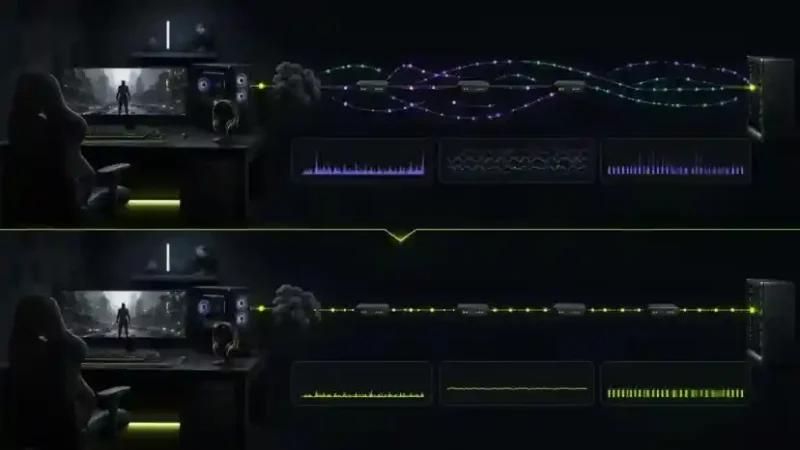
Players troubleshooting lag should monitor ping, jitter and packet loss together.
What is ping in Fortnite?
Ping measures how long data takes to travel between your device and the game server.
Lower latency generally produces faster communication with the server, but consistency is also important.
What is jitter?
Jitter measures variation in latency.
For example, a connection constantly changing between 25 ms and 100 ms may feel less stable than a connection maintaining a consistent 45 ms.
High jitter can cause:
- Inconsistent responsiveness
- Sudden lag spikes
- Delayed actions
- Unpredictable fights
What is packet loss?
Packet loss happens when network data fails to reach its destination.
In Fortnite, packet loss can contribute to:
- Rubber-banding
- Delayed actions
- Freezes
- Movement inconsistencies
- Building or editing delays
- Sudden connection interruptions
Why Is My Fortnite Ping High With Fast Internet?
Internet speed and game latency measure different things.
A speed test usually measures performance between your connection and a nearby testing server. Fortnite traffic must reach the actual game infrastructure through the route selected by your ISP.
Your connection may have excellent download speeds while still taking an inefficient path to the Fortnite server.
Common reasons for high Fortnite ping
High ping can be caused by:
- Long network routes
- ISP congestion
- Poor peering
- Incorrect server region
- Wi-Fi interference
- Background downloads
- Network saturation
- Routing changes
- Peak-hour traffic
Identifying where the problem occurs is the first step toward improving the connection.
Why Fortnite Ping Changes During Peak Hours
Fortnite may perform normally during the morning or afternoon but become unstable at night.
One possible cause is peak-hour congestion.
When more customers use the same ISP infrastructure, players may experience:
- Higher ping
- More jitter
- Packet loss
- Sudden latency spikes
- Route instability
Testing Fortnite during the hours you normally play provides a more realistic picture than testing only during low-traffic periods.
How NoPing Optimizes Fortnite Connections
NoPing focuses on optimizing the network path between the player and the game server.
Instead of relying exclusively on the default path selected by the ISP, NoPing can analyze alternative routes and look for a more stable connection.
Multi Connection: up to 5 routes
Multi Connection analyzes up to five routes to optimize game traffic.
This can be useful when the ISP's default path suffers from:
- Congestion
- Excessive hops
- Unstable transit nodes
- Poor peering
- Sudden route variation
The potential improvement depends on the quality of the player's original route.
Multi Internet: up to 6 connections
Multi Internet can work with up to six internet connections.
Possible setups include:
- Fiber + 5G
- Cable + mobile hotspot
- Broadband + secondary connection
- Multiple available internet connections
This can provide another option for players whose primary internet connection experiences instability.
Boost FPS
FPS and network latency are separate performance factors.
Boost FPS focuses on system-side optimization, reducing unnecessary background resource usage so more resources remain available for the game.
Network optimization should therefore be evaluated separately from CPU, GPU and FPS performance.
Fortnite on US Internet Providers
Fortnite network performance can vary between providers and even between customers using the same ISP.
Major US providers include:
- Comcast Xfinity
- Spectrum
- AT&T Fiber
- Verizon Fios
- T-Mobile Home Internet
- CenturyLink
- Quantum Fiber
- Cox
- Optimum
The ISP name alone does not determine Fortnite performance.
What matters is the actual route between your connection and the game server.
Fortnite High Ping on Comcast Xfinity
Xfinity users may experience different results depending on local network conditions and regional routing.
Cable infrastructure can become more susceptible to congestion in some areas during busy periods.
If Fortnite develops lag spikes primarily during peak hours, check:
- Ping variation
- Jitter
- Packet loss
- Local network usage
- Ethernet vs Wi-Fi
- Time-of-day patterns
If the local connection is healthy and the issue occurs farther along the network path, testing alternative routing can help determine whether the ISP route is contributing to the problem.
Fortnite Packet Loss on Spectrum
Packet loss should first be investigated at the local network level.
Spectrum users can check:
- Ethernet connection
- Modem status
- Local network traffic
- Signal stability
- Background downloads
- Packet loss outside Fortnite
If the local network is stable but packet loss appears farther along the route, a routing optimizer may help when an alternative path can avoid the affected network segment.
Fortnite Ping on AT&T Fiber and Verizon Fios
Fiber connections often provide strong baseline latency, but fiber alone does not guarantee the best possible route to every game server.
Routing and peering still matter.
Even with a fast fiber connection, players should monitor:
- Jitter
- Packet loss
- Ping spikes
- Route stability
- Performance during peak hours
If the existing ISP route is already efficient and stable, the potential improvement from route optimization may be smaller.
Fortnite Lag on T-Mobile Home Internet
5G home internet behaves differently from traditional fiber and cable connections.
Performance can vary because of:
- Cellular congestion
- Signal quality
- Tower load
- Routing changes
- CGNAT
- Local wireless conditions
For Fortnite, connection consistency matters more than headline download speed.
Players using 5G home internet should monitor ping variation and packet loss throughout complete gaming sessions rather than relying only on speed tests.
How to Reduce High Ping in Fortnite
Start by eliminating local network problems before investigating external routing.
Step 1: Use Ethernet whenever possible
A wired connection reduces variables caused by Wi-Fi interference and signal fluctuations.
Step 2: Stop unnecessary network traffic
Pause downloads, cloud synchronization, updates and high-bandwidth streaming while testing Fortnite.
Step 3: Check your Fortnite server region
Make sure Fortnite is connecting to an appropriate region for your location.
The geographically closest option is often a good starting point, but actual network routing should also be considered.
Step 4: Monitor ping, jitter and packet loss
Do not evaluate the connection using average ping alone.
Track:
- Average latency
- Maximum latency spikes
- Jitter
- Packet loss
- Connection consistency
Step 5: Test at different times
Compare performance during normal and peak hours.
Large differences may indicate congestion somewhere along the network path.
Step 6: Test an alternative route
After ruling out local issues, compare the ISP's default route with an optimized route.
Use similar matches, server regions and testing periods for a fair comparison.
How to Fix Fortnite Lag Spikes
Lag spikes are sudden increases in latency rather than consistently high ping.
Potential causes include:
- ISP congestion
- Wi-Fi interference
- Background downloads
- Bufferbloat
- Route changes
- Poor peering
- Unstable network nodes
To troubleshoot Fortnite lag spikes:
- Switch to Ethernet.
- Stop background downloads.
- Restart and check local networking equipment.
- Monitor packet loss and jitter.
- Test during different hours.
- Compare different network routes.
If spikes occur beyond your local network, route optimization may help when another available path avoids the problematic segment.
How to Fix Fortnite Packet Loss
Packet loss can originate locally, inside the ISP network or farther along the path to the server.
Start by determining whether the problem occurs before traffic leaves your home network.
Local packet loss
Check:
- Wi-Fi signal
- Ethernet cables
- Router performance
- Modem status
- Network saturation
ISP or routing packet loss
If the local network is clean, packet loss may occur farther along the route.
In this situation, testing alternative routes can help determine whether the problematic network segment can be bypassed.
Server-side packet loss
A route optimizer cannot fix problems occurring directly on overloaded or unavailable game servers.
Does NoPing Work With Fortnite Anti-Cheat?
NoPing focuses on network route optimization rather than modifying Fortnite game files.
Players should always use supported software and avoid applications designed to manipulate game files, inject unauthorized code or bypass anti-cheat protections.
Network optimization should change the route used by game traffic, not the integrity of the game client.
NoPing vs ExitLag vs GearUP Booster for Fortnite
NoPing, ExitLag and GearUP Booster operate in the gaming network optimization category, but features and routing strategies can differ.
The best comparison is not based only on advertised ping reduction.
Players should test each option using their actual Fortnite connection.
What should Fortnite players compare?
Monitor:
- Average ping
- Jitter
- Packet loss
- Ping spikes
- Route stability
- Peak-hour performance
- Overall in-game consistency
NoPing Multi Connection
Multi Connection analyzes multiple routes instead of depending entirely on the ISP's default path.
This is particularly relevant when poor routing, congestion or peering problems are affecting the connection.
NoPing Multi Internet
Multi Internet allows multiple available internet connections to be used, providing an additional option for setups affected by instability on a single connection.
Why results vary between players
Network optimization results depend on:
- Location
- ISP
- Fortnite server region
- Existing network route
- Time of day
- Local network conditions
No routing optimizer can guarantee identical improvements for every player.
How to A/B Test NoPing With Fortnite
A controlled test is the best way to determine whether route optimization helps your connection.
Test Fortnite without NoPing
Play your normal mode and record:
- Average ping
- Maximum spikes
- Jitter
- Packet loss
- Overall stability
Test Fortnite with NoPing
Repeat the test under similar conditions.
Whenever possible, use:
- The same server region
- The same game mode
- A similar time of day
- The same local network setup
Compare the results
Do not focus exclusively on the lowest ping number.
A route that produces fewer spikes and lower jitter may provide a more consistent experience even if average ping changes only slightly.
Can NoPing Guarantee Lower Fortnite Ping?
No.
The result depends on:
- ISP
- Player location
- Server region
- Existing route
- Network congestion
- Time of day
Route optimization has more opportunity to help when the original ISP route is inefficient, congested or unstable.
Players who already have a clean and efficient route may see a smaller difference.
Does Changing DNS Reduce Fortnite Ping?
Usually, changing DNS does not directly reduce in-game latency once the connection to the game server has been established.
DNS primarily helps translate domain names into IP addresses.
Fortnite ping is more directly affected by:
- Server distance
- ISP routing
- Peering
- Congestion
- Jitter
- Packet loss
For persistent high ping, investigating the actual network path is generally more relevant than simply changing DNS providers.
Is Ethernet Better Than Wi-Fi for Fortnite?
Ethernet is generally preferable for competitive gaming because it removes many sources of wireless instability.
Wi-Fi performance can be affected by:
- Distance from the router
- Walls
- Interference
- Other wireless devices
- Channel congestion
- Signal strength
A good Wi-Fi connection can still perform well, but Ethernet provides a more controlled baseline when troubleshooting Fortnite lag.
Does Faster Internet Reduce Fortnite Ping?
Not necessarily.
Upgrading from 300 Mbps to 1 Gbps does not automatically create a shorter route to the Fortnite server.
Once sufficient bandwidth is available for the game, routing quality and latency become more important than maximum download speed.
A slower connection with efficient routing can therefore have lower Fortnite ping than a much faster connection using an inefficient route.
Try NoPing for Fortnite
NoPing supports 3,000+ games and combines Multi Connection, Multi Internet and Boost FPS in a single client.
Fortnite players can use the free trial to compare their normal ISP route with an optimized route and determine whether their specific connection benefits.
The most reliable approach is to test under the conditions in which you actually play.
FAQ: Fortnite Ping, Lag and Network Optimization
Why is my Fortnite ping so high?
High ping can result from server distance, ISP routing, congestion, poor peering, Wi-Fi instability or background network usage. Internet speed alone does not determine latency.
Why does Fortnite lag even though my internet is fast?
Your speed test and Fortnite may use completely different network destinations. A fast connection can still follow an inefficient or congested route to the game server.
How can I lower my Fortnite ping?
Use Ethernet, stop unnecessary network traffic, select an appropriate server region, monitor jitter and packet loss, and test whether alternative routing improves the connection.
Can NoPing reduce Fortnite ping?
NoPing can help when an alternative network route is better than the default path provided by the ISP. Results depend on location, ISP, server and current network conditions.
Can NoPing guarantee lower ping?
No. No network optimizer can guarantee a reduction for every connection. Players should compare results under similar conditions.
What should I monitor besides Fortnite ping?
Monitor jitter, packet loss, latency spikes and overall connection stability.
Why does my Fortnite ping get worse at night?
Peak-hour ISP congestion or changes in network routing can increase latency and jitter during busy periods.
Can changing DNS fix Fortnite lag?
DNS changes generally do not directly fix in-game latency. Routing, server distance, congestion, jitter and packet loss are usually more relevant.
Is Ethernet better than Wi-Fi for Fortnite?
Ethernet generally provides a more stable baseline because it avoids many forms of wireless interference and signal variation.
Can NoPing fix Fortnite packet loss?
It may help when packet loss occurs on an avoidable external route. It cannot repair physical problems with your Wi-Fi, modem, cables, ISP access line or the Fortnite server.
Should I compare NoPing with ExitLag and GearUP Booster?
Yes. Test services under comparable conditions and evaluate actual ping, jitter, packet loss and stability instead of relying exclusively on advertised numbers.
How should I test NoPing for Fortnite?
Play Fortnite without NoPing and record your connection metrics. Then repeat the test with NoPing using the same region, similar game mode and similar time of day.
Does having fiber guarantee low Fortnite ping?
No. Fiber can provide an excellent baseline connection, but server distance, ISP peering and routing still influence latency.
Why can two Fortnite players in the same city have different ping?
They may use different ISPs, network routes, peering partners or local infrastructure. Even customers of the same ISP can sometimes follow different paths to the server.
Does NoPing improve FPS?
Boost FPS targets system-side performance, while Multi Connection and Multi Internet address network conditions. FPS and network latency should be measured separately.
What is the best way to know if route optimization works for Fortnite?
Run an A/B test. Compare Fortnite under similar conditions with and without optimization while monitoring ping, jitter, packet loss and latency spikes. Your own connection provides the most relevant result.