

Battlefield 6 error code 1:85008S can hit you out of nowhere and stop you from joining matches, especially during betas and early access windows.
It usually shows up as an inability to connect to EA services or as a message that your region or IP is blocked.
In this guide I walk through what the error is, likely causes, and a sequence of practical fixes you can try right now.
What is Battlefield 6 Error Code 1:85008S?
This error code is a connection or region issue reported by players that prevents the game from contacting EA backend services.
Users describe seeing the code along with messages like unable to connect to servers, region blocked, or a generic unknown error that forces the game to close.
It appears in the context of the beta and early access periods, and similar connection errors have been documented on EA forums and community hubs.
The error seems to be surfaced when the game or EA Auth fails to validate your region or IP, or when the client needs an update and cannot complete necessary checks.

Source: EA Forums
How to Fix Battlefield 6 Error Code 1:85008S?
Below are practical fixes, ordered so the quickest and most targeted solutions come first. Start at the top and work down until your problem is solved.
Use NoPing
If you are dealing with regional blocks, unstable routing, or high packet loss when connecting to EA servers, NoPing can help.
NoPing routes your game traffic through optimized paths and can make it possible to reach servers that are otherwise blocked by poor routing or ISP-level restrictions.
Users have reported success with VPNs or traffic optimizers when they could not reach EA services otherwise.
Here’s how to use NoPing to fix regional blocks in Battlefield 6:
- Sign-up through the website and download NoPing (you can try it for free)
- Open NoPing and search for Battlefield 6 inside the software
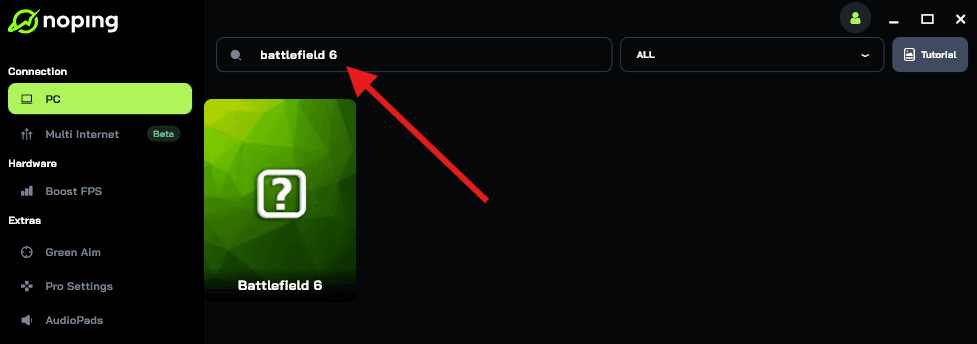
- Once you find Battlefield 6, click on it. Choose your server on the next screen and click on “Optimize Game”.
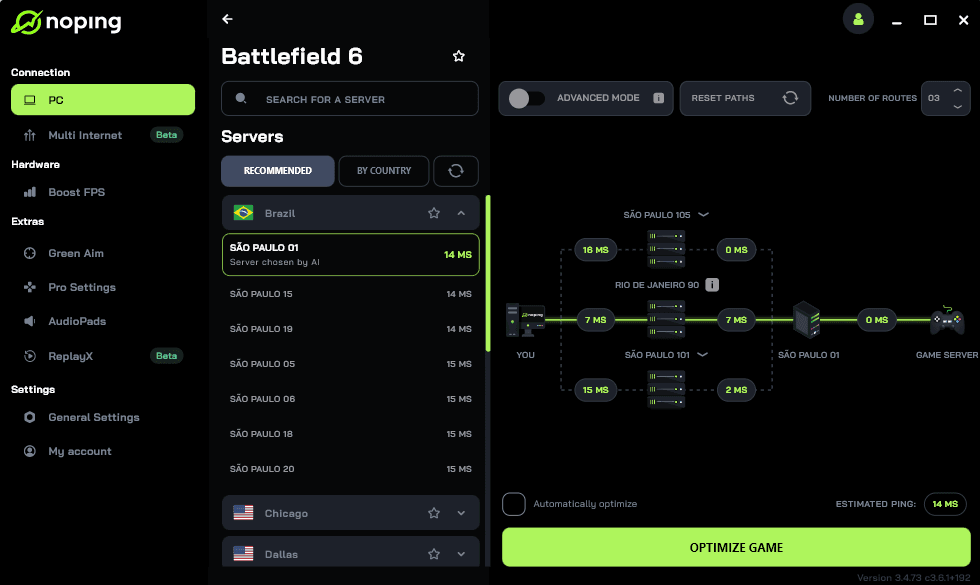
- And that’s it, you can start playing Battlefield 6 with optimized ping and no regional blocks!
You can test different servers within NoPing to see which gives you the lowest latency and bypasses regional blocks.
Quit the game and let the EA App update
Several players report that the error appears when the client needs an immediate update. Quit Battlefield and the EA launcher completely, then open the EA App and let it check for updates.
On Steam, verify game files or check for updates in the EA App.
Verify integrity of game files
If files are corrupt or missing, the client can fail at startup checks. On Steam, right click the game, Properties, Local Files, Verify integrity of game files.
On the EA App, look for a repair or verify option.
Try a different network or mobile hotspot
Switch to a different network to rule out ISP or local router issues.
Using a phone hotspot or a different Wi Fi network has helped players confirm whether the problem is local to their ISP.
If the hotspot works, you can narrow troubleshooting to router or ISP-level restrictions.
Check firewall, antivirus and open required ports
Ensure Windows Firewall, router firewall, and any antivirus are not blocking Battlefield or the EA App. Add both as exceptions.
Check that common gaming ports used by EA are not blocked by your router or ISP.
Overly strict firewall rules have long caused similar connection failures in online games.
Clear DNS cache and try alternate DNS
Run ipconfig /flushdns in an elevated command prompt to clear DNS cache.
If that does not help, try alternate DNS servers such as Google Public DNS or Cloudflare DNS to rule out DNS poisoning or stale resolution.
Some connection problems are resolved simply by ensuring your system resolves EA endpoints correctly.
Reinstall EA App or Battlefield
If other steps fail, reinstalling the EA App or the game client can clear stubborn issues.
Uninstall, reboot, reinstall, then try to launch and let the launcher apply updates before loading the game.
Contact EA Support and share logs
If nothing works, gather relevant logs and open a ticket with EA Support.
In your ticket include the exact error code, timestamps, the steps you attempted, and whether other players in your region are affected.
EA threads show support responding to region and server outages in some cases, and a bug report from many players helps them prioritize fixes.
Players Complaining About a Recent Region Block in Eastern Europe
There is an active thread on EA forums where players report that their region or IP appears blocked.
Players there write that they receive messages claiming their region or internet connection is blocked and that some are able to connect only by using a VPN.
The thread shows multiple recent replies and confirms this is a live issue affecting some users in Eastern Europe.
If you are in that region and see the error, it is likely related to the same phenomenon discussed in that forum. Read the thread for first hand reports and any official replies from EA staff.
How to Solve Regional Blocks in Online Games?
If a region block or poor routing prevents you from reaching game servers, NoPing can route you through a path that is accepted by the game backend and that provides stable latency.
As mentioned earlier, NoPing are designed for gamers.
Rather than just hiding your IP or pretending to be in another country, they focus on optimizing routing between your computer and the game servers (which helps in situations where your region isn’t outright blocked but your routing is terrible).
The advantages:
- Help you connect to game servers in regions where ordinary routing is blocked or inefficient.
- Allow you to choose among multiple exit nodes (countries) and pick the one that gives you the lowest latency.
- More “game-friendly” than generic VPNs because it’s optimized for latency and packet loss rather than just privacy.
What Causes Battlefield 6 Error Code 1:85008S?
Several root causes appear repeatedly in community reports and official responses for related connection errors.
- Server side or backend outages. Major service interruptions at EA or its hosting providers can produce widespread connection failures.
- Region restrictions or policy changes. Publishers sometimes remove support for certain regions or limit sales and connectivity for geo political or legal reasons. That can result in blocked IPs or endpoints not authorizing players from specific countries. Recent discussion about language and regional support suggests EA has taken steps that affect certain locales.
- ISP level routing issues or BGP blackholing. Your traffic path to EA servers may traverse problematic hops, causing timeouts or being misrouted. In those cases, routing through a different path using NoPing can work.
- Client needing update or corrupted files. When the local client is out of date or has corrupt files, the launcher or game may fail during handshake and show connection errors.
- Local firewall or security software blocking connections. Overactive security software can prevent the game from connecting to EA services. Adding exceptions or temporarily disabling the software for testing can reveal whether this is the cause.
Battlefield 6 error code 1:85008S has become one of those frustrating connection problems that can stop players from even getting into the game.
While it looks like a random technical bug, most evidence points to connection and region issues, whether due to routing failures, server maintenance, or geographic restrictions. The good news is that you have several ways to tackle it.
And the best one is using NoPing to bypass regional restrictions and improve your connection stability! Download now and start your free trial!