

Lag in Roblox has once again become a major topic among players. Right from the first matches, response delays already compromise basic actions. In addition, the instability goes beyond simple slowdowns, as it changes the game’s behavior in real time.
In practice, the issue interferes with the exchange of data between the player and the server. As a result, commands are no longer registered at the correct moment. Consequently, movements, collisions, and interactions lose precision during matches.
Lag and unstable latency affect immediate response
First of all, variable latency, known as jitter, reduces match consistency. When response times fluctuate, the game stops reacting predictably.
Because of this, simple actions begin to fail. In competitive modes, this difference directly impacts player performance.
Among the main causes are:
• Simultaneous internet usage across multiple devices
• Interference in Wi-Fi networks
• Applications consuming bandwidth in the background
• Congested network routes
Consequently, players lose control over their actions.
How lag in the home network interferes with gameplay
At the same time, local infrastructure has a greater influence than many realize. Wireless networks constantly suffer from interference. In contrast, cable connections tend to maintain greater stability.
In addition, parallel activities increase congestion. Streaming, downloads, and updates compete for the same bandwidth. As a result, response times increase even on fast internet connections.
Lag is also linked to system performance
On the other hand, the problem does not depend only on the internet. The device itself can create bottlenecks.
Active processes consume resources and affect communication with the server. Likewise, outdated drivers reduce connection efficiency.
To solve these issues:
• Close unnecessary applications
• Update network drivers
• Monitor CPU and bandwidth usage
This helps the system maintain a more stable data exchange.
Network routes increase the impact of lag
Another critical factor involves the path data takes. The route between the player and the server is not always direct. In many cases, it passes through congested points.
As a result, response times increase. Even with a good internet connection, performance may still drop.
This factor is beyond the user’s control, but it directly affects the gaming experience.
Try a free solution to reduce lag in Roblox
Tools like NoPing offer intelligent traffic rerouting. The proposal is to find more efficient routes in order to reduce delays and instability.
To use it:
• Create an account for a free trial
• Install the program
• Select Roblox

• Enable Auto Optimize
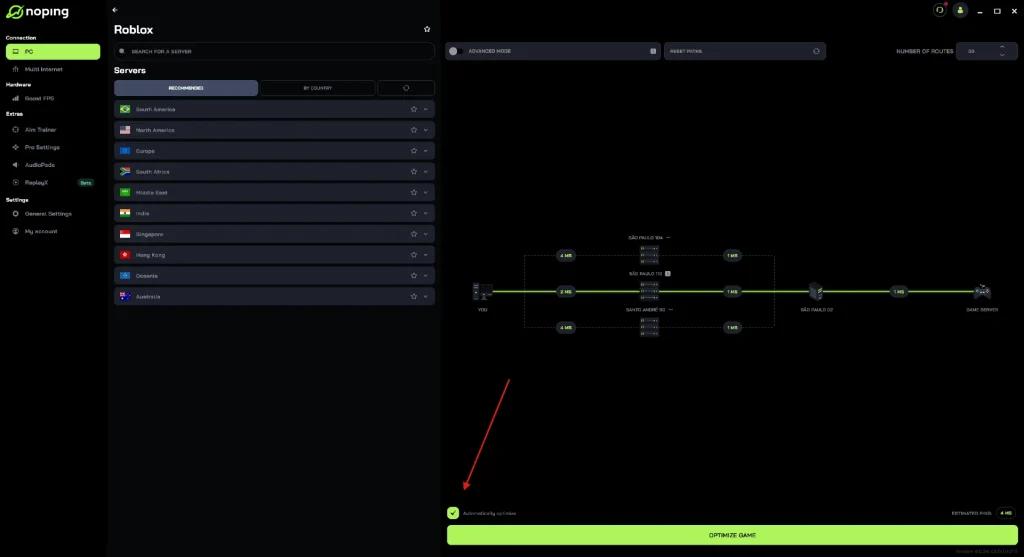
• Then click Optimize Game and start the match

Lag impacts competitiveness in real time
Finally, the effect goes beyond technical issues. In online matches, milliseconds make a difference.
When delays occur, decisions no longer reflect the player’s intentions. Therefore, lag compromises not only execution, but also competitiveness.
In a dynamic environment, connection stability stops being a detail and becomes a defining factor in results.