

Playing Roblox on PS5 is finally a reality for millions of gamers who waited years for the blocky multiverse to arrive on Sony's flagship console.
It feels like a lifetime ago when the rumors first started circulating, but since late 2023, the wait is officially over.
Whether you are a veteran builder or someone looking to jump into Blox Fruits for the first time, the transition to console brings a layer of polish and performance that mobile devices simply cannot match.
In this guide, we are going to break down everything you need to know about getting set up, optimizing your experience, and ensuring your connection is fast enough to keep up with the action.
How do you download Roblox on your PS5?
You can download Roblox directly from the PlayStation Store by searching for the title in the main menu.
The process is straightforward and mirrors how you would grab any other free-to-play title on the platform.
Since the game is native to the ecosystem now, you do not need to jump through any hoops or use third-party browsers to access your favorite experiences.
Follow these steps to get started:
- Turn on your PS5 and log in to your PlayStation Network account.
- Navigate to the PlayStation Store icon on the far left of your home screen.
- Select the search icon (magnifying glass) at the top right of the screen.
- Type "Roblox" into the search bar.
- Select the Roblox tile from the results.
- Click the "Download" button.
- Once the download finishes, the game will appear in your Game Library or on your home screen.
The file size is relatively small compared to AAA titles, so you should be ready to play within a few minutes depending on your internet speed.
If you already have a Roblox account, you can quickly link it using a QR code on your screen or by entering a code on the Roblox website through your phone or PC.

Is Roblox free on the PlayStation 5?
Yes, Roblox is completely free to download and play on the PS5. You do not need to pay an entry fee to access the platform or its millions of user-created games.
This follows the same business model found on PC, Xbox, and mobile, where the base experience is accessible to everyone regardless of their budget.
While the app is free, it is important to understand the role of Robux. Robux is the virtual currency used within the platform to buy cosmetic items, private servers, and gameplay advantages.
On the PS5, you can purchase Robux directly through the PlayStation Store. These transactions are processed using your PSN wallet, making it very easy to top up your balance.
If you are a parent setting this up for a child, ensure you have password protections on your checkout process to avoid any accidental spending spree on virtual hats or pets.

Do you need a PlayStation Plus subscription to play?
No, you do not need a PlayStation Plus subscription to play Roblox on PS5. Sony has a long-standing policy that free-to-play games do not require a paid membership for online multiplayer.
This is a huge win for the community because it means you can jump into any server with your friends without any monthly overhead.
This policy applies to all aspects of the game:
- Joining public servers in any experience.
- Playing with friends in private servers.
- Accessing the Avatar Shop.
- Creating and joining groups.
Even without a subscription, you still get the full social features of the platform. You can use the PlayStation's built-in party chat to talk to your friends while playing, though many users still prefer the in-game chat systems or external apps like Discord.
Also read: All About Roblox Oof (Death Sound): Origin, History and Samples
Can you play with friends on other platforms?
Yes, Roblox on PS5 supports full cross-platform play. This means you can join a server and play with friends who are on a PC, a Mac, an iPhone, an Android tablet, or an Xbox.
The Roblox ecosystem is designed to be one giant, unified world where the hardware you use does not dictate who you can interact with.
Cross-progression is also a standard feature. If you have been playing on your phone for years, all your items, currency, and game progress will be right there waiting for you on the PS5. When you log in, everything syncs automatically.
This is particularly useful for games that require hundreds of hours of grinding, as you can play seriously on your console at home and then do some quick resource gathering on your phone while you are away.
How does the PS5 hardware improve the Roblox experience?
The PS5 hardware significantly improves the Roblox experience by offering faster load times, better frame rates, and higher resolution than previous generations.
While Roblox is not exactly a graphical powerhouse like Cyberpunk 2077, it can be surprisingly demanding in games with complex scripts, high-fidelity textures, or massive player counts.
On the PS5, you benefit from:
- SSD Speed: Entering a new game or teleporting between worlds happens in seconds. The days of waiting for textures to pop in are largely over.
- Resolution: The game scales beautifully on 4K displays, making the lighting and shadows in more advanced experiences look crisp.
- Performance Stability: Even in chaotic scenarios like 50-player combat games, the PS5 maintains a much more stable frame rate than older consoles or mid-range mobile devices.
However, the hardware can only do so much. If your internet connection is struggling, you will still experience rubber-banding and lag regardless of how powerful the PS5 is. This is where connection optimization becomes vital.
Why is low latency important for Roblox on PS5?
Low latency is vital because Roblox is an extremely fast-paced environment where millisecond delays can result in losing a match or missing a jump.
In competitive games like BedWars or various shooters, a high "ping" means your actions are reaching the server later than your opponents' actions.
On their screen, they might have already hit you before you even saw them move.
Many players confuse "fast internet" (bandwidth) with "low latency" (ping). You might have a 1GB connection, but if the route your data takes to the Roblox servers is inefficient, you will still lag.
This is often caused by ISP routing issues, where your data travels through unnecessary nodes across the country before reaching its destination.
For a console player, this is frustrating because you have fewer tools to diagnose these issues than a PC player.
Here’s how to use NoPing to fix lag in Roblox:
- Sign-up through the website and download NoPing (you can try it for free)
- Open NoPing and search for Roblox inside the software
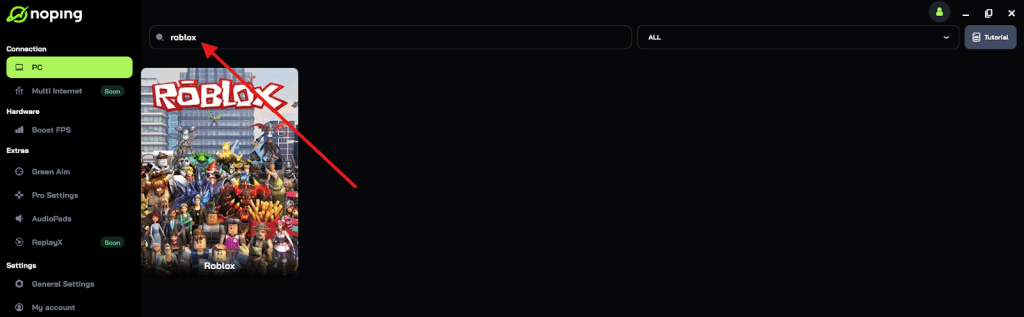
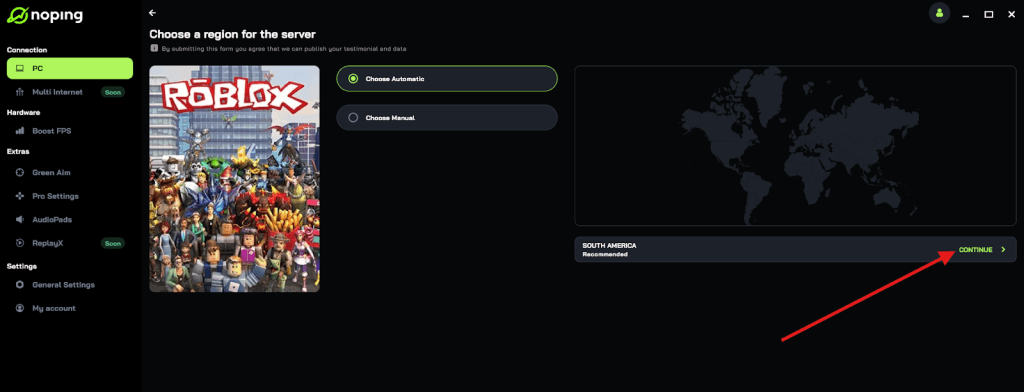
- Once you find Roblox, click on it and, on the next screen, select “Choose automatic” or “Choose manual” and click “Continue”. We recommend choosing automatic, as NoPing’s technology analyzes all routes on a global scale and automatically selects the best option for you.
- On the next screen, click on “Optimize Game”.
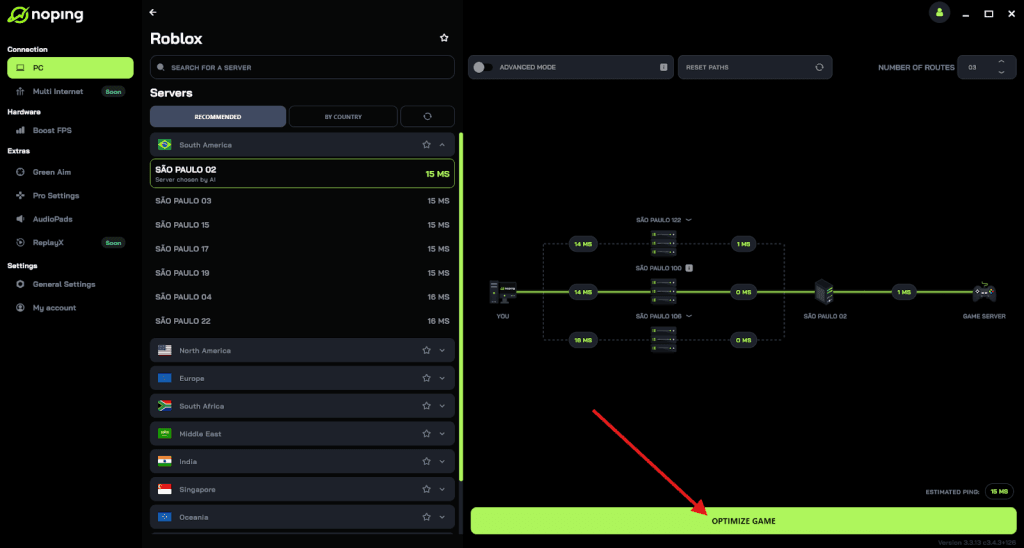
- And that’s it, you can start playing Roblox with optimized ping!
You can test different servers within NoPing to see which gives you the lowest latency.
Are the controls different on the PlayStation 5?
Yes, the controls on the PS5 are specifically mapped to the DualSense controller, offering a very different feel compared to a keyboard or a touchscreen.
For most users, this is an upgrade for movement-based games (like Obbys), but it can take some time to get used to for games that require precise aiming or complex menu navigation.
The default control scheme usually looks like this:
- Left Analog Stick: Movement.
- Right Analog Stick: Camera control.
- Cross (X) Button: Jump.
- Square/Circle/Triangle: Context-specific actions depending on the game.
- L1/R1: Cycling through your inventory items.
- R2: Primary action (shooting, clicking, etc.).
- Touchpad: Opening the in-game menu or chat.
One downside is that not every Roblox game was built with a controller in mind. Since developers have to manually add controller support, some older or more obscure games might feel a bit clunky.
However, the most popular titles are perfectly optimized for the DualSense.
How can parents manage safety on the PS5 version?
Parents can manage safety by using both the internal Roblox parental controls and the PlayStation 5's system-level restrictions.
Roblox has a reputation for being a vast playground, but like any social platform, it requires supervision.
To ensure a safe environment:
- Log into the Roblox account on a browser and visit the "Settings" menu.
- Go to "Privacy" to restrict who can message your child or join them in games.
- Go to "Parental Controls" to set a PIN that prevents settings from being changed.
- Use the "Allowed Experiences" feature to restrict gameplay to age-appropriate content (All Ages, 9+, 13+, or 17+).
- On the PS5, you can use the "Family Management" settings to limit screen time and spending.
These layers of protection ensure that the experience remains fun without exposing younger players to unwanted interactions or inappropriate content.
What should you do if Roblox is not working on your PS5?
If Roblox is not working on your PS5, you should first check the server status of both Roblox and the PlayStation Network.
Most issues are related to server maintenance or local network hiccups rather than the console itself.
If the servers are up but you still cannot play, try these fixes:
- Check for Updates: Highlight the Roblox icon on your home screen, press the "Options" button on your controller, and select "Check for Update."
- Restart Your Console: A full restart (not just Rest Mode) can clear out temporary system glitches.
- Reinstall the App: If the game keeps crashing, delete it and download it again from the store. This often fixes corrupted files.
- Test Your Connection: Go to Settings > Network > Test Internet Connection. Pay close attention to the NAT Type. If it is "Type 3" (Strict), you will likely have trouble connecting to other players.
In many cases, the "Connection Error" screen is a result of high packet loss. This is another area where a specialized routing tool can help by ensuring that the data packets being sent from your PS5 actually reach the Roblox server without getting lost along the way.
Is the 17+ content available on PS5?
Yes, the 17+ content is available on PS5, provided your account has been age-verified. Roblox recently introduced a tier of experiences specifically for older audiences, which may include more mature themes, blood, or social environments that are restricted to adults.
To access this content on your console, you must first complete the ID verification process on the Roblox website or mobile app using a government-issued ID. Once your account is verified as being 17 or older, those games will appear in your search results and home feed on the PS5. Without this verification, those specific games will remain hidden to protect younger users.
How can you improve your FPS in heavy Roblox games?
You can improve your FPS by adjusting the in-game settings, though the PS5 version handles most of this automatically. Unlike the PC version where you can toggle every single graphical shadow and texture, the console version is more streamlined.
If you find a specific game is stuttering:
- Open the in-game Roblox menu (usually by pressing the Options button or the top-left logo).
- Go to "Settings."
- Change the "Graphics Mode" from Automatic to Manual.
- Lower the "Graphics Quality" slider. Even a small drop can drastically increase your frame rate in poorly optimized games.
- Ensure your PS5 is in a well-ventilated area. If the console overheats, it will throttle performance to cool down, leading to lower FPS.
Most of the time, the PS5 stays at a solid 60 FPS. If you see drops, it is almost always due to the way the specific Roblox game was coded, not a limitation of your console.
Roblox on PS5 is a massive leap forward for the platform. It bridges the gap between casual mobile play and high-end gaming, offering the best of both worlds.
By ensuring your connection is optimized and your settings are dialed in, you can enjoy everything this massive universe has to offer with zero compromises.
Play Roblox without lag. Download NoPing now and start your free trial!