


You load into Roblox, excited to play, but within minutes you notice the problem: everything feels delayed, and you’re clearly on high ping servers in Roblox.
Movements take too long to register, fights feel impossible, and building or trading becomes a headache. It might seem like bad luck, but in most cases, there are specific reasons why this keeps happening.
The good news is that once you know what’s causing it, there are ways to avoid it and get back to playing without constant lag.
7 Reasons Why You Keep Joining High Ping Servers in Roblox
1. Roblox’s matchmaking isn’t perfect (and many games don’t expose region choices)
Some Roblox experiences use simple matchmaking or the default join flow, which doesn’t give players a choice of region.
If the game developer doesn’t provide region selection, Roblox’s automatic placement can still pick a server that’s not ideal for your location.
Developers sometimes build their own region selection systems, but many games don’t, so players get whatever server the platform assigns.
2. You’re being routed through inefficient internet paths (ISP routing)
Internet traffic travels through many networks (autonomous systems). Even if a physical data center is nearby, your ISP’s peering and routing decisions can send traffic on a long detour, increasing latency. That’s why two players in the same city can experience very different ping.
3. Roblox server location vs. game instance location confusion
Roblox runs instances in multiple data center regions. There isn’t a standardized, user-friendly way to see which exact region a server is in, so you might unknowingly join an instance hosted far away (or a nearby data center that’s temporarily unreachable).
The community often maps server IP ranges, which shows servers exist in many regions, but users don’t have an official “pick your region” button in most games.
4. Wi-Fi instability and local network issues
Packet loss, interference, and weak Wi-Fi signal cause retransmits and higher apparent ping. Switching to wired Ethernet or fixing Wi-Fi problems (channel interference, router placement, overloaded 2.4 GHz band) often reduces latency substantially.
Community support threads repeatedly list “use Ethernet” as a top fix.
5. Background apps and other devices hogging bandwidth
Large downloads, streaming, cloud backups, or other people on your network can push your latency up even if raw speed tests look fine.
Roblox is sensitive to jitter and packet loss, which can be caused by competing traffic on your home network.
6. Game-side problems: bad server scripts or overloaded instances
Sometimes the “high ping” you see is actually server or script performance problems inside the Roblox game itself: memory leaks, excessive server-side loops, or heavy networked objects can make the server unresponsive and raise the ping shown in client performance stats. This isn’t about physical distance but about the instance struggling.
7. Regional server load and temporary outages.
If your nearest data center is overloaded or having issues, Roblox may put you into another region’s instance. Server availability fluctuates, and status can change quickly: that’s why people sometimes see suddenly worse ping even without local changes.

How to Avoid Joining High Ping Servers in Roblox?
There are several steps you can take to lower the chances of ending up with high ping.
Play on a wired connection whenever you can
Wi-Fi is convenient, but it’s prone to interference and packet loss. Plugging in an Ethernet cable usually gives you a much more stable and lower-latency connection.
Reduce network congestion in your home
If other people are streaming movies, downloading large files, or gaming at the same time, your ping can spike. Pausing background updates and asking others to ease off the bandwidth can help smooth out your Roblox sessions.
Restart your router or modem
A quick restart can refresh your internet route and clear up temporary issues that might be adding unnecessary delay.
Switch to a reliable DNS
While DNS itself doesn’t reduce ping drastically, using a faster resolver like Google DNS or Cloudflare DNS can shorten the time it takes to connect to Roblox servers, helping you get into matches more quickly.
Pick less crowded servers if possible
Some Roblox games allow you to choose from server lists or regions. Whenever you see that option, join servers that are closer to your location and show lower player counts or lower ping.
Use NoPing
If Roblox keeps placing you in high ping servers, NoPing can be a game changer.
The software creates smarter routes between your PC and Roblox servers, cutting down unnecessary delays and stabilizing your connection.
Many players report lower ping, fewer spikes, and a smoother overall experience after turning it on. NoPing also runs in the background without complicated setups, so you can just launch it, choose Roblox, and start playing with better performance.
Here’s how to use NoPing to fix high ping in Roblox:
- Sign-up through the website and download NoPing (you can try it for free)
- Open NoPing and search for Roblox inside the software
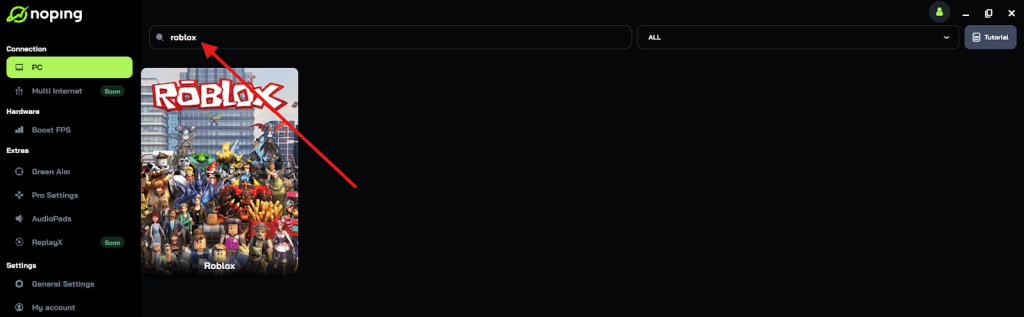
- Once you find Roblox, click on it and, on the next screen, select “Choose automatic” or “Choose manual” and click “Continue”. We recommend choosing automatic, as NoPing’s technology analyzes all routes on a global scale and automatically selects the best option for you.

- On the next screen, click on “Optimize Game”.
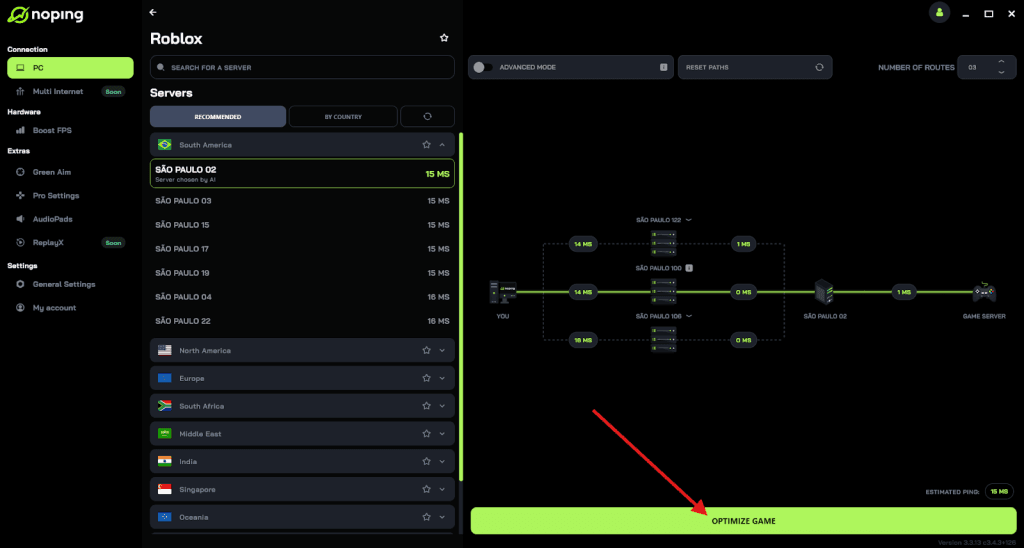
- And that’s it, you can start playing Roblox with optimized ping!
You can test different servers within NoPing to see which gives you the lowest latency.
Try different instances or play during off-peak hours
If a game server is overloaded, ping can rise even if it’s in your region. Joining a different instance or playing when traffic is lower can sometimes improve your connection.
Why Does Roblox Put You in the Same Server?
Roblox often ends up putting you in the same server as before (or with familiar people) for several reasons.
Some are by design, others happen because of technical constraints or developer settings. Here’s what’s going on behind the scenes, based on what the Roblox community and developer forums reveal.
Key Reasons
- Matchmaking Tries to Group Similar Players Together
Roblox matchmaking considers things like network latency (how fast your connection is), geographic location, and possibly other factors (language, region) when deciding which server to send players to. If you’re close (network-wise) to your previous server or friends, there’s a good chance Roblox will try to place you in a server with similar conditions, which often ends up being the same server. - Server Capacity & Availability
If a server isn’t full, Roblox may keep using it rather than creating a new one. That means if a server already has space, you (and others) might be routed into it instead of opening a fresh instance. This also means you might see the same server again when you rejoin or when friends join. - Friends / Party Systems Influence It
Roblox tends to try to put you in the same server as your friends or people you often play with, if there’s room. This is intended to improve social play and make it easier to connect. If someone in your friend list is already in a server, the system will prefer putting you there instead of somewhere completely new. - Reserved or Private Servers
Some games or developers use reserved/private server instances. When you are part of a group/party, or when the developer explicitly reserves a server for a set of players, Roblox will teleport those players together into that specific server. This means if you used a reserved server recently (or one with “friend” settings), you may get back into it. - Developer-Implemented Matchmaking or Queue Systems
Games can have custom matchmaking logic built in. Developers may create queues, lobbies, or “region selection” interfaces, which influence how players are grouped and which servers are used. If a game has you choose your region or settings that narrow down which servers you can join, that increases the odds you’ll see the same server (or ones very near in region). - Lack of Many Servers in Some Regions
If your region has fewer data centers or fewer open server instances, Roblox has less flexibility to distribute players across different servers. That means the same servers are reused more often. Players outside major hubs may notice this more.
FAQ - high ping servers in Roblox
Q: How do I check my actual ping to a Roblox server?
A: Because Roblox doesn’t publish a simple per-instance ping endpoint for players, community methods exist: some extensions reveal the server IP which you can then ping from your machine. Devs and advanced users also use in-game performance stats or developer console to inspect network latency. Keep in mind these methods require some technical steps and are not officially supported for general users.
Q: Is a higher FPS related to lower ping?
A: Not directly. FPS is your frame rate; ping is network latency. Higher FPS can make controls feel smoother, but it won’t reduce the time packets take to travel. Fixing ping requires network-focused steps (routing, wired connection, limiting bandwidth users), while FPS requires hardware and graphics tweaks.
Q: Why does my ping spike only in Roblox and not other games?
A: That can happen if Roblox uses a different route or data center set than other games, or if the specific Roblox instance has server-side problems. Also, platform behaviors, background services, or how Roblox transmits data can make it more sensitive to packet loss and jitter than some other titles. Community threads often note “Roblox-only” spikes for this reason.
Joining high ping servers in Roblox can ruin what should be a smooth and fun experience. Most of the time, it isn’t just random bad luck, it’s a mix of how Roblox handles server placement, the quality of your internet route, and the conditions of your own network at home.
But to always have the best connection to play Roblox on any server, use NoPing! Download now and start your free trial!