


High latency remains one of the main issues faced by Mu Online players. Increased ping affects real-time commands, delays skills, and reduces precision during PvP encounters, events, and guild battles.
In addition, constant connection fluctuations affect server responsiveness. As a result, even simple actions may experience delays, especially during intense combat situations.
The issue has become increasingly common among players involved in competitive content. In many cases, instability directly impacts movement, reaction time, and the execution of defensive abilities.
Latency Affects Commands During Battles
In Mu Online, communication between the player’s computer and the game servers occurs continuously. Because of this, any delay in data transmission directly impacts the in-game experience.
When ping increases, skills may take longer to respond. At the same time, movement can become inconsistent or experience short freezes during more intense battles.
Additionally, actions that depend on immediate precision tend to lose efficiency. This is especially noticeable during PvP fights, guild invasions, and events with many players connected simultaneously.
In competitive scenarios, even small delays can completely change the outcome of a battle.
Unstable Connections Increase Latency
The stability of a home network also directly affects performance in Mu Online. Wi-Fi connections are usually more vulnerable to interference, especially due to distance from the router, physical obstacles, and an excessive number of connected devices.
Furthermore, applications running in the background consume bandwidth during gameplay. Active downloads, video streaming, and automatic updates also contribute to connection instability.
To reduce these impacts, players often adopt some measures:
• Use an Ethernet cable;
• Close background applications;
• Limit the number of connected devices on the network;
• Prioritize game traffic on the router.
These adjustments help maintain greater stability during matches and reduce frequent connection fluctuations.
Connection Routes Also Increase Latency
Latency does not depend solely on the internet speed provided by the ISP. The path taken by data to reach the game servers also affects response times.
During peak hours, congestion on intermediary routes may increase ping even on fast connections. In these cases, the issue occurs outside the player’s home network.
Because of this, part of the community uses route optimization tools in an attempt to find more stable paths to the Mu Online servers.
These services aim to reduce delays caused by congestion in network infrastructure. Even so, latency fluctuations continue to affect the competitive experience within the game.
Free Trial to Reduce Latency
Players experiencing high latency during online matches can use route optimization tools to improve connection stability in games like Mu Online.
One of these solutions is NoPing, which offers a free trial and simplified setup. Here’s how to use it:
• Create an account to activate the free trial;
• Download and install the program on your computer;
• Open the application and search for “Mu Online”;

• Select the “Optimize Automatically” option;
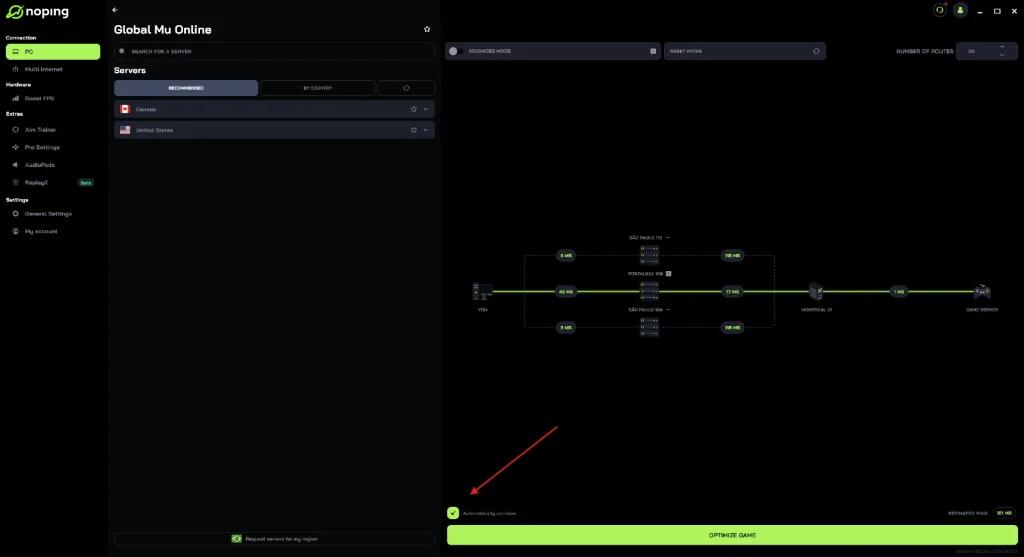
• Click “Optimize Game” and start playing.
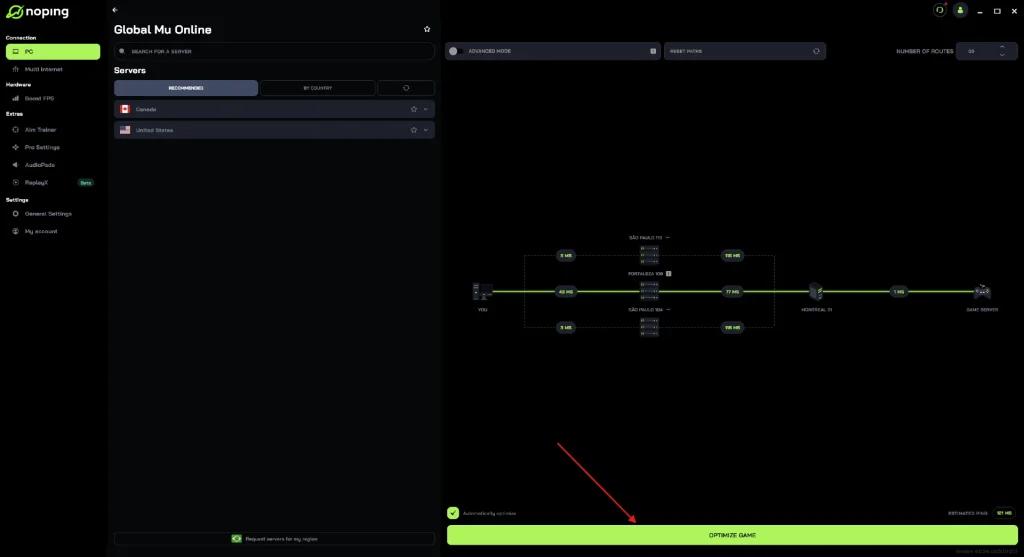
The goal is to reduce connection delays by automatically adjusting the route between the player and the servers.
Latency remains one of the main factors affecting the online gaming experience. In scenarios involving recurring instability, route optimization solutions may help improve overall stability.
In this context, NoPing appears as one of the most commonly used options among players looking to reduce ping in competitive matches.