


Modern Warfare 4 lets you check your K/D ratio, wins and weapon performance through the Career menu on the main screen. You can also track Multiplayer and DMZ progression separately, review challenges and check your Prestige progress.
How to check your stats in Modern Warfare 4
Open the Career menu to view your match statistics, progression and challenges.
- Launch Modern Warfare 4 and go to the main menu.
- Select Career in the top-left corner.
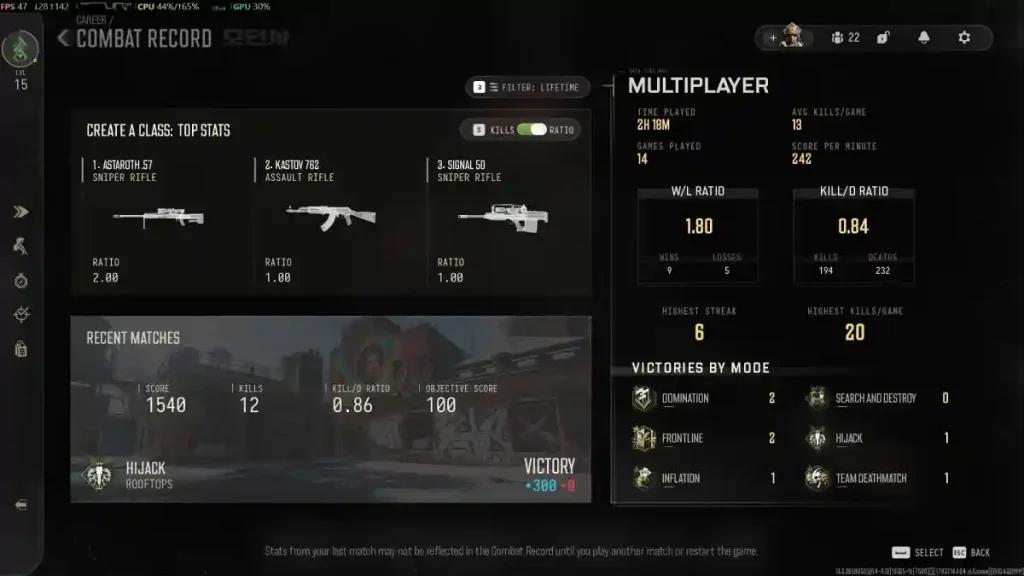
- Open Multiplayer Stats to check your K/D ratio, win/loss ratio, latest match performance and wins by mode.
- Select Progression to view Multiplayer and DMZ levels, Prestige progress and Prestige Master progression.
- Open Challenges to review camo, Calling Card and Armory challenges.
Where to find weapon stats and profile settings
Multiplayer Stats also shows data for your top three weapons. The Profile section contains your emblem, Calling Card, clan tag, Prestige icon and Prestige colour.
How Multiplayer and DMZ progression work
Multiplayer runs from level 1 to 55, while DMZ has a separate 70-level progression track. Check which mode you have selected before reviewing your progress.
To check an individual weapon, open it in Gunsmith and select Progression. This section shows its level and camo progress, including the requirements you still need to complete.
Why are my Modern Warfare 4 stats not updating?
Stats may take a few minutes to update after a match. During the beta, some updates reportedly appeared only after restarting the game.
If your latest results are missing:
- Wait a few minutes, then check the menu again.
- Fully close and restart the game if the issue continues.
- Make sure you are using the correct Activision account.
- If you use a third-party tracker, check that your stats privacy settings allow access.
Which stats should you track?
K/D ratio
K/D compares kills with deaths. A ratio below 1.00 means you recorded more deaths than kills during the selected period.
Wins and objective performance
In modes such as Domination and Hardpoint, wins and objective contributions help you assess your impact on the team’s results. Captures and defends are useful where those statistics are available.
Accuracy and camo progress
Accuracy indicates how many of your shots hit their target. Weapon kills and headshots also help you track progress towards camo challenges.
Test your connection with NoPing
Try NoPing free for one day, with full access, immediate activation and no credit card required. Compare your ping and connection stability during your matches.