


SQM and QoS for gaming can reduce bufferbloat when uploads or downloads fill the home connection and packets wait in oversized queues. First prove that latency rises under load on Ethernet. Then enable one supported queue-management method, set realistic line rates, and retest. It will not repair Wi-Fi interference, an ISP outage, a distant server, or an inefficient external route.

Figure 1. Gaming latency timeline showing delay that rises during an upload
How SQM and QoS for gaming control bufferbloat
Bufferbloat is excessive delay caused by queued traffic. QoS classifies or prioritizes traffic; Smart Queue Management (SQM) controls queues, often with FQ-CoDel. Neither creates bandwidth. Ask whether game packets wait behind a saturated upload or download.
Ping is round-trip time, jitter is its variation, and loss is missing traffic. FPS is local; if only FPS falls, this is the wrong branch.
Diagnose latency under load
Test one wired computer idle, then during a controlled upload or download. Keep destination, time, and equipment fixed.
| Observation | Likely branch | Next test |
| Ping rises only under load | Home queue | Test SQM/QoS |
| Ethernet stable, Wi-Fi poor | Wireless link | Fix signal first |
| One game poor when idle | External path | Record route |

Figure 2. Diagnostic tree for bufferbloat Wi-Fi and external route faults
Configure SQM or QoS without guessing
- Save the router configuration and current speed measurements.
- Confirm that its firmware supports SQM or documented QoS.
- Select the actual WAN interface and correct upload/download direction.
- Start with rates slightly below repeatable line capacity, not the advertised maximum.
- Enable one method only; avoid stacking device priority, bandwidth limits, and SQM.
- Retest idle latency, loaded latency, throughput, jitter, and loss, then roll back if stability worsens.
Router labels and limits differ. Follow its documentation; do not copy another connection's values.
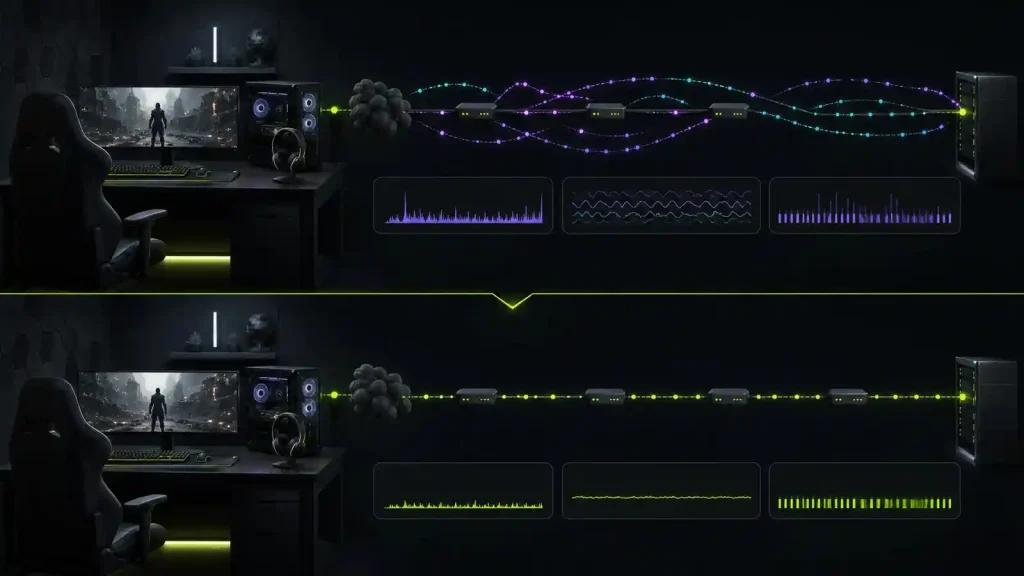
Figure 3. Matched gaming test before and after an SQM configuration
When a route optimizer is a separate test
SQM owns the home queue. Review connection monitoring only when idle and loaded Ethernet are stable but one destination follows a poor ISP path. A route optimizer cannot replace queue control, add capacity, fix radio interference, or guarantee lower ping. Test each intervention separately.
Frequently asked questions
Is SQM better than QoS for gaming?
SQM controls queues; QoS is a wider category. Choose the supported method that improves matched loaded tests without unacceptable throughput loss.
Should I give the gaming PC highest priority?
Priority may help contention, but it does not control every oversized queue. Measure before and after instead of assuming a device label solved bufferbloat.
Can SQM make download speed lower?
Yes. It deliberately keeps traffic below the bottleneck so queues remain controllable. The trade-off is worthwhile only when latency improves and capacity remains acceptable.
Record the setup. Test NoPing only for an external-route fault and keep it only when matched runs improve stability. Keep SQM only when loaded tests show a repeatable benefit.