


Nothing ruins a gaming session faster than being booted from a match because some cloud provider had a hiccup.
In recent years major cloud providers like Amazon Web Services have become central to how online games run, host matchmaking, and store progress.
When those services go down or become unreachable from your region you can get locked out of games, hit login queues, or suffer strange disconnects.
This guide explains which games commonly rely on cloud infrastructure, why outages and regional blocks happen (especially in Eastern Europe), and how to keep playing even if AWS is offline or blocked in your area.
What Online Games Use AWS?
First, a quick clarification. Big multiplayer titles use a mix of cloud providers, proprietary datacenters, and specialized backend services.
Still, many major studios use AWS components or otherwise depend on cloud infrastructure that can be affected by a generic cloud outage.
That means when a major AWS region or service has problems the effects can ripple into matchmaking, authentication, in-game stores, or game servers.
Below is your list with short notes where there is public confirmation or reporting about cloud dependency:
- League of Legends — Riot Games has documented migrations and use of AWS services for database and infrastructure tasks, so Riot’s ecosystem is closely tied to major cloud platforms.
- VALORANT — Riot operates VALORANT; Riot uses cloud services in parts of its infrastructure.
- Destiny 2 — Bungie’s online services have suffered outages in the past tied to external infrastructure or service issues. Game servers and APIs are sensitive to upstream cloud problems.
- Clash Royale and Clash of Clans — Supercell’s authentication or account systems have been reported offline during broader cloud incidents.
- For Honor — Ubisoft uses a mix of its own and cloud services; individual outages sometimes affect Ubisoft titles.
- New World — Amazon Games’ titles are obviously tightly coupled with AWS in some parts of the stack, though the company runs multiple backend pieces.
- Call of Duty: Warzone — Activision/Infinity Ward rely on a combination of dedicated servers and cloud systems; large outages to common services can affect login and matchmaking.
- Apex Legends — Respawn/EA use varied hosting strategies including cloud providers for portions of the backend.
- Fortnite — Epic Games has relied heavily on cloud scalability; reporting and technical write ups show Epic uses AWS resources for major parts of its infrastructure. When major AWS issues occur Fortnite and other Epic services have been affected.
- PUBG: Battlegrounds — PUBG Corp and related services use cloud infrastructure and have been impacted by larger network and service outages historically.
- Rainbow Six Siege — Ubisoft title with cloud-dependent services.
- Overwatch 2 — Blizzard uses a mixture of Blizzard-owned infrastructure and cloud providers for services.
- Battlefield 6 — EA titles are complex but can be affected by broad cloud outages and network issues.
- Rocket League — Epic acquired Psyonix and Epic Online Services and related outages have previously hit Rocket League and other Epic-ecosystem games.
As a rule, any big online game that uses third party services for logins, social, or matchmaking is at risk when services like AWS are degraded.
How to Keep Playing These Games Even if AWS is Offline or Blocked?
Well, the short answer: use NoPing, a gaming-oriented VPN and traffic optimization service, to bypass regional network restrictions or geo blocks and to route around service outages that are only affecting a specific path. NoPing can help in two practical situations:
Regional blocking or routing issues. If your ISP or country is blocking access to certain domains or the routing to a cloud region is broken, NoPing can route your traffic through a different country where access still works. That often restores logins and in some cases reestablishes stable connections to matchmaking endpoints.
Network path problems and poor routing. Outages or DNS failures may manifest as severe packet loss or inability to resolve game endpoints from your local resolver. By tunneling through an external server you sometimes avoid the damaged path and regain access. NoPing picks low-latency hops and servers close to the game data center, which can reduce lag compared to a generic consumer VPN.
Here’s how to use NoPing to bypass regional restrictions to avoid AWS outages:
- Sign-up through the website and download NoPing (you can test it for free).
- Open NoPing and search for your game inside the software
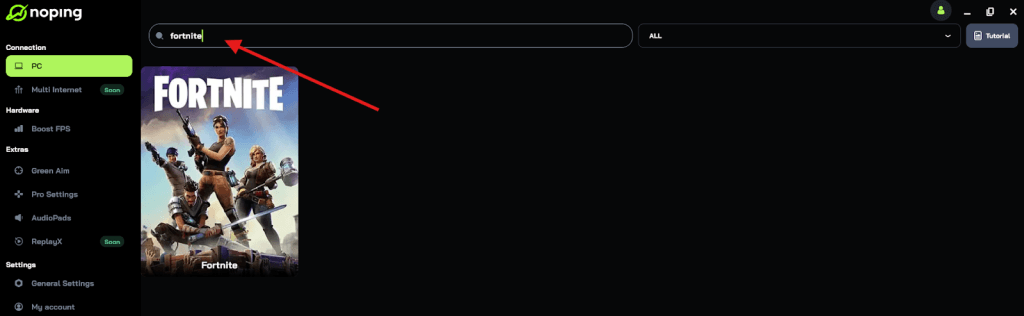
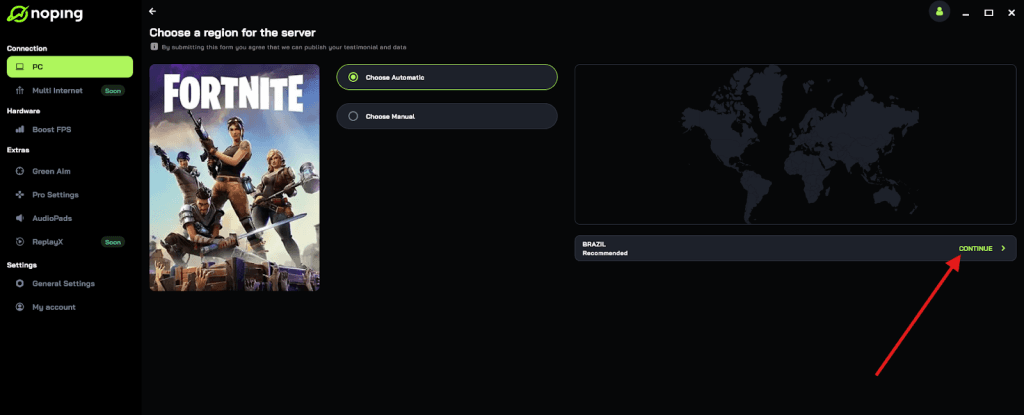
- Once you find it, click on it and, on the next screen, select “Choose automatic” or “Choose manual” and click “Continue”. We recommend choosing automatic, as NoPing’s technology analyzes all routes on a global scale and automatically selects the best option for you. But you can select servers that are outside the region blocked to keep playing normally.
- On the next screen, click on “Optimize Game”.
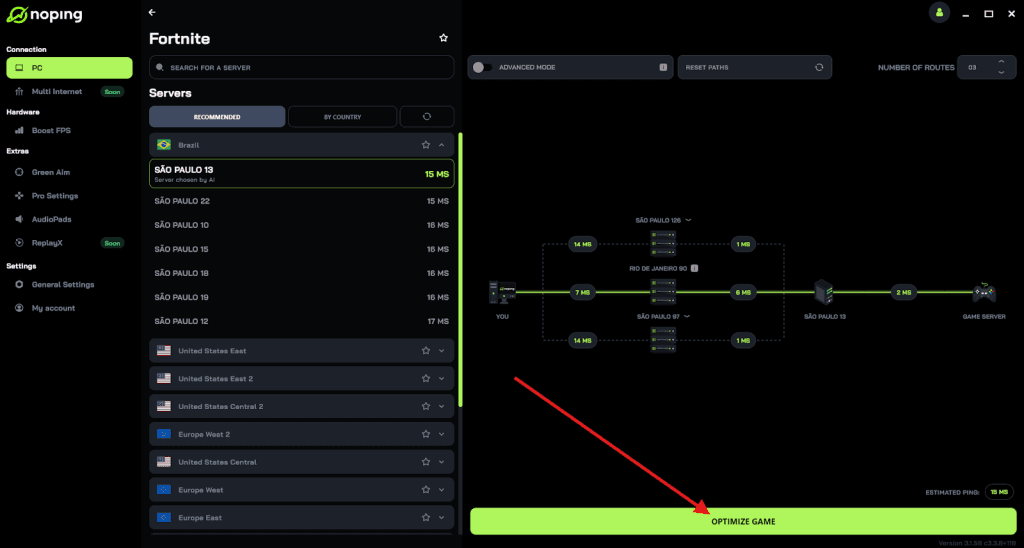
- And that’s it, you can start playing on servers worldwide and with optimized ping!
You can test different servers within NoPing to see which gives you the lowest latency.
Practical step by step to try when AWS or a cloud provider causes problems
- Check live status pages. Visit the game’s official status page or the developer’s Twitter/X feed. If they confirm a service-wide outage, it is likely not solvable on your side.
- Check broader reporting. Major cloud outages are reported by mainstream and tech outlets. If news sources report an AWS region problem, lots of games might be affected.
Russia Problems With AWS
There are political and regulatory reasons AWS access can be limited or complicated in certain countries.
Since 2022 and through subsequent years there have been moves and statements about cloud providers restricting new signups for Russian entities and about potential regulatory pressures from Russian authorities.
Russian telecom and regulator statements have also suggested restricting foreign cloud providers if they do not meet local rules or open local offices.
That creates a scenario where access to AWS-hosted services can be limited or unreliable for Russian-located players.
If you are playing from or through Russia, you may see degraded access or blocks tied to those geopolitical and regulatory dynamics.
And you can use NoPing to bypass these restrictions and keep playing your favorite games!
Cloud outages and regional blocks are one of the ugly realities of centralized infrastructure.
They are frustrating, but with NoPing you can keep playing! Download NoPing now and start your free trial!