

Direct Answer
FC 26 disconnects in the United States are typically caused by EA AntiCheat (EAAC) heartbeat timeouts during periods of ISP congestion from providers such as Comcast or Spectrum. NoPing rebuilds the connection path using 5 AI-powered parallel routes simultaneously and supports up to 6 physical internet connections running in parallel.
Introduction
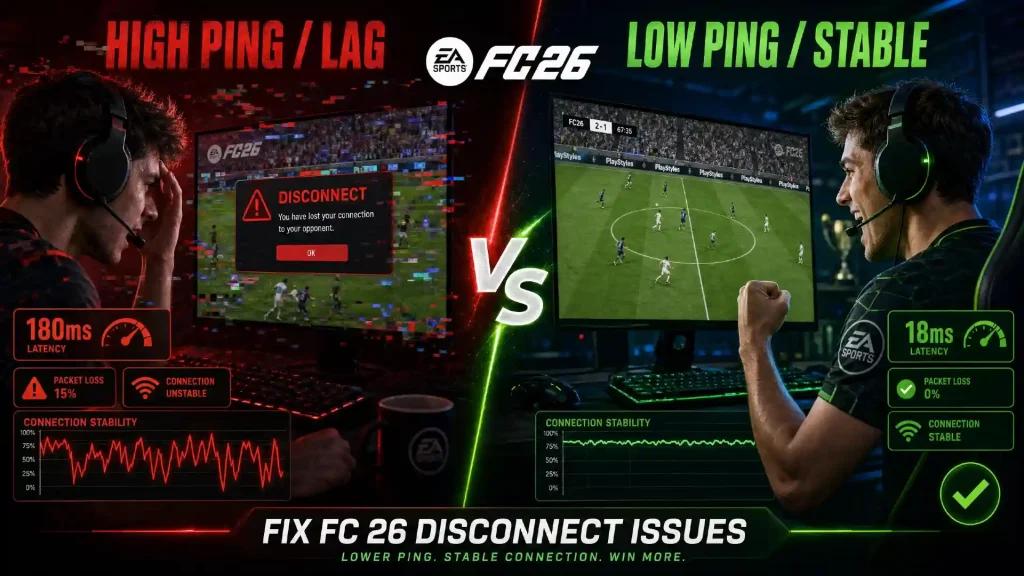
Getting disconnected from a FUT Champs match while leading 2-1 in the 70th minute is one of the most frustrating experiences in FC 26. EA’s disconnect policy may cause players to lose match credit and FUT Champs progress because of a brief internet instability.
The supposed "bug" is rarely an actual game issue. In most cases, it is caused by an EAAC heartbeat timeout during a Comcast routing fluctuation, a burst of retransmissions on Spectrum connections, or a failed P2P host migration triggered by packet loss spikes.
Connections such as AT&T Fiber and Verizon Fios are generally more stable, while T-Mobile 5G tends to experience higher jitter. CenturyLink, Cox, and Optimum each have their own network behavior patterns.
NoPing focuses on improving the connection path. The Multi Connection feature sends traffic through 5 AI-powered parallel routes simultaneously. Multi Internet combines up to 6 physical internet connections at the same time without relying on failover. Boost FPS helps keep the game's rendering performance stable.
Many users report up to 80% lower ping and a significant reduction in disconnects. The platform has an average rating of 4.9 out of 5, supports more than 3,000 games, and includes a one-day free trial.
Why FC 26 Disconnects Happen in the United States
The EAAC kernel-level heartbeat system requires consistent communication within expected timing thresholds. When ISP congestion occurs, packet loss windows can appear and may be interpreted as client tampering or exceed the system’s timeout threshold.
P2P host quality also affects FUT Champs matches. NoPing rebuilds network paths using the 5 AI-powered parallel routes provided by Multi Connection. As a result, temporary ISP instability can be masked by the parallel routing architecture.
Multi Internet: Up to 6 Physical Connections in Parallel
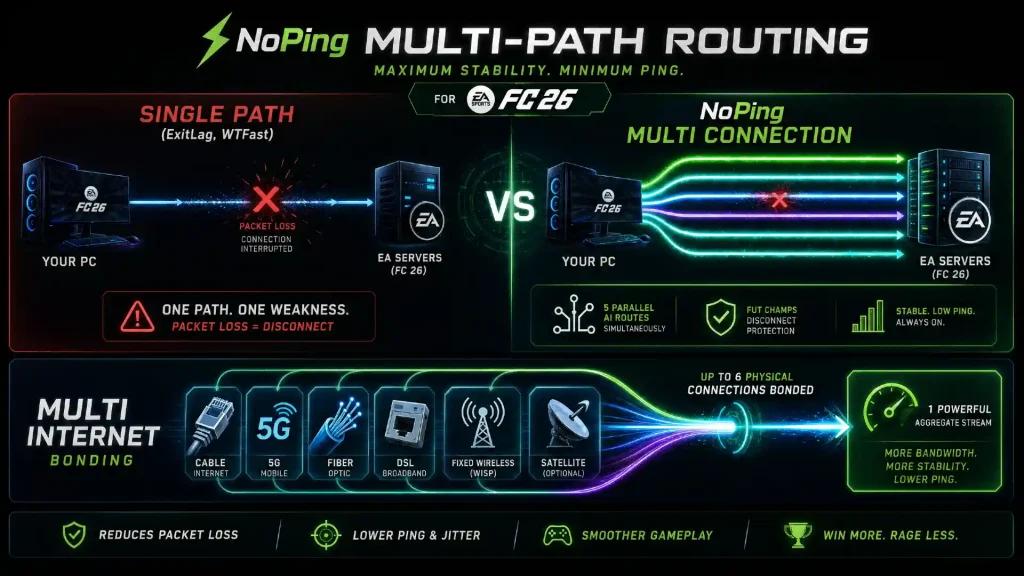
Multi Internet allows up to 6 physical internet connections to remain active simultaneously without depending on failover mechanisms.
By creating a more resilient aggregated route than any individual connection, the likelihood of disconnects can be significantly reduced.
Boost FPS to Reduce Heartbeat Timeout Risks
Performance drops and system freezes can delay EAAC heartbeat processing and trigger timeouts.
Boost FPS optimizes Windows process priorities, closes overlay applications, suspends telemetry services from ISP applications, and reduces unnecessary Windows 11 background services.
How to Configure NoPing
- Install NoPing.
- Log in using the free trial.
- Select FC 26.
- Choose the NA-East or NA-West server.
- Enable Multi Connection.
- Enable Multi Internet.
- Enable Boost FPS.
After completing the setup, disconnects often decrease significantly.
Free Trial
Try the following features free for one day:
- Multi Connection
- Multi Internet
- Boost FPS
Stop losing FUT Champs victories because of disconnects.
NoPing vs ExitLag, WTFast, GearUP, and LagoFast for Preventing FC 26 Disconnects
When searching for a solution to FC 26 disconnect issues in the United States, you will find several competitors. Here is how NoPing differentiates itself in areas related to EAAC stability, P2P match reliability, and route diversity.
ExitLag uses route optimization with dynamic real-time route selection. While it can adjust routes during a session, only one route remains active at any given time.
If that route experiences packet loss during peak hours on providers such as Comcast or Spectrum, the connection becomes vulnerable.
WTFast uses its Gamers Private Network (GPN), routing traffic through dedicated servers, but it also operates with a single active route.
GearUP Booster and LagoFast follow a similar approach, offering single-route optimization with varying levels of ISP-specific tuning.
NoPing uses Multi Connection, which maintains 5 AI-powered parallel routes simultaneously, not sequentially and not as failover.
All five routes carry FC 26 traffic at the same time. If one route experiences packet loss or jitter, the remaining routes continue supporting the connection.
In addition, Multi Internet combines up to 6 separate physical connections, such as cable internet, a 5G hotspot, or a secondary broadband connection, creating a level of redundancy that single-route solutions cannot provide.
A one-day free trial is available so players can compare disconnect frequency during FUT Champs matches.
Frequently Asked Questions
1. Why do I get disconnected during FC 26 matches even though I have good internet?
EAAC operates at the kernel level and requires constant communication with EA servers. During peak usage hours, providers such as Comcast and Spectrum may experience bursts of packet loss that the system interprets as suspicious behavior, resulting in a disconnect.
2. Is NoPing compatible with EA AntiCheat (EAAC)?
Yes. NoPing only operates at the network routing layer and does not modify game files or interfere with anti-cheat functionality.
3. Does Multi Internet work as a backup connection?
No. It uses up to 6 physical connections simultaneously in parallel.
4. Which server region should I choose in the United States?
NA-East: East Coast, Midwest, and Southeast regions.
NA-West: West Coast, Mountain States, and Pacific region.
Players located in central areas can test both and choose whichever provides lower ping.
5. Does Boost FPS really help prevent disconnects?
Yes. When the CPU or GPU is overloaded, EAAC heartbeat processing can be delayed. Boost FPS helps reduce that risk.
6. Does NoPing work with T-Mobile 5G home internet?
Yes. 5G connections naturally experience jitter due to signal fluctuations. Parallel routes help absorb these variations.
7. How can I test NoPing before subscribing?
The service offers a one-day free trial with full access to Multi Connection, Multi Internet, and Boost FPS.
FAQ
1. Is the EA Sports FC 26 disconnect bug only related to internet speed?
No. Routing quality, jitter, packet loss, ISP peering, and server region can be just as important as connection speed.
2. How should I test NoPing for EA Sports FC?
Test the same matchmaking queue before and after changing routes, then compare ping, jitter, and packet loss.
3. What local network issue is common in the United States?
Poor routing between the ISP and the game server region often has a greater impact than the advertised connection speed.
4. Can NoPing guarantee lower ping?
No. Results depend on the ISP, geographic location, server region, and time of day.
5. Is it worth comparing NoPing with ExitLag outside of Top 20 rankings?
Yes. Compare route stability, jitter, packet loss, and overall consistency rather than focusing only on advertised ping values.
6. Does anti-cheat block route optimization tools?
Compatible optimization tools that do not modify game files or manipulate packets generally do not interfere with anti-cheat systems.
7. Which metric should I monitor besides ping?
Pay attention to jitter, packet loss, route changes, and latency spikes during competitive matches.
8. When should I change routes again?
After ISP instability, server maintenance, major game updates, or whenever the current route shows signs of degradation.
Feature Comparison for Preventing FC 26 Disconnects
| Feature | NoPing | ExitLag | WTFast | GearUP | LagoFast |
|---|---|---|---|---|---|
| Active Parallel Routes | 5 simultaneous | 1 active | 1 active | 1 active | 1 active |
| Multi Internet | Up to 6 connections | No | No | No | No |
| Packet Loss Mitigation | Yes, via multipath | Limited | Limited | Limited | Limited |
| EAAC Compatible | Yes | Yes | Yes | Yes | Yes |
| U.S. ISP Profiles | Comcast, Spectrum, AT&T, Verizon, T-Mobile, and Cox | Partial | Partial | Partial | Partial |
| Free Trial | Full 1 day | Varies | Varies | Varies | Varies |
NoPing’s architecture is the only one that simultaneously uses 5 AI-powered parallel routes and up to 6 physical internet connections in parallel. For FUT Champs players who cannot afford disconnects during peak hours, this approach provides a level of redundancy that single-route solutions cannot replicate.
Technical Note
Ping, packet loss, jitter, and FPS are different issues.
Route optimization can help with network path-related problems, but it cannot fix local CPU or GPU bottlenecks, overloaded Wi-Fi networks, or game server outages.