

Fortnite on Mac has been a hot topic for years, and even as we enter 2026, the situation remains a mix of technical workarounds and cloud-based solutions.
If you are a Mac user, you likely remember the days when you could simply download the game and jump into the Battle Bus without a second thought.
However, a lot has happened in the legal and technical landscape between Epic Games and Apple, leaving players to wonder if they can still get their Victory Royale on a MacBook or iMac.
The short answer is yes, you can play, but the method you choose will depend on whether you want the most up-to-date version of the game or if you are just looking for a quick match.
Because the game is no longer officially updated for macOS, we have to look toward cloud gaming and virtualization to get the job done.
Is Fortnite still available on Mac natively?
No, you cannot play the modern version of Fortnite natively through the official Epic Games Launcher on macOS.
While you can technically download the launcher and install the game, you will find yourself stuck in a "time capsule" version of the game, specifically Version 13.40 from Chapter 2, Season 3.
This happened because of the long-standing legal battle between Epic Games and Apple regarding App Store fees.
Since Epic cannot update the game on Apple platforms, the native Mac client has been frozen in time.
You won't see new seasons, skins, or the latest map updates. If you want the full, current experience with Chapter 6 and beyond, you have to use alternative methods.
How can you play the latest version of Fortnite on Mac?
The most effective way to play the current version of Fortnite on a Mac today is through cloud gaming services.
These platforms allow you to stream the game from a high-end server to your Mac, meaning your hardware doesn't have to do the heavy lifting of rendering the graphics.
There are three primary services that work exceptionally well on macOS:
- Xbox Cloud Gaming: This is perhaps the easiest method because it is free and runs directly in your browser (Safari or Chrome). You don't even need a subscription, just a Microsoft account.
- NVIDIA GeForce NOW: This service connects to your Epic Games Store account. It offers a free tier, but the paid tiers provide better hardware (like RTX 4080 equivalents) and shorter queue times.
- Amazon Luna: If you are an Amazon Prime member, you can often play Fortnite for free through Luna, which also runs smoothly on Mac via the web browser.

Also read: How to Fix Fortnite Matchmaking Error: Full Guide
How to set up Xbox Cloud Gaming for Fortnite?
Playing via Xbox Cloud Gaming is the go-to recommendation for most players because it requires the least amount of setup.
- Open Safari or Google Chrome on your Mac.
- Navigate to the Xbox Cloud Gaming website.
- Sign in with your Microsoft account (or create one for free).
- Search for Fortnite in the search bar.
- Click "Play" and wait for the stream to initialize.
- Connect a controller via Bluetooth or use a keyboard and mouse if the browser supports it.
Is NVIDIA GeForce NOW better for Mac users?
Yes, NVIDIA GeForce NOW is often considered the superior choice if you care about performance and high refresh rates.
Unlike other services, GeForce NOW allows you to play at 120 FPS or even 240 FPS depending on your membership tier, making it feel much closer to a native experience.
To get started with GeForce NOW:
- Download the GeForce NOW macOS app.
- Install the app and log in with your NVIDIA account.
- Go to settings and link your Epic Games account.
- Find Fortnite in your library and hit "Play".
- Adjust your streaming settings based on your internet speed to ensure the lowest possible latency.
Can you play Fortnite on Mac using Windows virtualization?
Yes, but it is complicated and usually not recommended for Apple Silicon (M1, M2, M3) users.
If you have an older Intel-based Mac, you can use Boot Camp to install Windows on a separate partition and run Fortnite natively. This works because you are essentially turning your Mac into a Windows PC.
However, if you have a newer Mac with an M-series chip, you would have to use software like Parallels Desktop or Whisky.
The problem here is the anti-cheat software. Fortnite uses Easy Anti-Cheat (EAC) and BattlEye, which often do not play well with virtual environments.
Most players find that the game either fails to launch or results in a ban risk because the anti-cheat cannot verify the system environment.
What about the "iPad trick" for Apple Silicon Macs?
There is a technical workaround for users with M1, M2, or M3 Macs that involves sideloading the iOS/iPadOS version of Fortnite.
Since Apple Silicon shares the same architecture as iPhones and iPads, the mobile version of the game can technically run on macOS.
You will need a tool like Sideloadly and a decrypted .IPA file of Fortnite.
While this allows for a native-like experience on your chip, it still requires a controller for most functions and can be buggy since it isn't an officially supported configuration.
What are the minimum requirements to play Fortnite on Mac?
Since most people will be using cloud gaming, the hardware requirements for your Mac are actually quite low. The "real" requirement is your internet connection.
- Operating System: macOS 10.15 (Catalina) or later for browser compatibility.
- Processor: Any Intel Core i3 or Apple Silicon chip will suffice for streaming.
- Memory: At least 8GB of RAM is recommended to keep the browser and stream stable.
- Storage: Minimal, as cloud gaming doesn't require a full game download.
- Internet Connection: At least 25 Mbps download speed. For a competitive experience, a wired Ethernet connection is much better than Wi-Fi.
Also read: Is Valorant Crossplay? PC and Consoles
Why is your ping high while playing Fortnite on Mac?
Playing through a cloud service adds an extra layer of latency. Your inputs have to travel to the cloud server, the server processes them, and the video has to be sent back to your Mac.
If your connection route is inefficient, you will experience "input lag," which makes the game feel sluggish.
Common reasons for high ping include:
- Congested Wi-Fi channels.
- Inefficient ISP routing to the gaming servers.
- Background downloads taking up bandwidth.
- Distance from the cloud gaming data center.
Here’s how to use NoPing to fix high ping in Fortnite:
- Sign-up through the website and download NoPing (you can test it for free).
- Open NoPing and search for Fortnite inside the software
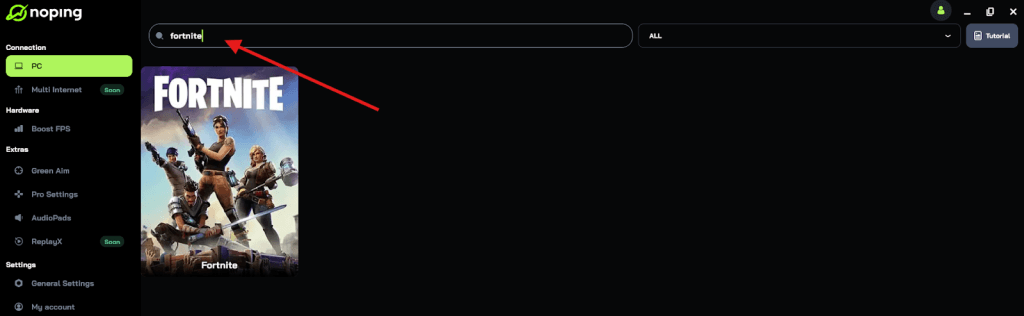
- Once you find Fortnite, click on it and, on the next screen, select “Choose automatic” or “Choose manual” and click “Continue”. We recommend choosing automatic, as NoPing’s technology analyzes all routes on a global scale and automatically selects the best option for you.
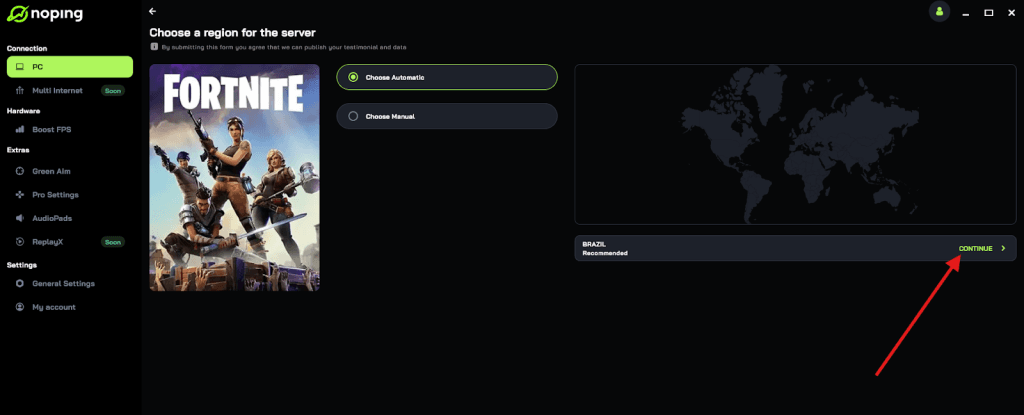
- On the next screen, click on “Optimize Game”.
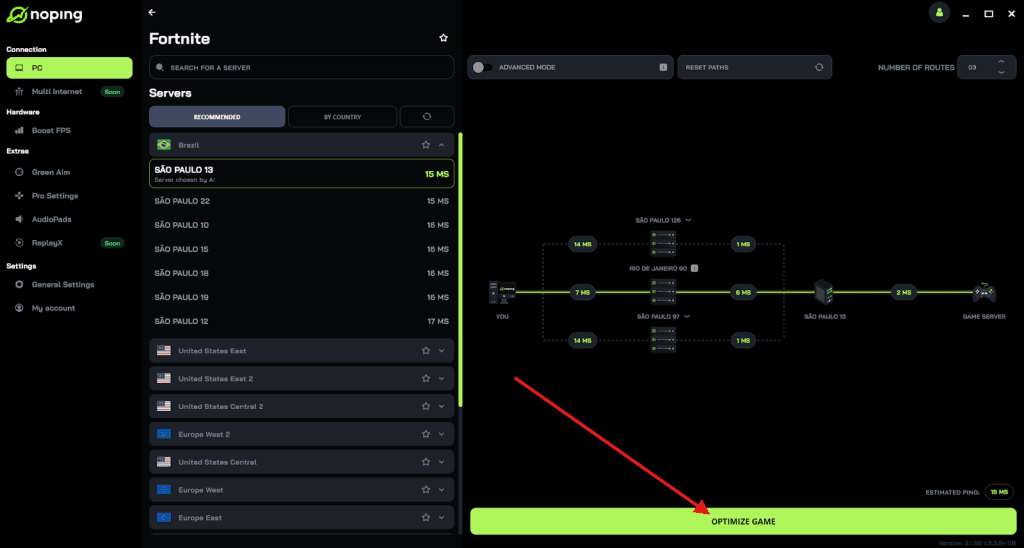
- And that’s it, you can start playing Fortnite with optimized ping!
You can test different servers within NoPing to see which gives you the lowest latency.
Summary: Is it worth playing on Mac?
If you already own a Mac and want to play with friends, it is absolutely worth it. While you can't just click "Install" in the App Store, the cloud gaming options available in 2026 are more robust than ever.
With a solid internet connection and the right optimization tools, the experience is nearly indistinguishable from playing on a console.
Play Fortnite without lag. Download NoPing now and start your free trial!