

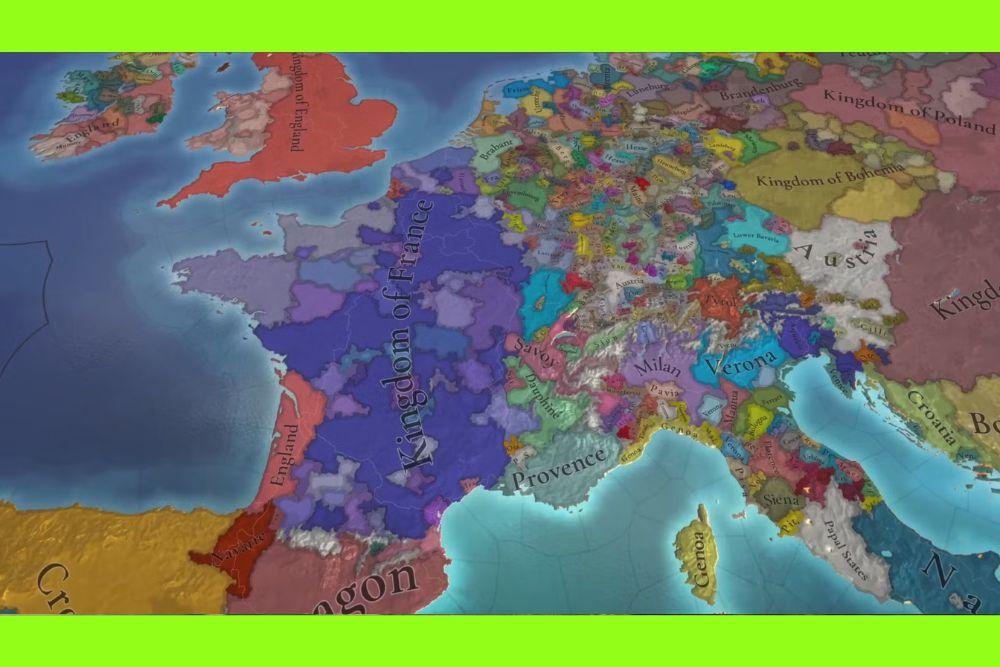
If you have spent any time with Paradox games, you know the map is more than just art. The Europa Universalis V map is the backbone of everything you do in the game: politics, economy, war, trade and culture all live on top of it.
In this article I will break down what the map actually contains, how big and detailed it is, what map modes you can use to read it, and some practical tips to get the most out of those overlays.
How big is the Europa Universalis V map?
Europa Universalis V is noticeably more detailed than many previous Paradox strategy titles. The world is divided into lots of small units that Paradox calls locations and tiles.
Those locations are the smallest unit of land you can interact with. Habitable locations hold population, have a dominant culture, a dominant religion and a raw good, and they are the places that can host buildings and armies.
That design makes the map feel like a living patchwork of population centers rather than a collection of abstract provinces.
One more concrete but technical detail that has been discussed is the apparent pixel breadth of the world map in some builds.
Community analysis and video breakdowns suggest very high-resolution map assets, with some creators referencing extremely wide pixel dimensions for the full world render. That extra resolution supports crisp zooming and detailed mapmodes.
Keep in mind that exact pixel numbers can vary with updates and builds, but the trend is clear: the map is built for fine detail and zoom.

Locations, provinces and regions in Europa Universalis V map
EU5 uses a hierarchical approach. At the bottom you have locations. Collections of locations form larger playable administrative areas which function similarly to provinces in older games.
Above that you will see regions, trade zones and diplomatic groupings that help the game engine and the player understand larger scale patterns.
Because each habitable location can have a raw good and population, economic and demographic mechanics can be much more localized.
That makes decisions like where to place a building, where to station troops, or where to direct development far more tactical. The granularity rewards careful local planning but also introduces more to manage.
Also read: How to Fix Ping Spikes in Any Game?
Map modes in Europa Universalis V
If one of the defining strengths of EU5 is the sheer number of map modes, Paradox and the community did not disappoint.

Source: Reddit
Map modes are overlays that color or annotate the map to show relevant data. EU5 organizes map modes into many categories such as government, economy, society, demography, diplomacy, military, geopolitics and geography. Each category contains several specialized modes.
For example, you can view market supply and demand, ideological breakdowns, demographic density, diplomatic opinions, military choke points and tactical overlays among others. These are not cosmetic. They are essential decision tools.
Government map modes
These show how countries are organised, ruled, and structured.
- Terrain: Displays terrain, useful for planning combat since topography affects battles.
- Political: Each nation has its own colour. Stripes show territory that is controlled by someone other than the owner.
- Building Based Countries: Shows only building-based countries.
- Pop Based Countries: Shows only population-based countries.
- Army Based Countries: Shows only army-based countries.
- Government Types: Colours locations based on the government type of each owner.
- Country Ranks: Colours locations based on the rank of the country that owns them.
- Dynasty: Colours locations by the ruling dynasties and displays the dynasty names.
- Court Language: Colours locations based on each owner’s court language.
- Integration: Colours locations according to their level of integration.
- Stability: A colour scale from red to green showing how much stability each country has.
Economy map modes
These focus on economy, resources, food, markets, infrastructure and development.
- Tax Base: Colours locations depending on the owner’s tax base.
- Development: Colours locations depending on development, with brightest green showing the highest values.
- Prosperity: Shows prosperity, with green for positive and red for negative.
- Location Ranks: Towns are silver, cities are gold.
- Raw Materials: Colours locations based on which raw good they produce.
- Province Food: Shows monthly food values. Green means selling or stable, red means starving.
- Food Productivity: Colours locations depending on how much food they produce.
- Control: Shows how much control a nation has over each location.
- Proximity to Capital: Colours locations depending on their distance to the owner’s capital.
- Roads: Highlights where roads exist.
- Markets: Colours each location by the market it belongs to. Shade indicates market access.
- Market Languages: Colours locations according to the market language of their market.
Society map modes
These focus on population composition and social behaviour.
- Population Satisfaction: Red to green depending on how satisfied pops are.
- Population: Colours each location based on how populated it is. Stripes indicate overpopulation.
- Majority Social Class: Colours locations by dominant social class, like nobles or burghers.
- Migration: Green where pops want to move, red where they want to leave.
- Rebels: Colours the rebel faction closest to uprising.
- Nobles: Shows how many nobles exist in each location.
- Clerics: Shows cleric population.
- Burghers: Shows burgher population.
- Laborers: Shows laborer population.
- Soldiers: Shows soldier population.
- Peasants: Shows peasant population.
- Tribesmen: Shows tribesman population.
- Slaves: Shows slave population.
Demography map modes
These are about culture, language, religion and demographic influence.
- Location Cultures: Colours each location by dominant culture.
- Culture Groups: Colours locations by culture group.
- Country Culture: Colours entire countries by the culture group of their dominant culture.
- Language Families: Colours locations by the family of the dominant language.
- Dominant Languages: Shows the dominant language in each location.
- Language Power: Colours locations based on how powerful their dominant language is.
- Dominant Dialects: Shows the dominant dialect.
- Common Languages: Colours locations based on the common language of the owner.
- Liturgical Languages: Colours locations based on their liturgical language.
- Country Religions: Colours each country by its religion.
- Location Religions: Colours locations by dominant religion.
- Location Religion Group: Colours locations by religion group.
- Holy Sites: Highlights locations containing holy sites.
- Works of Art: Colours places based on the quantity and quality of artworks.
- Literacy: Colours each location by literacy rate.
- Institutions: Colours locations depending on how many institutions they have.
Diplomacy map modes
These help visualise international relations and strategic diplomacy.
- Diplomacy: Shows diplomatic status and whether locations are in diplomatic range.
- Opinion: Colours each location based on its owner's opinion of the selected country.
- Great Powers: Colours each country by great power rank.
- Power Projection: Shows countries’ power projection relative to the selected nation.
- Antagonism: Shows which nations are antagonistic toward the selected country.
- War: Countries at war with the selected one are red, allies are green. Occupations are striped.
- Truces: Colours countries that have a truce with the selected one.
- Players: Highlights human players and shows their names.
- Victory Cards: Highlights locations with victory cards.
Military map modes
These show combat conditions, fortification and supply.
- Tactical: Shows defensive bonuses depending on terrain and climate.
- Fortifications: Friendly forts are green, enemy forts red, neutral forts yellow.
- Supply: Colours locations depending on supply limits. With an army selected, it shows if a location can support the army.
- Military Access: Shows which locations the selected country has military access to.
Geopolitics map modes
These represent global and environmental features.
- Diseases: Shows disease presence by location.
- Maritime Presence: Shows coastal and sea areas based on maritime presence.
- Natural Harbor Suitability: Colours locations based on how suitable the coast is for a harbour.
- Harbor Capacity: Colours locations based on harbour capacity.
- Naval Range: Green or yellow when inside naval range, red or black when outside.
- Privateering: Shows where privateers operate.
- Colonial: Shows owned colonies, foreign colonies, colonial buildings and charters.
Geography map modes
These represent physical land structure and environmental conditions.
- Locations: Shows individual locations.
- Provinces: Highlights all provinces.
- Areas: Shows areas, which are groups of provinces.
- Regions: Shows larger regional groupings.
- Subcontinents: Displays subcontinents.
- Continents: Displays continents.
- 3D Map: Removes overlays and shows the unfiltered 3D map.
- Topography: Colours terrain types like mountains, hills or plains.
- Vegetation: Shows forests, swamps, deserts and other vegetation types.
- Climate: Colours locations based on climate.
- Winter: Shows the current level of winter conditions.
- Dangers: Highlights volcano and earthquake risk.
- Current Weather: Colours locations based on active weather systems.
Some concrete examples of useful map modes you will want to learn early:
- Development or economic overlays that show raw goods, production capacity and where markets are strong or weak. These make site placement and trade decisions easier.
- Tactical or military overlays that reveal terrain advantages, choke points and recommended fort placements. Use them to plan defenses or to find weak flanks.
- Political and culture overlays to spot where your cores and claims may be fragile because of different culture groups or low development. These are crucial for long term expansion planning.
The UI gives you hotkeys and quick toggles so cycling through modes becomes part of the play flow rather than a tedious chore. Community guides and videos often recommend keeping a small set of favorite modes bound to keys for rapid situation checks.

Geography, terrain and climate: more variety under the hood
One of the big improvements in EU5 is how much the geography matters.
The game includes a large number of terrain and climate combinations that affect movement, combat and development costs.
Community and developer posts have highlighted many hundreds of unique terrain combinations once you consider climate, topography and vegetation together. That means a mountain pass in one part of the world can behave very differently from a similarly shaped tile elsewhere.
The more granular geography reinforces regional distinctiveness.
Also read: What is Input Lag and How Can You Fix it?
Cultural and demographic depth
EU5 pushes population, culture and society to the front of the design. The world map is not empty; it is filled with populations that have cultures, religions, and different economic roles.
Reports indicate thousands of culture entries and a fine-grained cultural map so that local identities matter a lot for uprisings, assimilation and governance. That richness changes not only how you expand but how you rule.
Expect to use mapmodes to monitor demographic pressures as much as to plan wars.
Practical tips for reading and using the map
- Learn your most important mapmodes first. Start with political, development, tactical and trade overlays. Those will answer the bulk of your immediate questions.
- Use the location-level detail when building. If you need population for buildings or manpower, zoom to location granularity to pick the right spot.
- Watch for terrain combos. If you see an unfamiliar terrain effect, flip to topography or vegetation modes to understand movement or attrition penalties before you march an army.
- Bind hotkeys to the overlays you use most. Rapidly toggling views saves time and helps prevent costly mistakes during wars or when expanding rapidly.
Modding and community maps
Paradox titles usually have robust mod support and an active mapping community. EU5 is no exception.
Players are publishing atlases, location spreadsheets and custom map visualizations while the official channels have released full world map previews and mapmode showcases. If you want even deeper insight, community-made spreadsheets and map packs are invaluable for planning big campaigns.
What to expect going forward
Because maps are a core part of EU5’s identity, the game will likely continue to get map-focused updates, new mapmodes and quality of life improvements that make reading and manipulating the map easier.
The early reviews and community coverage emphasize how central these mapmodes are to play and how many different overlays are now useful for making both micro and macro decisions. Expect map-related patches and community tools to keep evolving quickly.
If you love data driven strategy and enjoy digging into overlays and local decisions, the Europa Universalis V map is a huge part of the appeal. It gives you more local control and more ways to read the world than many previous Paradox titles.
That extra detail means more to manage, but it also gives you more leverage to shape outcomes through careful planning.
Learn a handful of mapmodes well, use the location detail when planning development or building placement, and treat the map as your primary interface for understanding the living world Paradox built.
Play more than 3000 games without worrying about lag! Download NoPing now and start your free trial!