

ANSWER BOX
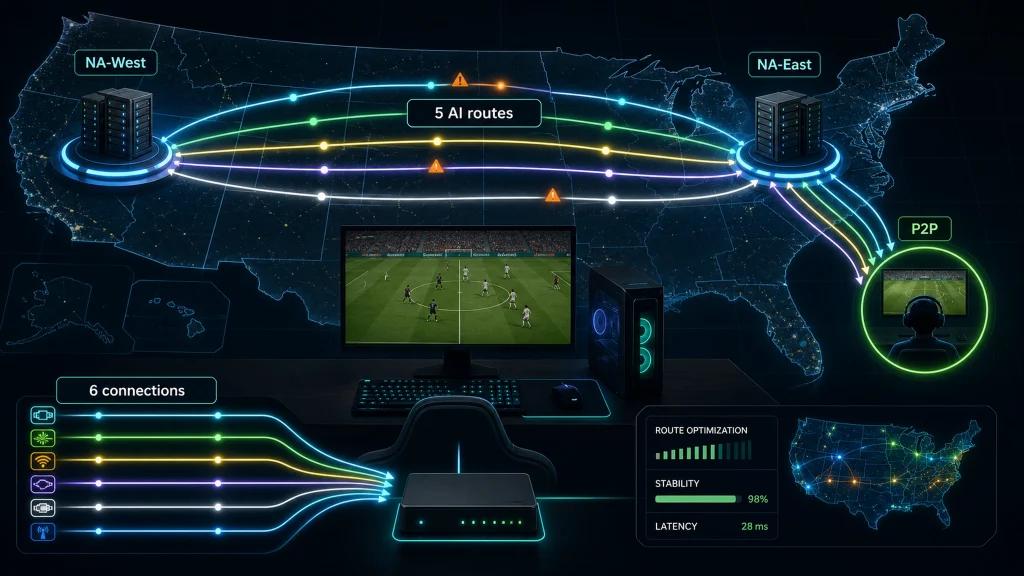
The transition from FIFA to EA Sports FC 26 kept Multiplay datacenters in NA-East and NA-West, but EA AntiCheat (EAAC) is now kernel-mode and FUT remains partly P2P. NoPing fixes the route via 5 parallel AI routes plus up to 6 physical connections in parallel.
INTRODUCTION
EA's rebrand from FIFA to EA Sports FC 24 in 2023, followed by FC 25 and FC 26 in 2026, introduced two technical changes that players in the United States still notice today.
First, EA AntiCheat (EAAC) became a full kernel-mode driver from 2022 onward, running alongside all FUT and online game modes. Second, FUT Champions and online friendlies retained their P2P-style host election system, even though dedicated EA Multiplay servers in NA-East and NA-West continue handling matchmaking and statistics synchronization.
From a networking perspective, routing quality did not significantly improve. Comcast peer congestion still occurs, Spectrum users still experience retransmissions, and AT&T Fiber and Verizon Fios remain among the most stable options. T-Mobile 5G users can still encounter higher jitter levels.
NoPing addresses these issues through route optimization. Multi Connection sends 5 AI-powered routes simultaneously, while Multi Internet bonds up to 6 physical internet connections in parallel rather than using traditional failover. Boost FPS helps maintain rendering performance and system responsiveness.
Many users report ping reductions of up to 80%. NoPing supports more than 3,000 games, holds a 4.9 out of 5 rating, and includes a one-day free trial.
What Changed Technically From FIFA to FC 26
- EA AntiCheat (EAAC) kernel-mode implementation introduced in 2022.
- Continuous evolution of the HyperMotion engine.
- User interface rebranding.
- FIFA branding removed while club licenses remained.
- Servers continue operating on EA Multiplay datacenters.
- FUT Champions and online friendlies still rely on P2P host selection.
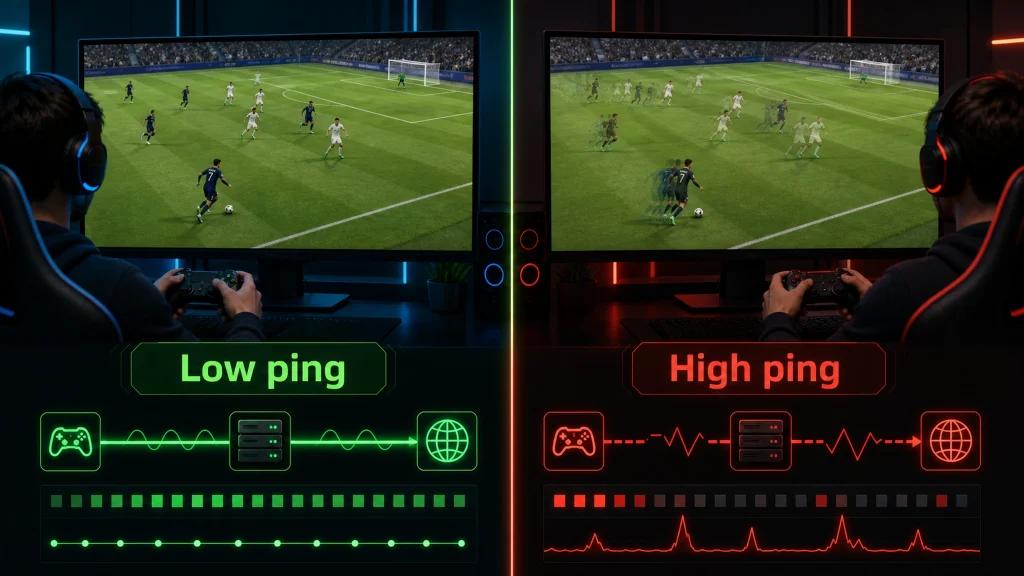
- The feeling of gameplay delay remained largely unchanged despite the rebrand.
Multi Connection for FC 26 in the United States
Multi Connection uses 5 AI-optimized routes simultaneously.
This helps:
- Maintain stable EAAC heartbeat timing.
- Improve route quality to EA servers.
- Provide a cleaner network profile during P2P host selection.
- Reduce packet loss and route instability.
Multi Internet: Up to 6 Physical Connections in Parallel
Unlike traditional failover systems, Multi Internet allows up to 6 physical internet connections to remain active simultaneously.
Benefits include:
- Greater connection stability.
- Reduced impact from ISP outages.
- Better resistance against packet loss spikes.
- Continuous connectivity during online matches.
Boost FPS for Smoother Gameplay
Boost FPS optimizes Windows specifically for gaming by:
- Adjusting process priorities.
- Closing unnecessary overlay applications.
- Suspending ISP companion app telemetry.
- Reducing Windows 11 background services.
This can improve frame consistency and increase 1% low FPS performance during demanding gameplay moments.
With the free one-day NoPing trial, players can test:
- Multi Connection
- Multi Internet
- Boost FPS
and experience FC 26 as intended.
NoPing vs. ExitLag and WTFast for EA Sports FC 26
Most VPN-style ping reduction services such as ExitLag, WTFast, and GearUP Booster route traffic through a single tunnel to a proxy server.
While this may help when an ISP's direct route is poor, it does not fully address P2P host election issues found in FUT Champions.
NoPing's Multi Connection technology runs 5 parallel AI routes simultaneously, maintaining the cleanest possible path to both EA Multiplay servers and P2P opponents.
For users seeking additional connection protection, Multi Internet bonds up to 6 physical connections in parallel rather than simply switching to a backup connection.
Other solutions generally continue relying on single-path routing or basic failover models.
Which US ISPs Cause the Most Problems for EA Sports FC 26?
Cable providers such as Comcast Xfinity and Charter Spectrum frequently experience neighborhood congestion during peak evening hours.
This can lead to:
- Packet loss
- Increased latency
- Speed-up lag
- Unstable FUT Champions matches
AT&T Fiber and Verizon Fios typically offer more stable, low-jitter routes to EA's NA-East and NA-West infrastructure.
T-Mobile 5G Home Internet may experience higher jitter due to the nature of fixed wireless networks.
For players using cable internet or 5G FWA connections, NoPing's Multi Connection can help bypass congested ISP routes.
FAQ
Did EA Sports FC servers move after the FIFA rebrand?
No. EA continues using Multiplay datacenters, primarily located in Virginia for NA-East coverage and Oregon for NA-West coverage.
Is EA AntiCheat running in kernel mode?
Yes. EA AntiCheat has operated as a kernel-level driver since 2022.
Does FUT Champions still use P2P?
Yes. FUT Champions and online friendlies continue using P2P matchmaking for gameplay sessions.
Why does FUT Champions feel delayed even with good ping?
Because gameplay responsiveness depends not only on your connection to EA's servers but also on the connection quality between you and your opponent.
A poor peer connection can create delay even when server latency appears low.
How does NoPing improve routing for EA Sports FC 26?
NoPing's Multi Connection creates up to 5 independent AI-optimized routes between your PC and the game's host.
The system monitors:
- Packet loss
- Jitter
- Latency
in real time and automatically prioritizes the most stable path.
Multi Internet can additionally combine up to 6 physical internet connections simultaneously.
Can NoPing reduce speed-up lag?
Yes. Speed-up lag is often caused by packet loss and route instability.
By optimizing network routes, NoPing may reduce the packet loss events that trigger these synchronization issues.
Does Boost FPS improve FC 26 performance?
Yes. Boost FPS reduces background activity and optimizes system resources, helping improve frame consistency and overall smoothness.
Can I try NoPing before subscribing?
Yes. NoPing offers a one-day free trial with access to all major features, including Multi Connection, Multi Internet, and Boost FPS.
Is EA Sports FC 26 the same as FIFA 24 or FIFA 25?
No.
EA Sports FC 26 is the latest entry in EA's football series following the FIFA rebrand.
It builds upon the gameplay systems introduced in FC 24 and FC 25, including:
- Updated rosters
- HyperMotion AI improvements
- EA AntiCheat kernel-mode integration
The server infrastructure remains based on EA Multiplay datacenters serving both NA-East and NA-West regions.
Does FIFA EA Sports FC 26 depend only on internet speed?
No. Routing quality, jitter, packet loss, ISP peering, and server location can be just as important as raw bandwidth.
How should I test NoPing for FIFA?
Test the same game mode before and after changing routes, then compare ping, jitter, packet loss, and overall match responsiveness.
What is a common connectivity issue in the United States?
Poor routing between an ISP and the game server region can have a greater impact than connection speed alone.
Can NoPing guarantee lower ping?
No. Results vary depending on ISP, location, server region, network conditions, and time of day.
Should I compare NoPing against ExitLag or other alternatives?
Compare measurable metrics such as route quality, stability, jitter, and packet loss rather than focusing solely on advertised ping numbers.
Does anti-cheat block route optimization software?
Supported route optimization tools should not modify game files or bypass anti-cheat systems.
What metric should I monitor besides ping?
Monitor:
- Jitter
- Packet loss
- Route changes
- Latency spikes during competitive gameplay
When should I test a new route?
Consider retesting routes after:
- ISP instability
- Server maintenance
- Major game updates
- Noticeable route degradation
Technical Note
Ping, packet loss, jitter, and FPS are separate performance metrics.
Route optimization may help network path issues, but it cannot fix:
- CPU bottlenecks
- GPU limitations
- Overloaded Wi-Fi networks
- Game server outages
Understanding the difference between these factors is essential when troubleshooting EA Sports FC 26 performance.