


High latency in VALORANT remains one of the main factors that negatively affect player performance in competitive matches. Delays in communication with the servers directly impact reaction time, reduce accuracy, and can compromise critical in-game decisions.
In practice, latency refers to the time it takes for data to travel from the player’s device to the server and back. When this interval increases, issues such as high ping, freezing, and delayed actions begin to appear.
From a technical perspective, up to 20 ms is considered ideal, while values above 150 ms already cause noticeable lag.
Connection adjustments help reduce latency in VALORANT
The first step involves improving connection quality. Using an Ethernet cable reduces common Wi-Fi interference and provides greater stability. In addition, limiting the number of devices connected to the network helps prevent congestion.
Other recommended practices include pausing downloads, stopping streaming services, and keeping the router in an open area. These simple measures help stabilize ping during matches.
Network settings and server selection are crucial
Enabling QoS (Quality of Service) on the router allows game traffic to be prioritized, reducing the impact of other internet activities. At the same time, selecting the closest server within VALORANT decreases data travel distance and improves response times.
Background applications increase delays
Open programs consume bandwidth and processing power without notice. Browsers, downloads, and video platforms directly interfere with connection quality. For this reason, closing unnecessary applications and prioritizing the game within the operating system is an essential step.
Hardware and external limitations also have an impact
Older equipment, especially entry-level routers, can worsen latency. Updating drivers, the operating system, and the game itself helps maintain stable performance. Lowering graphical settings can also improve consistency.
Even so, not every issue depends on the player. Internet provider instability or problems with the game servers may increase ping. In these situations, it is recommended to test the connection and check the service status.
Try a free solution to reduce latency in VALORANT
Players dealing with high latency in VALORANT can use a practical alternative to optimize their connection. Here’s how to use NoPing:
• Visit the website and create your account to try it for free
• Download and open NoPing on your computer
• Search for VALORANT within the software
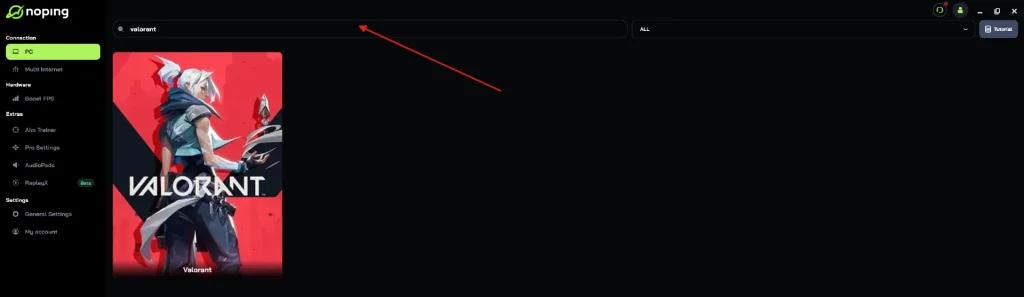
• Click on the game and select “Optimize Automatically”
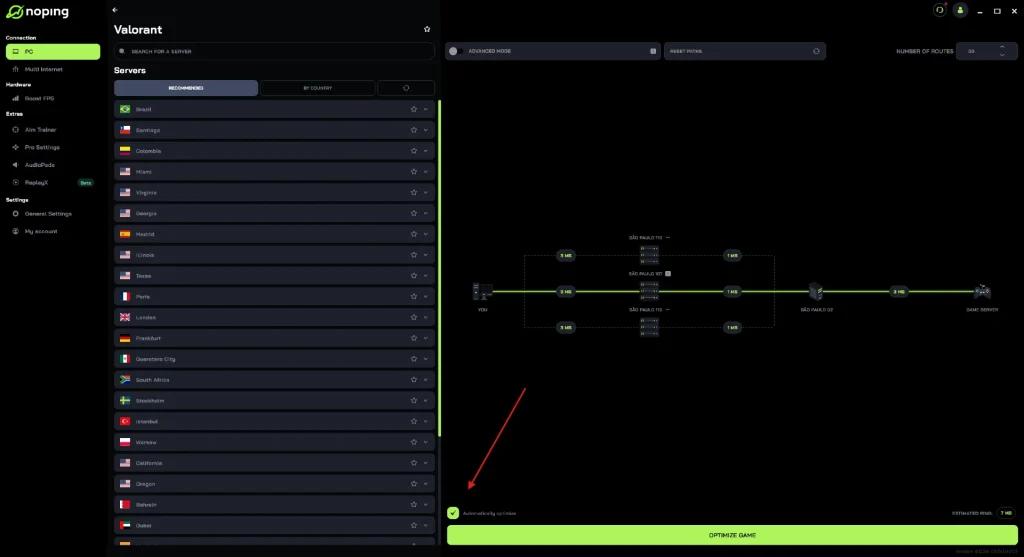
• Then click “Optimize Game”

That’s it. The game will launch with optimized routes designed to reduce ping and latency.
NoPing’s technology analyzes multiple connection paths in real time and automatically selects the best available route.
This can provide noticeable improvements, especially for players who are far from the servers or experience unstable ISP routing.
Small adjustments can provide a competitive advantage
Reducing latency in VALORANT depends on a combination of factors. Network improvements, application management, and the use of dedicated tools all contribute to faster response times and greater accuracy. In competitive games, this difference can directly influence match results.