


If you have ever stared at a loading screen during a critical ranked match, you have probably wondered how does WiFi work and why it sometimes feels like it is working against you.
Most of us treat the internet like magic: you turn it on, and suddenly you are streaming 8K video or clutching a 1v5 in your favorite shooter.
But beneath the surface, there is a complex dance of radio waves, binary code, and hardware coordination happening at the speed of light.
In the world of online gaming, understanding the "how" behind your connection is the first step toward fixing the "why" of your lag.
We are going to break down everything from the invisible waves in your living room to the cutting edge tech of WiFi 8, so you can finally master your home network.
What exactly is a WiFi signal?
At its most basic level, WiFi is just a form of radio communication. Think about how a standard car radio or a walkie-talkie works. It is the same principle, but much, much faster and more sophisticated.
While a radio station might broadcast music to thousands of people at once, your WiFi router is having a high speed, two way conversation with every device in your house.
These signals are part of the electromagnetic spectrum. Your router takes the digital data from your internet service provider (ISP), which consists of 1s and 0s, and converts it into radio waves.
Your phone or PC then catches those waves and turns them back into digital data. It is a constant loop of translation that happens billions of times per second.
How does the router translate data into waves?
This process is called modulation. Because computers speak in binary (on or off, 1 or 0), the router has to change the properties of the radio waves to represent those numbers. It can change three main things:
- Amplitude: The "height" or strength of the wave.
- Frequency: How often the wave repeats.
- Phase: The timing of the wave cycles.
Modern systems use something called Quadrature Amplitude Modulation (QAM). If you look at the specs for a high end router in 2026, you will see terms like 4096-QAM. This basically means the router can pack 4096 different "points" of data into a single signal. The higher the QAM, the more data you can cram into every millisecond of transmission. This is why a WiFi 7 router can handle massive downloads much faster than the old routers we used a decade ago.
Why are there different frequencies like 2.4 GHz and 5 GHz?
You have probably noticed your router offers two or three different networks. These are frequency bands, and they act like different lanes on a highway.
Choosing the right one can be the difference between a smooth gaming session and a frustrating lag spike.
What is the 2.4 GHz band?
This is the "old reliable" lane. It has been around since the beginning of WiFi. It uses longer waves, which gives it a huge advantage: range.
These waves can pass through walls, floors, and heavy furniture much better than higher frequencies.
However, the 2.4 GHz band is incredibly crowded. It is not just your neighbor's WiFi that interferes with it. Microwave ovens, baby monitors, and old Bluetooth devices all use this same frequency.
For a gamer, 2.4 GHz is usually a nightmare because the "noise" from other devices leads to packet loss.
What is the 5 GHz band?
The 5 GHz band uses shorter waves that can carry much more data. It is faster and less congested because fewer household items use this frequency.
The downside? Those short waves are terrible at going through solid objects. If you are gaming in a room two doors down from your router, your 5 GHz signal might be weaker than your 2.4 GHz one.
What about the new 6 GHz band?
This is the newest frontier, introduced with WiFi 6E and refined in WiFi 7. Think of the 6 GHz band as a brand new, private 14 lane superhighway.
It is incredibly fast and, as of 2026, it is almost entirely free of interference because only the newest devices can even "see" it. If you want the lowest possible latency without a cable, this is where you want to be.
How does the router manage all those devices at once?
In a typical home, you might have twenty devices trying to talk to the router at the same time. If they all shouted at once, the router wouldn't understand any of them. To solve this, routers use a few clever traffic management technologies.
What is MU-MIMO?
MU-MIMO stands for Multi-User, Multiple-Input, Multiple-Output. Older routers could only "talk" to one device at a time. They would switch between your phone, your laptop, and your console so quickly you didn't notice, but this still created a "queue" that added latency.
Modern routers with MU-MIMO can open multiple "streams" of data. Imagine a grocery store opening four checkout lanes instead of one. This allows the router to send data to your PS5 while simultaneously receiving data from your PC, without making either one wait.
What is Beamforming?
Standard routers broadcast their signal in a big, dumb circle in every direction. Beamforming is much smarter. The router uses its antennas to identify where your device is located and focuses the signal into a concentrated "beam" toward that device. This results in a stronger, faster, and more stable connection, especially at long distances.
What are the differences between WiFi 6, 7, and the new WiFi 8?
WiFi standards are basically the rulebooks that routers and devices use to communicate. As we move into 2026, we are seeing a massive shift in how these standards prioritize speed versus reliability.
Is WiFi 7 really that much faster?
Yes. WiFi 7, also known as 802.11be, is designed for "Extreme High Throughput." It introduces Multi-Link Operation (MLO), which is a massive win for gamers.
MLO allows a device to connect to multiple bands (like 5 GHz and 6 GHz) at the exact same time.
Before MLO, your phone would pick one band and stick to it. If that band got congested, you would lag. With WiFi 7, if one band has a spike in interference, the router instantly shifts the data to the other band without you even noticing.
It provides theoretical speeds up to 46 Gbps, which is honestly more than most of us will ever need for a home setup.
What is the deal with WiFi 8?
While WiFi 7 was all about raw speed, WiFi 8 (802.11bn) is focused on Ultra-High Reliability (UHR). As of early 2026, we are seeing the first prototypes that prioritize stability over everything else.
The goal of WiFi 8 is not to make the internet faster than 46 Gbps, but to make sure that speed never drops.
It uses coordinated spatial reuse, which allows different routers in the same apartment building to "talk" to each other so they don't step on each other's toes. For gamers, this means fewer random "jitters" caused by your neighbor starting a movie in the next room.
Does distance and physical objects really kill your speed?
Unfortunately, yes. WiFi signals obey the laws of physics, specifically the inverse square law. This means that as you move away from the source, the signal strength drops off exponentially.
What blocks WiFi signals the most?
Not all obstacles are created equal. Some materials are like glass to WiFi, while others are like a lead wall:
- Drywall and Wood: Minimal impact.
- Glass: Moderate impact, especially if it is treated or double paned.
- Water: Massive impact. If you have a large aquarium between you and the router, your signal is going to suffer. Humans are also mostly water, so a crowded room can actually dampen WiFi signals.
- Brick and Concrete: High impact. These are very dense and soak up radio waves.
- Metal: The ultimate WiFi killer. A metal cabinet or a mirror (which has a metal backing) will reflect the signal away from you entirely.
[Image showing WiFi signal penetration through different common building materials]
If your router is sitting on the floor behind a metal TV stand, you are essentially strangling your connection before it even starts.
Always place your router in an open, central location, preferably high up on a shelf.
Why is latency (Ping) different from speed?
This is the most common point of confusion for gamers. You can have a "1 Gbps" connection and still lag like crazy.
- Speed (Bandwidth): This is how much data can move at once. Think of it like a highway with 10 lanes. You can fit a lot of cars (data) on it.
- Latency (Ping): This is how long it takes for a single car to get from point A to point B.
You don't need massive "speed" for gaming. Most games only use about 1-5 Mbps of bandwidth.
What you need is low latency. If it takes 200 milliseconds for your "shoot" command to reach the server, it doesn't matter how fast your download speed is: you are already dead.
WiFi adds latency because of the "air gap." The time it takes to modulate the signal, transmit it through the air, deal with interference, and demodulate it on the other end adds precious milliseconds to your ping.
This is why NoPing are so vital: they optimize the path your data takes once it leaves your home, ensuring that even if your WiFi adds a little delay, the rest of the journey to the game server is as fast as possible.
Here’s how to use NoPing to fix high ping in online games:
- Sign-up through the website and download NoPing (you can test it for free).
- Open NoPing and search for your game inside the software
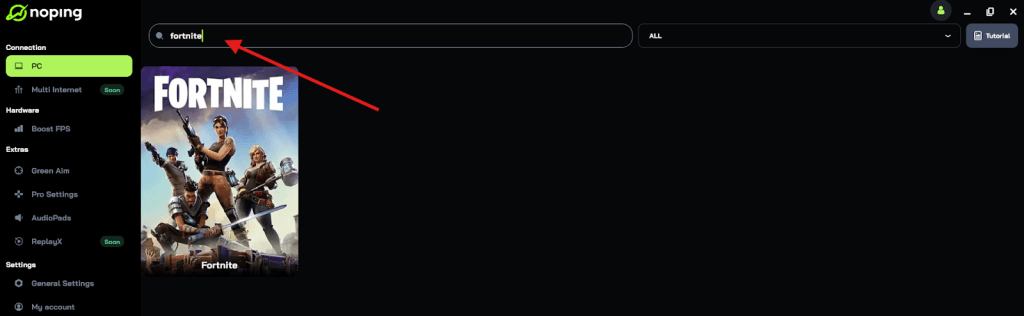
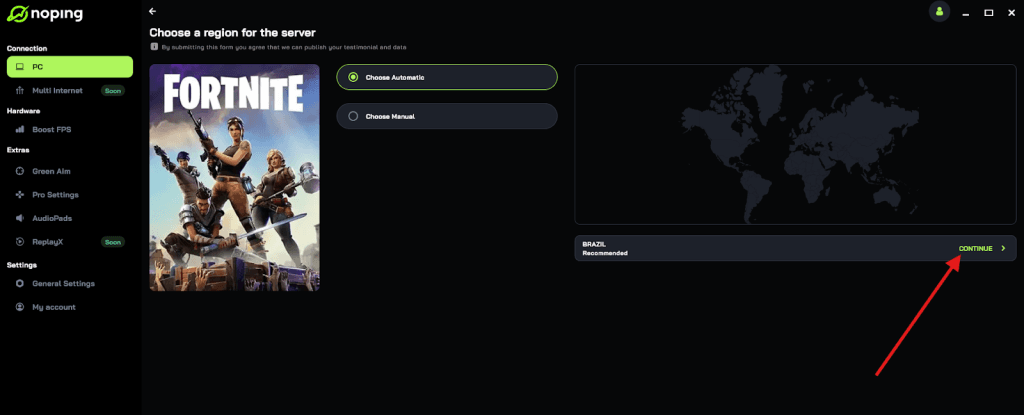
- Once you find it, click on it and, on the next screen, select “Choose automatic” or “Choose manual” and click “Continue”. We recommend choosing automatic, as NoPing’s technology analyzes all routes on a global scale and automatically selects the best option for you.
- On the next screen, click on “Optimize Game”.
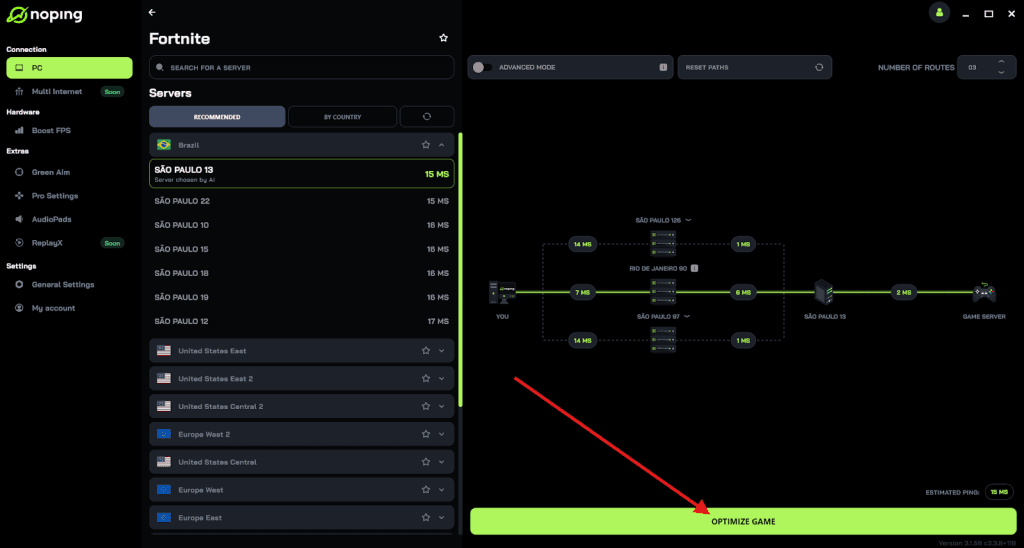
- And that’s it, you can start playing with optimized ping!
You can test different servers within NoPing to see which gives you the lowest latency.
How can you optimize your WiFi for gaming right now?
If you can't run a 50 foot Ethernet cable across your house, there are still ways to make your WiFi perform like a pro.
Use the 5 GHz or 6 GHz band exclusively
If you are gaming, stay away from 2.4 GHz. Go into your router settings and give your 5 GHz and 2.4 GHz networks different names.
Manually connect your gaming rig to the 5 GHz (or 6 GHz) band to ensure you aren't being pushed into the "slow lane" by your router's auto settings.
Change your WiFi channel
Most routers are set to "Auto" channel selection, which is often wrong. Use a free WiFi analyzer app to see which channels your neighbors are using.
If everyone is on Channel 1, move yours to Channel 6 or 11. Avoiding that overlap reduces the "noise" and keeps your ping stable.
Update your firmware
Router manufacturers frequently release updates that improve how the device handles traffic and manages new WiFi standards. An outdated router is a slow router.
Steps to optimize your router:
- Log into your router admin panel (usually via 192.168.1.1).
- Check for firmware updates.
- Enable Quality of Service (QoS) settings and prioritize your gaming console or PC.
- Ensure UPnP or specific Port Forwarding is set up for your games to avoid NAT issues.
- Turn off "Smart Connect" if it keeps switching you to 2.4 GHz.
Is WiFi finally as good as a wired connection?
We are getting closer, but we aren't there yet. Even with WiFi 7 and the upcoming reliability of WiFi 8, a physical Ethernet cable will always be superior.
A cable has zero interference, zero packet loss from "air noise," and the lowest possible latency.
However, modern WiFi is more than capable of handling competitive gaming if it is set up correctly.
By understanding the physics of radio waves and the logic of your router, you can eliminate 90% of the issues that cause lag.
When you combine a solid WiFi setup with a connection optimizer, you get a gaming experience that is indistinguishable from being plugged directly into the wall.
Understanding how does WiFi work is the ultimate power move for any gamer. You no longer have to guess why your connection is dropping: you have the technical knowledge to fix it.
Keep your router high, your firmware updated, and your frequency bands clear, and you will be well on your way to a lag free life.
Play more than 3000 games without lag. Download NoPing now and start your free trial!