


Error Code 2901 in Black Ops 6 has been frustrating players who just want to jump into matches without hassle.
Instead of loading into a lobby, you’re left staring at a connection failure screen, unsure of what went wrong.
The issue usually appears when trying to join friends, search for a game, or even host a session, making it a real blocker for multiplayer.
In this guide, we’ll break down what Error 2901 means, what causes it, and the most effective ways to fix it on PC and consoles.
What is error code 2901 in Black Ops 6?
Error Code 2901 is a matchmaking and lobby error. It prevents players from joining or creating lobbies, and sometimes kicks them out of matches entirely.
On PC, it often shows up when the game can’t communicate with servers.
On consoles, it can also happen if the account doesn’t have proper game entitlements or if the network is too restrictive.
Think of it as the game saying, “I can’t connect you to the session you’re asking for.” The reasons behind that message vary, but the end result is the same: you’re locked out of playing online.

Source: King of Geek
Guide to fix error code 2901 in Black Ops 6
Here’s a full troubleshooting guide. Start at step one and work your way down. The earlier steps solve the problem for most players.
1. Restart the game and platform
This may sound simple, but it’s often enough. Close Black Ops 6 completely, not just minimizing or suspending it.
On consoles, shut down the game and do a power cycle by turning the system off fully, waiting 10–15 seconds, and turning it back on. On PC, close both the game and the launcher (Steam, Battle.net, or Xbox app), then relaunch.
Why it helps: temporary files or a bad session token can cause the error. Restarting forces a clean connection to the servers.
2. Check server status
Before making big changes, verify if servers are actually online. If Black Ops 6 servers are down for maintenance or suffering from outages, Error 2901 is inevitable.
Activision usually posts status updates during downtime. If servers are unstable, you’ll need to wait until they’re fixed.
3. Confirm account entitlements
On Xbox Game Pass or shared accounts, error 2901 often appears when the account you’re using doesn’t have the right to play the game.
- On Xbox: make sure the account that owns the game is set as the console’s “home” account.
- On PlayStation: confirm the account is set as “primary” in the settings.
- On PC with Game Pass: sign in with the correct Microsoft account that owns the subscription.
If you’re using the wrong account, the servers can block matchmaking.
4. Review your internet connection
A poor connection or strict NAT is one of the most common causes. Here’s what you can try:
- Restart your router and modem.
- Test a wired connection if you’re on Wi-Fi.
- Run an internet speed test to confirm you have stable upload and download speeds.
- Change your DNS servers to something more reliable, like Google DNS (8.8.8.8) or Cloudflare DNS (1.1.1.1).
If your NAT type is Strict or Moderate, you might not be able to connect to certain players.
5. Forward the required ports (advanced)
For players comfortable with router settings, port forwarding can help. Black Ops games usually need specific ports open to connect smoothly.
If your NAT remains Strict, forwarding the official ports for your platform can make matchmaking easier.
- On Xbox: forward ports 88 (UDP), 3074 (UDP/TCP), 53 (UDP/TCP), 80 (TCP), 500 (UDP), 3544 (UDP), 4500 (UDP).
- On PlayStation: forward ports 1935 (TCP), 3478–3480 (TCP/UDP).
- On PC: forward 3074 (UDP/TCP) and additional ports used by your launcher.
This step is optional but useful if you constantly run into NAT-related issues.
6. Repair or verify game files
Corrupted files can also trigger Error 2901. Each platform has a built-in repair system:
- Steam: right-click the game, choose “Properties,” then “Verify Integrity of Game Files.”
- Battle.net: click the game, then select “Scan and Repair.”
- Xbox app (PC): use “Repair” or “Reset” in the app’s advanced options.
- Consoles: no repair option exists, but reinstalling the game replaces corrupted files.
7. Re-login to Activision account
Log out of your Activision account inside the game or launcher, then log back in.
Double-check that your Activision ID is properly linked to your Xbox, PlayStation, or PC account. A broken session or mismatched link can block lobbies.
8. Update everything
Keeping your software current matters:
- Update Black Ops 6 to the latest patch.
- Update your console firmware.
- On PC, make sure Windows is updated and GPU drivers are current. Outdated drivers often cause connection instability.
9. Fix Windows launch issues (0x800700c1)
If you’re on PC and see error code 0x800700c1 when launching, it’s related to corrupted system or installation files. Try these steps:
- Run SFC: open Command Prompt as administrator and type sfc /scannow.
- Run DISM: in the same window, type DISM /Online /Cleanup-Image /RestoreHealth.
- Clear your Windows temporary files.
- Reinstall the Xbox app or game launcher if the issue persists.
10. Rebuild database on PlayStation
If you’re on PS5 or PS4, boot into Safe Mode and select “Rebuild Database.” This clears corrupted cache entries that sometimes block games from launching or connecting properly.
11. Reset network settings on Xbox
On Xbox, you can reset network settings in the system menu. This clears cached configurations that sometimes interfere with matchmaking.
12. Reinstall the game
If all else fails, uninstall and reinstall. It’s time-consuming but guarantees you’re starting with a fresh installation. On consoles, back up your saves first.
13. Contact support
If none of these steps solve the problem, reach out to Activision support. Provide your platform, error code, and the troubleshooting steps you’ve already tried.
They may be able to confirm whether it’s an account or server-side issue.

How to play Black Ops 6 with top performance to avoid error code 2901?
One way to reduce the chances of running into connection-related issues like error code 2901 is by keeping your network optimized. That’s where NoPing comes in.
NoPing is a latency reduction software designed for online games. It works by routing your connection through more stable paths, lowering ping, avoiding packet loss, and reducing jitter.
Since many errors in Black Ops 6, including 2901, are tied to unstable or blocked connections, using a tool like NoPing can make matchmaking smoother and more reliable.
Here’s how to use NoPing to increase your performance in Call of Duty:
- Sign-up through the website and download NoPing (you can try it for free)
- Open NoPing and search for Call of Duty inside the software
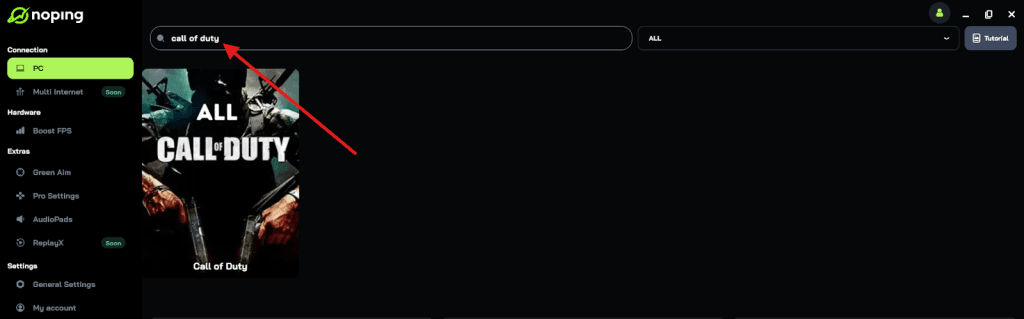
- Once you find Call of Duty, click on it and, on the next screen, select “Choose automatic” or “Choose manual” and click “Continue”. We recommend choosing automatic, as NoPing’s technology analyzes all routes on a global scale and automatically selects the best option for you.
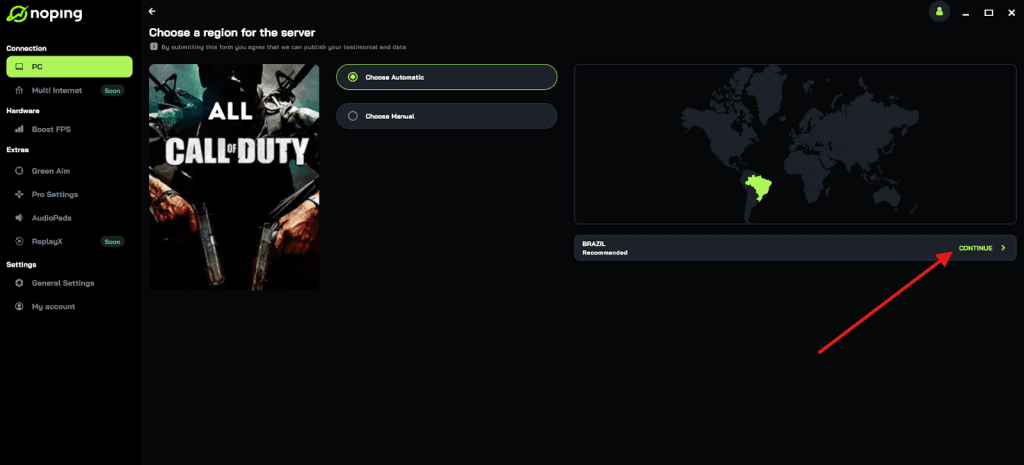
- On the next screen, click on “Optimize Game”.
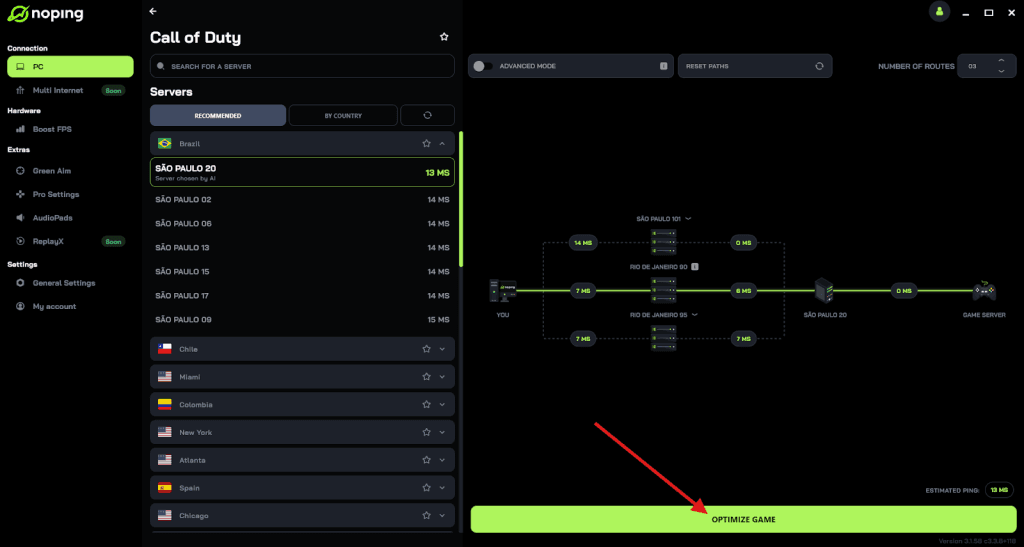
- And that’s it, you can start playing CoD with optimized ping!
You can test different servers within NoPing to see which gives you the lowest latency.
What causes error code 2901 in Black Ops 6?
Error Code 2901 doesn’t always come from the same source, but the most common causes are:
- Account entitlement issues (Game Pass or shared accounts not recognized).
- NAT restrictions or unstable network connections.
- Corrupted or missing game files.
- Temporary server outages or maintenance.
- Platform-specific bugs that need patching.
FAQ - error code 2901 in Black Ops 6
Q: Is Error Code 2901 the same as “lobby not found”?
Yes, most of the time. Both errors mean the game couldn’t connect you to the match or lobby.
Q: Does switching regions help?
It can, but it’s rare. Changing regions might connect you to a healthier server, but it often comes at the cost of higher ping.
Q: My friend can join lobbies but I can’t. Who’s at fault?
If your friend has no issues, the problem is likely on your end — NAT, account, or corrupted files. If multiple players see the same error at once, it’s probably the servers.
Q: What’s the difference between 2901 and 0x800700c1?
2901 is a matchmaking error once the game is running. 0x800700c1 is a Windows launch/install error. They’re separate, but fixing 0x800700c1 is necessary if you can’t launch the game at all.
Q: Can reinstalling the game alone fix this?
Yes, in some cases. If the cause is corrupted files, a clean install is the fastest solution. But it won’t help if the issue is server-side.
Q: Is there an official fix for 2901?
There’s no single official hotfix for this error. Activision usually rolls improvements into patches, but for now, following the steps above is the most effective approach.
And to always play Black Ops 6 with top performance to avoid these error codes, use NoPing! Download now and start your free trial!