


Path of Exile 2 lag is the worst.
You’re in the middle of a boss, frames drop, your skill goes off half a second late or the whole game stutters like a scratched disc, and suddenly that perfect run is gone.
The good news: a lot of causes for this lag are diagnosable and fixable.
This guide walks through the types of lag you might see, the common technical causes, and practical fixes you can try right now.
What types of lag you might have in Path of Exile 2?
Before you start changing settings, it helps to name the problem. Players commonly report these distinct symptoms:
- Low FPS / frame drops — your frames-per-second falls and stays low, or drops suddenly when effects spawn.
- Stuttering — short hitching or micro-freezes where the game seems to skip for a fraction of a second, even if average FPS looks OK.
- Input lag — a delay between pressing a key/mouse and the action happening on screen.
- High ping / latency — your connection to the server is slow, shown as high ms (e.g., 150 ms) and resulting in delayed responses or rubberbanding.
- Packet loss / jitter — inconsistent delivery of packets that causes choppy, inconsistent gameplay even if average ping is OK.
Naming which of the above you’re experiencing will guide the fix: FPS problems point to GPU/driver/settings; stuttering can be shader/streaming related; ping/jitter is a network issue.
What causes lag in Path of Exile 2?
Below I list the common causes; each cause gets its own short H3 as requested.
Server capacity and regional server issues
When Path of Exile 2 launched into early access it overloaded backend services at times and players saw queues, disconnects, and elevated latency.
This kind of server-side pressure or regional routing problem produces lag you can’t fix locally except by switching regions or waiting for GGG to scale services. If many players in your region report similar symptoms, suspect server-side issues first.
Network routing, ISP path and high ping
Your ISP’s route to the game servers can introduce high latency or packet loss. Even if your home connection shows decent speeds, the path your packets take across the internet may be congested or suboptimal, causing high ping and jitter
Lockstep network mode and synchronization stutter
Path of Exile 2 uses a deterministic networking model in some modes and players have reported stuttering caused by lockstep/sync behavior when ping gets moderately high; the client and server can fall out of sync and create repeated micro-freezes as the engine resyncs. This is a known discussion point on official forums and community threads.
Shader compilation and shader cache problems
Modern games compile shaders and/or use shader caches; if the shader cache is corrupted or not primed, entering new areas or spawning many effects can trigger shader compilation on the fly and cause severe stutters and frame drops. Clearing or increasing shader cache and ensuring the cache is built can reduce these spikes.
GPU drivers and driver regressions
Outdated or buggy GPU drivers can cause performance problems. Conversely, brand-new drivers can sometimes introduce regressions. DDU (Display Driver Uninstaller) clean installs and installing a stable driver known to work for the community can help.
In-game settings and VSync / adaptive sync issues
Features like adaptive VSync, certain anti-aliasing options, or buffering settings can introduce stutter or inconsistent frame pacing. Some players report toggling off adaptive vsync or changing buffering mode removes stutter.
Background apps, downloads and CPU / disk contention
Windows updates, Discord/Steam downloads, cloud sync apps and antivirus scans can eat CPU, disk I/O and network bandwidth, causing both FPS drops and packet spikes. Large disk I/O during streaming textures or shader builds can also cause hitching.
Insufficient hardware (CPU, RAM, VRAM, storage speed)
Path of Exile 2 is graphically heavier than its predecessor. If your CPU is bottlenecked (many cores/threads matter for streaming and simulation), or you run out of system RAM/VRAM, you’ll see drops and streaming hitches; slow HDDs vs NVMe/SSD also make texture streaming worse. Check the game’s minimum and recommended specs to see where you stand.
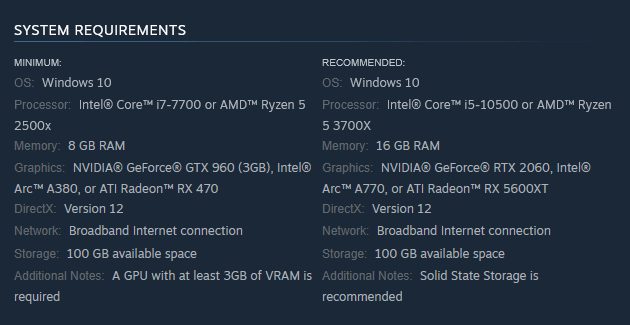
Source: Steam
Wi-Fi and local network problems
Wireless interference, poor router placement, overloaded Wi-Fi channels, or simply multiple devices saturating your connection will cause latency and packet loss. A wired Ethernet connection usually eliminates many of these variables.
How to fix Path of Exile 2 lag?
Below are practical fixes, each as an H3. Try them roughly from easiest to more invasive; combine fixes when necessary. One entry specifically covers NoPing.
1. Restart the client and your PC
Simple but effective. Many lockstep/resync stutters are temporarily cleared by restarting the client. If problems persist, reboot Windows to clear driver and system-level state.
2. Check server status and change region
If many players in your region are reporting issues, check official Path of Exile 2 forum threads and the game’s server status. Trying a different nearby region (if playable for you) can confirm whether the problem is regional.
3. Use a wired connection and reduce Wi-Fi interference
Plug an Ethernet cable into your PC. If you must use Wi-Fi, move closer to the router, switch to 5 GHz if available, reduce other devices’ load, and test latency with a ping to the server.
4. Close background apps and pause downloads
Shut down cloud sync programs, browsers with heavy tabs, Steam downloads, Windows Update, or antivirus scans while you play. Use Task Manager to spot unexpected CPU, disk or network usage.
5. Update or roll back GPU drivers; perform a clean install if necessary
Try the latest stable GPU driver. If problems began after a recent driver update, roll back to the last known good driver. For a truly clean install, use DDU (Display Driver Uninstaller) and then install the driver freshly.
6. Clear and rebuild shader cache
If you get stutters when loading areas or lots of particles spawn, clear the shader cache (Path of Exile 2 local appdata/cache path) and let the game recompile shaders while you sit in a safe area.
7. Tweak in-game graphics settings and disable adaptive sync features
Try lowering shadow quality, particle density, or view distance. Turn off adaptive VSync, test different buffering options, and toggle any “frame smoothing” features. Observe the performance graph (if the game exposes one) to see which setting moves the needle.
8. Check CPU/RAM/Storage — close heavy apps and consider upgrades
Use Resource Monitor or Task Manager to see if CPU or disk is pegged. If the game uses lots of RAM and you have <16 GB, consider closing other programs or upgrading. If you still run from an HDD, installing the game on an SSD/NVMe often improves streaming and reduces hitching.
9. Reset network stack and update network drivers
In Windows, run ipconfig /flushdns, netsh int ip reset, and update the Ethernet/Wi-Fi adapter drivers. This can clear routing and DNS glitches that cause intermittent lag.
10. Use NoPing to optimize routing and reduce latency
If your issue is high ping, jitter or packet loss caused by your ISP’s routing, a routing optimizer like NoPing can help by steering your connection through better paths to the game servers.
NoPing provides a dedicated route for many games and can reduce ping and packet loss in scenarios where the ISP path is congested or suboptimal.
Many players have seen measurable improvements in latency and reduced packet loss.
Here’s how to use NoPing to fix lag in online games:
- Sign-up through the website and download NoPing (you can test it for free).
- Open NoPing and search for your game inside the software

- Once you find it, click on it and, on the next screen, select “Choose automatic” or “Choose manual” and click “Continue”. We recommend choosing automatic, as NoPing’s technology analyzes all routes on a global scale and automatically selects the best option for you.

- On the next screen, click on “Optimize Game”.
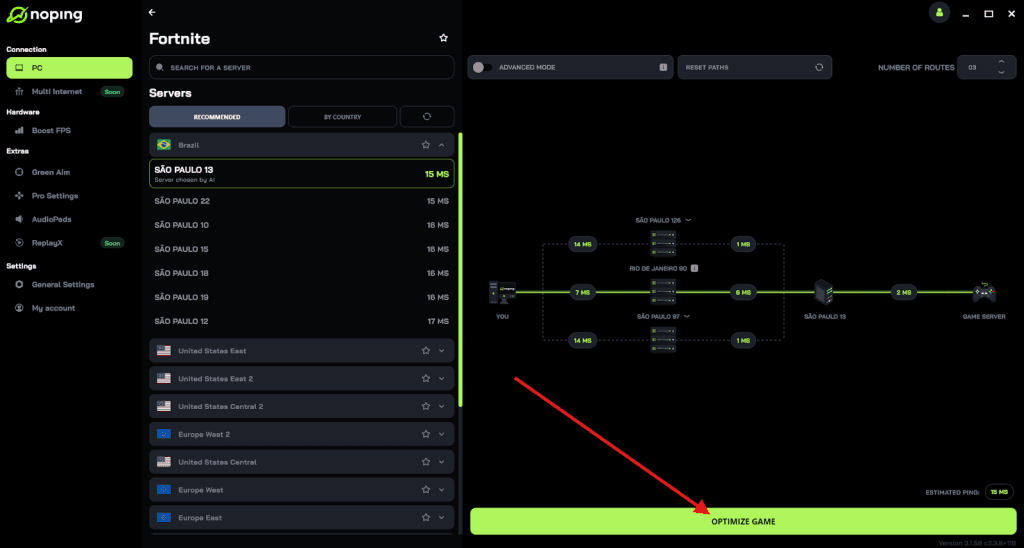
- And that’s it, you can start playing with optimized ping!
You can test different servers within NoPing to see which gives you the lowest latency.
11. Monitor and test: traceroute, ping, and packet loss checks
Use tracert/traceroute to see where latency spikes happen. Run ping -t to the server and use tools like WinMTR to log packet loss over time. If packet loss occurs at your router or ISP hop, contact your ISP with your trace results.
12. Try different network ports or QoS settings on router
Some routers allow quality-of-service prioritization for gaming traffic. Prioritize your PC or the Path of Exile 2 port range (if documented by GGG) to minimize local network contention.
FAQ - Path of Exile 2 Lag
Q: My FPS is fine but the game still stutters. What should I look for?
Stuttering with good average FPS often points to shader compilation, driver issues, or uneven frame pacing (VSync/adaptive sync). Clear the shader cache, test different drivers, and toggle adaptive VSync/buffering options. Also confirm the stutter isn’t actually network-sync stutter (check ping/jitter).
Q: How do I know if it’s a server problem vs my ISP?
Check official forums and Steam discussions for widespread reports. If multiple players in your region report lag or outages, it’s likely server-side.
Q: Will lowering graphics settings always fix lag?
Lowering settings helps CPU/GPU-bound FPS issues but won’t fix high ping, packet loss, or server-side stutter. If you have network issues, focus on network fixes first.
Q: Any quick checklist I can run through?
(Short checklist)
- Restart client/PC.
- Try wired Ethernet.
- Close background downloads/apps.
- Update or clean-install GPU/network drivers.
- Clear shader cache and test with graphic settings lowered.
Fixing Path of Exile 2 lag often takes a bit of detective work because the root cause can be on your PC, your local network, your ISP’s routing, or the game servers themselves.
To always play Path of Exile 2 with reduced ping and optimized FPS, use NoPing! Download now and start your free trial!