

Following people on Roblox is a simple way to keep up with players you like, join them in games when possible, and see public activity without having to add them as friends.
This guide walks you through exactly how to follow someone on Roblox from desktop, mobile, and in-game, explains the difference between following and friending, covers parental and privacy settings you should know about, and gives troubleshooting tips if the follow button is missing or not working.
How to follow people on Roblox: desktop / web
- Sign in to your Roblox account at roblox.com.
- Use the search bar at the top to find the player’s username or click their username from chat or group pages.

- On the player’s profile page look for the menu area near their avatar and name. If you do not see an obvious Follow button, click the three-dot menu to open extra options.
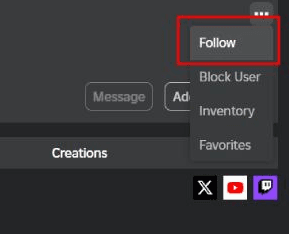
- Click Follow or Notify. The label may vary as Roblox has updated some naming conventions over time, but the menu item will subscribe you to that user’s public updates.
- If they are currently in a game and their privacy allows it, you might also see a Join Experience button so you can join them directly.
How to follow on mobile (iOS and Android)
- Open the Roblox app and sign in.
- Tap the search icon and type the username, or tap a username that appears inside chat or a game overlay.
- From the user’s profile screen tap the three-dot menu in the top-right corner if the Follow or Notify button is not immediately visible.
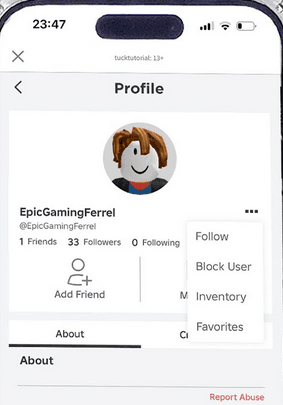
- Tap Follow or Notify. On mobile the interface mirrors the website, so follow should be straightforward once you open the profile menu. Many video guides demonstrate this exact flow if you prefer a visual walkthrough.
How to follow in-game and use Join Experience
If the person you want to follow is currently playing and their experience is configured to allow joining, Roblox may show a Join Experience option on their profile or search result.
Clicking Join Experience transports you into the same instance when possible. This is particularly useful when you want to team up quickly without inviting someone to be a friend first.
Roblox’s Help Center explains how the Join Experience feature works with following.
Also read: How to Enable Voice Chat in Roblox: Step-by-Step Guide
Unfollow someone
To unfollow a user return to their profile and click the same Follow or Notify button you used to follow them. The button toggles, so pressing it again will remove the follow.
You can also manage follows from any account management screens that list the people you follow, but the simplest method is to visit the user’s profile and toggle the follow off.
What does following on Roblox do?
When you follow someone on Roblox you subscribe to updates about them.
That can include seeing when they are in an experience and using the Join option to hop into the same session with them if the experience allows it.
Following is generally one-way, which means you do not need the other person to accept you.
That makes follow useful if you want to watch creators, keep tabs on teammates, or join a streamer without filling up your friends list.
Follow versus friend: what is the difference?
Friends are mutual connections. Adding someone as a friend creates a two-way relationship that shows up on both players’ friends lists and unlocks other social features based on privacy settings.
Following is one-way and lighter weight. You can follow many users to track their public activity while keeping your friends list for people you actually want mutual interaction with.
There are also technical and limits differences. In recent years Roblox changed friend limits and clarified that follows are treated differently from friends. Some community documentation and reporting indicate follows are effectively unlimited but platforms may enforce rate limits or hourly restrictions to prevent abuse.
If you need formal policy confirmation, check Roblox’s official pages or recent announcements because social features evolve.
Privacy and parental controls you should know
Roblox has been evolving its safety and parental-control features. Depending on the user’s age and the account’s privacy settings, some social actions are limited.
For instance, Roblox has rolled out stricter communication controls for accounts of younger users and introduced parent accounts to manage screen time and social permissions.
If you or someone you supervise cannot follow or join users, check privacy and contact settings in the account’s Settings page.
Parents can restrict who a child can interact with or disable communications entirely. If you manage a child’s account, review the Privacy or Contact Settings to ensure follows and joins are allowed.
Also read: 14 Fun Roblox Games You Need to Play
Why can’t I find a Follow button?
If you do not see the Follow or Notify option on a user’s profile try these checks:
Make sure you are signed in.
Click the three-dot menu. On some profiles the follow option is tucked into that menu rather than displayed as a primary button.
Check account privacy settings. The other user’s settings might block certain interactions or your account’s parental controls might limit social features.
Confirm you are viewing the correct account. Typos in usernames are common. Search the user’s exact username and verify avatar and join date to avoid following the wrong person.
Notifications and managing follow updates
After following someone you may receive notifications about certain actions, including when they start playing a game and if the experience supports joins.
Where those notifications appear depends on your account’s notification settings. You can manage notifications for follows from your account settings so you get the updates you care about without clutter.
Troubleshooting common problems
Problem: Follow button not working or gives an error
Solution: Log out and log back in, try a different device or browser, check for app updates, and confirm your internet connection. If the problem persists and you suspect a platform bug, check Roblox Status or the Roblox DevForum for reported outages or rate-limit notes. Community posts sometimes reveal temporary issues affecting follow functionality.
Problem: Cannot join someone after following them
Solution: The Join Experience option depends on the experience configuration and the other player’s privacy. Some games do not allow direct joining, or the player may be in a private server. Follow lets you receive public updates but does not guarantee you can always join.
Following people on Roblox is a lightweight social action that helps you track creators, teammates, and players you enjoy without filling your friends list.
Roblox’s interface sometimes changes terminology and placement of features, so if you do not see the button where older guides say it should be, check the three-dot menu and your privacy settings. If your follow attempts are blocked, consider rate-limiting as the likely cause and wait before trying again.
For the most authoritative and current instructions consult Roblox’s Help Center and the platform’s account settings, because social features and safety controls can change.
How to Play Roblox Without Lag?
NoPing is a service designed to optimize your route to Roblox’s servers. Sometimes, the normal path your internet provider uses isn’t the fastest.
NoPing reroutes your data through a better, more direct path.
Here’s how to use NoPing to fix ping spikes in Roblox:
- Sign-up through the website and download NoPing (you can try it for free)
- Open NoPing and search for Roblox inside the software
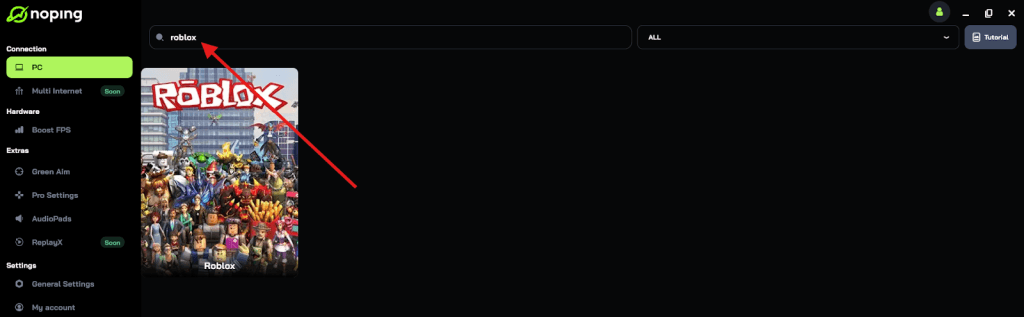
- Once you find Roblox, click on it and, on the next screen, select “Choose automatic” or “Choose manual” and click “Continue”. We recommend choosing automatic, as NoPing’s technology analyzes all routes on a global scale and automatically selects the best option for you.
- On the next screen, click on “Optimize Game”.
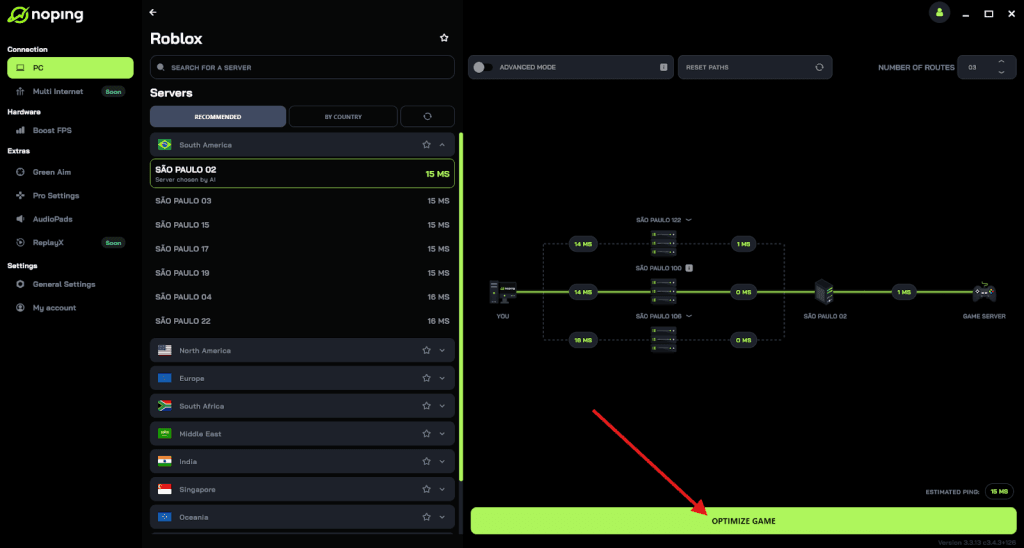
- And that’s it, you can start playing Roblox with optimized ping!
You can test different servers within NoPing to see which gives you the lowest latency.