


If you want to join a group in Roblox, this guide walks you through everything step by step, whether you are on PC, mobile, or console.
Groups are one of the easiest ways to find people who like the same games, make friends, recruit for teams, or join communities around a developer or creator.
Roblox sometimes calls them Communities in its help pages, but most players still say groups.
This guide covers the common flow across devices and points out platform quirks so you can join without head-scratching.
What Are Roblox Groups?
Roblox groups, also called communities, are player-run spaces on the platform where people gather for the same interests.
A group can be a fan club for a game, a clan that competes, a developer team, or a casual hangout.
Group owners can set ranks, permissions, rules, approve new members if they want manual screening, and use the group to publish items or run group-managed assets.
Creating a community costs Robux and there are limits on how many communities an account can join or create.
How to Search for a Group in Roblox?
There are a few ways to find a group you want to join.
- Open the Roblox website or app and use the search bar.
Type the group name, a keyword, or the name of a game and press Enter. On the website you can filter the results to show Groups or Communities specifically. - Browse the Groups/Communities section.
On the website there is a dedicated Groups or Communities page in the left navigation where you can browse featured and recommended groups. - Use a direct link or group ID.
If a friend, game page, or creator shares a group link or numeric group ID, paste it into your browser or open it in the app to go straight to the group page. - Look in game pages and developer profiles.
Many experiences link to their official group from the game’s details or from the developer’s Roblox profile.
The Roblox help center has a short walkthrough for finding and joining communities. If a group has manual approval enabled, the owner or moderators will need to accept your request before you become a member.
Also read: What is a Roblox Obby? The Best Obbys to Play Now
How to Join a Group in Roblox?
Here are step-by-step instructions that cover the website, mobile app, and console routes.
On the Roblox website (PC or mobile browser)
- Log in to your account at roblox.com.
- Search for the group by name or navigate via the Groups/Communities tab.
- Open the group page so you can see its banner, description, and member list.
- Click the Join Group or Join Community button.
• If the group is open, you will be added immediately.
• If the group requires approval, your request will be sent and you must wait for a moderator to accept it.
In the Roblox mobile app (iOS or Android)
- Open the Roblox app and log in.
- Tap the search icon and search for the group name or tap the More or Groups/Communities tab.
- Open the group page and tap Join Group or Join Community.
- If approval is required, follow any additional instructions the group may require, such as sending a message or answering join questions.
On Xbox or other consoles
Roblox on consoles does not always include the full web-style interface for group management.
The simplest approach is to use the Roblox website on a phone or computer while signed into the same account that you use on console. You can also use the Xbox web browser to open the Roblox website and join the group there.
Some features related to group management are limited on consoles and may require signing in via web.
Quick troubleshooting
Can’t find a Join button? The group may be private, removed, or disabled.
Join button grayed out? You might already be a member or have reached the account limit for groups.
Approval pending for a long time? Contact the group owner or check group rules for expected wait times. Group roles with “Accept Join Requests” permission control approvals.

And How to Leave a Group in Roblox?
Leaving a group is straightforward and similar across platforms.
From the website
- Go to your Groups or Communities section (your profile menu shows groups you belong to).
- Click the group you want to leave.
- On the group page, click Leave Group or Leave Community. Confirm when prompted. The group will no longer appear in your list.
From the app
- Open the app and go to your profile or the Groups/Communities tab.
- Tap the group, scroll to the group options, and tap Leave Group. Confirm.
Also read: How Many People Play Roblox in 2025? Roblox Player Count and Growth
Tips for Interacting With Your Group in Roblox
Joining is only the start. Here are practical tips to make the most of a group.
- Read the rules first. Most groups have pinned rules or a description. Breaking rules can get you muted or removed.
- Introduce yourself politely. A short hello and what you like about the group works better than long posts.
- Respect role hierarchy. Don’t harass moderators or request ranks unless the group has sign-up rules for promotions.
- Use group chats and events. Groups often organize events or game nights. Participating helps you make friends and gain trust.
- Avoid sharing Robux or personal info. Roblox policies restrict trading Robux between players outside official channels. Stay safe and avoid giving away account details.
- Report problems responsibly. If you see scams, abuse, or rule violations, use the in-app reporting tools instead of trying to police things yourself.
- If you are a group owner, use roles and join-request questions to set expectations and reduce spam.
How to Play Roblox Without Lag?
NoPing is a service designed to optimize your route to Roblox’s servers. Sometimes, the normal path your internet provider uses isn’t the fastest.
NoPing reroutes your data through a better, more direct path.
Here’s how to use NoPing to fix ping spikes in Roblox:
- Sign-up through the website and download NoPing (you can try it for free)
- Open NoPing and search for Roblox inside the software
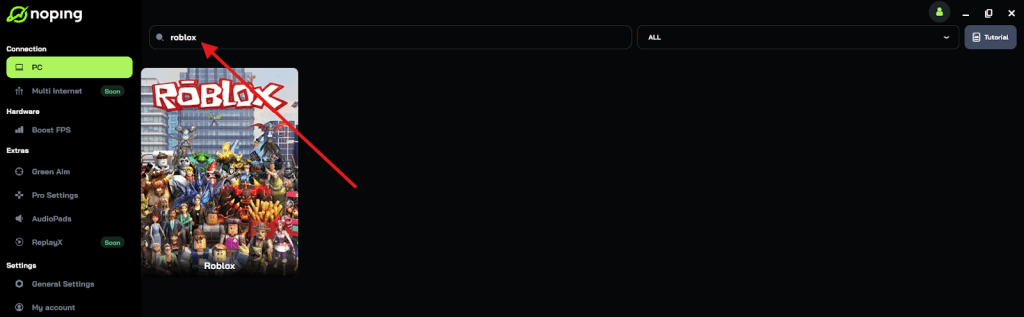
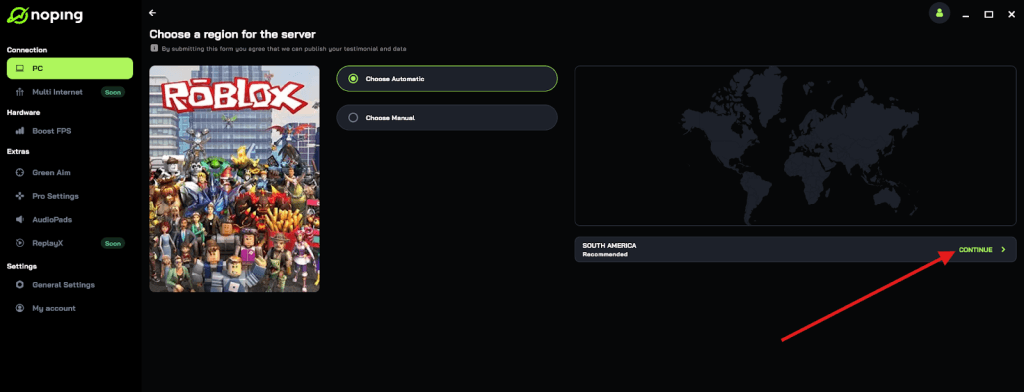
- Once you find Roblox, click on it and, on the next screen, select “Choose automatic” or “Choose manual” and click “Continue”. We recommend choosing automatic, as NoPing’s technology analyzes all routes on a global scale and automatically selects the best option for you.
- On the next screen, click on “Optimize Game”.
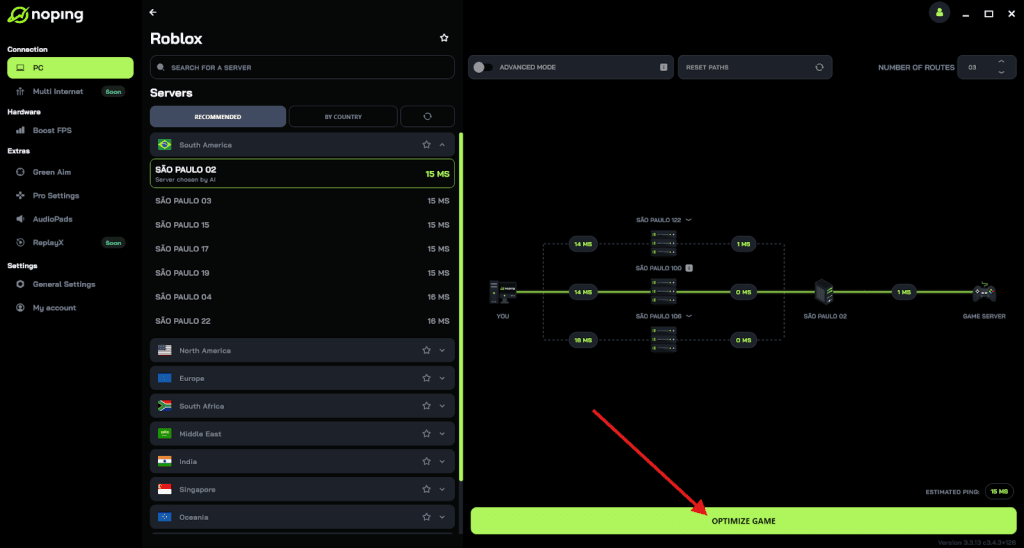
- And that’s it, you can start playing Roblox with optimized ping!
You can test different servers within NoPing to see which gives you the lowest latency.
FAQ - How to Join a Group in Roblox
Q: Do I have to pay Robux to join a group?
A: No. Joining a group is free for members. Creating a community costs a one-time fee of 100 Robux. That is a cost for owners who want to set up a group, not for people who join.
Q: How many groups can I join?
A: Roblox sets limits on the number of communities an account can join and create. The typical limit is up to 100 communities joined and up to 100 created, but these are platform-level limits and could be updated by Roblox. If you hit a limit, you will not be able to join more until you leave others or policies change.
Q: My account is under 13. Can I join any group?
A: Age and privacy controls affect what under-13 accounts can do. Roblox has increased safety and content restrictions for younger players. Some social features and experiences are limited for kids, and some group features may also be restricted. Use parental controls if relevant.
Q: Can groups have chats and voice?
A: Groups can have text-based community features and may organize chats or events. Roblox has added social features like Party which are limited by age and verification, and voice features require account verification in certain cases. Group owners sometimes link external chat services, but be cautious and follow privacy rules.
Q: How do I find a group ID?
A: Open the group page on the Roblox website. The numeric ID is usually in the URL. You can paste that number after roblox.com/groups/ to link directly to the group.
Q: What if the group owner is abusive or scammers are in the group?
A: Report abuse through Roblox’s reporting system and leave the group. Do not share account credentials, personal information, or payment details with anyone. Use in-game reporting for immediate issues and contact Roblox Support for more serious cases.
Q: Can I be kicked or banned from a group?
A: Yes. Group owners and moderators can remove members or ban them according to the rules. If you get kicked, check the group rules and any messages from moderators to understand why.
Joining a group is one of the best ways to make Roblox more social and rewarding. Use the website or app to search, follow the group rules, and interact respectfully.
And to enjoy a good time with your group in Roblox without worrying about lag, use NoPing! Download now and start your free trial!