

You need to know how to log someone out of your Roblox account immediately if you suspect that your security has been compromised or if you simply left your profile active on a public computer.
Roblox is a massive platform with over 79 million daily active users, which unfortunately makes it a prime target for account hijackers and session sniffers.
Whether it is a friend who won't stop messing with your avatar or a legitimate security breach, taking control of your sessions is the first step toward a safe gaming experience.
How can I log everyone out of my Roblox account at once?
You can remove every other active session by using the "Log Out of All Other Sessions" feature located in your account settings. This is the most effective way to ensure that you are the only one with access to your account at any given moment.
To do this on a web browser, follow these steps:
- Log in to your account on the official Roblox website.
- Click the gear icon in the upper right corner to open Settings.
- Select the Security tab from the menu on the left.
- Scroll down to the bottom of the page to find the section titled "Where You're Logged In".
- Click the button that says "Log Out of All Other Sessions".
If you are using the mobile app, the process is very similar:
- Tap the three dots (More icon) in the bottom right corner.
- Scroll down and tap on Settings.
- Select Security.
- Scroll to the "Where You're Logged In" section and tap the logout button.
This action invalidates the session tokens for every device except the one you are currently using. If someone was actively playing a game on your account, they will be disconnected and sent back to the login screen instantly.

What if I only want to remove one specific device?
You can choose to terminate individual sessions if you recognize most of the devices but want to remove a specific one, such as an old phone or a school computer.
Roblox provides a detailed list of every device that has accessed your account recently, including the device type, approximate location, and the date of the last activity.
In the same "Where You're Logged In" section mentioned above, you will see a list of entries.
Each entry represents a unique login session. If you see a device you don't recognize, or one that you no longer own, simply click the arrow or the specific entry and select "Log Out of Session".
This is a cleaner approach if you are sharing an account with a sibling on a console but want to kick a suspicious browser session from a different city.
Also read: Is Crimson Desert an MMO? Let’s Clear This Up
Does changing my password log everyone out automatically?
Yes, changing your password is one of the most reliable ways to force a logout across all devices while simultaneously securing your account against future attempts.
When you update your password, Roblox typically invalidates all existing session cookies to ensure that anyone with the old credentials cannot remain connected.
To change your password:
- Go to Account Info in your Settings.
- Click the pencil and paper icon next to Password.
- Enter your current password and then your new, strong password.
- Save the changes.
It is worth noting that while the "Log Out of All Other Sessions" button is faster for an immediate kick, changing the password is the only way to prevent the person from simply logging back in if they already know your current credentials.
We recommend doing both in quick succession if you suspect a hack.
How do I stop someone from logging back into my account?
You must enable Two-Step Verification (2FA) to ensure that even if someone has your password, they cannot access your account without a secondary code.
This is the gold standard for gaming security in 2026. Roblox offers several layers of protection that every serious player should utilize.
- Authenticator Apps: Use apps like Google Authenticator or Microsoft Authenticator. These are more secure than email because they are tied to your physical device.
- Email Verification: A code is sent to your registered email every time a login attempt is made from a new device.
- Security Keys: For maximum security, you can use physical hardware keys like Yubikey.
- Backup Codes: Always generate and save your backup codes in a safe place. If you lose your phone, these codes are the only way to regain access without waiting weeks for customer support.
By activating 2FA, you create a barrier that is nearly impossible for average "account crackers" to bypass. You can find these options under the Security tab in your settings.
What is the new Account Session Protection feature?
Roblox recently introduced Account Session Protection to prevent a specific type of attack known as "session hijacking" or "cookie logging".
This feature validates that your login session is specific to your hardware and network environment.
By default, this feature is enabled for all users. It works in the background to ensure that if a hacker steals your "session cookie" (a small file that tells Roblox you are logged in), they cannot simply paste that cookie into their own browser to impersonate you.
The system will detect that the device signature does not match and will block the access. Unless you are a developer using specific APIs that require this to be turned off, you should never disable this setting.
Can I use a Parent PIN to secure my account changes?
Roblox has transitioned from the old "Parent PIN" system to a more robust "Parental Privileges" framework.
Instead of a simple four digit code that could be easily guessed, parents can now link their own accounts to their child's account.
This allows for:
- Spend Limits: Preventing unauthorized Robux purchases.
- Content Maturity Settings: Locking the account to age appropriate experiences.
- Controlled Settings: Ensuring that the child (or a hacker) cannot change the email or password without the parent's approval through their own device.
If you are an older player, you can still use these features to add an extra layer of "self locking" to your account, making it much harder for anyone who gains temporary access to lock you out permanently.
Why should I use NoPing for a more secure gaming experience?
Using a tool like NoPing does more than just lower your latency: it provides a stable and optimized path for your data.
When your connection is unstable, you are more prone to disconnections, which can sometimes be exploited or simply lead to a frustrating experience where you can't re-enter your account quickly enough to secure it.
NoPing works by finding the best route between your computer and the Roblox servers. By avoiding congested internet nodes, we reduce the chance of packet loss. While this is primarily a performance boost, a stable connection ensures that your security heartbeats (the small signals your client sends to verify you are still there) are consistent.
Here’s how to use NoPing to fix lag in Roblox:
- Sign-up through the website and download NoPing (you can try it for free)
- Open NoPing and search for Roblox inside the software
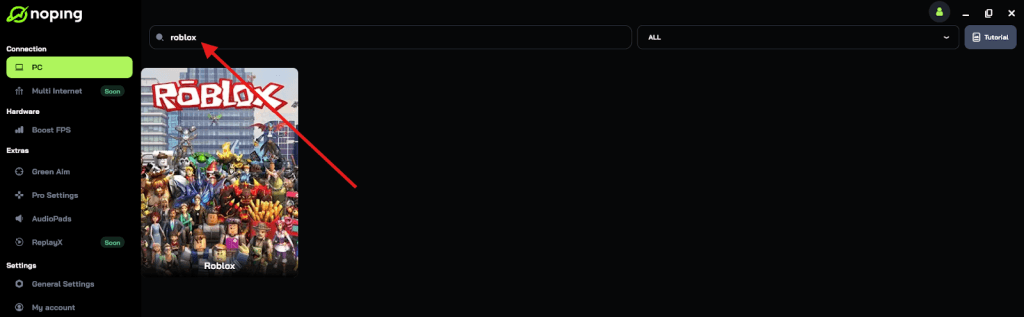
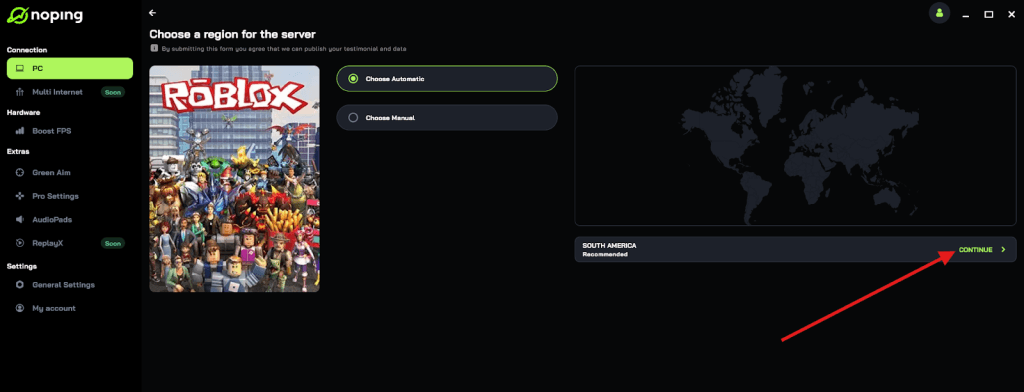
- Once you find Roblox, click on it and, on the next screen, select “Choose automatic” or “Choose manual” and click “Continue”. We recommend choosing automatic, as NoPing’s technology analyzes all routes on a global scale and automatically selects the best option for you.
- On the next screen, click on “Optimize Game”.

- And that’s it, you can start playing Roblox with optimized ping!
You can test different servers within NoPing to see which gives you the lowest latency.
What should I do if I am already locked out of my account?
If someone has already changed your password and you can no longer log in, you must act quickly to contact Roblox Support. Provide as much evidence of ownership as possible, such as receipts from Robux purchases or the original email address used to create the account.
Once you regain access, the very first thing you should do is use the "Log Out of All Other Sessions" button. After that, immediately change your password and enable 2FA using an authenticator app.
Security is a continuous process, not a one time setup. Stay vigilant against phishing links and never share your login details with anyone, even those claiming to be "Roblox Staff".
Play Roblox without lag! Download NoPing now and start your free trial!