

If you are a regular player, you know that the social aspect is what keeps the ecosystem alive. But what exactly is the cap? Currently, you can have up to 1,000 friends on Roblox.
This number represents a massive increase from the old limit of 200, which lasted for nearly a decade.
This change, implemented in 2025, transformed how players manage their social networks within the platform.
The transition to the 1,000-friend limit was accompanied by a change in terminology. Now, Roblox refers to your friends as Connections.
This shift reflects the company's desire to make the network more dynamic and similar to modern social platforms, where the focus is not just a static list, but the ability to interact with a larger circle of players across different experiences.
What is the Roblox friend limit in 2026?
The current limit is 1,000 friends. Roblox finally listened to the community and drastically expanded the capacity of the contact list.
For many years, players were restricted to just 200 people, which forced content creators and popular players to constantly delete friends to make room for new acquaintances.
With the update that raised the ceiling to 1,000, the friendship system became much more flexible.
However, it is important to note that having such an extensive list can affect how you view who is online.
The user interface has been optimized to handle this volume, but "friend joined the game" notifications can become constant if you fill all the slots.
For those who play competitively or in crowded servers, this expansion requires smarter management to prevent the activity feed from becoming cluttered.
You can check more details about friendship guidelines on the official Roblox support page.
What happens if I reach the 1,000 friend limit?
When you hit the limit of 1,000 friends, you will not be able to accept new friend requests until you remove someone from your current list.
The system will simply prevent new connections from being formalized. This means that if you send an invite to someone who is already at the limit, they will receive a notification that their list is full.
In this situation, the best alternative is to use the Followers system.
Unlike the friend list, which requires both parties to agree to the link, the follower system is unlimited.
If you are a developer or an influential player, encouraging others to follow your profile instead of sending friend requests is the ideal solution.
Followers can still see when you are online and join the same servers as you, provided your privacy settings allow it.
What is the difference between Friends and Followers?
The main difference is that friendship is a two-way street, while following is unilateral. To be friends with someone, the request must be sent and accepted.
To follow someone, you just need to click the follow button on the person's profile, with no approval required.
Friends have special privileges that followers do not. Depending on your privacy settings, only friends can send direct messages, join your private server, or see detailed information about your status.
Followers function more like an audience. They can follow your creations and join public games where you are, but they do not take up space in your 1,000-connection quota.
If you want to keep your inner circle organized, reserve the friend list for people you actually play with frequently.
What are Trusted Connections on Roblox?
Trusted Connections are a special category of friends focused on safety and advanced communication, requiring age verification.
They allow players over the age of 13 to have access to less restricted chat features and specific voice tools.
This feature was introduced to create a safer environment for teenagers and adults. When you add someone as a Trusted Connection, Roblox understands that there is a higher level of closeness between you.
This unlocks, for example, group voice chat without heavy filters, making tactical coordination easier during intense matches.
To use this function, both users must have gone through the platform's identity verification process. Learn more about how this works in the official Roblox newsroom.
Is it possible to increase the friend limit beyond 1,000?
At the moment, there is no official or paid way to increase the limit beyond 1,000 friends. Roblox set this ceiling based on technical limitations and platform usability to avoid overloading the chat and presence systems.
There were rumors in the past about the possibility of buying extra slots with Robux, but this was never implemented.
The Roblox engineering team focuses on maintaining system stability. Increasing this number indefinitely could cause extreme slowness in loading the home page and the friend menu within games.
If 1,000 slots are not enough for you, the official recommendation remains using Groups and the Follower system.
How to manage a very large friend list?
The best way to manage your list is by performing periodic cleanups, removing players who have not logged into the platform for months.
Roblox does not offer a mass removal tool, so you will need to do this manually through the friends tab on your profile.
A useful tip is to observe the activity status. If a player does not have an updated avatar or hasn't played anything in a long time, they are just taking up space that could be used by a new teammate.
Additionally, use privacy settings to control who can send you requests. If you receive hundreds of requests per day, it might be interesting to close friend requests and leave only the follow option available.
This reduces visual clutter in your notifications and ensures you only add those who really matter.
Why did Roblox take so long to increase this limit?
The delay was mainly due to the old architecture of the site and the friendship APIs, which were originally designed to support a much smaller user base.
Scaling a system for hundreds of millions of daily active users is no simple task.
Many of the old Roblox APIs, such as GetAllFriends, were created with the 200 limit in mind. To make the increase to 1,000 possible, the company had to rewrite much of the code that manages online presence and contact lists.
This was necessary to ensure the site didn't crash every time a player with many friends logged in. This modernization process is part of a larger initiative to transform Roblox into a global communication platform.
More information on technical challenges can be found on the developer forum.
How to ensure the best experience playing with friends?
To make the most of your 1,000 connections, you need a stable connection that supports fast server entry and the use of voice chat.
Roblox is a game that relies heavily on synchronization between players, and any network oscillation can disconnect you from that server where all your friends are.
If you feel that the game takes too long to load the friend list or that you suffer from lag when entering servers recommended by your contacts, NoPing can be the definitive solution.
By optimizing the route between your computer and the Roblox servers, it reduces ping and eliminates packet loss, allowing you to play with your 1,000 friends without hiccups.
After all, what good is having a huge list if you can't keep a stable connection during matches?
Here’s how to use NoPing to fix lag in Roblox:
- Sign-up through the website and download NoPing (you can try it for free)
- Open NoPing and search for Roblox inside the software
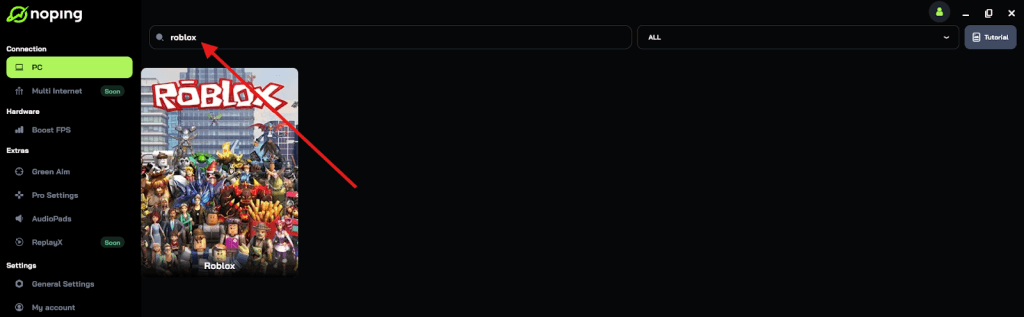
- Once you find Roblox, click on it and, on the next screen, select “Choose automatic” or “Choose manual” and click “Continue”. We recommend choosing automatic, as NoPing’s technology analyzes all routes on a global scale and automatically selects the best option for you.
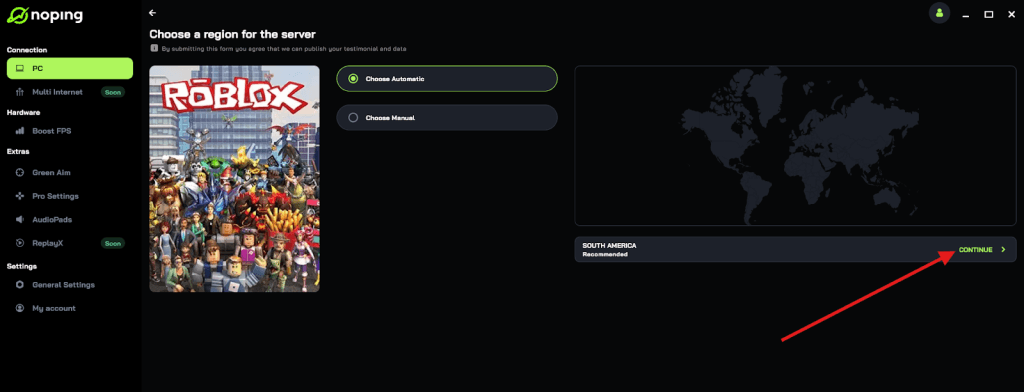
- On the next screen, click on “Optimize Game”.
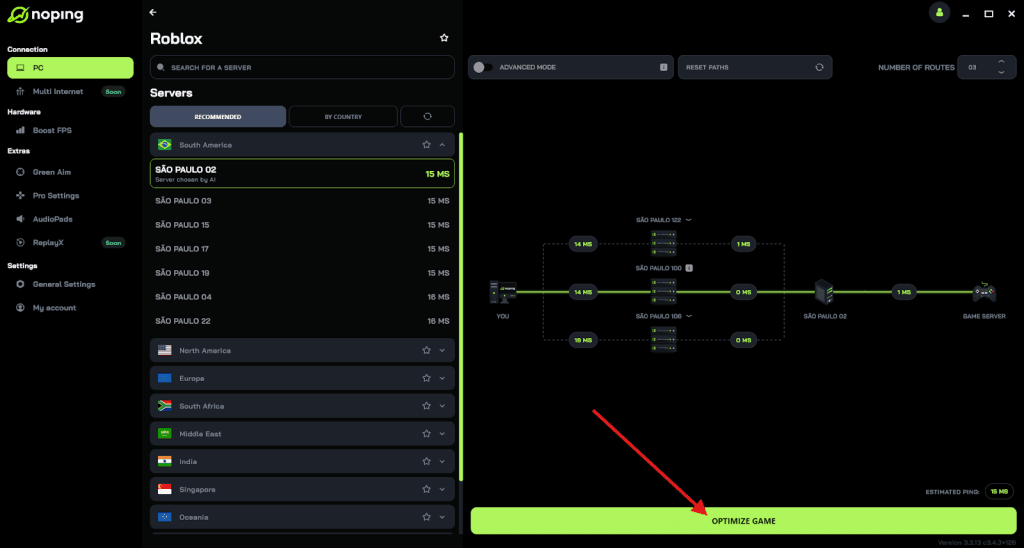
- And that’s it, you can start playing Roblox with optimized ping!
You can test different servers within NoPing to see which gives you the lowest latency.