

High ping in Roblox causes delays in communication with servers and affects the execution of real-time actions during online matches. High latency, measured in milliseconds (ms), directly impacts command responsiveness, affecting movement, object interaction, and the use of abilities within the game.
In competitive scenarios, the issue reduces action precision and makes fast decision-making more difficult. In Roblox, where many experiences rely on constant synchronization, latency fluctuations can change the outcome of encounters and hurt player consistency throughout matches.
High ping represents the time it takes for data to travel between the user’s device and the game servers. When it stays below 50 ms, responses tend to feel immediate. Between 50 ms and 100 ms, gameplay can still remain relatively stable. Above that range, delays become noticeable and start to directly interfere with command execution.
Practical ways to reduce ping in Roblox
Reducing latency involves a few simple connection adjustments:
• Use an Ethernet cable instead of Wi-Fi
• Close background applications
• Choose servers closer to your region
• Restart the router
• Keep network drivers updated
These measures help reduce interference and improve communication stability with game servers.
Home network structure and connection quality affect performance
The home network setup directly influences ping. Features such as QoS (Quality of Service) allow users to prioritize game traffic, reducing delays caused by other connected devices.
On shared networks, simultaneous bandwidth consumption may create instability. In addition, inefficient routing paths between the internet provider and the game servers can increase latency, even on high-speed internet connections.
Try a free solution to reduce ping in Roblox
Route optimization tools can be used in cases of recurring instability. Here’s how to use NoPing:
• Create an account for a free trial
• Download and install the software
• Search for Roblox within the platform
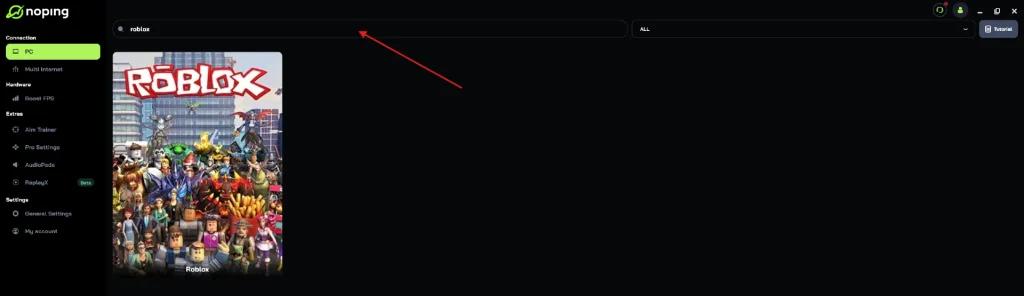
• Select “Optimize Automatically”
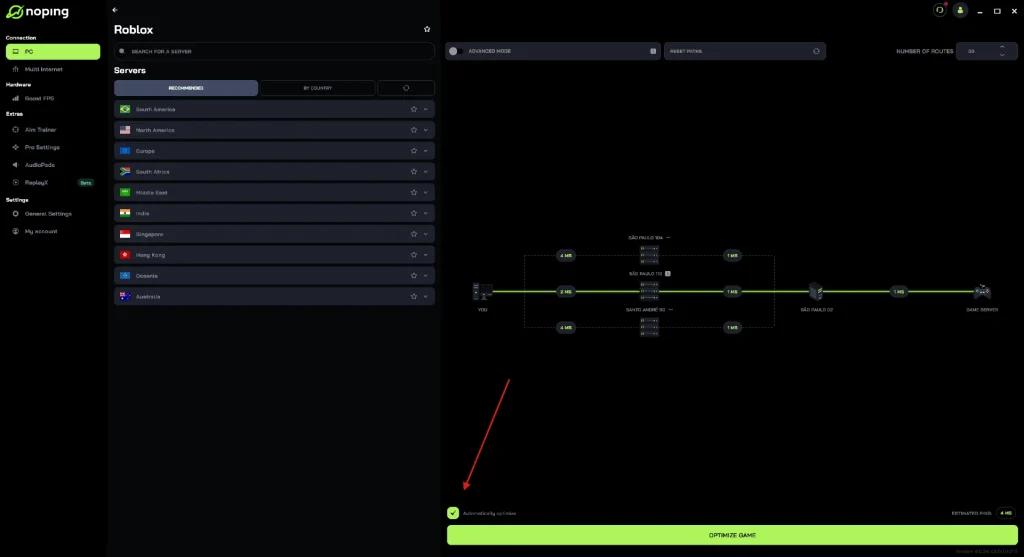
• Click “Optimize Game” and start playing

The technology searches for more efficient routes to game servers, with the potential to lower ping and improve connection stability.
Real-time monitoring helps identify latency fluctuations
Roblox offers tools to monitor network statistics during gameplay. This feature allows players to track ping in real time and identify fluctuations, making it easier to apply immediate adjustments and diagnose the source of the issue.
Latency directly affects match results
Latency in Roblox impacts response speed and action precision. In online matches, even small ping fluctuations can interfere with command execution and alter player performance.
Adopting good network practices and using optimization tools can contribute to a more stable gaming experience.