

If you want to play Roblox on a school computer in 2026, you have probably noticed that IT departments have become much smarter at blocking your favorite games.
Schools use sophisticated firewalls and web filters to keep students focused on their studies, but that does not mean you are completely locked out.
Whether you are using a Chromebook or a standard Windows PC, there are still several reliable methods to get back into your favorite experiences.
Why do schools block Roblox on their networks?
Schools block Roblox because it consumes a massive amount of bandwidth and can be a major distraction during class hours.
IT administrators use content filters like GoGuardian, Securly, or Lightspeed to monitor what students are doing and automatically block any site categorized under gaming.
These systems work by checking the URL you type against a massive database of restricted sites. They also use deep packet inspection to see if the data traveling through the network looks like game traffic.
Beyond just the distraction factor, there are security reasons for these blocks. Roblox allows for user generated content and communication, which schools often view as a potential risk for younger students.
In 2026, these filters have evolved to identify and block the most common bypass methods, such as basic VPNs or older proxy sites, which is why you need to stay updated with the latest techniques.
Is cloud gaming the best way to play Roblox in 2026?
Yes, cloud gaming is currently the most effective method because it allows you to run the game on a remote server rather than on the school hardware itself.
This means the school computer only has to handle a video stream of the game, making it much harder for filters to detect that you are actually playing Roblox.
Platforms like now.gg and Easyfun.gg have become the gold standard for this.
To use cloud gaming platforms for Roblox, follow these steps:
- Open your browser and navigate to a cloud gaming site like now.gg or easyfun.gg.
- Search for Roblox in the search bar of the platform.
- Click on the Play in Browser button.
- Log in with your existing Roblox credentials.
- Wait for the stream to initialize and start playing.
The major benefit here is that you do not need to download any files. Since many school computers prevent users from running .exe files or accessing the Microsoft Store, browser based cloud gaming skips the installation process entirely.

What are the most reliable proxy sites for Roblox right now?
Proxy sites act as a middleman between your computer and the Roblox servers, making it appear as if you are visiting a generic, unblocked website instead of a gaming portal.
In early 2026, the most effective proxies are those that use advanced encryption to hide the URL from the school firewall.
Popular options include CroxyProxy, Shadow Proxy, and various Utopia links that are frequently updated to avoid detection.
Using a proxy site involves a few specific steps to ensure it works correctly:
- Find a working proxy link from a trusted community source or a site like macrolorblx.com.
- Paste the proxy URL into your browser address bar.
- Once the proxy interface loads, type https://www.roblox.com into the search bar provided by the proxy.
- If the site is blocked, try a different proxy server location, such as one based in Europe or Asia.
- Log in and play directly within the proxied tab.
Keep in mind that proxies can be slow. Because your data has to travel to the proxy server before going to Roblox, you might experience significant lag.
This is where a specialized gaming network tool can help stabilize your connection once you have bypassed the initial block.
Can you use a VPN to unblock Roblox on school WiFi?
A Virtual Private Network (VPN) is one of the most powerful tools for bypassing network restrictions because it encrypts all your internet traffic.
When you use a VPN, the school firewall cannot see what sites you are visiting or what apps you are running; it only sees an encrypted tunnel to the VPN server.
In 2026, many schools have started blocking the ports used by standard VPN protocols, so you need a service that offers obfuscated servers or "stealth" modes.
How does NoPing improve your experience once you get in?
Once you have managed to get Roblox running, your next challenge will be the lag. School networks are often crowded and use poor routing, which leads to high ping and frequent disconnections.
This is particularly annoying in fast paced games like BedWars or Blox Fruits. NoPing is a specialized software designed to find the shortest and most stable path between your computer and the game servers.
Here’s how to use NoPing to fix lag in Roblox:
- Sign-up through the website and download NoPing (you can try it for free)
- Open NoPing and search for Roblox inside the software
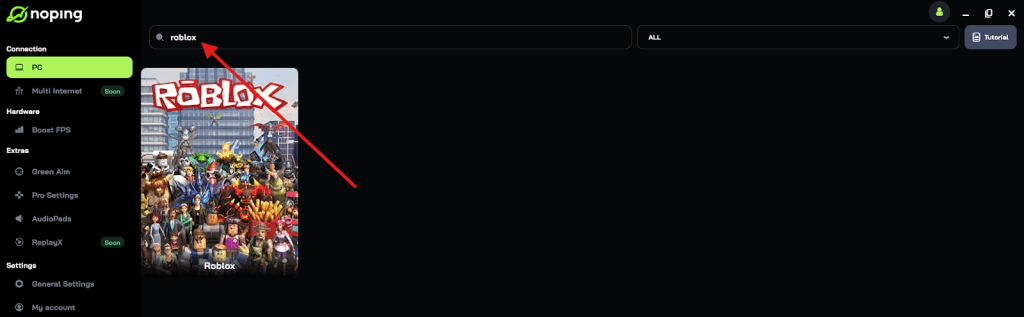
- Once you find Roblox, click on it and, on the next screen, select “Choose automatic” or “Choose manual” and click “Continue”. We recommend choosing automatic, as NoPing’s technology analyzes all routes on a global scale and automatically selects the best option for you.
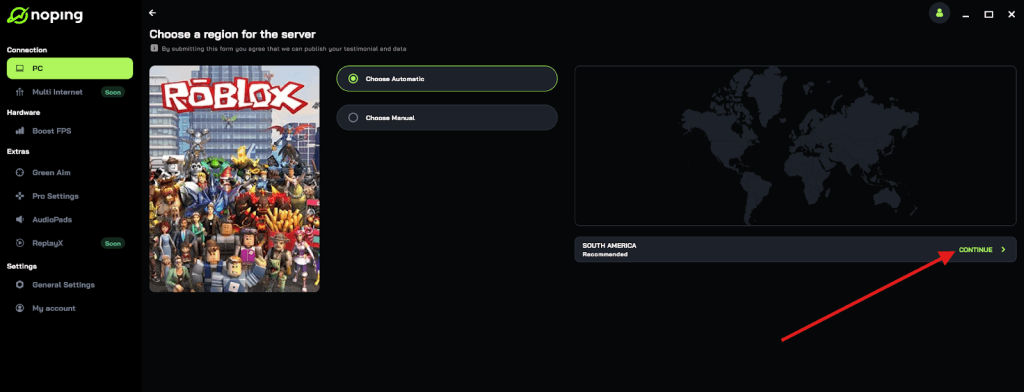
- On the next screen, click on “Optimize Game”.
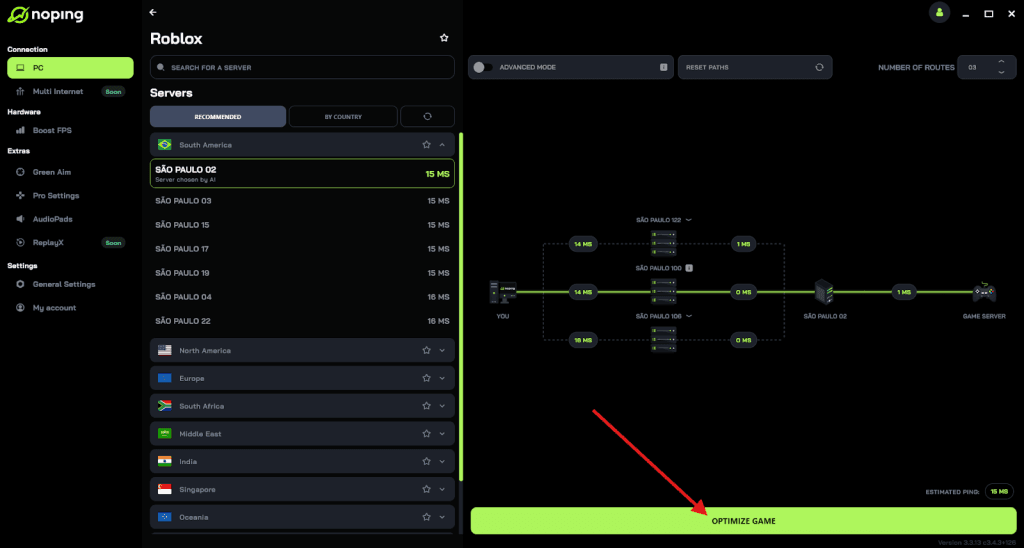
- And that’s it, you can start playing Roblox with optimized ping!
You can test different servers within NoPing to see which gives you the lowest latency.
Is it possible to play Roblox using a USB drive?
Running Roblox from a portable browser on a USB drive is a classic method that still works in 2026 if the school has not disabled the USB ports.
This method is great because it carries all your settings and bypasses the local browser restrictions entirely. You essentially bring your own pre configured environment to the school computer.
To set up a portable Roblox environment:
- On your home computer, download a portable version of a browser like Mozilla Firefox Portable or Google Chrome Portable.
- Install the browser onto a high speed USB 3.0 or 3.1 drive.
- Install a VPN extension or a proxy configuration within that portable browser.
- Plug the USB drive into the school computer and run the browser directly from the folder.
- Navigate to Roblox and log in as usual.
Some schools use software that prevents unauthorized .exe files from running even from a USB drive.
If you encounter a "This app has been blocked by your system administrator" message, this method will not work, and you should stick to the cloud gaming or web proxy options mentioned earlier.
What should you do if your favorite unblocked site stops working?
It is common for unblocked sites and proxies to go down as school IT departments find and blacklist them.
This is often referred to as a "cat and mouse" game. If your go to site is suddenly blocked, do not panic; there are always mirrors and new links being generated.
Here is how to find new links quickly:
- Check dedicated Discord servers or Reddit communities focused on unblocked games.
- Look for "GitHub mirrors" of popular proxy sites, as these are harder for schools to block individually.
- Use a search engine other than Google, like DuckDuckGo or Bing, which sometimes show different results for "unblocked Roblox 2026" that might not have been flagged yet.
- Try using the IP address of the website instead of the URL, although this is a basic trick that many modern firewalls already recognize.
Staying flexible is the key. Most students who successfully play Roblox at school have a list of five or six different methods they rotate through as the school updates its security.
What are the risks of bypassing school internet filters?
While playing Roblox during your free time might seem harmless, it is important to understand the potential consequences.
Most schools have an Acceptable Use Policy (AUP) that you signed at the beginning of the year.
Bypassing security measures can be seen as a violation of this policy, which could lead to losing your computer privileges or even more serious disciplinary action.
Additionally, be careful with the proxy sites you use. Some free proxies might inject ads or track your data.
Always ensure you are not entering sensitive information, like your bank details or primary email passwords, while using an unverified proxy or unblocked site.
Stick to your Roblox login and nothing else. If you are using NoPing, you can feel safer knowing it is a professional service designed for gamers, rather than a random link found on a suspicious forum.
Playing Roblox on a school computer in 2026 is definitely possible if you know which tools to use. Cloud gaming remains the most consistent option for those who cannot install software, while proxies and VPNs offer a more traditional way to browse the web freely.
Remember that getting past the firewall is only half the battle; keeping your lag low is just as important for a good gaming session.
By combining these bypass methods with a connection optimizer, you can enjoy a smooth and uninterrupted experience even on a restricted network.
Play Roblox without lag. Download NoPing now and start your free trial!