

Roblox is a global phenomenon that has redefined how we think about user generated content and social gaming.
Whether you are building massive cities, roleplaying in a suburban town, or competing in intense obstacle courses, the platform offers endless creativity for millions of players.
Given the portability and family friendly nature of the Nintendo Switch, it seems like a match made in heaven.
However, if you have searched the eShop recently, you likely noticed a glaring absence.
This guide walks you through the current status of the game, the reasons behind its missing official app, and the unofficial ways some players are trying to bridge the gap in 2026.
Is Roblox officially available on the Nintendo Switch eShop?
No, as of early 2026, Roblox is not officially available for download on the Nintendo Switch eShop.
While the game has expanded to almost every other major platform, including a highly anticipated release on PlayStation consoles a couple of years ago, Nintendo fans are still left waiting.
If you search for the game on your console, you might see results for other titles with similar names, but none of them are the official Roblox client.
The lack of a native app means there is no way to simply "install and play" like you would on an Xbox or a PC.
This has been a point of frustration for the community for years, especially since the Switch's hardware is technically capable of running many of the lighter experiences found on the platform.
Despite numerous rumors and hints from executives in the past, a legitimate version for the current Switch hardware has never materialized.
Also read: Why is Roblox not Working? General Issues Solved
How can you access the Roblox website on Switch using the DNS trick?
You can access the Roblox website through a hidden browser by changing your console's network settings, although this method does not actually allow you to play the games.
The Nintendo Switch does not have a public web browser for general use, but you can bypass this restriction by using a specific DNS server that redirects your connection to a landing page.
Here is the step by step process for the DNS workaround:
- Navigate to System Settings from the Switch home screen.
- Select Internet and then click on Internet Settings.
- Select your current Wi-Fi network and choose Change Settings.
- Scroll down to DNS Settings and switch it from Automatic to Manual.
- Click on Primary DNS and enter the following address: 045.055.142.122.
- Save the settings and click Connect to This Network.
- The connection will fail at the second stage, which is normal. Click Next to open the SwitchBru DNS page.
- Once the page loads, select Useful Links and find the link for Roblox.com.
Once you are on the site, you can log in, check your messages, and browse the catalog.
However, because the Switch's hidden browser does not support the Roblox engine or the execution of external applications, clicking the play button will result in nothing happening.
It is a useful trick for account management on the go, but it is not a gameplay solution.

What are the steps to play Roblox using an Android installation on Switch?
Playing the actual game on Switch hardware is only possible by installing a custom Android operating system, which allows you to run the mobile version of the Roblox app.
This is a complex and risky process that involves "jailbreaking" your console. It typically requires an unpatched V1 Switch or a hardware modchip for newer models like the OLED.
If you choose to go this route, the general steps are:
- Format a high speed microSD card to support the installation of LineageOS (Android for Switch).
- Download the necessary files from the official developers of the Switch Android project, including the Hekate bootloader.
- Boot your Switch into RCM (Recovery Mode) and use a payload injector to launch Hekate.
- Use the partitioning tools to set up the Android environment on your SD card.
- Flash the Android build and the Google Apps package (GApps) so you can access the Play Store.
- Once Android is booted, sign in to your Google account, download Roblox from the Play Store, and launch it.
While this method allows the game to run and even supports Joy-Cons as controllers, it comes with severe downsides.
Modding your console voids your warranty and puts you at a high risk of being banned from Nintendo's online services.
Furthermore, performance is often inconsistent, with many games suffering from low frame rates due to the lack of optimization for the Switch's specific drivers.

Why has Roblox not been officially ported to the Switch yet?
The primary hurdles for an official port are a combination of hardware limitations and strict platform policies regarding content moderation.
The Nintendo Switch uses the Tegra X1 chip, which is now considered legacy hardware. While it can run many games well, the unoptimized nature of millions of user generated experiences in Roblox poses a significant technical challenge.
Ensuring that every game on the platform runs smoothly on the Switch without crashing is a massive undertaking.
Additionally, Nintendo maintains very high standards for child safety and content moderation. Roblox is an open social platform where interactions are harder to control than in a traditional game.
Negotiations between Roblox Corporation and Nintendo also involve complex discussions about the monetization of Robux.
Nintendo typically takes a percentage of all eShop transactions, and integrating the Roblox economy into that system requires a formal business agreement that has seemingly not been reached.
Will the Nintendo Switch 2 finally feature a Roblox app?
The prospects for Roblox on the rumored Nintendo Switch 2 are much higher than they ever were for the original console.
With significantly improved processing power and more RAM, the technical barriers that plagued the first Switch are largely expected to vanish.
Industry leaks from early 2026 suggest that Nintendo is looking to bolster its third party library with heavy hitters to compete with mobile and other consoles.
If Roblox launches on the successor, it will likely be a fully featured version with cross play and cross progression.
This would mean your items, Robux, and friends would all be there the moment you sign in. Until an official announcement is made by Nintendo or Roblox Corporation, we can only look at the expanding reach of the platform on other consoles as a sign that a Nintendo release is the next logical step.
What games on Switch offer a similar experience to Roblox?
If you are looking for creative, sandbox, or community driven games that are actually available on the Switch right now, there are several high quality alternatives. These titles offer building mechanics and social features that mirror the core appeal of Roblox.
- Minecraft: The ultimate sandbox game that allows for endless building and exploration on community servers.
- Game Builder Garage: A Nintendo original that provides tools to create your own games using a visual programming language.
- LEGO Worlds: A digital playground focused on building with LEGO bricks and exploring procedurally generated worlds.
- Fortnite Creative: While mainly a battle royale, the creative mode allows players to design their own maps and mini games with a depth similar to Roblox Studio.
How does NoPing improve your Roblox performance on other devices?
Since you are likely playing Roblox on a PC or mobile device while waiting for a Switch version, ensuring a stable connection is the most important factor for a good experience.
High latency and packet loss can make games unplayable, causing your character to teleport or fail to register actions.
NoPing solves this by finding the most efficient route between your device and the Roblox servers, bypassing congested internet paths.
Using NoPing can significantly lower your ping and eliminate jitter, which is crucial for competitive games or complex obbies where timing is everything.
Here’s how to use NoPing to fix lag in Roblox:
- Sign-up through the website and download NoPing (you can try it for free)
- Open NoPing and search for Roblox inside the software
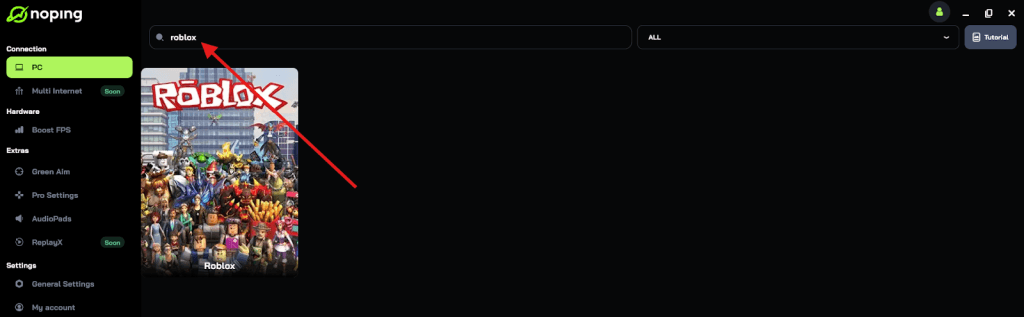
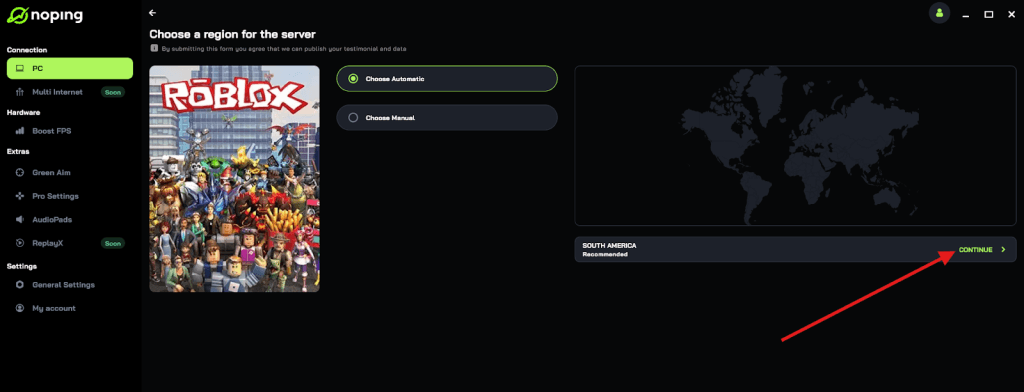
- Once you find Roblox, click on it and, on the next screen, select “Choose automatic” or “Choose manual” and click “Continue”. We recommend choosing automatic, as NoPing’s technology analyzes all routes on a global scale and automatically selects the best option for you.
- On the next screen, click on “Optimize Game”.
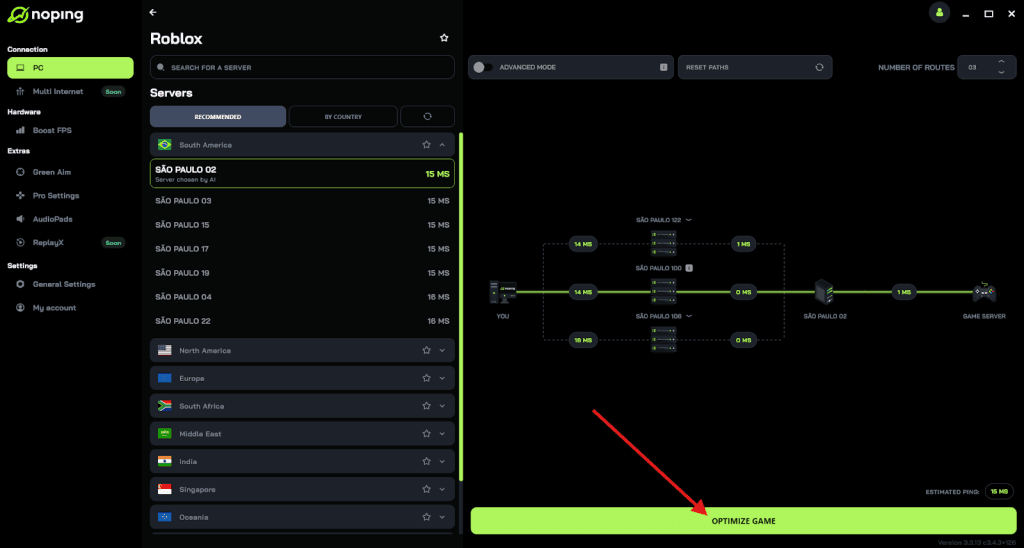
- And that’s it, you can start playing Roblox with optimized ping!
You can test different servers within NoPing to see which gives you the lowest latency.