

Roblox has grown into a massive platform with over 151 million daily active users in 2025. It is no longer just a game: it is a digital universe where millions create, share, and hang out. However, with that scale comes occasional frustration.
There is nothing worse than sitting down for a session of Blox Fruits or Grow a Garden only to be met with a grey screen, a cryptic error code, or a permanent loading circle.
When Roblox stops working, it usually boils down to three categories: server side problems, local hardware issues, or connection instability.
Understanding which one is hitting you is the first step to getting back into the game.
Is Roblox down for everyone right now?
Yes, sometimes the problem has nothing to do with your computer or internet. To check if Roblox is officially down, you should visit the official Roblox Status page.
This site provides real-time updates on whether the website, mobile app, or game servers are experiencing issues.
In late 2025, players have reported specific backend service outages like Error 9007, which indicates that service instances are unavailable.
When this happens, you might see your home feed fail to load or find that group pages are broken. If the status page shows "Partial Outage" or "Service Disruption," there is nothing you can do but wait for the engineers to fix it.
You can also check community sites like DownDetector to see if other players in your region are reporting similar crashes.
Why does Roblox keep crashing on my PC?
Crashing is often caused by corrupted temporary files or outdated graphics drivers. If your game closes suddenly without an error message, your system might be struggling to handle the resources or encountering a software conflict.
A common fix is to clear your temporary internet files. On Windows, you can press the Windows Key + R, type %temp%, and delete the files inside that folder.
This removes old data that might be causing the "Endless Install Loop" where the browser asks you to install Roblox even if it is already there.
Additionally, ensure your graphics drivers are up to date. Since Roblox constantly updates its engine, older drivers can lead to compatibility issues that force the application to shut down.
How do I fix connection errors like Code 279 or 277?
These codes typically mean your client cannot maintain a stable handshake with the Roblox servers.
Error Code 279 is a general connection failure, while 277 usually indicates a sudden disconnection. The first step is to switch from a Wi-Fi connection to a wired Ethernet cable.
Wireless signals are prone to interference from other devices and physical obstacles. If a cable is not an option, try changing your DNS settings to a more reliable provider like Google (8.8.8.8) or Cloudflare (1.1.1.1).
Also, check if your firewall is blocking the ports Roblox uses. Roblox requires UDP ports 49152 to 65535 to be open. If your security software is too aggressive, it will treat the game data as a threat and kill the connection.
Can NoPing help with Roblox lag and disconnects?
Yes, NoPing is designed to solve the routing issues that your standard Internet Service Provider (ISP) often ignores.
While your ISP might send your data through a long, congested path to reach the Roblox servers, NoPing calculates the shortest and most stable route possible.
By reducing the number of "hops" your data takes, you significantly lower your ping and eliminate packet loss. Packet loss is the main culprit behind those "teleporting" players and delayed inputs.
Here’s how to use NoPing to fix lag and disconnects in Roblox:
- Sign-up through the website and download NoPing (you can try it for free)
- Open NoPing and search for Roblox inside the software
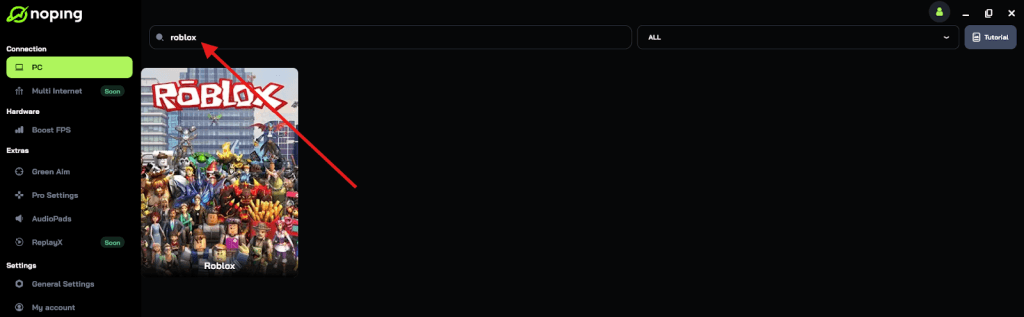
- Once you find Roblox, click on it and, on the next screen, select “Choose automatic” or “Choose manual” and click “Continue”. We recommend choosing automatic, as NoPing’s technology analyzes all routes on a global scale and automatically selects the best option for you.

- On the next screen, click on “Optimize Game”.
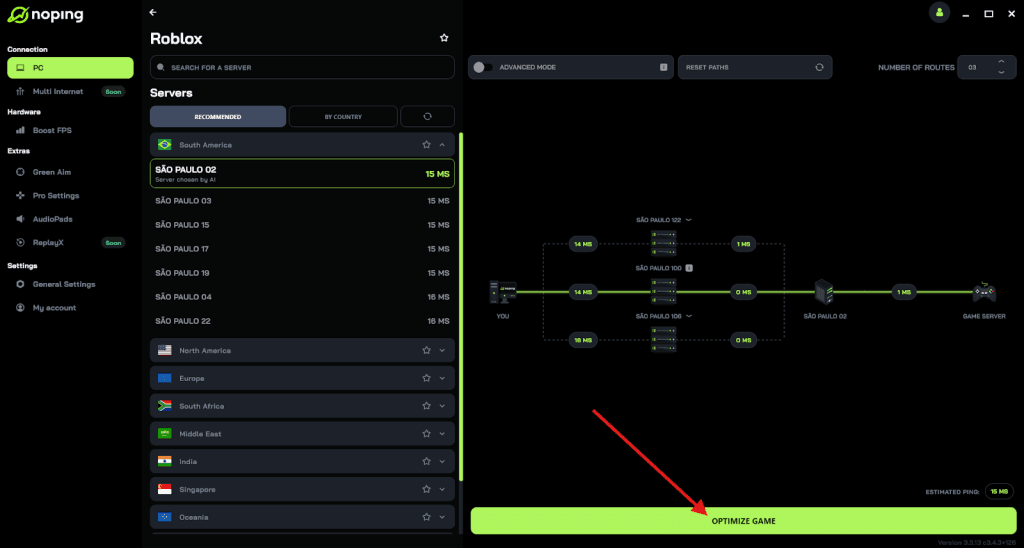
- And that’s it, you can start playing Roblox with optimized ping!
You can test different servers within NoPing to see which gives you the lowest latency.
Why is my Roblox app showing a black or pink screen on mobile?
On mobile devices, a black or pink screen usually indicates a memory (RAM) issue or a corrupted app cache.
As Roblox becomes more graphically demanding in 2025, older smartphones often run out of available memory when trying to render complex environments.
To fix this, go into your phone settings, find the Roblox app, and select "Clear Cache." Do not confuse this with "Clear Data," which might log you out.
If the issue persists, uninstall the app entirely and download the latest version from the App Store or Google Play.
Ensure that no other heavy applications are running in the background, as Roblox needs as much processing power as it can get to maintain a stable frame rate.
How do browser settings affect Roblox gameplay?
Your browser acts as the gateway to the Roblox player, and certain extensions can break that link. Ad-blockers are the most frequent offenders.
While they are great for browsing, they often block the scripts required to launch the Roblox client from the website.
If you click "Play" and nothing happens, try disabling your browser extensions or using an Incognito/Private window. If the game works there, one of your add-ons is the problem. Also, ensure your browser is updated to the latest version.
Roblox officially supports Chrome, Firefox, and Microsoft Edge, but using an outdated version of these can lead to "Authentication Errors" where the site fails to verify your login session.
What should I do if my avatar or items are not loading?
This is usually a sign of "Asset Delivery" issues on the Roblox side. When the platform is under heavy load, the servers prioritize game connectivity over cosmetic rendering.
You might appear as a "noob" or a grey character model.
First, try resetting your character in-game. If that does not work, check the Roblox help center for any reported issues with the Avatar Shop.
Occasionally, clearing your browser cookies and re-logging can force the site to refresh your inventory data.
If you recently bought Robux or an item and it is not appearing, wait at least 24 hours. During high-traffic periods, purchase processing can be delayed.
The key to a smooth Roblox experience is a combination of updated hardware and a stable network.
Play Roblox without lag with NoPing! Download now and start your free trial!