

If you have ever wondered how to make a private server public on Roblox, you are likely looking for a way to open up your exclusive VIP gaming session to friends, communities, or perhaps even strangers without forcing them to be on your friends list.
Roblox is a massive platform where social interaction is key, but sometimes the standard public servers are too chaotic, too full, or simply too laggy for a serious gaming session.
Private servers, often called VIP servers, are the standard solution for players who want control over who enters their game.
However, the terminology can be confusing. Strictly speaking, a "private" server is designed to be exclusive. Making it "public" essentially means changing the access permissions so that people other than the owner can join.
This guide will cover everything you need to know about configuring these servers, generating invite links, and troubleshooting common connection issues that might prevent players from joining your lobby.
What exactly is a Private Server on Roblox?
Before we dive into the settings, it is crucial to understand what you are actually renting when you buy a private server.
A private server is a dedicated instance of a specific game (experience) that you purchase with Robux. It belongs to you for as long as you pay the monthly subscription fee.
When you first buy one, it is usually locked down completely. Only you, the owner, can enter. This is perfect for testing game mechanics, recording content for YouTube without interruptions, or simply playing in peace.
However, the fun of Roblox lies in the community. Eventually, you will want others to join you.
This is where the concept of making it "public" comes in. You are not publishing the server to the main Roblox discovery page where millions of random players can scroll and click on it. Instead, you are relaxing the entry requirements.
You are creating a semi-public environment where access is controlled by a link or a specific permission setting rather than a strict whitelist.
How to make a private server public on Roblox (configure Private Server permissions)
To start opening up your server, you need to access the configuration menu. This process is slightly different depending on whether you are on a computer or a mobile device, but the core settings remain the same.
The goal here is to change the "Friends Only" status or to activate the link generator.
First, navigate to the game's page on the Roblox website. You cannot do this from inside the game client itself; it must be done through the browser or the app interface before you hit "Play." Scroll down to the "Servers" tab.
Here you will see a list of public servers, but at the very top, you should see your specific private server listed under "My Private Servers."
Click the three dots (menu icon) located on the right side of your server box. Select "Configure" from the dropdown menu. This will take you to the control panel for that specific instance.
Once you are in the configuration menu, look for the section labeled "Friends Allowed." If you toggle this switch to "On," every single person on your Roblox friends list can join your server directly from the game page without needing an invite. This is the first step in making your server more accessible.
How do you generate and share a Private Server link?
If you want to go beyond just your friends list, you need to generate a Private Server Link. This is the most effective way to make a private server public to a wider audience, such as a Discord community or a group of followers.
In the same "Configure" menu mentioned above, scroll down until you see the "Private Server Link" section. You should see a button that says "Generate." Click it. Roblox will instantly create a unique URL for your server.
This link is powerful. Anyone who clicks it will be launched directly into your server, provided they have the necessary privacy settings enabled on their own account. You can copy this link and paste it anywhere.
It is important to note that you can regenerate this link at any time. If you post the link on a public forum and suddenly get an influx of trolls or griefers ruining the game, you can go back to the configuration tab and click "Regenerate."
The old link will immediately stop working, and a new one will be created. This gives you moderation control over who has access to your "public" private server.

Can you strictly make a Private Server public to the whole world?
This is the most common misconception among new server owners.
You cannot take a VIP server and have it listed alongside the official public servers in the game's main server browser.
If you play a popular game like Blox Fruits or Grow a Garden, you will see a list of public servers that are filled automatically by Roblox's matchmaking system. You cannot force your private server onto that list.
If your goal is to have random players fill up your server without you doing any work, that is unfortunately not possible with a standard private server. The "public" aspect of a private server refers to shareability.
You can generate a link that allows anyone who clicks it to join, regardless of whether they are your friend or not.
This effectively makes the server public to anyone who possesses that link, but it still requires you to distribute the URL manually through Discord, social media, or group chats.
Why can't players join my server even after I sent the link?
You have generated the link, posted it in your group chat, and yet people are complaining that they cannot join. They might be seeing an error message, often appearing as "Error 524" or a message stating they do not have permission. This is rarely a problem with your server itself and is usually an issue with the player's personal privacy settings.
Roblox has strict safety features, especially for users under the age of 13. If a player has their account privacy settings configured to block invites from everyone except friends, they might not be able to join a private server via a link.
They need to check their settings under "Privacy" and look for "Who can invite me to private servers?" It usually needs to be set to "Everyone" or "Friends and Users I Follow." depending on their relation to you.
Another common issue is that the server owner (you) might have accidentally left the "Allow Joining" toggle off in the main configuration. Always double-check that the master switch for allowing players into the server is active. Furthermore, ensure your subscription is active.
If your monthly payment failed or you canceled the subscription, the server might still appear in your list but will be inaccessible to others until renewed.
Are you actually trying to make your Roblox game public?
Sometimes, the terminology trips people up. If you are a developer who has built a game in Roblox Studio and you want to know how to make that game playable by the public, you are not looking for "Private Server" settings. You are looking for "Experience Permissions."
To fix this, open your game in Roblox Studio. Go to "File" and then "Game Settings." Under the "Permissions" tab, you will see options for Private, Public, and Friends. If your game is set to Private, nobody can play it but you.
You must select "Public" and save the changes. Once you do this, your game will be indexed by Roblox and can be found in the search bar. This is completely different from configuring a VIP server for an existing game like Jailbreak or Doors.
How connection optimization helps in Private Servers
This is where connection optimization becomes vital. Many players assume that because they paid for a private server, the connection will be flawless.
Unfortunately, a private server does not grant you a better route to the game host. You are still subject to the same internet traffic and routing issues as a public server.
NoPing are designed to solve this specific problem. NoPing works by finding the most direct and stable route for your data packet to travel from your computer to the Roblox game server.
Here’s how to use NoPing to fix high ping in Roblox:
- Sign-up through the website and download NoPing (you can try it for free)
- Open NoPing and search for Roblox inside the software
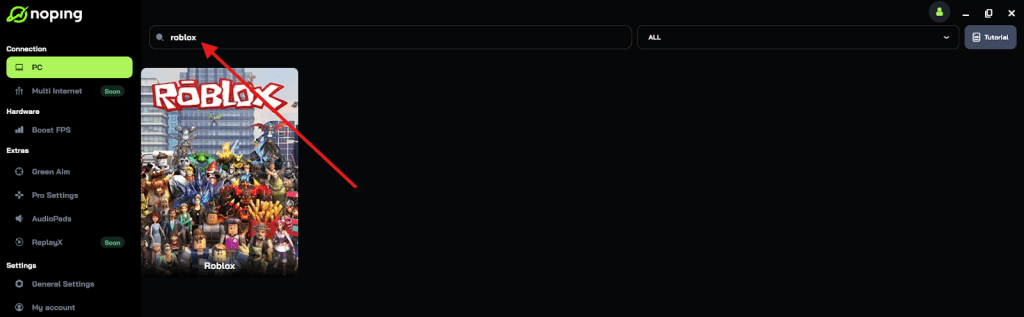
- Once you find Roblox, click on it and, on the next screen, select “Choose automatic” or “Choose manual” and click “Continue”. We recommend choosing automatic, as NoPing’s technology analyzes all routes on a global scale and automatically selects the best option for you.

- On the next screen, click on “Optimize Game”.
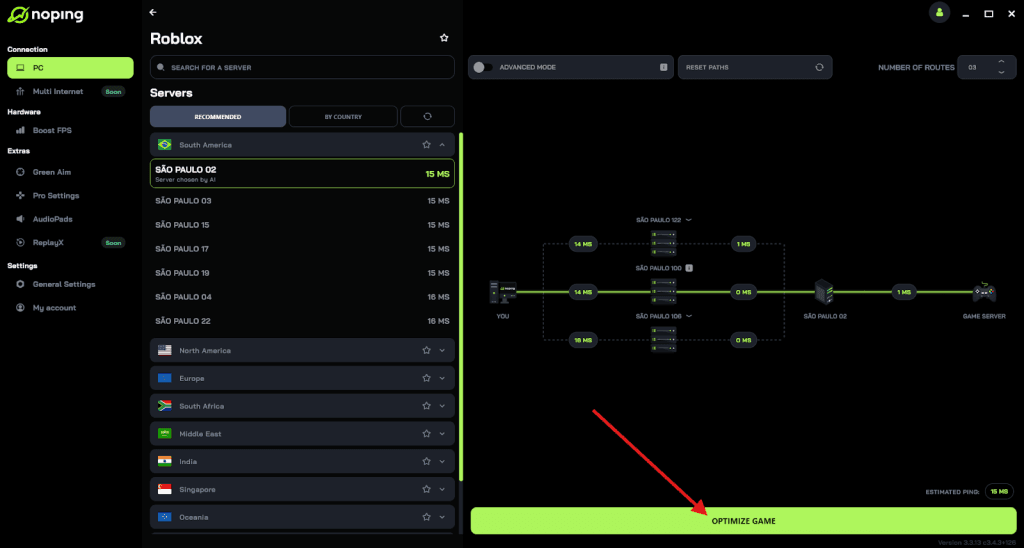
- And that’s it, you can start playing Roblox with optimized ping!
You can test different servers within NoPing to see which gives you the lowest latency.
How much do Private Servers cost?
The cost of a private server is not fixed across Roblox. It is determined entirely by the developer of the game. Some developers want to encourage community events and set the price to 0 Robux, making the servers free for anyone to create.
However, most popular games charge a monthly fee. This usually ranges from 100 to 500 Robux per month. It is a recurring subscription, meaning Roblox will automatically deduct the amount from your account every 30 days unless you cancel it.
When you decide to make your server public via links, you are essentially providing a free service to the people joining you. You pay the fee, and they get to play in a lag-free (hopefully), controlled environment without paying a dime.
Making a private server public on Roblox is less about flipping a single switch and more about managing access. You are bridging the gap between a solitary experience and a chaotic public lobby.
By using the "Friends Allowed" toggle and the "Generate Link" feature, you can curate exactly who plays with you. Whether you are hosting a tournament, recording a movie, or just hanging out, these tools give you the power to control your environment.
And remember, a controlled environment is only fun if the gameplay is smooth. Keep your ping low and your connection stable to ensure that your private server is the best place to play.
Play Roblox without lag. Download NoPing now and start your free trial!