

Error code 277 in Roblox is that annoying “you were disconnected” message that kicks you out of a game, usually because the game client lost contact with the server.
In this guide I’ll walk you through what it means, common causes, a practical set of fixes, other similar error codes you might see, and a short FAQ with a few extra tips I didn’t slot into the main text.
What is the Error Code 277 in Roblox?
Error Code 277 is Roblox’s generic message for “Lost connection to the game server, please reconnect.”
In practice that means the Roblox client stopped receiving timely updates from the server hosting the match or experience.
Sometimes the fault is with your internet path, sometimes with the device you’re playing on, and sometimes with Roblox’s own servers or even bugs in a particular game.
The official Roblox help pages list it as a lost connection issue and recommend basic connection and device troubleshooting as a first step.

Source: Roblox Developer Forum
8 Ways to Fix Error Code 277 in Roblox
Below are eight practical fixes you can try, ordered roughly from simplest to more advanced.
Try them one at a time and test Roblox after each change: that helps you figure out what actually worked.
1. Restart your device and router/modem
Turn your PC/console/phone completely off, wait 20–30 seconds, and power it back on. Also power-cycle your modem and router (turn off, wait 30 seconds, turn on).
This clears transient network issues and device resource problems that frequently cause disconnects.
2. Switch networks (or try wired instead of Wi-Fi)
If you’re on Wi-Fi, try a wired Ethernet connection, it’s more stable and less susceptible to packet loss.
If you can’t run a cable, try moving closer to the router or temporarily using mobile hotspot data to see if the issue is your ISP or home network.
3. Flush DNS and renew IP (Windows
Open Command Prompt as admin and run:
ipconfig /flushdns
ipconfig /release
ipconfig /renew
Flushing DNS and renewing your IP can solve problems caused by stale DNS entries or an IP conflict that makes your client lose its route to Roblox servers.
4. Temporarily disable firewall/antivirus or add Roblox to exceptions
Security software occasionally blocks game traffic or interferes with connections. Temporarily disable it to test whether it’s the cause; if that fixes the disconnects, add Roblox to your firewall/antivirus exceptions or restore protective settings afterward.
Be careful: re-enable protection after testing.
5. Update network drivers, Windows (or console firmware), and Roblox client
Ensure your operating system, network adapter drivers, and the Roblox client are all up to date.
On Windows you can also try “Run as Administrator” or use the Store app’s repair/reset options if you installed Roblox through the Microsoft Store. Outdated drivers or app files can cause instability.
6. Reinstall Roblox (clear app data first)
Uninstall Roblox, manually remove leftover Roblox folders (AppData on Windows), then reinstall. Corrupted local files or bad cached logs sometimes produce persistent 277 errors for some users.
Follow a full uninstall/reinstall rather than a quick reinstall for maximum effect.
7. Check Roblox server status and the specific game’s health
Before deep troubleshooting, check whether Roblox has outages or the specific experience’s server is unstable. If Roblox’s servers or a game’s host are having problems, no client-side fix will help.
Developers on Roblox DevForum point out that sometimes the error is caused by server-side memory leaks or crashes in the game itself.
If many people are disconnecting from the same game, it’s likely on the developer/Roblox side.
8. Use NoPing to stabilize your connection
NoPing is a gaming-oriented network optimizer that reroutes your game traffic through specialized nodes and can reduce latency, packet loss, and unstable routes.
For players who see repeated disconnects because of route instability or long/fragile internet paths, NoPing stabilizes the path between your device and Roblox servers.
Here’s how to use NoPing to stabilize your connection in Roblox:
- Sign-up through the website and download NoPing (you can try it for free)
- Open NoPing and search for Roblox inside the software
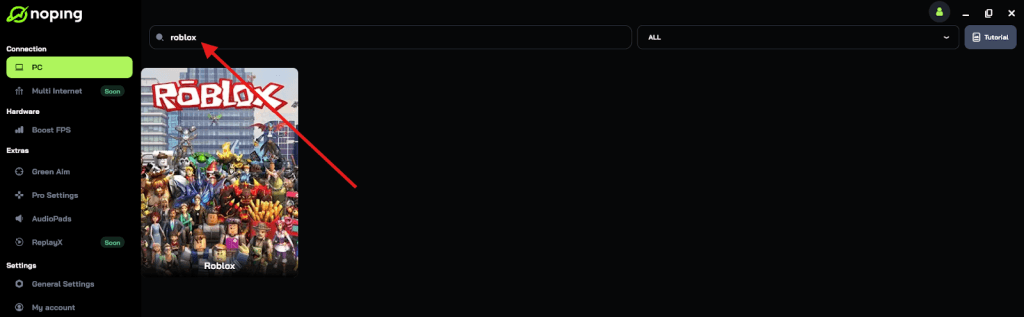
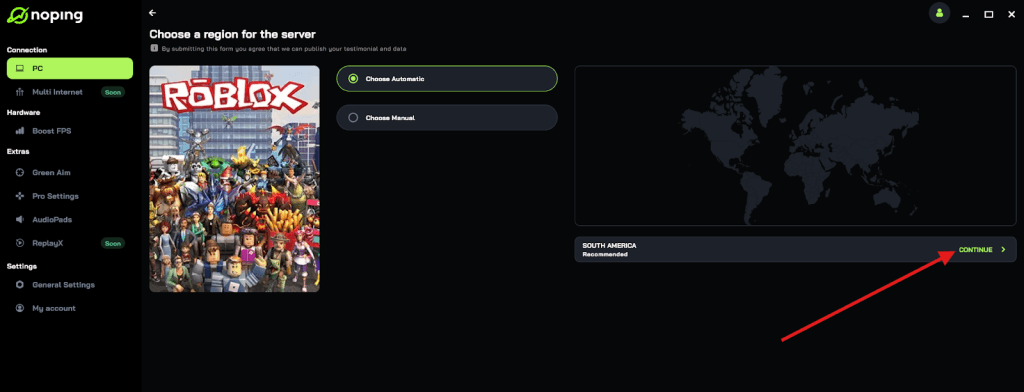
- Once you find Roblox, click on it and, on the next screen, select “Choose automatic” or “Choose manual” and click “Continue”. We recommend choosing automatic, as NoPing’s technology analyzes all routes on a global scale and automatically selects the best option for you.
- On the next screen, click on “Optimize Game”.
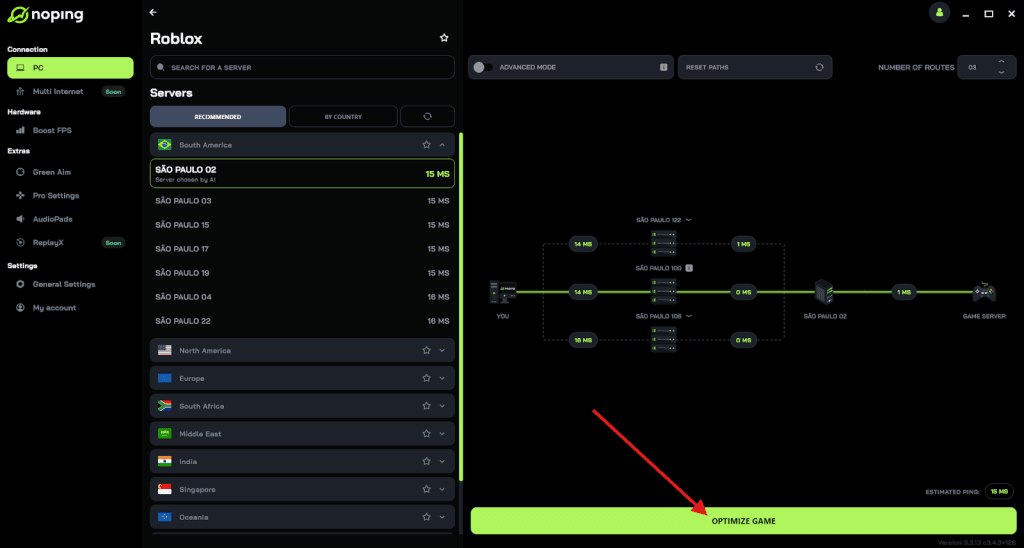
- And that’s it, you can start playing Roblox with optimized ping!
You can test different servers within NoPing to see which gives you the lowest latency.
What Causes Error Code 277 in Roblox?
Error Code 277 is a symptom, not a single root cause.
Here are the usual categories of causes and how they produce disconnects:
- Local network instability — packet loss, jitter, or an IP address changing mid-session are common culprits. Wireless interference, overloaded home networks, or ISP routing problems can drop the connection. (If a different network or wired connection works, the root is almost always network-related.)
- Device or client issues — corrupted app files, outdated drivers, memory pressure on low-end devices, or restrictions imposed by firewall/antivirus can interrupt the client’s ability to keep a steady connection. Reinstalling or repairing the client often helps here.
- Game-side or server problems — game scripts that leak memory, overloaded game hosts, or problems on Roblox’s platform can cause mass disconnects for many users. When several players in the same experience get 277 at the same time, suspect the server/game side.
- ISP or route-level issues — the path your packets take across the internet can be suboptimal or have transient problems.

Other Error Codes in Roblox
Roblox has a raft of error codes; here are a few you may see and what they generally mean:
- Error 279 — usually “Failed to connect to the server” (often port or network-level block). Similar to 277 but typically happens at connection time rather than mid-session.
- Error 268 — “You were kicked” (often server kicked the client due to exploit detection or admin action).
- Error 529 — service-related issue, often when Roblox is down for maintenance or experiencing wide outages.
- Error 290 series and others — can indicate client/asset loading problems, permission issues, or server-side script failures.
Each code has different troubleshooting priorities. 279 often means ports or firewall/ISP blocks; 268 usually means a server-side kick or rules enforcement.
When you see other codes, search for that specific code plus “Roblox” and check Roblox’s status pages and community threads.
FAQ - Error Code 277 in Roblox
Q: Can I do anything as a game creator to reduce 277 for my players?
A: Yes. Keep server scripts optimized, avoid memory leaks, limit large synchronous operations, and monitor server health. If players report repeated disconnects on your title only, check logs and consider scaling up server instances or optimizing scripts.
DevForum threads and reports often point to script memory leaks as a cause.
Q: Is Roblox itself often the cause of 277?
A: It happens, but not always. Roblox platform outages or server crashes can cause mass 277 errors; check official status pages and community reports.
If many players are affected at once, it’s likely server-side.
Q: I tried everything and still get 277 only on one specific game — what then?
A: Contact the game developer (usually there’s a Discord or group link on the experience page) and report the behavior with your device, OS, and approximate times.
Give them logs or screenshots if possible; developers can inspect server-side errors and memory use. Often the fix needs to come from the game’s developer.
Q: Are there console-specific tips?
A: On consoles, check for system updates, router NAT type issues, and whether the console is on a congested network. Console users have fewer deep-network tools, so trying a different network or contacting ISP often helps.
Play all Roblox experiences without worrying about connection errors. Download NoPing now and start your free trial!