

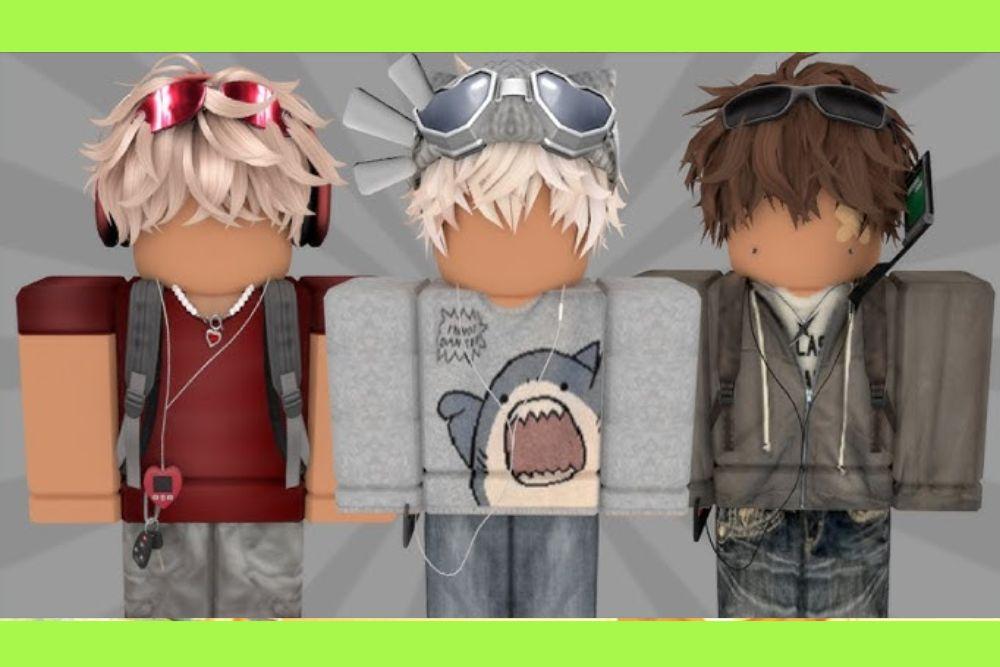
Roblox is no longer just a platform for blocky adventures. It has evolved into a massive digital fashion hub where your identity is as important as the games you play.
With over 274 million avatar updates happening every single day in 2025, it is clear that players view their characters as much more than just a set of pixels.
Whether you want to look like a high-end fashion icon, a legendary warrior, or a bizarre internet meme, the Marketplace offers nearly infinite possibilities.
In this guide, we will break down the styles that are dominating the platform right now and give you the roadmap to building an avatar that stands out from the crowd.
What are the most popular Roblox avatar styles?
The current landscape of Roblox fashion is a mix of nostalgia and hyper-modern digital expression. One of the biggest surges this year has been the Y2K and 2000s nostalgia aesthetic.
This includes baggy clothing, bright neon highlights, and accessories inspired by brands like Hello Kitty, which saw a massive spike in searches recently.
Another dominant force is the Preppy/Aesthetic look. These avatars usually feature soft pastel colors, layered clothing, and "cute" accessories like bear masks or flower crowns. On the flip side, we have the Slender and Emo styles, characterized by tall, thin R15 body types, dark clothing, and edgy hair combinations.
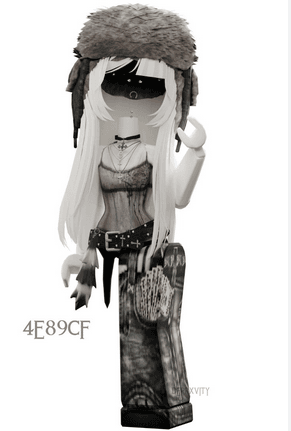
Source: Pinterest
We are also seeing a massive rise in Branded Digital Fashion. According to recent data from the 2025 Roblox Digital Expression Report, 70% of Gen Z users have worn branded items, with many prioritizing clothing from recognized real-world brands to match their physical identity.
Source: Pinterest
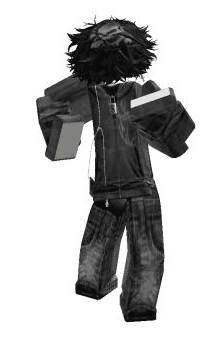
Source: Pinterest
How can you create a unique Roblox avatar from scratch?
Creating a unique avatar starts in the Avatar Editor, which you can access via the main navigation menu on both desktop and mobile.
The first step is deciding on your base. You can choose between the classic R6 rig (which is more blocky and nostalgic) or the R15 rig, which allows for more fluid movement and detailed layering.
To make something truly your own, follow these steps:
- Pick a Theme: Don't just buy random items. Decide if you want a "Tactical," "Kawaii," or "Cyberpunk" look.
- Layer Your Clothing: Use the Layered Clothing system to stack jackets over shirts or hoodies. This adds depth that traditional 2D clothing cannot match.
- Mix and Match Bundles: You don't have to use an entire character bundle. You can take the arms from one, the legs from another, and the torso from a third to create a custom silhouette.
- Use the Marketplace Filter: Look for User-Generated Content (UGC). Independent creators often make much more detailed and niche items than the official Roblox account.
If you are looking for a shortcut, tools like the Avatar Catalog Creator allow you to try on any item for free inside a game environment before you spend your Robux.
Also read: How Do You Make a Private Server Public on Roblox? Complete Guide
Is it possible to get high-quality avatar items for free?
Yes, you can look "rich" on Roblox without spending a single cent. While the most coveted items like the Headless Head or Korblox Deathspeaker cost tens of thousands of Robux, there are many ways to build a professional-looking character for free.
Roblox regularly releases Promo Codes and event-specific items. For example, experiences like the "Mansion of Wonder" or "Island of Move" offer permanent accessories like the "Ring of Flames" or "Kinetic Staff" just for entering a code.
Additionally, the Marketplace always has a "Free" category under clothing and accessories.
Many players also use Classic Shirts and Pants that they create themselves. If you have a basic understanding of image editing, you can upload your own designs.
While there is a small fee to list them for sale, wearing your own creations is a great way to ensure no one else has the exact same look.
Also read: How to Fix Roblox Error 500 Internal Server Error: Easy Guide
What are the trending "Meme" and "Troll" avatars right now?
Not everyone wants to look like a fashion model. Troll avatars are a massive part of Roblox culture, designed to be either hilarious or intentionally unsettling.
The most popular ones often involve the "Despacito Spider" (a multi-legged creature with a specific head) or extremely wide/distorted body types achieved by mixing specific character bundles.
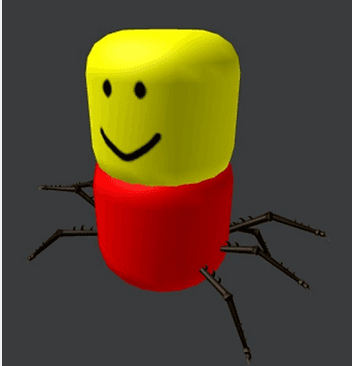
The "Noob" aesthetic is also making a huge comeback. This involves using the classic yellow, blue, and green color scheme but "upgrading" it with modern 3D accessories like noob-themed capes or floating pets.
Another recent trend involves "Brainrot" avatars, which use bizarre, surreal heads or items inspired by viral internet memes to catch people's attention in social experiences like Brookhaven.
How do animations and emotes change your avatar's vibe?
An avatar is more than just a static image. The way you move says as much about your style as what you are wearing.
Animations change your idle stance, your walk, your run, and even how you swim.
For a more "tough" or "cool" look, many players opt for the Mage or Ninja animation packs. If you prefer the Preppy or Aesthetic styles, the Old School or Bubblgum animations provide a more relaxed and bouncy feel.
In 2025, Emotes have become a primary communication tool. Data shows that "dance" is consistently a top search term in the Marketplace. Equipping a set of trendy emotes allows you to interact with the community without ever typing a word.

Can you create your own 3D items for the Marketplace?
If you want to go beyond just wearing clothes and start making them, you will need to learn some technical skills. Most professional Roblox creators use Blender to model 3D accessories and clothing.
Roblox has opened up the UGC (User-Generated Content) program significantly, allowing more players to upload their own creations to the Marketplace. To do this effectively, you should:
- Download the official Roblox templates to understand the scale of the avatar.
- Learn about "Skinning" and "Rigging" so your items move naturally with the character's body.
- Check the Roblox Creator Documentation for specific technical requirements.
Also read: How to Appear Offline on Roblox?
By creating your own items, you aren't just making a unique avatar for yourself, you are potentially building a business where other players pay you Robux to wear your designs.
The future of Roblox avatars is clearly headed toward Hyper-Realism and Interoperability.
With the introduction of "Dynamic Heads" that support facial tracking and voice chat lip-syncing, avatars are becoming more expressive than ever. You can now use your webcam to make your avatar mirror your real-life facial expressions in real-time.
We are also seeing a shift toward avatars that can "travel" between different platforms. While we aren't fully there yet, the push for a unified digital identity means your Roblox look might eventually influence how you appear in other virtual spaces. The goal is to make your digital self as flexible and unique as your physical self.
Play all Roblox games without lag! Download NoPing now and start your free trial!