


Lag and high ping remain among the biggest issues faced by World of Warcraft players. Connection instability directly affects command responsiveness, disrupts abilities, and increases mistakes during raids, dungeons, and PvP encounters.
The impact becomes even more noticeable in content that requires fast reactions. Even small delays can affect response times, make movement harder to execute, and interfere with critical actions during matches.
In addition, constant latency fluctuations may cause temporary freezes, loss of synchronization with game servers, and noticeable delays when activating abilities.
Lag in World of Warcraft affects command responsiveness
Ping measures the time it takes for data to leave the player’s computer, reach the game servers, and return to the device. When this communication experiences delays, latency spikes occur.
In practice, commands take longer to register, abilities become delayed, and movement loses precision. In competitive content, even a few milliseconds can make a difference during fast encounters and complex mechanics.
Because of this, World of Warcraft players often monitor connection stability while playing.
Network instability increases lag
Several factors can worsen connection quality. Simultaneous internet usage across multiple devices reduces the available bandwidth for the game. Meanwhile, automatic downloads, background applications, and streaming services continue consuming network resources.
As a result, latency increases and the connection becomes less stable. Wi-Fi is also one of the main sources of instability. Physical obstacles, too many connected devices, and interference from nearby networks can intensify fluctuations during online matches.
In some situations, the issue goes beyond the home network. Unstable routing between the internet provider and the game servers may significantly increase connection response times.
How to reduce lag during matches
Some measures can help improve connection stability in World of Warcraft. Although they may not completely eliminate the problem, these adjustments help reduce interference and create more consistent communication with the servers.
Among the main recommendations are:
• Use an Ethernet cable instead of Wi-Fi;
• Restart the router before gaming sessions;
• Close background programs;
• Stop downloads and streaming services;
• Update the computer’s network drivers;
• Limit simultaneous internet usage on other devices.
These practices help reduce fluctuations and improve command responsiveness during raids and PvP matches.
Try a free solution to reduce ping in World of Warcraft
Players experiencing high ping in World of Warcraft can also use route optimization software to improve connection stability during gameplay.
Among the available options is NoPing. According to the platform, the system analyzes different routes in real time to identify potentially more stable paths to the game servers.
To use the software, the process includes:
• Access the website and create an account for a free trial;
• Download and open the software on the computer;
• Search for “World of Warcraft” inside the platform;

• Click on the game and select “Optimize Automatically”;
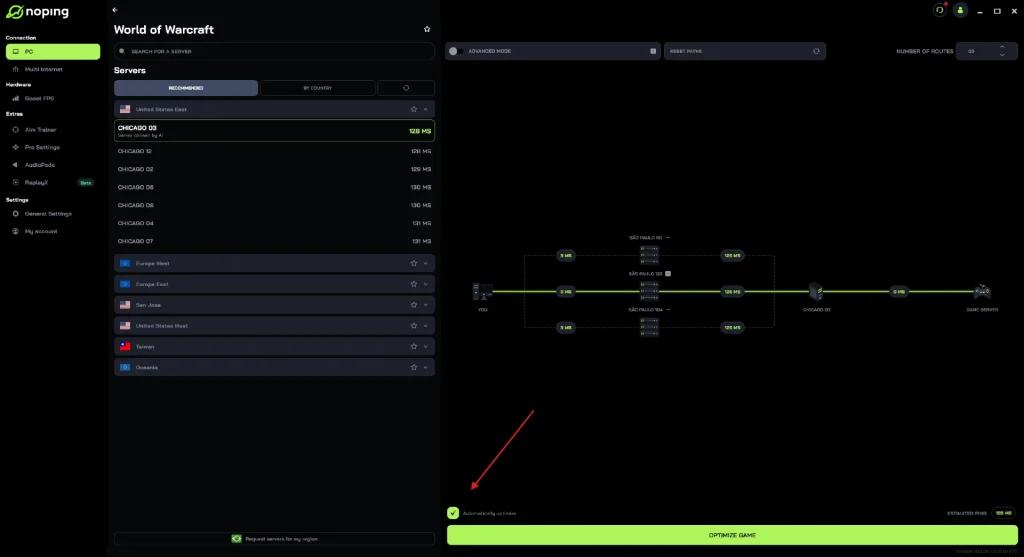
• Then choose the option “Optimize Game”.
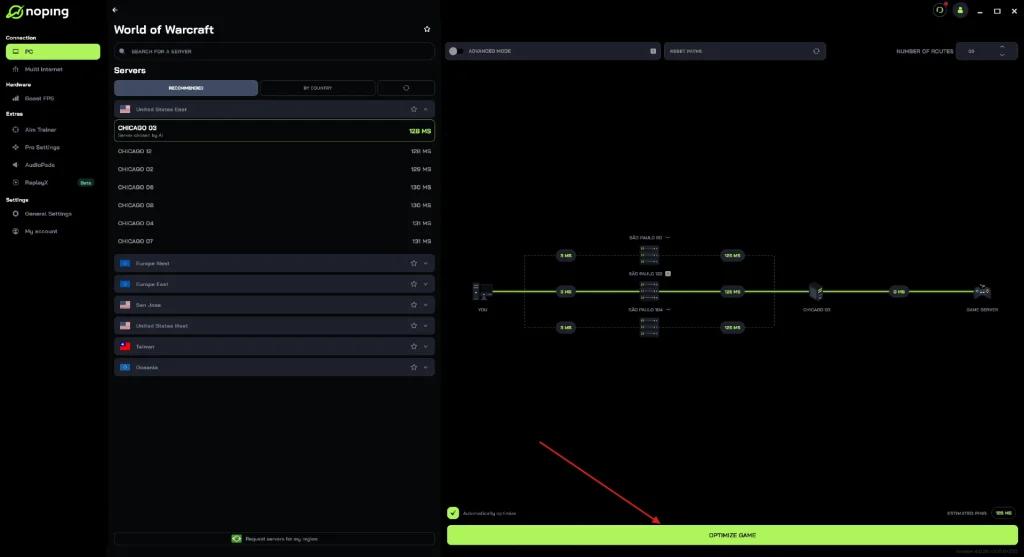
The tool is designed to reduce latency fluctuations and improve connection stability during online sessions.
As online matches become increasingly dependent on stability and fast response times, World of Warcraft players continue searching for alternatives to reduce the impact of latency during gameplay sessions.
After basic network troubleshooting, optimization tools such as NoPing remain among the options used by players attempting to maintain a more stable connection to the game servers.