

If you want to build a prestigious inventory without spending a fortune, learning how to trade on Roblox is the most effective strategy available in 2026.
This system allows users to exchange rare items for others, effectively creating a player-driven economy that rivals many real-world marketplaces.
While the core mechanics have remained stable over the years, the landscape of item values and security risks has evolved.
This guide breaks down everything you need to know to navigate the trading scene safely and profitably.
What are the requirements to trade on Roblox?
To participate in the trading system, you must have an active Roblox Premium subscription and a verified account.
This is a security measure implemented by the platform to ensure that participants are committed users and to reduce the frequency of throwaway accounts being used for fraudulent transactions.
There are three main tiers of Premium, and any of them will grant you access to the trade feature.
Besides the subscription, both you and the person you are trading with must have Trade Accessibility enabled in your account settings.
You can find this under the Privacy tab. You should also ensure that your account has Two-Step Verification (2FA) active.
Without 2FA, you are a prime target for account "beaming," a common theft method where hackers take over your session to drain your inventory.

How do you start a trade with another player?
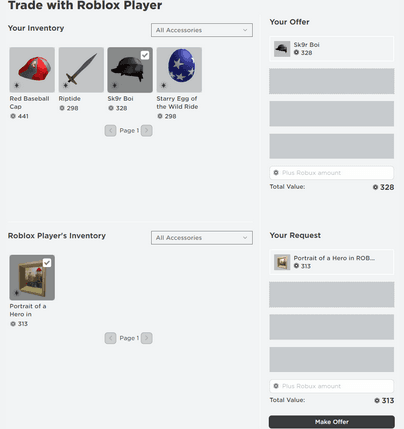
You can initiate a trade by visiting the profile of the user you want to bargain with and selecting the Trade Items option from the menu.
This menu is usually hidden behind the three dots in the upper right corner of their profile box.
Once you click it, a window will appear showing your inventory on one side and theirs on the other.
You can select up to four items from each side to create a deal. If the values don't quite match up, you can add Robux to your offer to bridge the gap.
However, keep in mind that Roblox takes a transaction fee (usually around 30 percent) on the Robux portion of the trade.
After you are satisfied with the items selected, you click Make Offer and wait for the other player to accept, decline, or counter.
Source: Roblox
Also read: How to Fix Valorant Connection Error
Which items are actually tradeable?
Only items categorized as Limited or Limited U can be traded between players.
You can identify these items by the green "Limited" or "Limited U" banners on their icons in the Avatar Shop or your inventory.
Standard items that are still available for purchase from the official Roblox account or regular UGC (User Generated Content) creators cannot be traded unless they were specifically released as Limiteds.
In 2026, the market for UGC Limiteds has grown significantly, meaning you have more options than ever beyond the classic "Old Roblox" hats like Valkyries or Federations.
If an item does not have that specific tag, it is permanently tied to your account.
How do you evaluate a fair trade in 2026?
A fair trade is determined by comparing the Recent Average Price (RAP) and the community-assigned Value of the items involved.
RAP is a metric provided by Roblox that shows the average price an item has sold for lately, but it can be easily manipulated.
Experienced traders rely on external value monitors like Rolimons to see the true market sentiment.
Some items are "Projected," meaning someone bought a cheap item for an absurdly high price to artificially inflate its RAP.
If you trade a stable high-value item for a projected one, you will lose money once the RAP inevitably crashes.
Always check the price history graphs before hitting the accept button. If an item's price spiked vertically in the last 24 hours without a clear reason, stay away.
What are the common scams you should avoid?
The most dangerous scam in 2026 remains the "Beam Link" or phishing attempt where a user asks you to check their "private server" or "GFX portfolio" via an external link.
Clicking these links can allow a script to steal your browser cookies, giving the hacker full access to your account even if you have 2FA enabled.
Another common tactic involves "middleman" scams. A player might suggest using a third party or a specific Discord bot to "verify" the items.
Roblox does not support or protect trades made outside of its official trade window. If someone asks you to "buy my shirt first" or "send the item and I'll pay you after," they are trying to steal from you.
Play Roblox without lag! Download NoPing now and start your free trial!