

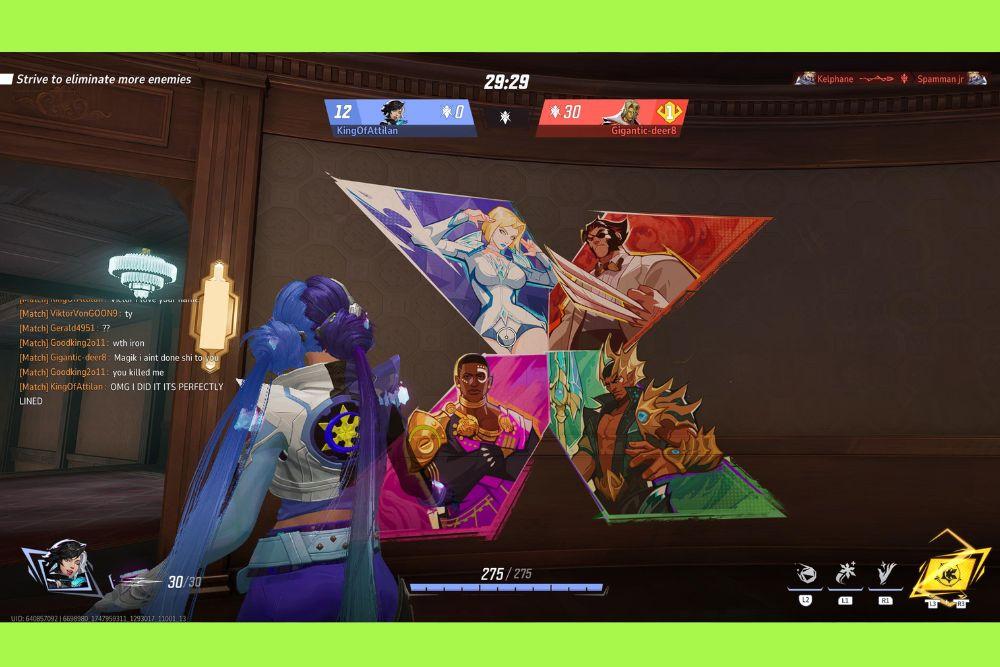
If you want to leave your mark on the battlefield, learning how to use sprays in Marvel Rivals is the perfect way to show some personality while you are busy saving the multiverse.
Whether you just wiped the enemy team with a perfectly timed Iron Man ultimate or you simply want to mark your territory as Jeff the Land Shark, sprays are the ultimate tool for self expression.
This guide will walk you through every single detail about these digital tags, from the basic controls to the high level tactics of psychological warfare.
In a fast paced hero shooter like this, every second counts. While you are focusing on your positioning and ability cooldowns, it is easy to forget about the smaller cosmetic details. However, sprays are more than just pretty pictures on a wall.
They are a core part of the game culture, allowing you to communicate with teammates and taunt opponents without saying a single word.
Let us dive into the specifics of how you can make the most of this feature.
What exactly are sprays in Marvel Rivals?
Sprays are collectible 2D or animated images that players can place on almost any surface within the game world.
Think of them as digital graffiti that allows you to claim a piece of the map as your own. In Marvel Rivals, these cosmetics are often inspired by classic comic book art, iconic character poses, or community memes.
They serve as a fun way to interact with the environment and other players.
Unlike skins which change your character appearance, sprays are interactive items. You can find a flat wall, a floor, or even certain objects like crates and statues to slap your chosen image onto.
While they do not provide any competitive advantage in terms of stats, they are essential for anyone who wants to fully engage with the social aspect of the game.

How do you equip sprays for each hero?
Before you can show off your collection in the heat of battle, you need to set up your spray wheel.
The process is handled through the main menu and can be customized for every single hero in the roster. Follow these steps to get your favorite tags ready:
- Open the main game menu and navigate to the Heroes tab at the top of the screen.
- Select the specific hero you want to customize, such as Spider-Man or Hela.
- Once you are in the hero profile, click on the Cosmetics tab located in the sub-menu.
- From here, select the Sprays option to see your full library for that character.
- You will see a list of unlocked sprays on the left side. Click on the one you like.
- Click the Equip button, which will open the spray wheel interface.
- Choose one of the slots on the wheel to place your spray.
- If you want this spray to be available for every character you play, look for the Apply to All toggle to save time.
It is worth noting that while many sprays are universal, some are specifically designed for certain heroes.
Organizing your wheel ensures that you always have the most relevant images ready to go when the match starts.
What is the default button to use sprays during a match?
When you are actually in a game, you need to know exactly which button to hit to drop a spray before an enemy respawns.
The controls vary slightly depending on whether you are on a computer or a console.
- PC Players: The default keybind is T. Holding down this key will bring up a radial menu. You can then use your mouse to hover over the spray you want and release the key to place it on the surface you are looking at.
- PlayStation 5 Players: You need to hold down the Left D-Pad button. This opens the communication wheel where you can select your spray using the right analog stick.
- Xbox Series X/S Players: Just like on PlayStation, you hold the Left D-Pad and use the right stick to pick your tag from the radial wheel.
If you find that the default keys are not comfortable for your playstyle, you can always change them.
Simply go to Settings, then Controls, and look for the Emotes and Sprays section. Many competitive players prefer to bind sprays to a side mouse button or a key closer to the WASD cluster so they can use them instantly without losing momentum.
Can you customize the spray wheel in the settings?
Yes, the spray wheel is highly customizable to ensure you have quick access to the images you use the most.
The wheel usually has eight slots, which can be shared with emotes or reserved entirely for sprays.
Having a well organized wheel allows you to react to different situations quickly. For example, you might have one slot for a GG (Good Game) spray, one for a "Thanks" icon, and one for a salty taunt to use after a kill.
The game allows you to preview how the spray will look on a generic wall before you even enter a match.
This is great for checking out animated sprays, which have special effects that move or glow. To manage this, stay in the Hero Gallery and experiment with different combinations until the wheel feels natural to you.
How can you unlock more sprays without spending money?
Not everyone wants to drop credits on cosmetics, and the good news is that Marvel Rivals offers several ways to build your collection for free.
You just have to be willing to put in some playtime and keep an eye on active events.
- Hero Proficiency: As you play a specific hero, you earn proficiency points. Reaching the first level of proficiency with any character usually rewards you with a unique spray themed after them.
- Free Battle Pass Tiers: Every season has a Battle Pass with a free track. You can earn sprays simply by completing daily and weekly challenges to level up the pass.
- Events and Limited Time Challenges: Marvel Rivals frequently runs themed events. Completing specific tasks during these periods often grants exclusive sprays that cannot be obtained elsewhere.
- Twitch Drops: By linking your game account to Twitch and watching partnered streamers, you can often earn "drops" which include avatars, emotes, and rare sprays.
- Chronos Tokens: You can earn this in-game currency through various missions and then spend it in the shop to pick up specific items you like.
By staying active in the community and checking your mission logs regularly, you will find your library growing very quickly without needing to touch your wallet.
What are the differences between static and animated sprays?
In Marvel Rivals, sprays are categorized into different rarity tiers: Rare, Epic, and Legendary. This classification usually dictates how much visual flair the spray has.
Static Sprays (Rare): These are the standard 2D images. They are simple, clean, and usually represent a character icon or a comic book cover. They are great for quick communication because they are easy to read even from a distance.
Animated Sprays (Epic and Legendary): These are the high tier items. They feature moving parts, such as a flickering flame on a Ghost Rider spray or a waving hand on a Groot icon. These are much more noticeable and are often considered a status symbol within the game. Because they require more resources to render, they are generally harder to unlock and are frequently found in the higher tiers of the Battle Pass.
Is there a limit to how many sprays you can place?
You cannot cover the entire map in graffiti, unfortunately. To keep the game performance stable and the visuals clear, there is a limit on how many sprays can be active at once.
Usually, a single player can have up to five sprays active on the map. If you place a sixth spray, the first one you placed will disappear.
This limit is important to keep in mind if you are trying to mark a specific path for your team or if you are in a "spray war" with an opponent.
Furthermore, sprays will eventually fade away over time or at the end of a round. This ensures that the map does not become too cluttered with visual noise during long matches.
Why do some players use sprays as a tactical tool?
While sprays are mostly for fun, experienced players sometimes use them for actual tactical purposes. It is a subtle way to enhance team coordination or mess with the enemy focus.
- Marking Health Packs: Some players place a bright spray near a hidden health pack location. This helps teammates who are new to the map find healing quickly without having to look at a mini map.
- Indicating Flank Routes: If you are playing a scout like Black Panther, you might leave a spray at the entrance of a flank route to let your team know where you are heading.
- Baiting the Enemy: In certain situations, a well placed spray can actually distract an opponent. A flash of color in their peripheral vision might make them flick their aim towards a wall, giving you the split second you need to land a headshot.
- Communication without Microphones: If you are not using voice chat, using a specific spray can signal your intent to your team, such as "group up here" or "watch this spot."
Are there character specific sprays or are they all universal?
The library in Marvel Rivals is a mix of both. Universal sprays are those that any hero can use.
These are usually general Marvel icons, logos, or seasonal items like holiday themed tags. These are great because you only need to unlock them once to have them available for everyone.
Character specific sprays, however, are locked to a single hero profile. For example, a spray that shows Spider-Man's mask or a stylized version of Iron Man's arc reactor can only be equipped by those specific characters.
These are often the coolest looking items in the game because they highlight the unique personality of the hero. If you are a "one trick" player who only uses a specific character, focusing on unlocking their specific sprays through the proficiency system is your best bet.
What should you do if your sprays are not appearing on walls?
If you are pressing the button but nothing is happening, there are a few common reasons why. It is rarely a bug and usually has to do with settings or the environment.
- Check the Surface: Not every surface in Marvel Rivals can be sprayed. Very irregular surfaces, transparent glass, or certain interactive objects might block sprays. Try aiming at a flat, solid wall.
- Distance Matters: You have to be relatively close to a surface to apply a spray. If you are standing too far away, the action will fail.
- Graphics Settings: If your graphics settings are set to the absolute minimum, the game might limit the number of decals (like sprays and bullet holes) visible on your screen to save performance. Check your "Effects" or "Decal" settings in the video menu.
- Network Issues: As mentioned before, if your connection is unstable, the server might miss the request to place the spray. If you see other players' sprays but not your own, it might be a local connection hiccup.
- Cooldowns: While very short, there is a tiny internal cooldown on spraying to prevent players from spamming them and crashing the server. Wait a second or two before trying again.
Using sprays in Marvel Rivals is one of those small details that makes the game feel alive. It is a way to bridge the gap between being a player and being part of the Marvel universe.
Whether you are using them to be funny, to be helpful, or to be a bit of a nuisance to the other team, they add a layer of depth to every match.
Remember to keep your hero gallery updated and always check the latest Battle Pass for the coolest animated options.
Most importantly, ensure your connection is rock solid so that every tag you place is seen by everyone on the server. A smooth connection is the foundation of a good gaming experience, allowing you to focus on your skills and your style.
Play Marvel Rivals without lag. Download NoPing now and start your free trial!