


Minecraft vs Roblox has been one of the biggest debates in gaming for over a decade.
Both are blocky, creative, and ridiculously popular among kids and teens, but they’re actually very different experiences.
Minecraft is a sandbox where you explore, craft, and build your world. Roblox is more like a giant platform of games made by the community.
If you’ve ever wondered which one is better (for learning, safety, creativity, or just plain fun) here’s a deep dive into all the key areas that make them unique.
Learning curve
Minecraft
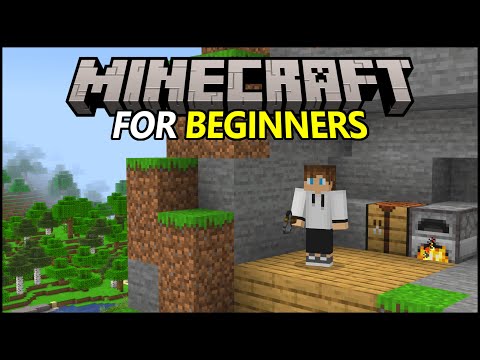
Minecraft is easy to understand right from the start. You punch trees, collect resources, and slowly learn how to survive or build.
The controls are simple, and the interface is clean. You can play at your own pace, exploring in Creative Mode without any danger or testing your limits in Survival Mode.
Once you get comfortable, Minecraft has a deep layer of complexity waiting for you — redstone mechanics, farms, automation, command blocks, and even Java modding.
It’s the kind of game where you learn naturally by experimenting, which makes it approachable for kids but still interesting for experienced players.
Roblox
Roblox has two learning curves: one for players and one for creators.
As a player, it’s very simple. You just download the client, pick an experience from the homepage, and play. Some games are so easy that you don’t need a tutorial at all.
But as a creator, it’s a different story. Roblox Studio is a full development environment where you create your own games using Lua scripting.
It’s not as straightforward as placing blocks in Minecraft, but it teaches real programming logic. That’s why many coding schools use Roblox as an intro to game development.

In short: Minecraft is easier to play, Roblox is easier to expand once you know what you’re doing.
Safety
Minecraft
Minecraft is generally safer, especially in single-player mode or private realms.
You can control who joins your world, and there’s no need for open chats with strangers unless you connect to public servers.
The biggest risks come from third-party servers, where moderation varies. Some might have chat filters, while others rely on admins or plugins to keep things civil.
Microsoft has improved safety with reporting tools and parental controls, but because Minecraft can be hosted by anyone, safety depends on where you play.
Roblox
Roblox takes safety seriously, but because it’s an open platform with millions of games and a huge user base, moderation is an ongoing challenge.
The company uses advanced chat filters, age restrictions, and parental controls. There’s even age estimation technology to apply stricter safety settings automatically.
Still, inappropriate content occasionally slips through, especially in user-generated games.
For parents, Roblox demands more attention: you need to set privacy limits, turn off chat for young users, and monitor what your child plays. The tools are there, but they only work if you use them.
Child friendly
Minecraft
Minecraft has earned its reputation as one of the safest and most educational games for children, and that’s not an accident. Its design encourages creativity, exploration, and problem-solving instead of competition or violence.
Even though you can fight mobs like zombies or skeletons, the visuals are simple and non-realistic: there’s no blood, no gore, and the tone remains playful and imaginative.
For younger players, Creative Mode is the perfect starting point. There are no enemies, no hunger, and no health bar. Kids can focus on building castles, farms, or pixel art without worrying about survival mechanics.
This makes Minecraft a great introduction to gaming in general, especially for children under ten.
Parents also appreciate how predictable and self-contained the Minecraft experience can be. When you play single-player or in a private world, you control everything: who joins, what happens, and how challenging it is.
Even the monsters and night cycle can be turned off in the settings. It’s one of the few games where kids can safely play offline for hours without external risks.
For schools and educators, there’s Minecraft Education Edition, a version designed specifically for classroom use. It includes built-in safety features, teacher controls, and curated lessons that encourage collaboration and creativity. Teachers can guide students through math challenges, history adventures, or science experiments, all within a controlled and secure digital world.
Another factor that makes Minecraft child-friendly is its community culture. While there are online servers where chat is open and interactions are less moderated, the majority of young players enjoy the game through private realms or local play, often with siblings or classmates.
In short, Minecraft’s design philosophy is simple: give players tools to imagine, not incentives to fight. That’s why parents, teachers, and even child development experts often recommend it as a “first game” for kids.
Roblox
Roblox, on the other hand, is a little more complicated when it comes to being child-friendly, not because it’s unsafe by default, but because it’s a platform rather than a single game. That means experiences can range from wholesome and educational to chaotic or occasionally inappropriate, depending on what the player chooses.
At its core, Roblox was built with younger audiences in mind. Its colorful visuals, simple controls, and community-driven content make it naturally appealing to kids.
Many of the most popular experiences (like Brookhaven RP, Adopt Me!, MeepCity, or Obby games) are fun, creative, and family-friendly. These games teach cooperation, responsibility, and imagination in playful ways.

However, because anyone can create and publish games on Roblox, quality and content vary a lot.
Some experiences may have themes or chat interactions unsuitable for younger children. That’s why Roblox provides a wide range of parental controls to customize what kids can access. Parents can:
- Restrict chat or disable it completely
- Limit which games can be played based on age rating
- Approve friend requests manually
- Enable “Account Restrictions” to block unverified games
The company also uses automatic chat filters and content moderation, which flag or remove inappropriate language.
Roblox’s moderation team works around the clock, but with millions of new experiences uploaded, no system is perfect; occasional issues still slip through.
The platform also added Age Guidelines for experiences. Developers now tag their creations with appropriate age groups (like 9+, 13+, etc.), making it easier for parents to know what’s suitable. Roblox even uses age estimation technology to apply stricter filters to accounts likely used by younger players.
Still, Roblox’s social nature means kids are often interacting with strangers online. While most conversations are harmless, it’s important for parents to stay involved, helping children understand digital safety, online etiquette, and how to report bad behavior.
Despite those challenges, Roblox can be an amazing space for kids when used responsibly. It encourages imagination and social connection, and it teaches valuable lessons about creativity and digital responsibility. Many families treat it as a shared experience, playing together, exploring new games, and setting healthy boundaries for screen time and chat interactions.
In short, Roblox is child-friendly when supervised and configured properly. It offers a world of fun, learning, and creativity, but parents need to take an active role in shaping that experience.
Also read: How to Fix Minecraft Exit Code 1
Creativity
Minecraft
Minecraft gives you the ultimate blank canvas. You can literally build anything: a castle, a spaceship, or an entire functioning computer. Creativity here is visual and architectural. You use blocks, redstone, and command blocks to bring your imagination to life.
Many players express themselves through design and engineering rather than code. Others build adventure maps, roleplay worlds, or full mini-games using in-game mechanics.

Roblox
Roblox creativity is about designing games, not just worlds. Roblox Studio lets you create anything from racing games to tycoon simulators, complete with custom scripts, assets, and monetization options.
It’s more like a game engine than a sandbox.
That makes Roblox a great outlet for aspiring developers and designers. If your idea of creativity is coding, scripting, or running a business, Roblox is the winner here.

Social aspect
Minecraft
Minecraft’s social experience depends on servers and realms. You can invite friends to your world, or join multiplayer servers that host minigames, roleplay maps, and survival communities.
It’s collaborative, but usually within smaller groups. You might work together on a massive city or compete in parkour challenges.
It’s social, but not overwhelming: ideal for kids who prefer structured teamwork rather than constant chatting.
Roblox
Roblox is inherently social. Players join experiences filled with other users, often chatting and cooperating instantly. There’s a strong culture of hanging out, roleplaying, and joining trend-based experiences together.
Events and brand collaborations often bring millions of people together, turning Roblox into a virtual social hub. However, this same openness also introduces moderation challenges and potential exposure to inappropriate behavior, which is why parental controls are important here.
Multiplayer experience
Minecraft
Multiplayer in Minecraft is persistent: worlds stay alive and change over time.
Players collaborate, build towns, and create shared projects that evolve for months.
This makes Minecraft’s multiplayer experience slower but more meaningful. You’re not just hopping between matches; you’re contributing to a world that’s constantly being built.

Roblox
Roblox multiplayer is instant and constantly changing. You can join a game with 10 or 100 players, play for a few minutes, and then move on to something else.
It’s more like browsing YouTube than building a world together. There’s always something new to try, and social matchmaking is automatic. It’s faster-paced, but less permanent.

Game modes
Minecraft
Minecraft’s game modes are one of the main reasons it’s so versatile and appealing to so many types of players. Whether you like relaxed building, tense survival, or just exploring massive custom worlds, there’s a mode for every playstyle.
The five main official modes are Survival, Creative, Adventure, Spectator, and Hardcore, and each one changes the game completely.
Survival Mode
It's the heart of Minecraft. You start with nothing — just your fists and a harsh, blocky wilderness. You gather resources, craft tools, build shelters, and face enemies like zombies, skeletons, and creepers. Hunger, health, and inventory management come into play, making every choice matter. This mode teaches planning, patience, and resilience, especially for beginners learning to manage limited resources.
Creative Mode
It's the opposite. You get unlimited blocks, no enemies, and the ability to fly. It’s perfect for pure builders, kids, or players who just want to relax and create without worrying about danger.
In this mode, players can focus entirely on construction and design — whether it’s pixel art, massive cities, or intricate redstone contraptions. Many schools and online communities use Creative Mode for collaborative projects or virtual art exhibitions.
Adventure Mode
Adds more structure to Minecraft. It’s primarily used for custom maps and story-driven worlds created by other players. In this mode, you can’t break or place blocks unless the map allows it, which makes it ideal for puzzle maps, parkour challenges, and narrative-driven adventures.
Think of it as Minecraft’s “campaign mode”, the closest the game comes to storytelling without official quests.

Spectator Mode
It’s a special mode that lets you fly freely through the world, pass through blocks, and observe gameplay without participating. It’s commonly used by YouTubers, map reviewers, and event organizers who want to record or explore builds without interfering.
Hardcore Mode
A favorite among veteran players. It’s like Survival Mode, but with permadeath — once you die, that world is gone forever. It adds tension and thrill, turning every moment into a test of skill and caution.
What makes Minecraft’s modes so impressive is how flexible they are. You can combine them, switch between them, or even customize rules through commands and mods. Players often create unique hybrids, like survival servers with creative building zones or adventure maps that use command blocks to simulate mini-games.
In short, Minecraft’s modes are about player expression. You decide how you want to experience the game: as an explorer, a builder, an engineer, or a survivor. It’s this adaptability that keeps Minecraft relevant and exciting, even after more than a decade.
Roblox
Roblox doesn’t have traditional “modes” like Minecraft does — instead, it offers an endless number of experiences (or games within the platform), each with its own mechanics, rules, and objectives. It’s not one game, but rather a massive ecosystem of community-created content.
Every “game mode” on Roblox is technically an independent creation, made by users in Roblox Studio. That means the variety is practically limitless: you can play a tycoon simulator one minute, a horror escape room the next, and a cozy roleplay town right after. It’s like a giant online arcade that’s always expanding.
Here are some of the most popular types of experiences you’ll find on Roblox, which roughly act as its “game modes”:
Obbys (Obstacle Courses)
Simple, fast-paced platforming challenges where you jump, dodge, and climb your way through colorful stages. Obbys are often the first games new players try. They’re easy to learn, quick to play, and perfect for mobile devices.
Roleplay Games
Games like Brookhaven RP, Adopt Me!, and Royale High dominate Roblox’s social scene. Players take on roles (as families, students, shop owners, or fantasy characters) and create their own stories.
These experiences are more about imagination and social interaction than winning or losing.
Tycoons and Simulators
In these games, you manage a business or a repetitive task that slowly earns in-game currency. You might run a pizza shop, dig for gold, or raise pets. They appeal to kids who love progression systems and collecting upgrades, and they often include cooperative play.

Combat and Shooter Games
For older players, there are action-heavy experiences like Arsenal, BedWars, and Tower Defense Simulator.
These offer competitive gameplay with rankings and rewards, but still keep violence cartoonish and suitable for younger audiences.

Horror Games
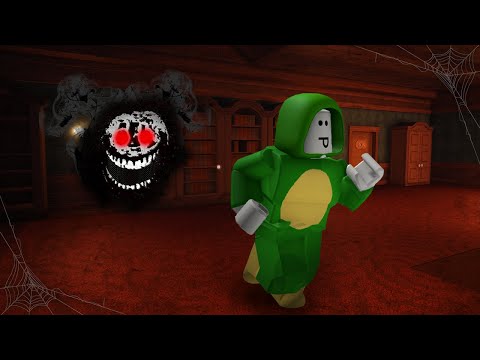
Surprisingly, Roblox has a big horror genre. Titles like Doors, The Mimic, and Rainbow Friends use jump scares and suspenseful storytelling to deliver age-appropriate thrills.
These games often mix exploration with puzzle-solving, showing just how flexible Roblox’s engine can be.
Minigame Collections and Events
Some experiences mix everything together (think of Wacky Wizards or Epic Minigames) offering constant variety and quick rounds. These are ideal for friends who want to play multiple styles without switching games.
Because Roblox games are made by users, developers can invent entirely new modes that didn’t exist before.
For example, racing games, rhythm games, and even full RPGs have become popular, each introducing unique gameplay systems and mechanics.
This freedom is what makes Roblox stand out. It’s not limited by official updates or pre-defined modes — the creativity of the community drives everything. You can log in every day and find something completely new to play.
However, this variety also means that quality control can vary a lot. Some experiences are polished and professionally developed (even by studios with paid teams), while others are rough prototypes or meme projects. That’s both the charm and the challenge of Roblox: it’s an ever-changing universe powered by millions of creative minds.
So while Minecraft’s modes are officially built and neatly organized, Roblox’s “modes” are community-driven categories that constantly evolve. In Roblox, the only real limitation is what creators can imagine — and with new scripting tools and monetization options being added all the time, that limit keeps expanding.
Mods
Minecraft
Minecraft has a legendary modding community. With tools like Forge and Fabric, players can add thousands of new features, from new biomes and creatures to full questlines and technology systems.

Mods can completely change the game, and installing them is relatively easy on PC. There are also texture packs, data packs, and shaders for visual customization.
Roblox
Roblox doesn’t use “mods” in the same sense. You can’t install modifications to the main client. Instead, creativity happens inside Roblox Studio, where developers can script new mechanics and publish them as independent games.
So while Minecraft modding focuses on enhancing one core game, Roblox creation focuses on building entirely new ones.
Platforms
Minecraft
Minecraft runs on practically everything: PC, consoles (Xbox, PlayStation, Switch), mobile, and even some smart devices. Cross-play works between most Bedrock platforms, so friends can play together no matter the device.
The Java Edition, on PC, offers deeper mod support but doesn’t cross-play with Bedrock. There’s also Minecraft Education Edition, specifically made for classrooms.
Roblox
Roblox is also highly accessible. It’s available on PC, Mac, iOS, Android, and Xbox. It’s not on PlayStation yet, though support is reportedly being tested.
Roblox runs well on low-end devices, which helps explain its massive user base, practically any kid with a smartphone can play.
Content updates
Minecraft
Minecraft updates are big, carefully planned, and community-driven. Each major patch adds new biomes, mobs, and gameplay systems, like the Caves & Cliffs or Trails & Tales updates.
Updates are slower but more impactful, and Mojang usually teases them months in advance, creating hype across the community.
Roblox
Roblox updates constantly, but in smaller, distributed ways. The core platform gets engine improvements and safety features regularly, but the real updates come from the community.
Since anyone can publish new games, Roblox feels fresh every day. Big developers release new events, limited items, and minigames weekly. So while Minecraft updates the world, Roblox updates the universe.
Price
Minecraft
Minecraft is a one-time purchase (around $30 depending on the platform). After that, you own it.
There are optional marketplace skins, texture packs, and realms subscriptions, but you can easily play for free once you buy the base game.
Minecraft Education Edition uses a school license model, and there are no in-game ads or forced microtransactions.
Roblox
Roblox is free to download and play. The catch is Robux, the in-game currency. Players use Robux to buy cosmetics, game passes, and premium content.
You can also get Roblox Premium, a monthly subscription that gives a Robux allowance and extra perks. Roblox’s model makes it more accessible but also more monetized.
Can you use them as learning tools?
Minecraft
Minecraft is already a classroom staple. Minecraft Education Edition includes coding lessons, chemistry labs, history simulations, and even collaborative math projects.
Students learn teamwork, problem-solving, and creativity in a familiar game environment. Teachers can control everything from student movement to in-game objectives. It’s one of the most successful educational games ever made.

Roblox
Roblox is increasingly used in coding camps and STEM workshops. Kids learn Lua scripting, game design, and digital entrepreneurship.
Some schools and organizations use Roblox to teach logic, programming, and even project management.
It’s more technical than Minecraft Education, but also more aligned with real-world development. Students can build playable games and even earn money from them, which is a unique motivation.
How to play Minecraft and Roblox without lag?
Whether you’re mining diamonds in Minecraft or building your dream game in Roblox, nothing kills the fun faster than lag.
You know that annoying delay when you try to break a block and it takes three seconds to respond?
Or when your character rubberbands back and forth like it’s stuck in a time loop? Yeah, that’s lag, and it can ruin the experience in both games.
NoPing is a game optimization software designed to reduce ping and stabilize your connection while you play online.
It works by finding the fastest and most direct route between your PC and the game server, cutting down unnecessary traffic that causes delays.
The result? Your character moves smoothly, blocks break instantly, and online worlds load without stuttering.
Here’s how to use NoPing to fix lag in Minecraft and Roblox:
- Sign-up through the website and download NoPing (you can try it for free)
- Open NoPing and search for Minecraft or Roblox inside the software
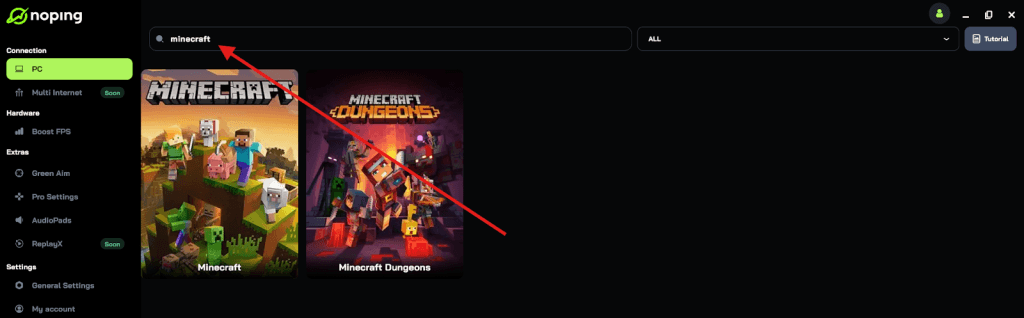
- Once you find Minecraft or Roblox, click on it and, on the next screen, select “Choose automatic” or “Choose manual” and click “Continue”. We recommend choosing automatic, as NoPing’s technology analyzes all routes on a global scale and automatically selects the best option for you.
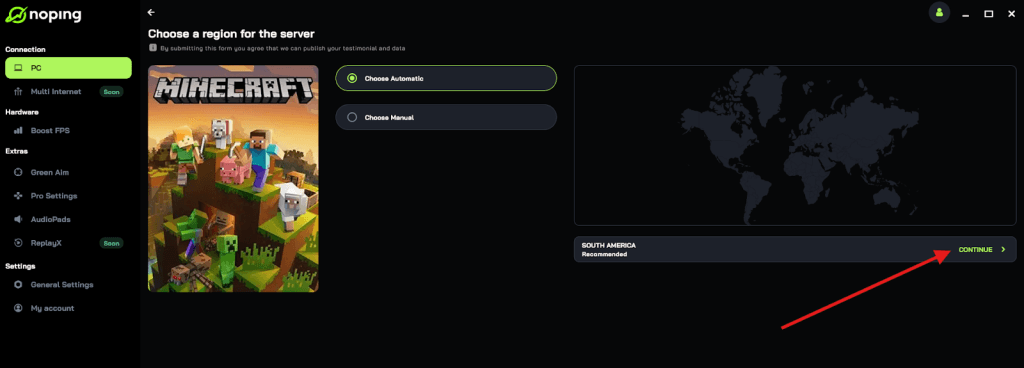
- On the next screen, click on “Optimize Game”.
- And that’s it, you can start playing Minecraft and Roblox with optimized ping!
You can test different servers within NoPing to see which gives you the lowest latency.
Final thoughts: which one should you choose?
If you love building worlds, exploring, and creative freedom without coding, Minecraft is your best pick. It’s structured, peaceful, and endlessly customizable with mods.
If you love creating games, learning to code, and social experiences, Roblox is where you’ll thrive. It’s more dynamic, faster-paced, and full of community interaction.
Ultimately, it’s not really Minecraft vs Roblox. They’re two sides of the same creative coin. Minecraft helps you build your imagination block by block. Roblox helps you build your imagination line by line of code.
Either way, both continue to shape how an entire generation plays, learns, and creates.
And to always play Minecraft and Roblox without worrying about lag, use NoPing! Download now and start your free trial!