

Battlefield 6 errors can hit you harder than a surprise rocket to the face in the middle of a match.
They show up when you launch the game, when you try to join friends, or sometimes right after you finally load into a map.
This guide is here to help untangle that mess with clear explanations and fixes that actually work.
Let’s turn those roadblocks into minor speed bumps so you can get back to doing what really matters. Winning the war, laughing with teammates, and maybe crashing a helicopter in style.
Guide to Fix All Battlefield 6 Errors
Below are the common error types players report, each presented as a short diagnosis and a prioritized set of fixes you can try. I arranged fixes from safest to more intrusive.
DirectX errors (DXGI_ERROR_DEVICE_REMOVED, GetDeviceRemovedReason, device hung)
What it looks like
Game crashes with a DirectX message, black screen, or a sudden exit to desktop.

Source: Reddit
Why it happens
Usually the GPU driver or the GPU itself failed to respond to the game, or the game detected that the GPU device was removed. This can be caused by outdated drivers, unstable GPU overclocks, or driver conflicts.
Fixes to try
- Update your GPU drivers to the latest stable release from AMD or NVIDIA.
- Reinstall DirectX redistributables if the game asks.
- Disable any GPU overclocking and revert power/thermal profiles to defaults.
- In Device Manager, make sure Windows recognizes the GPU correctly; try reinstalling the GPU device.
- If problems persist, do a clean driver install using the vendor clean install option or a tool like DDU then fresh driver.
AMD driver detection error (game says wrong driver or driver not supported)
What it looks like
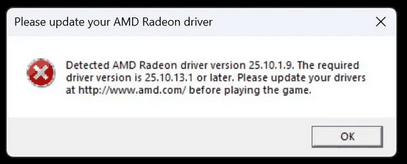
Battlefield 6 refuses to start or reports it cannot detect a compatible AMD driver.
Source: Reddit
Why it happens
Some laptop OEM drivers, driver signature checks, or version checks can make the game think your GPU driver is unsupported.
Fixes to try
- Install the latest AMD driver from the official AMD website rather than OEM drivers.
- For laptops, check both the laptop maker site and AMD; sometimes the OEM vendor driver is required.
- Some users reported registry tweaks to bypass strict version checks, but that is risky. Try driver reinstall and official packages first.
Also read: What is Jitter? Causes, Problems and How to Fix
DICE online error / DICEONLINEERROR_UNKNOWN / Unknown error
What it looks like
You try to join or matchmake and get an error labeled Dice Online Error or an unknown error code. Matchmaking fails or times out.

Source: Reddit
Why it happens
These are typically server side issues, matchmaking backend problems, temporary outages, or routing problems between your network and EA servers.
Fixes to try
- Check EA server status first. If servers are reported down, the only option is to wait.
- Restart the game and the EA app. Simple restarts resolve many transient backend errors.
- Try repairing game files via steam or the EA app.
Secure Boot or anti cheat errors (Javelin / Secure Boot not enabled)
What it looks like
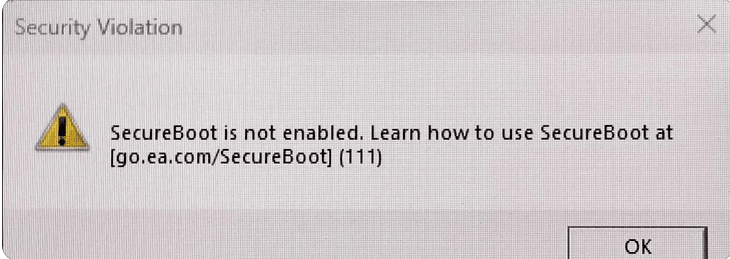
The game will not launch and reports Secure Boot is not enabled or refuses to run due to anti cheat requirements.
Source: Reddit
Why it happens
Battlefield 6 uses a kernel level anti cheat that requires Secure Boot and certain platform integrity features to be enabled on Windows. If Secure Boot is off the game will refuse to run.
Fixes to try
- Reboot into BIOS / UEFI and enable Secure Boot. Save and restart. If you are on a custom OS or dual boot, enabling Secure Boot may need special steps.
- Make sure TPM and Secure Boot settings are set correctly; some systems require updating BIOS to expose these options.
- If you use Linux, Steam Deck or other unsupported platforms, Secure Boot requirement can block the game entirely.
Matchmaking and server queue issues
What it looks like
Long matchmaking times, being stuck on results screen, or getting separated from friends between rounds.
Why it happens
High loads, regional server problems, or bugs in the matchmaking state machine can cause players to be stuck in queues or not join subsequent rounds.
Fixes to try
- Check server region selection and switch to a nearby region if you have options.
- Restart the game client between matches. This often clears stuck states.
- If you join friends, have the party leader invite rather than auto join after rounds.
- Keep an eye on patch notes and server status because developers sometimes deploy fixes to matchmaking quickly. Recent updates have targeted matchmaking improvements.
Error codes like 1:86001S, 1:85008S and similar sign in / auth errors
What it looks like
Specific numeric error codes blocking sign in, joining, or creating sessions.
Why it happens
Authentication, router level filters, or corrupt game files can trigger these codes.
Fixes to try
- Restart PC and router.
- Verify or repair game files.
- Temporarily disable router firewalls, parental controls, or ISP filters that may block authentication packets. Some router firmwares have threat databases that trigger false positives.
- If the code persists, check EA help pages for code-specific guidance and open a support ticket with logs.
Launch failures and crashes (general)
What it looks like
Game crashes on startup or during play without a clear DirectX message.
Fixes to try
- Update Windows and GPU drivers.
- Run the EA app or Steam as administrator.
- Turn off overlays such as Discord, Nvidia overlay, or in-game overlays and see if crashes stop. Overlays sometimes conflict with anti cheat or rendering paths.
- Disable unnecessary USB devices or peripherals that have driver conflicts.
- If nothing works, collect crash logs and submit to EA support.
Also read: How to Increase FPS and Boost Your Gameplay
What Causes These Errors in Battlefield 6?
Short answer: a mix of server side load, modern anti cheat requirements, driver and OS mismatches, and the usual hardware quirks.
Longer answer:
Battlefield 6 is a modern AAA game that ties deeply into system hardware, drivers, platform sign in, and a kernel level anti cheat.
When any layer is out of date or misconfigured the game will refuse to run. On the network side, matchmaking depends on backend services.
If those are overloaded or your ISP route to EA is problematic you see Dice online errors and timeouts. GPU and DirectX errors tend to come from driver mismatches, GPU instability, or Windows graphics stack bugs.
The Secure Boot requirement is a deliberate choice to make anti cheat effective but it creates compatibility friction for some setups. Official EA troubleshooting is a good starting point when errors appear.
How to Avoid Connection Problems in Battlefield 6?
Lag in Battlefield 6 feels like the game is rewriting history in real time.
You shoot first, the server decides your opponent shot earlier, and suddenly you are taking an unexpected nap on the ground.
When the problem is your connection route to the game servers, even a powerful PC cannot save you.
That is where NoPing becomes your best teammate. NoPing optimizes the path between your PC and the Battlefield servers so your data takes the fastest shortcut instead of wandering through slow and crowded routes. The result is a smoother match, lower ping, fewer disconnects, and far less teleporting enemies.
Here’s how to use NoPing to fix network issues in Battlefield 6:
- Sign-up through the website and download NoPing (you can try it for free)
- Open NoPing and search for Battlefield 6 inside the software
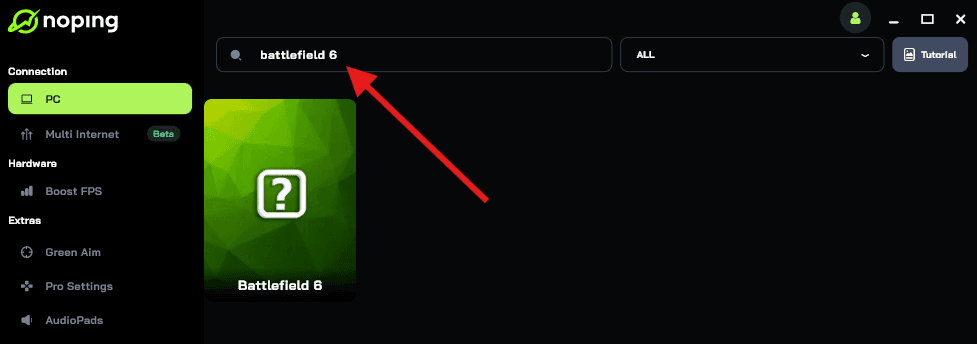
- Once you find Battlefield 6, click on it. Choose your server on the next screen and click on “Optimize Game”.
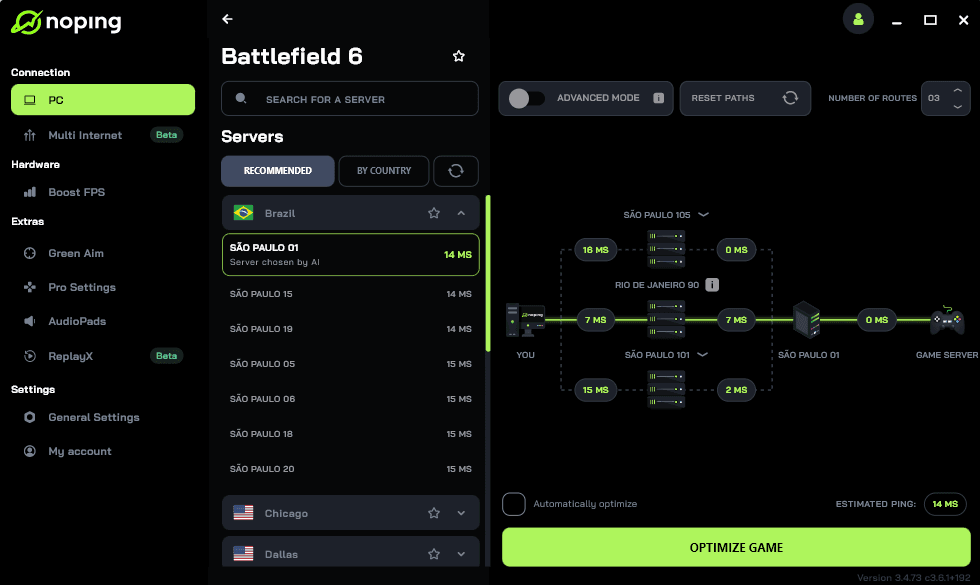
- And that’s it, you can start playing Battlefield 6 with optimized ping!
You can test different servers within NoPing to see which gives you the lowest latency.
FAQ - Battlefield 6 Errors
Q. Should I edit the registry to bypass driver checks mentioned in some threads?
A. Avoid registry edits unless you fully understand them. They can fix a narrow detection problem but can destabilize the system. Try safe fixes first: clean driver install, BIOS update, and official driver packages.
Q. Is Secure Boot safe to enable for gaming?
A. Yes. Enabling Secure Boot is the intended Microsoft workflow for Windows 11 and many games that use kernel anti cheat expect it. If you have a dual boot Linux configuration or custom boot loaders you will need to handle those separately.
Q. When an error shows a numeric code should I open a ticket right away?
A. Do the basic checklist first: restart PC and router, check server status, verify game files, update drivers. If the error persists after these steps, collect logs and open a support ticket with EA including error code, platform, and relevant logs.
Q. Does disabling overlays help?
A. Sometimes. Overlays can hook rendering and input. If you experience crashes, try disabling overlays from Steam, Geforce Experience, Discord or other utilities and test.
Keep software up to date, and when you hit a problem, document what you tried. If the issue is clearly server side check EA’s status page and official channels.
For local driver and DirectX problems follow the safe path: update, clean install drivers, verify game files, and disable overclocks.
Avoid any connection errors in Battlefield 6 with NoPing! Download now and start your free trial!