


Learning how to change your name on Roblox is one of the first things many players look for when they want to refresh their digital identity.
Whether you are tired of a username you picked years ago or just want to match your friends' group tag, the process is straightforward but comes with specific rules and costs that you need to know.
Is there a difference between a Display Name and a Username?
Yes, there is a major difference: your Display Name is free to change every seven days, while your Username costs 1,000 Robux to change.
Think of your Username as your permanent social security number on the platform. It is unique to you, used for logging in, and helps people find you specifically in a search.
On the other hand, your Display Name is how you appear to others in games and on your profile.
While multiple people can have the same Display Name, your Username remains one of a kind.
If you are looking for a quick change without spending money, the Display Name is your best bet.
How can you change your Display Name on Roblox for free?
You can change your Display Name for free by
- heading into your Account Settings
- selecting the edit icon next to your current name
The process is simple and works on almost all devices. If you are on a computer, click the gear icon in the upper right corner of the screen and select Settings.
Under the Account Info tab, you will see your Display Name.
Click the pencil and paper icon next to it, type in your new name, and hit Save. If you are using the mobile app, tap the three dots in the bottom right corner, go to Settings, then Account Info, and follow the same editing steps.
Remember that you can only do this once every seven days. If you make a typo, you are stuck with it for a week.
Also, your Display Name must follow the Roblox Community Standards, meaning no profanity or inappropriate terms.

How do you change your Username using Robux?
To change your Username, you must go to Account Settings and pay a flat fee of 1,000 Robux.
Unlike the Display Name, this change is "permanent" in the sense that it updates your login credentials and your unique identifier.
To do this, navigate to Settings and then Account Info.
Click the edit icon next to your Username. You will be prompted to enter your new desired name and your account password to verify the change.
If you have the 1,000 Robux required, you can click Buy to finalize the process.
Before you commit, ensure you have a verified email address attached to your account.
Roblox requires this for security reasons to prevent unauthorized name changes. It is also worth noting that once you change your Username, your old one is "saved" to your account, so no one else can take it.
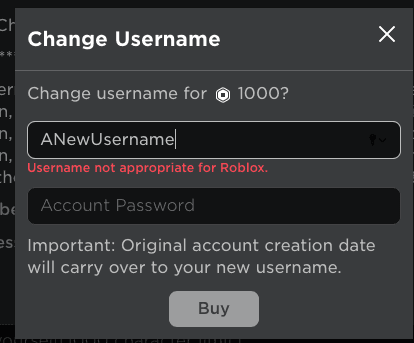
Source: Roblox
What are the naming restrictions and rules you should know?
Roblox requires names to be between 3 and 20 characters long and they cannot include spaces or special characters except for underscores in specific cases.
The platform uses a heavy filtering system. If you try to use a name that is already taken (for Usernames) or one that contains blocked words, the system will not let you save it.
Additionally, you cannot swap names between two accounts you own. If you have an "alt" account with a name you want, you can't simply change the alt's name and then take it for your main account immediately.
There are often protection periods or system restrictions that prevent this kind of sniping.
Why does a name change cost 1,000 Robux?
The 1,000 Robux fee exists to maintain platform stability and prevent users from constantly cycling through identities to avoid being recognized.
In a massive ecosystem like Roblox, tracking millions of users is a technical challenge. If every user changed their unique identifier every day, it would put a significant load on the database and potentially make it harder to moderate bad behavior.
The cost acts as a barrier to ensure that players only change their Username when they are serious about it. For most players, the free Display Name feature satisfies the need for a fresh look without the financial hit.
Also read: The Best Guns in Battlefield 6 By Class: Full Guide
How do you change your name on Roblox on a console?
To change your name while playing on Xbox or PlayStation, you must access the settings menu which will often provide a QR code to complete the process on a mobile device or browser.
Console interfaces are sometimes limited when it comes to account management.
Usually, you will navigate to the More icon or the three dots within the Roblox app on your console, select Settings, and then Account Info.
If the console doesn't allow direct text entry for the name change, it will show a link or a QR code. Scanning this with your phone will take you directly to the mobile browser version of your settings where you can complete the change.
What happens to your old Usernames after a change?
Your previous Usernames are stored in your account history and can still be seen by other players in the search results or on your profile.
Roblox does this for transparency and safety. If a player changes their name, their friends and the moderation team need to be able to see who they were previously.
If you ever want to switch back to an old name, you can, but it will still cost you another 1,000 Robux. You essentially "own" your past names, so no other user can claim them.
Can you get a free Username change through support?
You can only get a free Username change if your current name contains your real life full name or if it was moderated by Roblox by mistake.
In very rare cases, if you accidentally used your real identity as your username when you were younger, you can contact Roblox Support and ask for a privacy-related change. They may grant this once per account.
Other than that, there are no "glitches" or "codes" for free Username changes. Be wary of any website or video claiming otherwise, as these are often phishing scams designed to steal your account.
Play Roblox without lag. Download NoPing now and start your free trial!