

Knowing how to like a game on Roblox is the best way to show support for the developers who create the experiences you enjoy every day.
Whether you are navigating through a complex obstacle course (Obby) or managing a virtual restaurant, a simple thumbs-up can change the trajectory of a game's success.
On a platform with millions of active experiences, user ratings are the primary currency that helps the best content rise to the top.
In this guide, we will explore the exact steps to rate games on every device and why your vote might not be counting.
How do you like a game on Roblox using a PC or Mac?
You can like a game by navigating to its main landing page and clicking the thumbs-up icon located just below the play button.
This is the most common way to interact with the platform. When you are on a computer, the interface provides a clear view of the game's statistics, including the current number of likes and dislikes.
Follow these specific steps:
- Log into your account on the official website.
- Search for the experience you want to rate.
- Click on the game's thumbnail to open its dedicated page.
- Look for the Thumbs Up and Thumbs Down icons.
- Click the Thumbs Up icon to cast your vote.
If the icon turns green, your vote has been recorded. If you see a message stating you need to play the game first, it is because the platform requires at least one session of activity before allowing a rating.
This prevents botting and ensures that only real players are influencing the algorithm.

How do you like a game on Roblox using a mobile device?
To like a game on the mobile app, you must tap the experience to open its details and then locate the rating bar below the play button.
The mobile interface is streamlined for touch, so the icons are slightly larger but tucked away in the experience info section.
Here is the mobile process:
- Open the app on your iOS or Android device.
- Tap the game you want to support.
- Scroll down slightly past the "About" section if you don't see the icons immediately.
- Tap the Thumbs Up icon.

On mobile, connection spikes are more common. If you tap the icon and it doesn't change color or flickers, you might be experiencing packet loss.
This is a situation where your device sends the "Like" command, but the server never receives it. Using NoPing can help stabilize these interactions, ensuring your support for a developer is actually registered on the server side.
Here’s how to use NoPing to fix lag in Roblox:
- Sign-up through the website and download NoPing (you can try it for free)
- Open NoPing and search for Roblox inside the software
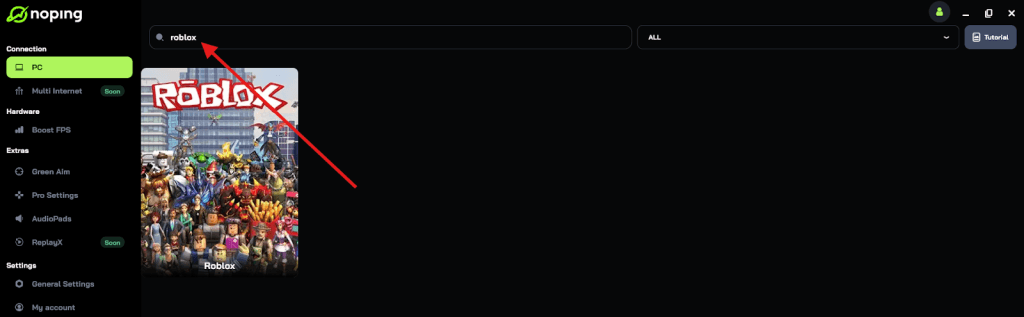
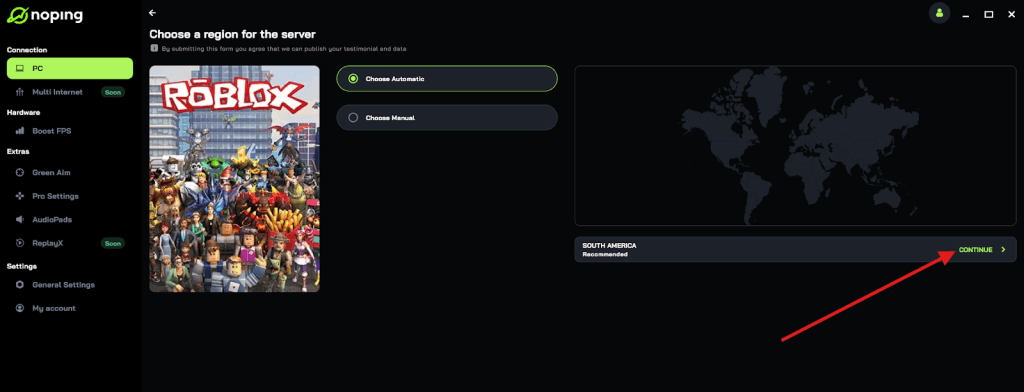
- Once you find Roblox, click on it and, on the next screen, select “Choose automatic” or “Choose manual” and click “Continue”. We recommend choosing automatic, as NoPing’s technology analyzes all routes on a global scale and automatically selects the best option for you.
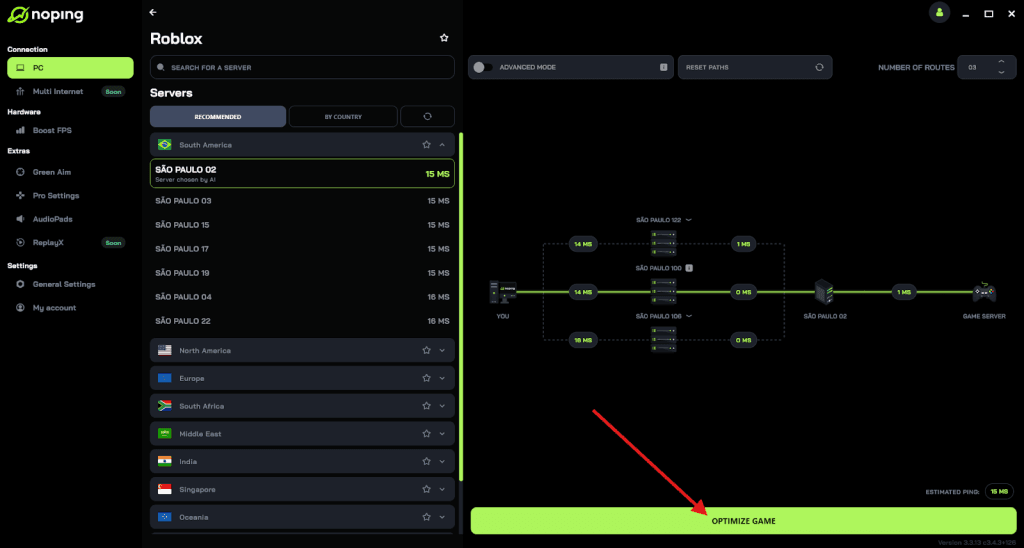
- On the next screen, click on “Optimize Game”.
- And that’s it, you can start playing Roblox with optimized ping!
You can test different servers within NoPing to see which gives you the lowest latency.
How do you like a game on Roblox on PlayStation or Xbox?
Casting a like on a console requires using your controller to highlight the rating section on the experience's dashboard.
Since you aren't using a mouse or touch screen, navigation relies on the directional pad (D-pad) or the analog stick.
Steps for console players:
- Select the game from your home screen or search results.
- On the game's launch page, move the selection cursor down to the rating icons.
- Press the A button (Xbox) or X button (PlayStation) while the thumbs-up is highlighted.
Console versions of the platform often have stricter interface layouts. If you find that the cursor is "jumping" over the rating section, try restarting the app.
This is often a UI glitch related to how the console handles web-based menus.

Why is the like button grayed out or not working?
You cannot like a game if you haven't played it yet or if your account has certain restrictions. Roblox implements these barriers to maintain the integrity of their rating system.
If the icons are non-responsive, it is usually due to one of the following factors:
- Playtime Requirement: You must enter the experience at least once. Some developers even set a specific duration of playtime before a vote can be cast to prevent "review bombing."
- Account Verification: With the new security measures introduced in 2026, including facial age estimation for certain features, unverified accounts may face limitations on social interactions.
- Lag and Latency: If your ping is too high, the request to "Like" the game might time out. High latency doesn't just affect your gameplay: it affects your ability to interact with the platform's database.
- Server Maintenance: Occasionally, the rating system is taken offline for updates.
If you are sure you have played the game and your account is in good standing, the issue is likely your connection.
Also read: Beginner Battlefield 6 Helicopter Control Guide (Mouse + Keyboard)
What is the difference between liking and favoriting a game?
Liking a game is a public vote that influences its ranking, while favoriting a game is a personal bookmarking tool.
While both actions show support, they serve different purposes within the ecosystem.
| Feature | Like (Thumbs Up) | Favorite (Star Icon) |
| Primary Goal | Boosts the game's rating and visibility. | Adds the game to your profile for quick access. |
| Visibility | Public (affects the percentage shown to everyone). | Private/Public (visible on your profile page). |
| Algorithm Impact | High: Helps the game reach the "Popular" or "Top Rated" sorts. | Medium: Shows engagement, but doesn't affect the % score. |
| User Benefit | Helps developers get more traffic. | Saves you from searching for the game every time. |
To favorite a game, simply click or tap the Star icon located next to the like button. You can find all your favorited experiences later by going to your profile and selecting the "Favorites" category.
How do likes affect the Roblox algorithm in 2026?
Likes are a critical metric that the algorithm uses to determine which games deserve a spot on the "Front Page."
In 2026, the platform has become even more data-driven. A high like-to-dislike ratio signals to the system that an experience is high-quality, safe, and engaging.
When a game receives a surge of likes in a short period, it may be placed in the "Up-and-Coming" category.
This exposure is worth millions of potential visits. Conversely, if a game is heavily disliked, the algorithm will hide it from search results to protect the user experience. This is why your single vote matters: it is a piece of data that helps the community filter out low-effort or broken games.
Play Roblox without lag. Download NoPing now and start your free trial!