

Mastering movement in Roblox is the difference between being a casual player and a parkour professional.
Whether you are tackling a 16 stud gap in a difficulty chart obby or trying to outrun someone in a competitive game, the long jump is your most valuable tool.
This guide covers everything from basic physics to frame-perfect glitches that the community has perfected over years of gameplay.
What defines a long jump in Roblox?
A long jump is any jump that exceeds the standard character jump distance by using momentum, physics manipulation, or specific animations.
In the standard Roblox engine, a character without any buffs typically jumps about 10 to 12 studs. When we talk about a long jump, we are referring to techniques that allow you to clear 13, 14, or even 16 studs without using specialized gear or power-ups.
This mechanic relies heavily on the game engine's ability to calculate your position relative to the edge of a part.
Because Roblox uses a specific type of physics simulation, your character has a slight "coyote time" (the ability to jump for a few milliseconds after leaving a ledge) and a momentum system that can be exploited.
Also read: How to Run Roblox at Max Settings With a Laptop
How do you perform a basic long jump?
The basic long jump is all about timing and maximizing your forward velocity before leaving the platform. It does not require glitches, just a high level of precision with your keyboard.
To perform a standard long jump, follow these steps:
- Gain Maximum Speed: Ensure you are walking or sprinting at full speed.
- Use Shift Lock: Go to settings and enable Shift Lock. This fixes your character's orientation to your camera, which is vital for maintaining a straight trajectory.
- The Edge Jump: You must press the spacebar at the very last possible frame before falling. If you jump too early, you lose distance. If you jump too late, you fall.
- Air Control: Once in the air, do not let go of the forward key (W). Moving your camera slightly can also help align your landing.
The difference between a 10 stud jump and a 12 stud jump is often just those last few pixels on the edge of the block.

What is the Laugh Glitch for long jumping?
The Laugh Glitch, often called the Emote Long Jump, is a famous technique used to clear gaps as large as 13 or 14 studs.
It works by resetting the character's state while an animation is playing, which tricks the engine into providing a small momentum boost or altering the hitbox behavior during the leap.
Here is the step by step process for the 2.0 Laugh Glitch:
- Open the chat box and type /e laugh but do not press enter yet.
- Walk toward the edge of the gap.
- Right as you reach the edge, press enter to start the emote.
- Immediately after the animation starts, jump and move forward.
- In some variations, players reset their character or use specific timing with the /e dance emote to achieve similar results.
This technique is common in high-tier obbies where the developers have placed gaps that are technically impossible with standard jumping.
For more technical details on character states, you can visit the Roblox Developer Forum.

Why does the Avatar Type (R6 vs R15) matter?
The physics of your jump changes drastically depending on whether the game uses the R6 or R15 avatar system. This is one of the most debated topics in the Roblox parkour community.
- R6 Avatars: These consist of only six parts. Their hitboxes are simple boxes, making them extremely consistent. Most professional parkour players prefer R6 because the momentum is easier to predict and "ladder flicks" are more reliable.
- R15 Avatars: These have 15 parts and complex animations. While they look better, the multi-part hitboxes can sometimes cause you to "trip" on edges or lose momentum unexpectedly.
If you are struggling with long jumps, check the game settings. If the game allows you to choose, R6 is almost always the superior choice for movement precision.
Also read: 14 Fun Roblox Games You Need to Play
How do you do a Wraparound jump?
A wraparound is a specific type of long jump where you jump from one side of a wall, go around it in mid-air, and land on the other side. This is a staple in games like Tower of Hell.
To execute a wraparound:
- Turn on Shift Lock (this is non-negotiable for this trick).
- Stand at the very corner of the block.
- Jump outward, away from the wall.
- While in the air, quickly flick your camera 180 degrees while holding the side movement key (A or D) and the forward key (W).
- Curve your movement back toward the platform on the other side.
This maneuver requires you to understand how "air strafing" works in Roblox. By rotating your camera and holding forward, you can slightly change your trajectory in mid-air.
How can you practice these techniques effectively?
You cannot master the long jump by reading about it; you need muscle memory. There are specific games designed solely for practicing these mechanics.
- Long Jump Trainers: Search for "Stud Long Jump" in Roblox. These games have marked distances (10 studs, 11 studs, etc.) so you can see exactly how far you are reaching.
- Obby Creator: You can build your own practice courses here. Set up a gap, try to clear it, and if you succeed, move the block one stud further.
- Frame Rate Matters: Using an FPS unlocker can help. While Roblox is capped at 60 FPS by default, higher frame rates allow for smoother input registration, making the "edge jump" easier to hit. You can find information on performance optimization at Roblox Support.
How does NoPing improve your Roblox parkour?
NoPing is a software designed to optimize your connection by finding the shortest and most stable route between your computer and the game server.
For a Roblox player, this means more than just a lower number in the performance stats.
Using NoPing reduces the "lag compensation" issues that plague parkour games. When your path to the server is optimized, your inputs (like that crucial spacebar press at the edge of a 14 stud gap) are transmitted faster and with more consistency.
This eliminates the "dead jump" phenomenon and ensures that your momentum remains fluid.
By reducing jitter and packet loss, NoPing provides the stable environment needed to execute glitches and high-precision jumps every single time.
Here’s how to use NoPing to fix lag in Roblox:
- Sign-up through the website and download NoPing (you can try it for free)
- Open NoPing and search for Roblox inside the software
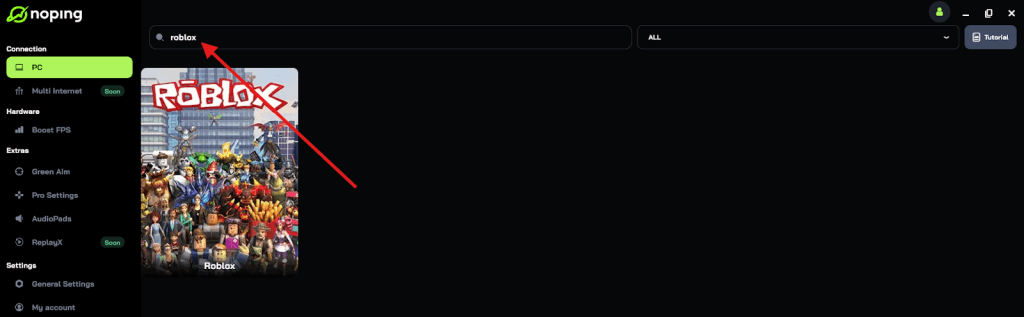
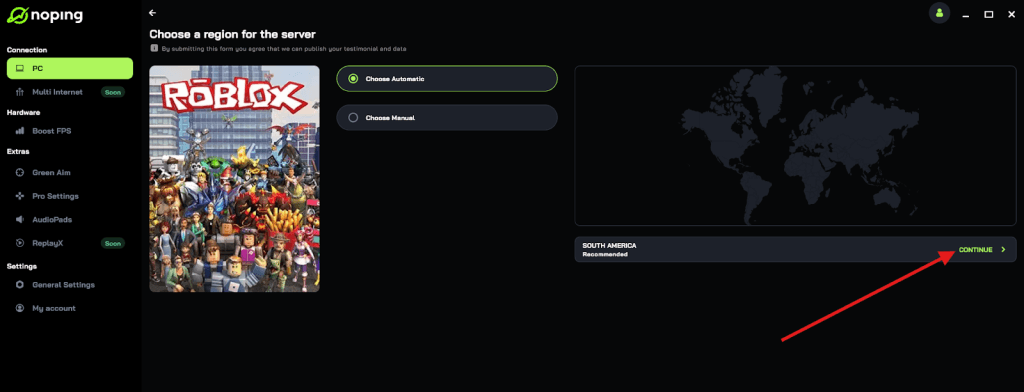
- Once you find Roblox, click on it and, on the next screen, select “Choose automatic” or “Choose manual” and click “Continue”. We recommend choosing automatic, as NoPing’s technology analyzes all routes on a global scale and automatically selects the best option for you.
- On the next screen, click on “Optimize Game”.
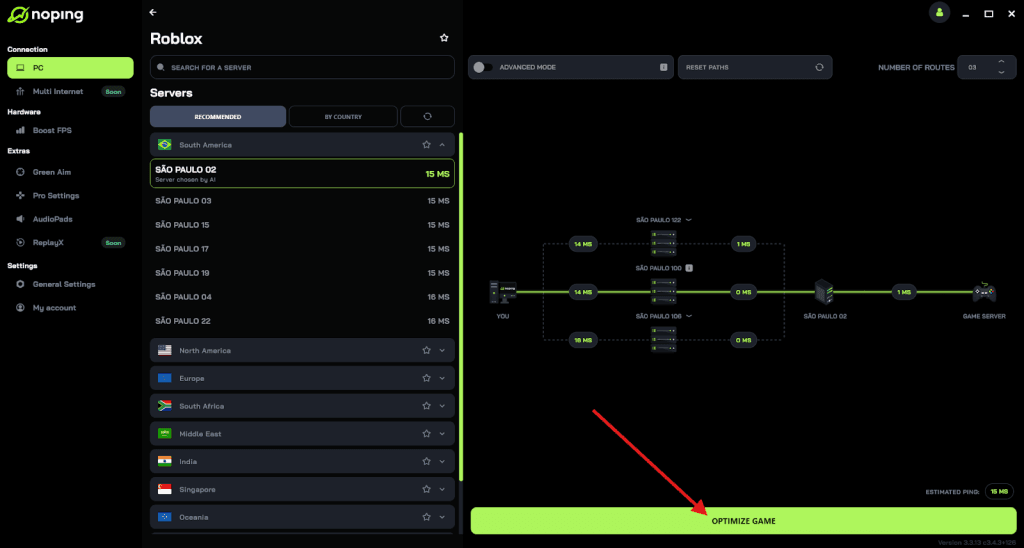
- And that’s it, you can start playing Roblox with optimized ping!
You can test different servers within NoPing to see which gives you the lowest latency.