


If you are one of the millions of MMORPG fans outside of Asia eagerly diving into NCSoft’s massive sequel, you are probably already asking: "Is it actually possible to play AION 2 without lag?"
The short answer is yes, mostly, but you have to be smart about it. Since the game’s initial launch is focused solely on the Asian market, players connecting from North America, Europe, or South America are fighting an uphill battle against the sheer physics of distance.
This guide is here to break down the reality of connecting halfway across the globe and give you the best, most practical steps you can take to reclaim your ping and enjoy the world of Atreia 200 years later.
The Problem: Currently, AION 2 Only Has Servers in Korea and Taiwan
To understand why you are experiencing lag, you need to understand where your game data is traveling.
As of the initial rollout, NCSoft has logically decided to launch AION 2 exclusively on servers located in its domestic markets: Korea (KR) and Taiwan (TW).
This is a common strategy for major Asian developers, allowing them to thoroughly test, stabilize, and iterate on the core game systems before attempting a massive global rollout.
The global release for regions like North America (NA) and Europe (EU) is generally slated for some time later, with optimistic estimates pointing toward mid-2026.
This staggered release creates a significant, unavoidable hurdle for international players: geographical distance.
When you log into an MMORPG, data packets travel from your computer to the game server and back again.
The time it takes for this round trip is measured in milliseconds (ms) and is known as latency, or more commonly, "ping."
In a perfect world, a ping of under 50ms is considered excellent, offering near-instantaneous response times.
For those of us connecting from continents away—say, from Los Angeles or London—to a server in Seoul or Taipei, the data packet has to cross oceans, jump through dozens of intermediary network nodes operated by various internet service providers (ISPs), and travel thousands of miles.

How to Reduce Lag in AION 2?
Playing an Asian-centric MMORPG from the West requires a multi-pronged approach.
You need to address the distance problem (network routing) and simultaneously fix any issues on your home network and PC (local optimization).
Here are the essential tips to reduce your AION 2 lag and improve your overall performance.
1. Use NoPing to optimize your route to the servers
This is arguably the most critical step you can take to bridge the continental gap.
Since your data has to cross so many different networks before it reaches Korea or Taiwan, your standard ISP connection often defaults to a path that is busy, overloaded, or simply inefficient.
This is where NoPing comes in.
NoPing operates by routing your connection through a private, optimized network of servers, often referred to as global nodes.
Instead of your data traveling a meandering, congested path from, say, New York to a server in Europe, then to Japan, and finally to Taiwan (a highly inefficient example, but you get the idea), NoPing's technology analyzes all possible routes in real time.
It then sends your data onto the fastest, least congested path, often cutting out unnecessary stops and minimizing the overall travel time.
Here’s how to use NoPing to reduce lag in AION 2:
- Sign-up through the website and download NoPing (you can try it for free)
- Open NoPing and search for AION 2 inside the software
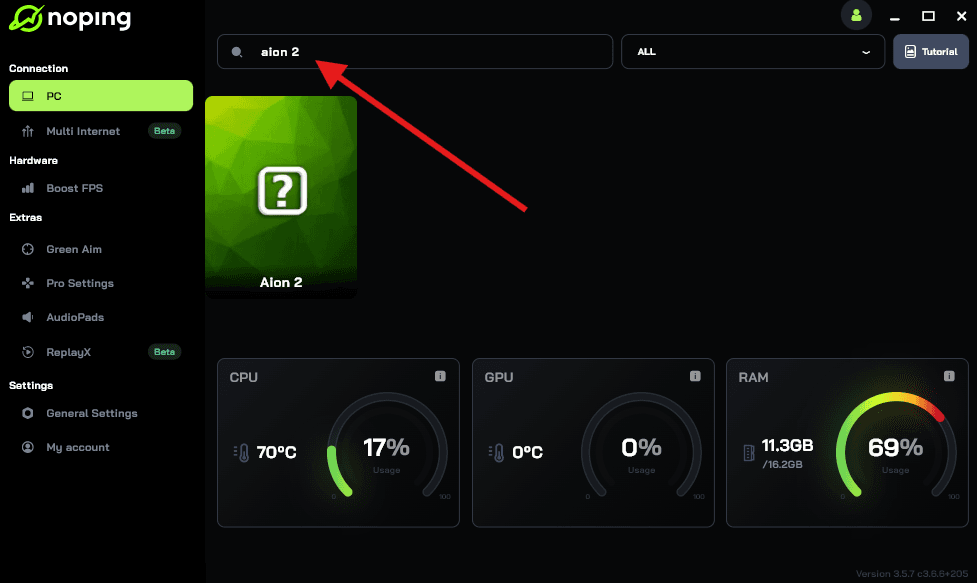
- Once you find AION 2, click on it. Choose your server on the next screen and click on “Optimize Game”.
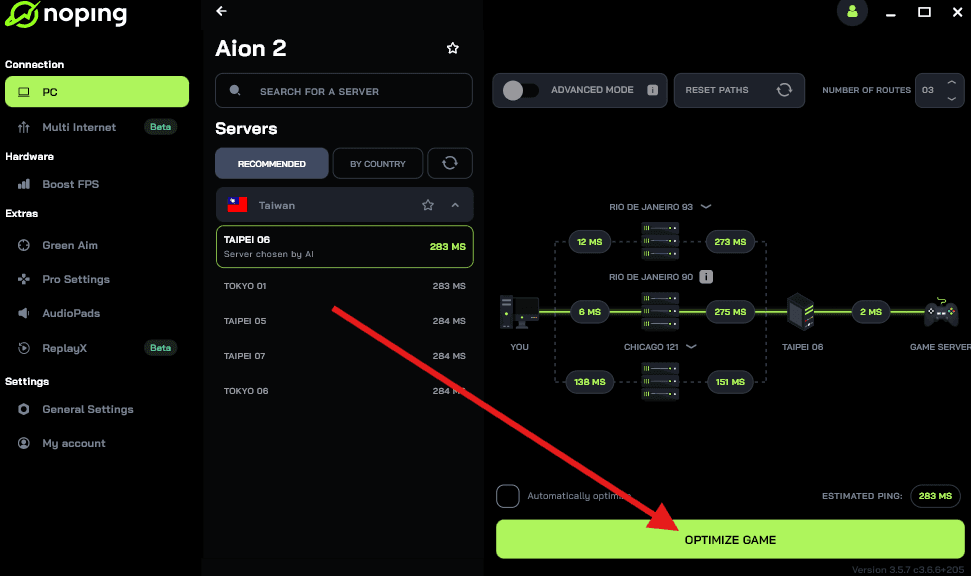
- And that’s it, you can start playing AION 2 with optimized ping!
You can test different servers within NoPing to see which gives you the lowest latency.
Also read: How to Play AION 2 Worldwide (outside Korea and Taiwan)
2. Switch to a Wired Ethernet Connection
This tip is foundational for any serious online gaming, but it is especially important when you are already dealing with high base latency.
Wi-Fi is incredibly convenient, but it is inherently less stable and slower than a direct wired connection.
The fix: Use an Ethernet cable. Plug your PC directly into your router or modem. A wired connection guarantees a stable, high-bandwidth link with the lowest possible local latency, ensuring that any lag you experience is due to the server distance, not your living room setup.
3. Manage Your Connection and Bandwidth (Close Background Apps)
Your high ping is not always entirely the fault of the long-distance network or the server.
Sometimes, the problem is that your PC or other devices in your home are silently stealing your bandwidth.
The Bandwidth Thieves
Before you launch AION 2, do a quick audit of what is running in the background.
Are you streaming Netflix on a second monitor? Is Steam downloading a massive update for another game? Is your browser open with a dozen active tabs?
Even seemingly harmless programs can consume resources and hog your bandwidth.
Windows itself might be the culprit, attempting to run a background update at an inconvenient time.
Actionable Steps:
- Close Browsers: Exit or minimize heavy browsers like Chrome, especially if you have video or streaming tabs open.
- Pause Downloads: Go into your game launchers (Steam, Epic, etc.) and pause any background downloads.
- Check Windows Updates: Ensure Windows is not scheduled to download or install updates during your play session.
- Limit Streaming: If you live with others, ask them to pause high-definition streaming or large file transfers while you are playing. High latency makes packet loss worse, and packet loss is often caused by trying to shove too much data through a pipe that is already far too long.
By cleaning up your digital environment, you ensure that 100% of your available bandwidth and system resources are dedicated to maintaining a stable connection to the AION 2 server.
4. Optimize In-Game Graphics Settings to Prevent Stuttering
Lag is often used as a blanket term for any kind of in-game slowdown, but it is important to distinguish between network lag (high ping/latency) and client-side lag (low FPS/stuttering).
AION 2 uses Unreal Engine 5, which means it can be quite demanding on your PC hardware. If your frames per second (FPS) drop during a busy battle or in a crowded city, it feels exactly like network lag, making your input feel delayed and unresponsive.
To mitigate this, you need to lighten the load on your graphics card (GPU) and central processing unit (CPU).
Also read: What is Geo-Blocking and How Does it Affect Online Gaming?
Graphics Adjustments to Prioritize Performance:
- Lower Shadow Quality: Shadows are notoriously resource-intensive. Reducing this setting often yields massive FPS gains with minimal visual degradation.
- Reduce Texture and Model Detail: While AION 2 is a beautiful game, lowering texture quality, especially in crowded PvP/PvE zones, reduces memory and GPU strain.
- Turn Off Post-Processing Effects: Effects like bloom, lens flare, and motion blur add computational cost. Disabling these can drastically smooth out performance and make the game feel much more responsive.
- Set Frame Rate Limit to Unlimited (or 60 FPS Stable): While it might seem counterintuitive, you want your game client running as smoothly as possible. A consistent, high FPS helps mask the effects of high network latency because the game state updates more frequently on your end.
By focusing on stable FPS, you eliminate half of the "lag" problem, making the remaining high ping much easier to tolerate.
5. Tweak System and Router
These are small changes, but they can add up, especially if your local network is complex or slightly outdated.
Restart and Refresh
The classic IT advice is often the most effective: restart your hardware. Your modem and router accumulate cached data and can become sluggish over time.
Before a serious gaming session, unplug your modem, wait 60 seconds, plug it back in, and then repeat the process for your router.
This simple reboot clears up minor memory errors and forces the device to re-establish a fresh, clean connection with your ISP.
Update Drivers
Ensure your network adapter drivers and graphics drivers are fully up to date.
Outdated network drivers can sometimes process data inefficiently, leading to slow transfers and higher latency, while outdated graphics drivers are a common source of client-side stuttering.
Consider Changing Your DNS
The Domain Name System (DNS) is like the phonebook of the internet. When you connect to a server, your ISP’s default DNS translates the server name into an IP address. Sometimes, your ISP’s DNS is slow.
Switching to a public, optimized DNS service like Google DNS (8.8.8.8 and 8.8.4.4) or Cloudflare (1.1.1.1) can slightly speed up that initial connection process. While this does not affect in-game ping dramatically, a faster initial connection can contribute to overall network snappiness.
6. Play Smart: Embrace the Off-Peak Hours
This tip requires planning, but it is completely free and highly effective. Network congestion is a real factor.
The internet is busiest during "peak" hours—evenings in your local time zone (when everyone is home from work and school streaming, downloading, and gaming) and also peak hours in the server’s local time zone (when the majority of Korean and Taiwanese players are active).
The Sweet Spot:
By playing during off-peak hours, you bypass two types of congestion:
- Local Congestion: You avoid the busiest hours of your local ISP, meaning your data has a clearer path to the international backbone.
- Server Congestion: You avoid the most crowded hours on the AION 2 servers themselves. Less load on the game server means it can process your commands faster, slightly offsetting the distance delay.
If you are on the US West Coast, playing late at night or early in the morning might coincide with a relatively quiet time on the Asian servers.
Finding this "sweet spot" of low local traffic and low server traffic can be the difference between a frustrating night and a smooth grinding session.
Ultimately, playing AION 2 outside of Asia requires managing expectations. You will likely never achieve the buttery-smooth 20ms ping of a local player.
However, by combining NoPing with meticulous local and client-side adjustments, you can successfully shave off enough latency and stabilize your connection to make the combat manageable, the dungeons enjoyable, and your progression achievable.
Until the global servers finally grace us with their presence in the West, these strategies are your best bet for soaring through the skies of AION 2.
Download NoPing now and play AION 2 with reduced ping and optimized FPS! Start your free trial!