

Losing access to your virtual world is a frustrating experience, but learning how to recover Roblox account access is often a matter of following the right security protocols.
Whether you simply forgot a password or someone managed to bypass your security settings, the platform provides several avenues to get you back into the game.
In this guide, we will walk through every possible scenario: from standard password resets to dealing with compromised accounts and lost two-factor authentication.
Can you reset your password if you still have your email?
Yes, resetting your password via a verified email address is the quickest and most common way to regain access.
This method works as long as you still have control over the inbox linked to your Roblox settings.
If you are stuck on the login screen, follow these steps to trigger a reset:
- Navigate to the Roblox Login page.
- Click on the option labeled Forgot Password or Username?
- Ensure the Password tab is selected.
- Enter your email address in the provided field and hit Submit.
- Check your inbox for an email from Roblox (usually from [email protected]).
- Click the Reset Password button inside that email.
- Enter a new, strong password and confirm it to finish.
If the email does not show up within a few minutes, check your spam or junk folders. Sometimes, automated emails are filtered out by aggressive security settings.
Adding the official Roblox email address to your contacts can help ensure these messages reach you.
It is also important to note that the link provided in the reset email is temporary; if you wait too long to click it, you will need to start the process over.

What if you want to use your phone number instead?
You can absolutely recover your account using a mobile number, provided you previously linked and verified it in your account settings.
This is a great alternative for players who do not check their email frequently or have lost access to their email provider.
The process is very similar to the email method:
- Go to the Forgot Password page.
- Select the Phone tab.
- Select your country code from the dropdown menu.
- Enter your phone number and click Submit.
- Wait for a six-digit code to arrive via SMS.
- Enter that code on the Roblox site and follow the prompts to set a new password.
Keep in mind that standard text messaging rates may apply depending on your carrier. If you do not receive the code, ensure your phone is capable of receiving international SMS, as Roblox's verification servers sometimes send messages from different regions.
How do you find a forgotten username?
You can recover your username by using the same "Forgot Password or Username" tool, which will send a list of all accounts associated with your contact info.
Many players have multiple alt accounts, and it is easy to mix them up over time.
To see which usernames are tied to your info:
- Visit the recovery page.
- Click the Username tab.
- Enter your verified email or phone number.
- Click Submit.
- Open the email sent by Roblox to see a list of every username linked to that address.
If you have never verified an email or phone number, finding your username becomes much harder.
In that case, you might need to check old browser history or search for your profile through a friend's account.
Is it possible to recover an account without email or phone access?
Yes, but it requires reaching out to the support team and providing specific proof of ownership.
This is often called "Hard Mode" recovery because it involves manual verification by a human agent rather than an automated system.
If you never added an email or if a hacker changed your contact info, you should:
- Enter your birth date to verify you are old enough to use the form.
- Provide a current email address where the support team can reach you.
- Under Issue Details, select the device you usually play on.
- For the Type of Help Category, select Account Hacked or Can't Log In.
- In the description box, explain that you have lost access to your original contact methods.
The key here is proof. Roblox agents will look for "First Email" or billing information.
If you ever bought Robux or a Premium subscription, mentioning the last four digits of the credit card used or the email address on the PayPal account can verify you are the owner. Gift card codes used on the account are also excellent proof.
What should you do if your account was hacked?
You must act immediately by changing your password and contacting support if you see unauthorized changes to your avatar or currency.
A compromised account can lead to the loss of rare items or "Limiteds" that have high value in the community.
If you still have access but suspect someone else is logging in:
- Go to Settings and then Security.
- Select Sign Out of All Other Sessions at the bottom of the page.
- Immediately change your password to something unique.
- Check your email and phone number settings to ensure the hacker did not add their own.
- Turn on Two-Step Verification if it was not already active.
Be prepared to wait 24 to 72 hours for a response. Do not send multiple tickets for the same issue, as this can actually slow down the response time by pushing your request to the back of the queue.
Why is Two-Step Verification (2SV) blocking you?
Two-step verification is meant to be a safety net, but it can become a barrier if you lose your phone or delete your authenticator app.
Without the code, Roblox will not let you log in even if your password is correct.
If you are stuck at the 2SV screen:
- Try to find your Recovery Codes. When you first set up 2SV, Roblox gives you a list of one-time use codes to save.
- If you don't have those, look for other 2SV methods you might have enabled, like email verification.
- If all else fails, you must contact Roblox Support.
Explain to the support team that you have lost access to your 2SV device. They will likely ask for billing information or the original email used to create the account to verify your identity before disabling the security feature for you.
Can you appeal a banned or deleted account?
Yes, if your account was moderated for a rules violation, you have a window of time to file an appeal.
This is not the same as a forgotten password, but it is a common reason why players find themselves unable to log in.
To appeal a moderation action:
- Select Moderation as the help category.
- Choose Appeal Account as the subcategory.
- Provide a clear and polite explanation of why you believe the ban was a mistake.
You must submit your appeal within 30 days of the moderation action. If you wait longer, the account may be permanently deleted and unrecoverable.
Be honest in your appeal; the moderation team has access to chat logs and activity history.
How do you prevent future account loss?
Prevention is always better than recovery, and keeping your account secure involves more than just a strong password.
In the modern gaming landscape, session hijacking and phishing are more common than traditional hacking.
To stay safe, follow these rules:
- Use a Passkey: These are more secure than passwords and use your device's biometric data (like FaceID or fingerprints) to log you in.
- Never share your .ROBLOSECURITY cookie: This is a code hidden in your browser that allows anyone to log into your account without a password or 2FA.
- Avoid "Free Robux" sites: These are almost always phishing scams designed to steal your credentials.
- Keep your connection stable: Using NoPing can help maintain a stable connection to Roblox servers. While NoPing is primarily for reducing lag and improving ping, a stable connection prevents frequent disconnects that might force you to re-enter your login details on potentially unsafe public networks.
Here’s how to use NoPing to fix lag in Roblox:
- Sign-up through the website and download NoPing (you can try it for free)
- Open NoPing and search for Roblox inside the software
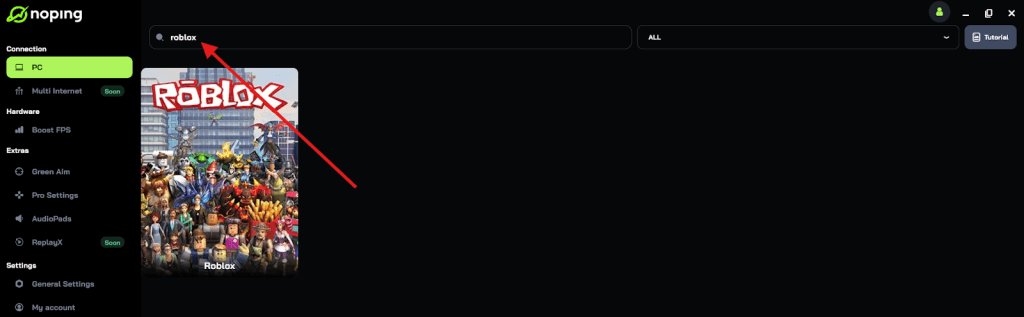
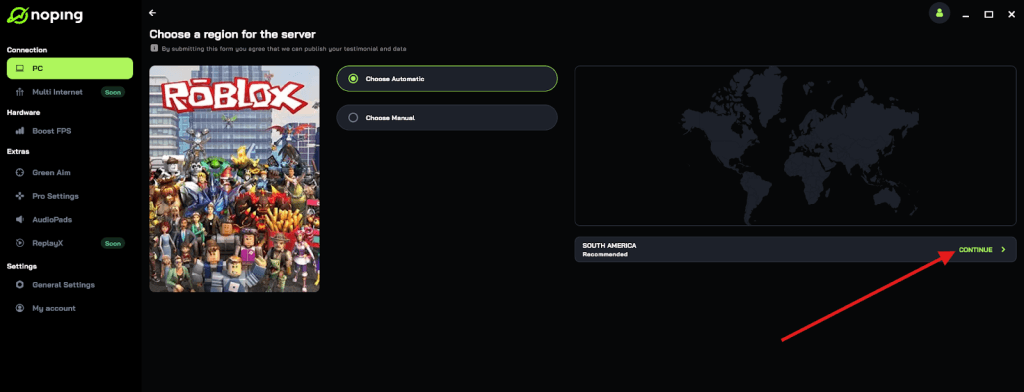
- Once you find Roblox, click on it and, on the next screen, select “Choose automatic” or “Choose manual” and click “Continue”. We recommend choosing automatic, as NoPing’s technology analyzes all routes on a global scale and automatically selects the best option for you.
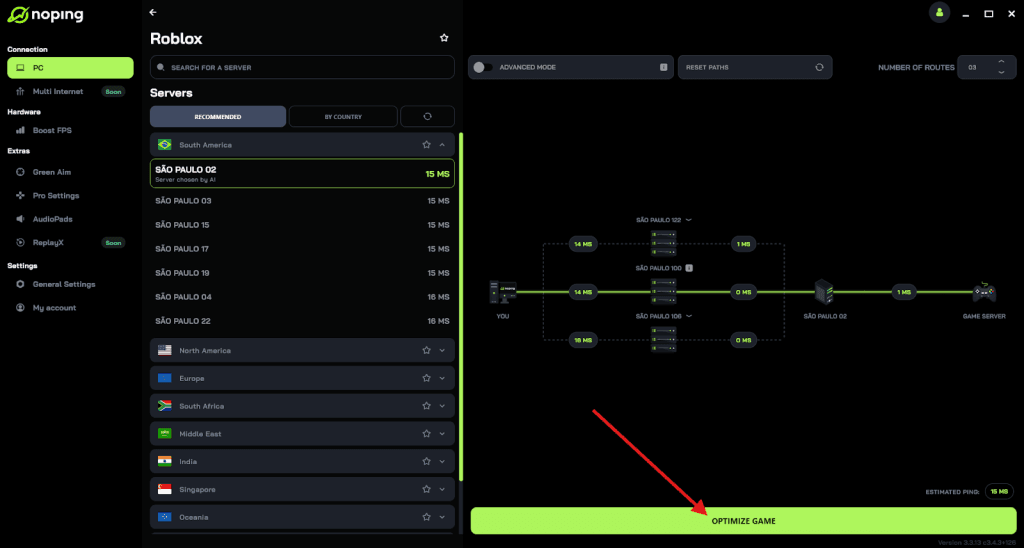
- On the next screen, click on “Optimize Game”.
- And that’s it, you can start playing Roblox with optimized ping!
You can test different servers within NoPing to see which gives you the lowest latency.
Additionally, always ensure your linked email address has its own form of two-factor authentication. If your email is compromised, your Roblox account is effectively theirs as well.
Summary Checklist for Recovery
If you are currently locked out, here is your immediate action plan:
- Try the automated Password Reset first.
- Check your SMS if you have a phone linked.
- Search your email inbox for any old Roblox receipts or notifications.
- Gather proof of ownership, such as billing dates or gift card codes.
Recovering a Roblox account takes patience, especially when dealing with human support agents.
Provide the information they ask for clearly and concisely, and you will likely see your avatar again soon.
Play Roblox without lag. Download NoPing now and start your free trial!