


For US players using Comcast Xfinity, Spectrum, AT&T Fiber, Verizon Fios, T-Mobile Home Internet, CenturyLink, Cox, or Optimum, having a fast internet plan does not necessarily guarantee low ping in Rainbow Six Siege X. The route your ISP uses to reach the game server can matter just as much as raw download and upload speed.
NoPing is designed to optimize this connection. Multi Connection uses five parallel AI-powered routes simultaneously for game traffic, while Multi Internet can combine up to six physical internet connections in parallel. Boost FPS focuses on system performance, reducing unnecessary background resource usage and helping maintain more consistent frame times.
For competitive Rainbow Six Siege X players, the objective is simple: reduce network instability and maintain a consistent connection throughout ranked matches.

Rainbow Six Siege X Routing and Ping in the US in 2026
Rainbow Six Siege X is particularly sensitive to latency, jitter, packet loss, and sudden routing changes.
Its competitive network environment includes BattlEye anti-cheat, MouseTrap input-detection systems, and 60 Hz ranked servers. At 60 Hz, the server processes updates approximately every 16.7 milliseconds, making unstable connections especially noticeable during fast engagements.
Even when average ping looks acceptable, sudden latency spikes or packet loss can affect the consistency of a ranked match.
Why Is My Rainbow Six Siege Ping High?
High Rainbow Six Siege ping is not always caused by slow internet.
Common causes include:
- Poor ISP routing
- Inefficient peering
- Congested network hops
- Packet loss
- High jitter
- Peak-hour congestion
- Wi-Fi instability
- 5G latency variation
- Distance from the selected Siege server region
- Cable-modem retransmissions
This explains why a player with a fast connection can still experience lag or unstable ping.
A speed test primarily measures bandwidth and latency toward the test server. Rainbow Six Siege traffic may travel through an entirely different network path.
Rainbow Six Siege Ping on Xfinity, Spectrum, AT&T Fiber, Verizon Fios, and Other US ISPs
Network performance in Rainbow Six Siege X can vary significantly depending on your ISP, location, server region, and time of day.
Comcast Xfinity
Comcast Xfinity can provide strong connectivity to Rainbow Six Siege servers, particularly when the selected region has efficient peering.
However, congestion at exchange or peering points can increase jitter and latency during peak evening hours.
If your Rainbow Six Siege ping increases at roughly the same time every night, ISP congestion or routing changes may be contributing to the problem.
Spectrum
Spectrum users can experience similar routing issues.
Because many Spectrum connections use cable infrastructure, packet retransmissions and local network congestion can also contribute to latency spikes and packet loss.
A connection can therefore have sufficient bandwidth for gaming while still producing unstable Rainbow Six Siege performance.
AT&T Fiber and Verizon Fios
Fiber connections such as AT&T Fiber and Verizon Fios generally provide strong baseline latency and stability.
However, fiber does not eliminate internet routing problems.
Your traffic still needs to travel across multiple networks before reaching the game server, meaning inefficient peering or congestion can still cause high ping, jitter, or packet loss.
CenturyLink and Quantum Fiber
CenturyLink and Quantum Fiber performance can vary according to regional infrastructure and peering.
Players should compare multiple Rainbow Six Siege server regions instead of assuming the geographically closest server will always provide the most stable route.
T-Mobile Home Internet
T-Mobile Home Internet can provide enough bandwidth for Rainbow Six Siege X, but fixed 5G connections may experience greater latency variation than wired fiber or cable.
Competitive players should pay particular attention to jitter and packet-loss spikes rather than looking exclusively at average ping.
Cox and Optimum
Cox and Optimum users can also encounter regional routing differences and peak-hour congestion.
The most important factor is the actual route between your connection and the Rainbow Six Siege server rather than the advertised speed of your internet plan.
How NoPing Optimizes Rainbow Six Siege Routes
NoPing Multi Connection sends game traffic across five parallel AI-powered routes simultaneously rather than depending exclusively on the default route selected by your ISP.
This creates alternative paths when a route becomes congested or develops latency instability.
The objective is not simply to reduce the ping number displayed on screen. Route optimization can also target:
- Jitter
- Packet loss
- Latency spikes
- Route instability
- Congested network hops
- Peak-hour routing problems
For competitive Rainbow Six Siege X, connection consistency can be just as important as average latency.
What Is NoPing Multi Connection?
Multi Connection is NoPing's routing technology that uses five parallel AI-powered routes simultaneously for game traffic.
Instead of depending on a single network path, multiple routes remain active so the system can use available paths according to network conditions.
This is particularly useful when your ISP's default Rainbow Six Siege route becomes congested or unstable.
Is Multi Connection Just a Backup Route?
No.
Multi Connection does not simply keep four routes inactive while waiting for the primary connection to fail.
Five routes operate simultaneously, allowing NoPing to optimize game traffic without relying exclusively on a single path.
What Is NoPing Multi Internet?
Multi Internet can use up to six physical internet connections in parallel.
Depending on the connections available to the player, this can include combinations such as:
- Comcast Xfinity
- Spectrum
- AT&T Fiber
- Verizon Fios
- T-Mobile 5G
- Mobile hotspot
- Another broadband connection
Multi Internet is designed around simultaneous connectivity rather than conventional backup-only or failover behavior.
For players with more than one available internet connection, this reduces dependence on a single ISP path.
Can Multi Internet Help Rainbow Six Siege X?
Multi Internet can be particularly useful when one available connection suffers from temporary congestion, jitter, packet loss, or unstable routing.
For example, a player with a wired broadband connection and another available internet connection can use Multi Internet instead of relying entirely on one network path.
The effectiveness depends on the quality of the available connections, location, ISP routing, and Rainbow Six Siege server region.
Rainbow Six Siege X, BattlEye, and NoPing
Rainbow Six Siege uses BattlEye as part of its anti-cheat environment.
NoPing operates at the network-routing layer. It is designed to optimize the path game traffic takes across the internet rather than modifying Rainbow Six Siege game files.
This distinction is important.
Network route optimization should not be confused with modifying the game client, game memory, input systems, or anti-cheat components.
Players should always use supported software and avoid tools designed to manipulate game files or bypass anti-cheat protections.
Rainbow Six Siege X, MouseTrap, and Network Stability
MouseTrap is designed to address unauthorized input-device behavior in Rainbow Six Siege.
It serves a different purpose from network route optimization.
NoPing focuses on the network path between the player and game infrastructure. It does not exist to modify or bypass MouseTrap.
For legitimate players, the goal of route optimization is straightforward: maintain stable network conditions with lower jitter, packet loss, and latency variation.
Boost FPS for Rainbow Six Siege X
Network optimization addresses only one part of competitive gaming performance.
A stable internet connection cannot prevent every FPS drop, frame-time spike, or CPU bottleneck.
Background applications, overlays, Windows processes, CPU contention, and unnecessary system workloads can contribute to stuttering during demanding moments.
NoPing Boost FPS is designed to optimize system resources and reduce unnecessary background workload.
Can Boost FPS Improve Rainbow Six Siege 1% Lows?
Boost FPS can help improve system consistency when background applications or system processes are contributing to frame-time drops.
This can be particularly relevant during:
- Ranked gunfights
- High-action rounds
- Utility-heavy engagements
- CPU-intensive situations
- GPU-heavy scenes
- Moments with multiple overlays running
- Competitive matches where frame-time consistency matters
Actual FPS improvements depend on the player's CPU, GPU, RAM, Windows configuration, drivers, graphics settings, and existing background processes.
Boost FPS is included with NoPing plans and can be combined with Multi Connection and Multi Internet.
How to Reduce Rainbow Six Siege Ping
If you are experiencing high ping or lag in Rainbow Six Siege X, start by identifying whether the problem comes from your local network or the route outside your home.
Useful steps include:
- Use Ethernet instead of Wi-Fi when possible.
- Stop unnecessary downloads and uploads.
- Close bandwidth-heavy background applications.
- Check packet loss.
- Monitor jitter.
- Compare Rainbow Six Siege server regions.
- Restart your modem and router when local instability appears.
- Test outside peak ISP hours.
- Compare your default ISP route with an optimized gaming route.
Do not evaluate your connection using average ping alone.
A 30 ms connection with frequent jitter and packet-loss spikes can feel worse than a stable connection with slightly higher average latency.
How to Test NoPing With Rainbow Six Siege X
The best way to determine whether NoPing improves your connection is to perform a controlled before-and-after test.
First, play Rainbow Six Siege X without route optimization and record:
- Average ping
- Jitter
- Packet loss
- Latency spikes
- Connection stability
- Performance during gunfights
Then activate NoPing and repeat the test using the same server region and similar network conditions.
Testing at approximately the same time of day is important because ISP congestion can change significantly between daytime and peak evening hours.
NoPing offers a one-day free trial, allowing players to test the available features on their own connection.
Which US Rainbow Six Siege Server Should I Use?
The best Rainbow Six Siege server is usually the one that provides the lowest stable latency rather than simply the geographically closest location.
East Coast players should generally start by testing eastern US servers, while West Coast players should test western US servers.
Players in central states should compare available regions because ISP peering can make a more distant server perform better than expected.
The best server can depend on:
- Physical location
- ISP
- Peering
- Time of day
- Network congestion
- Packet loss
- Jitter
- Current game infrastructure
Test the available regions instead of assuming one server will always provide the best connection.
Why Does My Rainbow Six Siege Ping Increase at Night?
If your Rainbow Six Siege ping becomes worse during the evening, peak-hour network congestion may be responsible.
Residential ISPs handle substantially more traffic during evening hours. Congested local infrastructure, exchange points, or peering links can increase latency and jitter even when your internet speed remains high.
This is why some players experience stable Siege ping during the afternoon but latency spikes during evening ranked sessions.
Alternative routing can help when the congestion exists on a path that can be avoided.
Why Is My Rainbow Six Siege Ping High With Fast Internet?
Internet speed and gaming latency are different metrics.
A 1 Gbps connection can still have high Rainbow Six Siege ping if traffic follows an inefficient route.
For competitive gaming, important metrics include:
- Ping
- Jitter
- Packet loss
- Route stability
- Latency spikes
Bandwidth becomes a major concern when the connection is saturated, but simply purchasing a faster internet plan does not automatically fix inefficient routing.

Can a Gaming VPN Reduce Rainbow Six Siege Ping?
A gaming VPN or game route optimizer can reduce ping when it provides a more efficient path than the default route selected by the ISP.
It cannot guarantee lower latency in every situation.
If the existing ISP route is already optimal, there may be little room for improvement. If the default route contains congestion or unnecessary network hops, an alternative path can produce better results.
This is why testing the route on your own connection is more useful than relying exclusively on advertised ping-reduction percentages.
NoPing vs. ExitLag, GearUP Booster, WTFast, and LagoFast for Rainbow Six Siege
NoPing, ExitLag, GearUP Booster, WTFast, and LagoFast are designed to address gaming connectivity through alternative routing technologies, but their features and routing implementations differ.
NoPing combines Multi Connection, which uses five parallel AI-powered routes for game traffic, with Multi Internet, which can use up to six physical connections simultaneously.
When comparing gaming route optimizers for Rainbow Six Siege X, players should focus on measurable results on their own connection.
Important metrics include:
- Average ping
- Jitter
- Packet loss
- Latency spikes
- Route stability
- Server coverage
- Peak-hour performance
- Ease of configuration
The best gaming route optimizer is the one that produces the most stable measurable result for your specific ISP, location, and Rainbow Six Siege server.
NoPing vs. ExitLag for Rainbow Six Siege
When comparing NoPing and ExitLag for Rainbow Six Siege, do not evaluate the tools exclusively through an advertised ping number.
Run both under comparable conditions and monitor actual network performance.
For example, compare:
- Ping before optimization
- Ping after optimization
- Jitter
- Packet loss
- Peak-hour latency
- Frequency of ping spikes
- Stability during ranked matches
NoPing differentiates its approach through Multi Connection and Multi Internet, combining parallel routing with the ability to use multiple physical internet connections.
Can You Fix Rainbow Six Siege Routing Problems Yourself?
You cannot directly change the peering agreements between your ISP and Ubisoft's infrastructure.
However, you can improve your local network and test alternative routes.
Start by eliminating local causes such as Wi-Fi interference, background downloads, overloaded network equipment, or bandwidth saturation.
If the problem remains outside your home network, alternative routing may provide another path to the game server.
NoPing Multi Connection provides five parallel AI-powered routes, reducing dependence on a single default ISP path.
Rainbow Six Siege X FAQ
Does NoPing work with BattlEye in Rainbow Six Siege?
Yes. NoPing operates at the network-routing layer and does not modify Rainbow Six Siege game files or BattlEye's client-integrity functions.
What is Multi Connection?
Multi Connection is NoPing's routing technology that uses five parallel AI-powered routes simultaneously for game traffic rather than relying exclusively on one network route.
Is Multi Internet a backup connection?
No. Multi Internet can use up to six physical internet connections simultaneously rather than operating exclusively as a traditional backup or failover system.
Which US server is best for Rainbow Six Siege?
Choose the server region that provides the lowest stable latency from your location. East Coast players should generally test eastern servers first, while West Coast players should start with western servers. ISP routing can change which region performs best.
Does Boost FPS help Rainbow Six Siege 1% lows?
It can help when background applications, overlays, Windows processes, or resource contention are contributing to frame-time drops. Results depend on the PC and its configuration.
How long is the NoPing free trial?
NoPing offers a one-day free trial.
Does Rainbow Six Siege performance depend only on internet speed?
No. Routing, ping, jitter, packet loss, ISP peering, server region, and connection stability can matter more than raw download speed during competitive gameplay.
Why is my Rainbow Six Siege ping high on Xfinity?
High Siege ping on Xfinity can result from congestion, inefficient routing, peering conditions, packet loss, or latency spikes. Compare different server regions and monitor whether the problem becomes worse during peak evening hours.
Why does Rainbow Six Siege lag on Spectrum?
Spectrum players may experience routing issues, peak-hour congestion, packet retransmissions, jitter, or packet loss. A fast speed test does not necessarily mean the route to the Siege server is optimal.
Is AT&T Fiber good for Rainbow Six Siege?
AT&T Fiber can provide strong baseline latency and stability, but actual Rainbow Six Siege performance still depends on location, server region, ISP peering, and current network conditions.
Is Verizon Fios good for Rainbow Six Siege?
Verizon Fios can provide a strong wired connection for competitive gaming, but fiber alone cannot guarantee an optimal route to every Rainbow Six Siege server.
Is T-Mobile Home Internet good for Rainbow Six Siege?
It can work, but fixed 5G connections may have more variable latency and jitter than wired connections. Monitor jitter and packet loss in addition to average ping.
Can NoPing guarantee lower Rainbow Six Siege ping?
No. Results depend on your ISP, location, game server, existing route, and current network conditions. Testing alternative routes is the best way to determine whether optimization improves your connection.
Does anti-cheat block route optimization?
Network routing and anti-cheat operate at different layers. Route optimization should not modify game files, game memory, or bypass anti-cheat systems.
What should I monitor besides ping in Rainbow Six Siege?
Monitor jitter, packet loss, latency spikes, route stability, and sudden connection changes during competitive moments.
When should I change my Rainbow Six Siege route?
Retest your route after ISP instability, server maintenance, game updates, regional infrastructure changes, or whenever a previously stable connection begins showing increased latency, jitter, or packet loss.
Is Ethernet better than Wi-Fi for Rainbow Six Siege?
Generally, yes. Ethernet eliminates many sources of wireless interference and usually provides more consistent latency and packet delivery than Wi-Fi.
Why do I have low ping but still lag in Rainbow Six Siege?
Average ping does not show the entire connection quality. Jitter, packet loss, latency spikes, Wi-Fi interference, or frame-time problems can cause noticeable lag even when the displayed ping is relatively low.
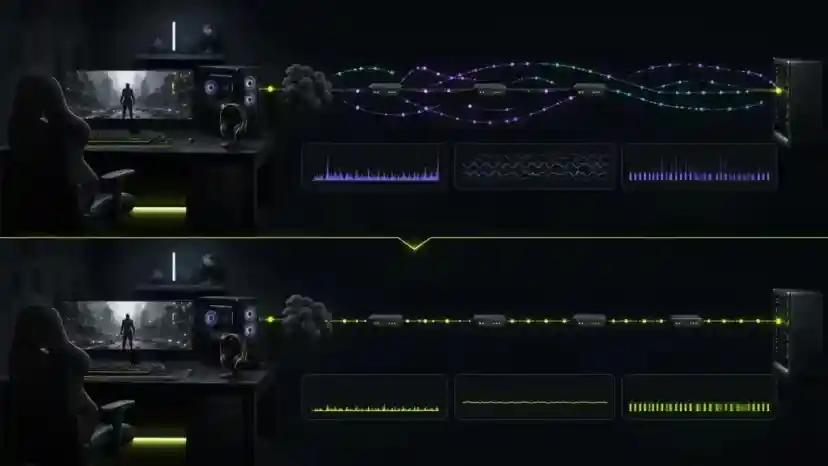
Optimize Your Rainbow Six Siege X Connection
A fast internet plan alone does not guarantee a stable competitive connection.
Rainbow Six Siege X performance depends on the complete path between your PC and the game server, including your local network, ISP routing, peering, congestion, latency, jitter, and packet loss.
NoPing Multi Connection uses five parallel AI-powered routes for game traffic. Multi Internet can use up to six physical connections simultaneously, while Boost FPS targets unnecessary system overhead that can affect frame-time consistency.
Start the one-day NoPing free trial and compare Rainbow Six Siege X before and after route optimization on your own connection.