

A lot of players are trying to jump into AION 2 and are finding that character creation is simply blocked.
This situation is tied to several launch-week complications, including server limits, balance controls, regional rules, and technical adjustments from NCSoft.
To make everything clearer, this article breaks down the real reasons behind the restriction and what each one means for your account.
Short answer first
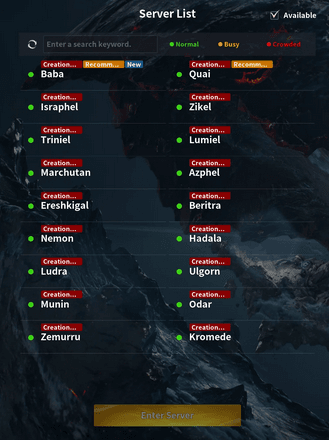
Most of the time "creation restricted" means the operator has temporarily disabled the ability to create new characters on that server or for that faction.
This is often done because servers are at capacity, to control population balance between factions, or as a stopgap while the developer addresses launch problems and server stability.
In other cases the restriction is an indirect symptom of launcher/region/account troubles or bugs in the character editor.
Source: Reddit
Cause 1 — Servers are full and NCSoft is limiting creation
The most common and straightforward reason is server capacity. When a newly launched MMO gets a surge of players, the company must protect server stability.
One blunt tool is to simply block new character creation once a server hits its safe capacity. That prevents more load from being added and gives operations time to add resources or spin up new servers.
NCSoft has publicly acknowledged expanding capacity and opening new servers while also imposing temporary limits during pre-customization and launch windows.
How it looks to you
- The option to create a new character is greyed out, or you get the "creation restricted" popup only on certain servers.
- Players report some servers showing as open for one race or faction and closed for another.
What you can do
- Try a different server or a less popular region.
- Watch the official server status page or the NCSoft newsroom for announcements about added servers or slot expansions.
Cause 2 — Faction or race locking to balance population
MMOs sometimes intentionally restrict character creation for a specific faction or race to avoid severe population imbalance.
If, for example, one side is overrun at launch the developer may stop new characters on that side until transfers or additional servers correct things.
This is a targeted version of the capacity-management approach and is common when faction identity matters to gameplay.
Cause 3 — Emergency maintenance, hotfixes, and rollbacks
When a big launch goes badly there are often emergency patches, rollback actions, or temporary gates while teams fix critical bugs.
Recent news coverage and official apologies indicate NCSoft deployed emergency fixes and promised to address numerous launch problems including shop issues and server instability.
During those windows character creation may be disabled on affected servers to avoid compounding the issue while state changes occur.
Also read: How to Play AION 2 Without Lag Outside Asia?
Cause 4 — Launcher, region, and account verification problems
Not every "cannot create" case is a server-side intentional restriction. Some players are blocked by launcher bugs, wrong client region, or account verification failures such as SMS or two-factor steps.
There’s a list of client-side reasons that can prevent character creation from completing: SMS verification errors, regional gating, Purple launcher quirks, or corrupted local files. If the character creator UI opens but the editor is broken or disconnects during creation, that points to a client or routing issue rather than a deliberate server block.
What to check
- Confirm your account region and whether the server you picked matches your region.
- Look for SMS or verification error messages during registration.
- Try reinstalling the client or clearing launcher temporary files.
- Try NoPing if you suspect routing problems.
NoPing is a service designed to optimize your route to AION 2’s servers. Sometimes, the normal path your internet provider uses isn’t the fastest. NoPing reroutes your data through a better, more direct path.
Here’s how to use NoPing to fix network issues in AION 2:
- Sign-up through the website and download NoPing (you can try it for free)
- Open NoPing and search for AION 2 inside the software
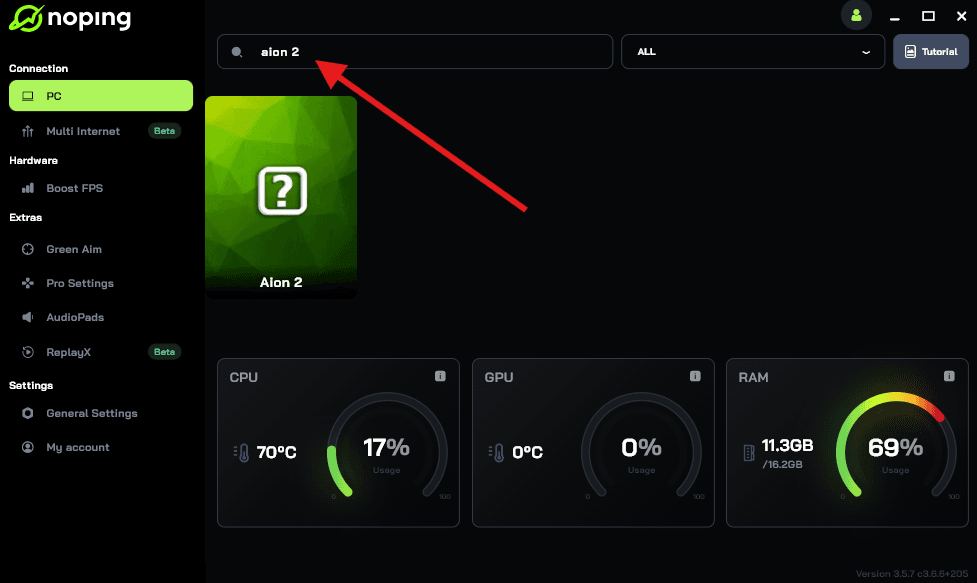
- Once you find AION 2, click on it. Choose your server on the next screen and click on “Optimize Game”.
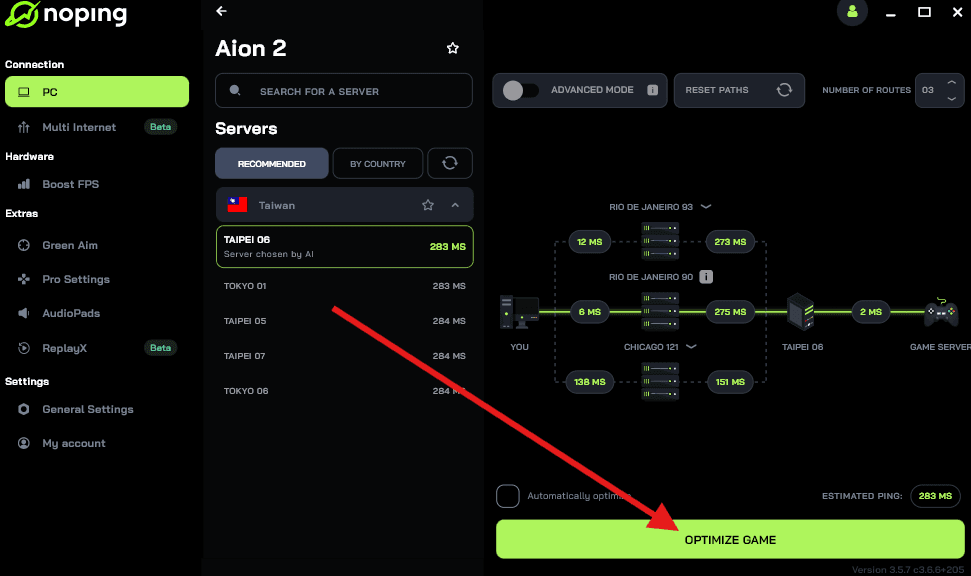
- And that’s it, you can start playing AION 2 with optimized ping!
You can test different servers within NoPing to see which gives you the lowest latency.
Cause 5 — Bot prevention and anti-abuse measures
MMO teams sometimes lock creation when they detect abusive behavior from automated bots or when early bot waves are saturating servers.
Temporarily limiting new accounts and creations helps slow down scripted accounts while the team applies mitigations.
While companies do not always announce these measures in detail, community moderators and operators sometimes confirm that anti-bot steps are active during chaotic launches.
Cause 6 — Policy, monetization, or restricted sales windows
Less common but worth knowing is that publishers can tie character creation limits to commercialization choices.
For example, if premium packages or founder packs are being managed, or if there are account/region restrictions tied to sales or entitlement checks, creation can be gated until entitlements reconcile.
Reporting around the AION 2 launch highlighted controversies about shop items and problematic packages, and the developer temporarily suspended some sales while fixes were applied. Those same systems can interact with character creation flows.
How to know which cause is affecting you
- Check official NCSoft channels first. If they announce server openings, hotfixes, or added capacity, that likely explains the restriction.
- Look at large community hubs such as the official subreddit and major news sites. If many players across regions report the same issue at once, it points to server-side restrictions or a wide outage.
- If your client shows verification errors, SMS timeouts, or launcher crashes while others can create characters, the problem is probably account or client related. Check troubleshooting guides specific to your region.
Practical advice while you wait
- Pick a backup server and create a character there if progressing early matters to you. Many players who insist on a specific server end up waiting and losing early advantages.
- Follow NCSoft’s newsroom and social channels for status updates. They have moved to expand capacity and promised fixes.
- If you suspect a client bug, check if pre-customization is only available on PC for your region.
Play AION 2 right now wherever you are with reduced ping. Download NoPing and start your free trial!