


AION 2 system requirements are definitely something you need to look at if you're planning on diving into this huge new MMORPG.
NCSoft is bringing back the AION franchise with a major sequel built on Unreal Engine 5, and that means the visuals are going to be gorgeous, but they'll also demand a bit more from your hardware than the original game ever did.
Since this game is launching on both PC and mobile (with the PC version being the lead platform), we've got two different sets of requirements to explore.
Keep in mind that while the game was launched in Korea and Taiwan in November 2025, and will be released globally in 2026, the developer hasn't released one single, definitive 'official' spec sheet yet.
What we have here are the most consistent and well-researched estimated requirements floating around the community and specialized sites, based on pre-release info and the typical demands of a high-end Unreal Engine 5 title.
Think of these as your best guess for what you'll need to jump into the world of Atreia when it opens up.
PC System Requirements
If you're a PC player, you're going to get the full, high-fidelity experience—dynamic lighting, high-resolution textures, and huge-scale battles. Naturally, this is where the hardware demands are highest.
We'll break it down into the bare Minimum specs needed to run the game and the Recommended specs for a smooth, high-quality experience.
Minimum PC Requirements
The minimum requirements are what you'll need to get the game running and playable, likely at 1080p resolution (FHD) and with lower to medium graphics settings. If you're on these specs, you might see some frame rate dips in really crowded areas like major cities or during massive PvP faction battles.
| Component | Specification |
| Operating System | 64-bit Windows 10/11 |
| CPU (Processor) | Intel Core i5-10400F / AMD Ryzen 3 3300X (or equivalent) |
| Memory (RAM) | 16 GB RAM |
| Graphics Card (GPU) | NVIDIA GTX 1660 (6GB) / AMD Radeon RX 580 (or equivalent) |
| Storage | 40–50 GB available space (SSD highly recommended) |
| DirectX | Version 12 |
Honestly, that 16 GB of RAM and the newer CPU/GPU generations show that AION 2 is a modern game.
If you're running older hardware, especially with only 8 GB of RAM, you might struggle, as the Unreal Engine 5 can be quite demanding on memory and CPU during busy scenes.
Upgrading to an SSD is also a huge quality-of-life improvement for loading times in any modern open-world MMO, so consider that a soft requirement even at the minimum.
Recommended PC Requirements
If you want to experience the game closer to how the developers intended—smooth frame rates, higher settings, and less frustration in large-scale combat—you'll want to aim for the recommended specs.
These parts should handle the game comfortably at 1440p resolution (QHD) with high graphic settings enabled.
| Component | Specification |
| Operating System | 64-bit Windows 10/11 |
| CPU (Processor) | Intel Core i5-12400F / AMD Ryzen 5 5600X (or equivalent) |
| Memory (RAM) | 32 GB RAM |
| Graphics Card (GPU) | NVIDIA RTX 3060 Ti / AMD Radeon RX 6700 XT (or equivalent) |
| Storage | 100 GB available space (NVMe SSD preferred) |
| DirectX | Version 12 |
The leap to 32 GB of RAM might seem like a lot, but for a next-gen MMORPG with complex environments and a lot of player models loading simultaneously, it makes perfect sense for ensuring stability and eliminating stuttering.
A mid-to-high-range GPU like the RTX 3060 Ti is the sweet spot for a great 1440p experience, especially since AION 2 is expected to support performance-boosting technologies like NVIDIA DLSS and AMD FSR.
Using these upscaling features can give you better visuals with higher frame rates, effectively lowering the strain on your GPU.

Mobile System Requirements
Since AION 2 is a cross-platform title, a lot of people will be playing on their phones or tablets.
While the mobile version might feature some scaled-down elements compared to the PC version, it's still running on Unreal Engine 5, meaning you'll need a fairly recent, powerful device to get a decent experience.
The mobile requirements are a little less specific, as device performance can vary wildly even with the same listed CPU, but here's what the community consensus suggests:
- Operating System: Android 10+ or iOS 14+ (or newer)
- Minimum RAM: At least 6 GB RAM
- Recommended Processor: Qualcomm Snapdragon 855 / Apple A12 Bionic or higher
- Storage: Estimated 10–15 GB available space
The key takeaway here is the 6 GB RAM requirement for Android, which is listed on the Google Play Store page.
For a game of this scope, devices with less RAM will likely struggle with background apps and extended play sessions.
Essentially, if your phone is a flagship model from the last three to four years, you should be fine, but if you have an older or budget device, you might be limited to the lowest graphical settings or face performance issues.
Also read: How to Play AION 2 Worldwide (outside Korea and Taiwan): Account Creation and Ping Reduction
Why the High Specs? Understanding the Unreal Engine 5 Factor
You might be looking at those minimum specs and thinking they seem a bit high for an MMO. There's a good reason for that: Unreal Engine 5 (UE5).
UE5 is known for its incredibly advanced graphical features that allow for stunning levels of detail, dynamic lighting, and massive, seamlessly loaded worlds.
While the developers, NCSoft, are working hard to optimize the game, and its scalability is a point they've emphasized, these features are inherently demanding:
- Lumen (Global Illumination): This is a dynamic, real-time lighting system in UE5. It makes the world look fantastic, but it's a huge processing load for the CPU and GPU.
- Nanite (Virtualized Geometry): This technology allows for incredibly detailed geometry, meaning the game can render billions of polygons without hitting the memory ceiling of traditional rendering. This creates highly detailed environments but can still strain your GPU's VRAM and your system's memory.
- Scale of Combat: AION is famous for its large-scale faction battles. When you have dozens or even hundreds of player characters onscreen, all rendering unique armor, abilities, and particle effects, the game becomes intensely CPU-bound. That's why the minimum CPU requirements are quite high, you need a fast processor to manage all that data in real-time.
Also read: How to Play AION 2 Without Lag Outside Asia?
The Network Factor
It's crucial to remember that a massive multiplayer online role-playing game (MMORPG) is not just about raw hardware power; your network connection is just as important, if not more so, for a smooth experience.
- Latency (Ping): Low latency (a low ping number) is essential for action-oriented combat like AION 2's, where you need real-time dodges and strategic strikes. High ping means a noticeable delay between when you press a button and when your character performs the action.
- Stability: A stable connection with no packet loss is vital, especially during PvP. A momentary drop can mean getting killed in a critical fight.
NoPing is a service designed to optimize your route to AION 2’s servers. Sometimes, the normal path your internet provider uses isn’t the fastest. NoPing reroutes your data through a better, more direct path.
Here’s how to use NoPing to fix network issues in AION 2:
- Sign-up through the website and download NoPing (you can try it for free)
- Open NoPing and search for AION 2 inside the software
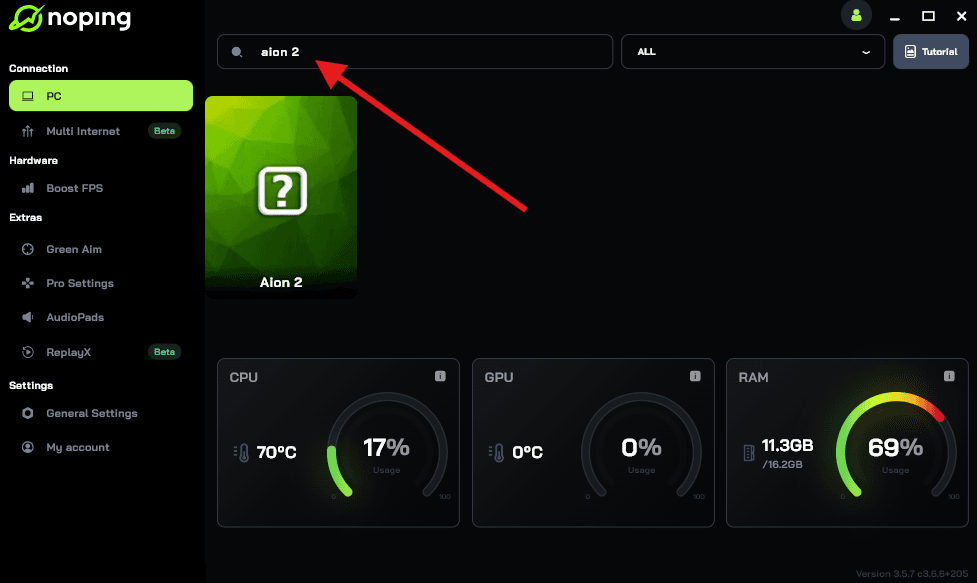
- Once you find AION 2, click on it. Choose your server on the next screen and click on “Optimize Game”.
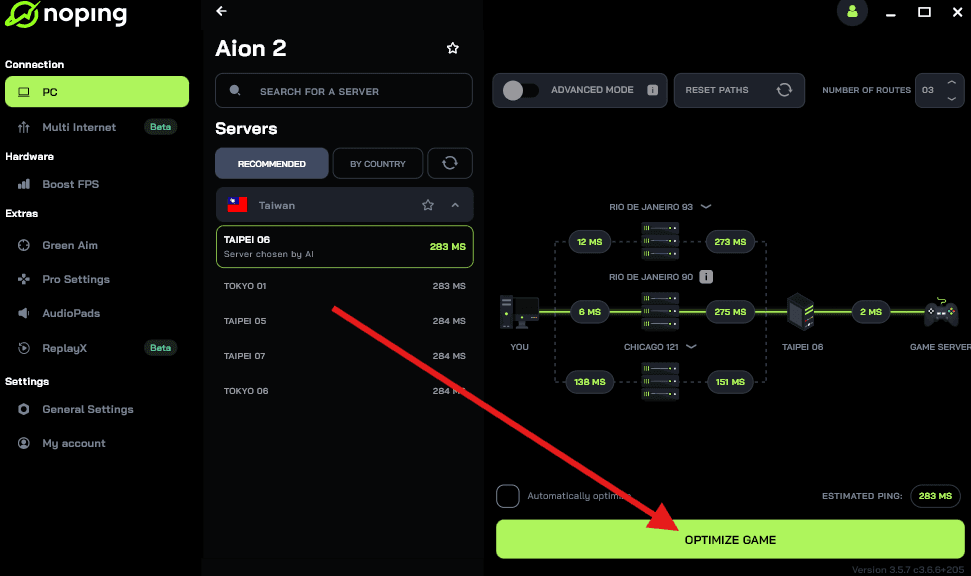
- And that’s it, you can start playing AION 2 with optimized ping!
You can test different servers within NoPing to see which gives you the lowest latency.
Performance Tuning
If your PC is hovering around the minimum requirements, don't despair! You can still have a great time by optimizing your settings. Here are a few quick tips to maximize your frame rate without completely sacrificing graphical quality:
- Lower Resolution: If you're struggling at 1080p, dropping to a slightly lower resolution or using your graphics card's upscaling feature (DLSS or FSR) can give you a massive boost in performance.
- Reduce Shadows and Volumetric Effects: These two settings often have the biggest impact on frame rate. Lowering shadow quality and disabling things like screen-space shadows can really help.
- Disable Unnecessary Visual Fluff: Turn off effects like Motion Blur and Chromatic Aberration. They don't usually add significant value to the gameplay and only introduce a mild performance hit.
- Prioritize Draw Distance: For an MMORPG, seeing opponents and landmarks far away is important. You might be better off keeping the Draw Distance setting higher while lowering the quality of textures or shadows to compensate.
The launch of AION 2 is a huge deal for MMORPG fans, but it's also a significant benchmark for current gaming hardware due to its use of Unreal Engine 5. If you're a serious player, aiming for the Recommended specs is the safest way to ensure you can enjoy the game's large-scale battles and stunning world without performance anxiety.
The most critical components to prioritize for AION 2's demands are:
- RAM: Aim for 32 GB for optimal performance and stability.
- Storage: Get an SSD (or NVMe SSD) to minimize load times between zones and during fast travel.
- CPU: A modern mid-range Core i5 or Ryzen 5 will be the backbone of your system in crowded areas.
If you have to make a choice between a slightly better GPU or a slightly better CPU, the CPU is often more vital in a highly-populated, action-heavy MMO like AION 2.
The system requirements for AION 2 confirm that this will be a gorgeous, next-generation MMORPG experience. Prepare your system, get a stable internet connection, and get ready to soar through the Abyss once again!
Play AION 2 with reduced ping on every server. Download NoPing now and start your free trial!