


Apex Legends map rotation is the system Respawn uses to cycle the playable maps across the game’s different modes so players don’t have to fight on the same terrain every match.
In this guide I’ll walk you through how the rotation works today, how it’s changed over past seasons, how long maps stick around by mode, how to track what’s live right now, some practical tips, and finish with a short FAQ containing bits not covered earlier.
Current Apex Legends Map Rotation
Respawn changes map pools every season and often rotates which subset of maps is used in public playlists versus Ranked or event modes.
As of the most recent season cycle (Season 26 / Showdown era and onward), the public Battle Royale rotation typically contains three maps at once (out of the full map pool Respawn maintains), while Ranked uses a smaller set with alternating “splits.”
News outlets and community trackers publish the exact current rotation and which maps are live at any moment.
For quick, live-checking you can use status/rotation trackers like Apex Legends Status or community-built map clock sites.
Note: exact “which map is live right this minute” changes frequently during the day; for live info use a tracker or the in-game menu.
How Does Apex Legends Map Rotation Work?
Here are the core mechanics, based on Respawn’s patterns and community documentation:
- Public Battle Royale (Pubs / Play Apex): Respawn usually cycles three of the large BR maps in the public queue. Those three maps swap at set intervals (commonly every 60 or 90 minutes). That means during a play session you may see one map for a chunk of time, then the server switches to the next. This keeps variety high during casual play.
- Ranked Leagues: Ranked commonly uses a narrower rotation. Historically Ranked alternates between two maps per split (periods within the season) and Respawn may change the Ranked map every 1–2 weeks to align with competitive pacing. This makes Ranked climbs more consistent for players practicing a particular map meta.
- Mixtape / LTMs / Special Modes: These rotate independently and can be on temporary schedules or event-driven windows. Mixtape can include smaller maps, control modes, or unique rule sets. During events, Respawn often keeps the event map(s) available for the event duration.
- New or Updated Maps: When Respawn introduces a brand-new map or a major layout update, they sometimes temporarily keep that map in rotation more heavily (for example, as the only or predominant map for a short period) so players can get used to it and test balance. Community pages and patch notes typically call this out.
All of the above are general policies; Respawn may deviate for experimental reasons, technical issues, or player-data-driven changes. When something unusual happens (a map is temporarily disabled for a fix, for instance) Respawn or community trackers will note it.

Source: Reddit
Comparison With Previous Seasons
Respawn’s approach has evolved:
- Early seasons: Rotations were simpler — fewer maps and longer times between swaps. As the game added more maps and experiment modes, rotations became more dynamic.
- Mid-periods (several seasons ago): Ranked started to get explicit “map splits” and public queues began using shorter in-day swaps (the 60–90 minute windows became common). Respawn also experimented with making Arena/Arenas-like modes permanent, then temporary, then back again; that affected map-mode relationships.
- Recent seasons (25/26 era): Respawn is more active about rotating maps in and out of the pool, occasionally leaving a new map dominant for a short time so the community can adapt. They also launched new permanent modes (like Wildcard) that use modified, smaller map variants, which changes how we think about rotation because those modes reuse map assets differently.
Put simply: Respawn moved from static, slow rotations to more frequent, flexible swaps, especially as they added more maps and experimental modes.
Also read: 16 Games Like Apex Legends
What’s the Map Rotation Duration by Mode?
Exact numbers can vary, but community and wiki sources converge on these typical durations:
- Public BR (Pubs / Play Apex): Maps rotate every 60 to 90 minutes in many regions/periods. That’s the most commonly reported interval used by Respawn for Play Apex queues.
- Ranked Leagues: Ranked maps usually change on a weekly to biweekly cadence, often aligned to splits inside a season. The Ranked pool is smaller and switches less frequently than Pubs.
- Mixtape / LTMs: Highly variable. Some Mixtape rotations can change daily or weekly; event LTMs follow the specific event window. During special events, Mixtape can run for the whole event or be swapped in/out rapidly.
- New map launches / updates: Respawn sometimes pins a new map for a one- to two-week heavier presence so players can get comfortable. This practice is done on a case-by-case basis (depends on the scale of the new map/update).
Because these are operational choices Respawn can change for balance or technical reasons, it’s safest to rely on live trackers and official patch notes for precise timing.

How to Track the Current Map?
If you want to know right now which map is live, use one of these options:
- In-game: The easiest way is the main menu. The game shows the current map in the playlist header. This is the source of truth. (No citation needed for in-game UI, but community trackers replicate it.)
- Community trackers / map clocks: Websites such as Apex Legends Status, apexmap (various community pages) and other sites show live rotation with countdowns and upcoming maps. These are popular because they let you check without launching the game.
- Social & patch notes: For scheduled changes (Ranked switches, seasonal map changes), follow Respawn’s official patch notes and news posts — they’ll announce major rotation changes and new map introductions. Gaming press summarizes those notes too.
Tip: if you need to practice a specific map, set a reminder to queue during windows shown by trackers instead of hoping the map shows up in random play. Trackers typically display how much time remains until the next swap.
Overall Tips for Apex Legends Map Rotation
- Plan practice sessions around rotation windows: If you want extended practice on a single map, queue during its live window or use private matches with friends.
- Use Ranked windows to your advantage: Since Ranked changes less frequently, pick a window to focus your Ranked climb and practice meta strategies for that map.
- Follow patch notes: Map updates can change rotation patterns. If a map received a major overhaul, Respawn might give it extra rotation time — that’s the moment to study it.
- Use trackers for efficiency: Save time by checking a map tracker before you play, especially if you’re trying to get specific loot, challenges, or map-certain achievements.
- Watch pro / content creator POV: When a new map appears in rotation or is promoted heavily, watch a couple of high-skill streams or videos focused on rotations, hot zones, and endgame loops for that map — it’s the fastest way to learn what matters. (No single citation — general community tip.)
Also read: How to Fix Apex Legends Integrity Error?
How to Play All Apex Legends Maps Without Lag?
If you want to enjoy all Apex Legends maps without lag, the best solution is using NoPing, a software built to reduce latency, packet loss, and network instability in online games.
Apex Legends relies heavily on quick reactions, smooth movement, and precise aiming, and even a few milliseconds of delay can ruin your fights, especially on large and complex maps like Broken Moon or Olympus.
NoPing works by optimizing your connection route to Apex Legends servers. Instead of sending your data through slow or congested paths, it automatically finds the fastest route between your PC and the game’s server, cutting down ping and preventing spikes.
The result is a more stable and responsive experience, no matter which map is in rotation.
Here’s how to use NoPing to fix lag in Apex Legends:
- Sign-up through the website and download NoPing (you can try it for free)
- Open NoPing and search for Apex Legends inside the software
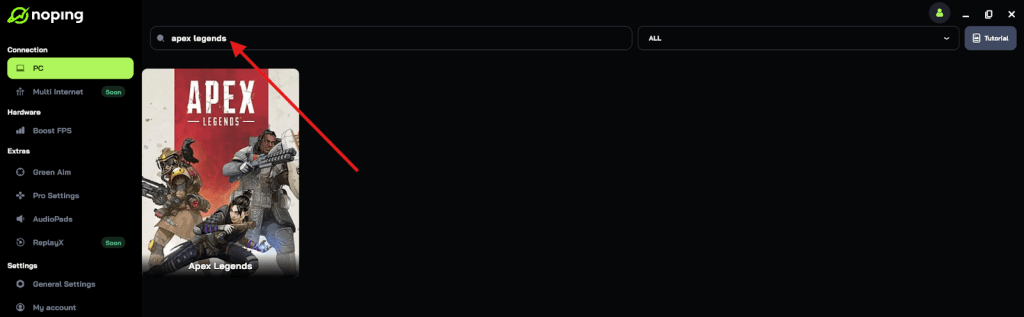
- Once you find Apex Legends, click on it and, on the next screen, select “Choose automatic” or “Choose manual” and click “Continue”. We recommend choosing automatic, as NoPing’s technology analyzes all routes on a global scale and automatically selects the best option for you.

- On the next screen, click on “Optimize Game”.
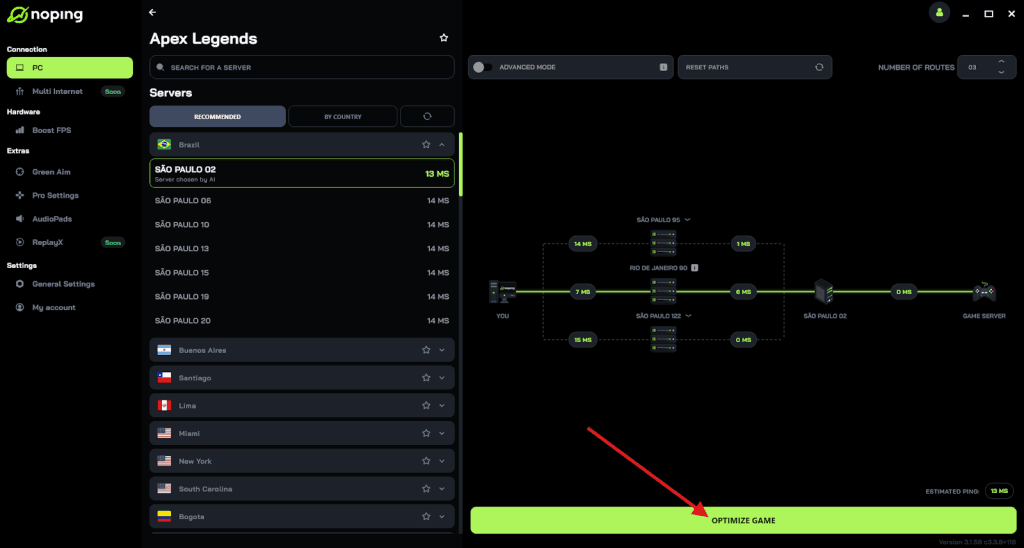
- And that’s it, you can start playing Apex Legends with optimized ping!
You can test different servers within NoPing to see which gives you the lowest latency.
FAQ - Apex Legends Map Rotation
Q: Can I vote for which map appears next?
A: No, there’s no in-game vote system for the next BR map. Map rotation is server-driven by Respawn.
Q: Do map rotations differ by platform or region?
A: The rotation schedule (the occasional 60 vs 90 minute cadence) is generally consistent across platforms, but server timing and exact swap timestamps can look different in local timezones.
Q: What happens if a map is removed temporarily (bug/fix)?
A: Respawn can temporarily disable a map for technical fixes; community trackers and Respawn’s status pages or social channels typically announce it. Example: maps have been temporarily taken out for fixes in past seasons.
Q: Are there hidden patterns to which maps pair together in rotation?
A: Respawn’s choices aim for variety (different verticality, rotation speed, and playstyles) but the exact pairings are not publicly declared as a strict formula. They do, however, tend to keep the total live maps to small sets (three for Pubs, two for Ranked) so pairings are predictable in scale if not in exact sequence.
Q: Where will Respawn announce a major map schedule change?
A: Official patch notes, Respawn’s social channels, and reputable gaming news outlets cover major map changes.
Respawn’s map rotation exists to keep Apex Legends fresh and competitive across hundreds of thousands of daily matches.
The practical takeaways: pubs rotate frequently (60–90 minutes), Ranked changes are slower and more deliberate, and new or updated maps may get special rotation treatment.
If you want to be efficient about practice or climbing, use a tracker, watch the patch notes, and schedule play sessions around the windows the trackers show.
For live checking, I recommend bookmarking a reliable status/rotation site or simply glancing at the in-game header before you queue.
And to play all Apex Legends maps without worrying about lag, use NoPing! Download now and start your free trial!