

Roblox ban bypass by timezone… sounds like one of those quick hacks you see in forums: flip a setting on your device, pretend to be somewhere else, and magically get back into your account.
Short answer: changing your device’s timezone will not bypass a Roblox ban. Long answer: keep reading, we’ll explain why timezone changes don’t help, what types of bans Roblox uses, what (if anything) can actually change access, and the safest, correct way to deal with a moderation action.
Does Roblox Ban Bypass by Timezone?
No. Changing your device’s timezone does not change the identifiers Roblox uses to decide who can and cannot access the platform.
Timezone is a local display setting that affects how your clock looks on your device. Roblox’s enforcement decisions are based on account data, IP/network identifiers, device signals, and their moderation systems, not the timezone setting you see in your system preferences.
If you are banned or blocked from Roblox, simply switching to another timezone will not make that ban disappear nor will it prevent Roblox from recognizing the account or the network it’s coming from.
Why Time Zone Changes Won't Work
Let’s break this down into plain terms.
What a timezone change actually does
Changing timezone on your computer or phone only updates the local time setting and how dates/times are presented.
It does not reroute or mask your internet traffic, change your IP address, or alter account-level information like email, phone number, or username.
Roblox communicates with servers over the internet; the server sees connection metadata (IP address, timestamps in UTC, device fingerprints), not the timezone “label” you set for your clock.
What Roblox bases enforcement on
Roblox enforcement typically involves account-level moderation, device signals, and network indicators (IP address).
There are different enforcement types: temporary suspensions, permanent terminations, and IP-based blocks that prevent connections from a specific IP or subnet.
If Roblox flags an account for violating rules or detects behavior tied to a particular network, changing the timezone won’t change any of those signals.
Server-side timestamps vs local timezone
On the server, events are recorded in standard timebases (usually UTC or a server-local time). Your device’s timezone only affects how you see times locally; it doesn’t rewrite server logs or the enforcement records Roblox holds.
So any moderation timestamp Roblox uses remains unchanged and unaffected by your local clock.
Because of these three facts, timezone switching is harmless but pointless when your objective is to regain access after a ban.
What is Roblox IP Ban? Is There a Way to Bypass it?
First, definitions.
Account ban / suspension: Roblox suspends or terminates accounts when they violate Terms of Use or Community Standards.
This affects the account itself (login credentials, profile, items, etc.) and is tied to the account metadata. Appeals are possible via Roblox support for eligible cases.
IP ban: An IP ban blocks connections from a particular IP address (or sometimes a range/subnet).
If Roblox decides to block an IP because multiple violating accounts came from it, or because of severe abuse tied to that network, anyone using that IP will be unable to connect until the ban is lifted or the IP changes.
IP bans are network-level, not timezone-level.
Can you bypass an IP ban?
Technically yes. Changing the IP address can bypass an IP-level block. Practical ways people try include:
- Restarting a home router (to get a new dynamic IP from the ISP)
- Using a mobile hotspot or different internet connection (different IP)
- Using a VPN or proxy to route traffic through another IP
- Using residential proxies or advanced anti-detect tools
All of these change the IP seen by Roblox, so they can circumvent an IP block. But there are important legal/policy and safety caveats:
- Policy risk: Using VPNs or proxies to evade enforcement can violate Roblox’s terms and may lead to further enforcement, including account termination. Roblox’s enforcement systems may detect and link attempts to evade bans.
- Technical detection: Roblox and other platforms invest in alt-account detection, device fingerprinting, and other methods that go beyond IP addresses. Even if you change IP, other signals (device fingerprints, cookies, tied emails/phone numbers) might flag you.
So while an IP change can work technically, it’s not a clean or necessarily safe solution, and it may not even be effective long term if Roblox links accounts by other signals.
What about device bans or HWID bans?
There’s community discussion and developer conversations about multi-layer detection (HWID, cookies, device identifiers). Roblox has tools and internal APIs to detect alt-account patterns and identify abuse beyond just IPs.
If enforcement uses device signals, simply changing IP or timezone is insufficient.
Will Your Account Get Banned if You Enter a Different Timezone?
No, simply switching your device to a different timezone will not get your account banned. Changing timezone is not an offensive action, it’s just a setting.
Roblox won’t flag a timezone change as a rule violation.
That said, some caveats:
- If you combine timezone changes with other suspicious behavior (multiple new logins from different countries in a short time or rapid creation of alt accounts), that overall pattern could attract attention from automated systems. In other words, it’s not the timezone itself but the surrounding behavior that matters.
- If Roblox receives signals that an account is being used to evade bans, for example, logging in from a set of IPs that match previously terminated accounts or pairing a new account with credentials tied to a banned user, the account could be suspended or terminated. That’s enforcement of the ban-evading behavior, not punishment for a timezone flip.
So if your only change is Date & Time > Time Zone on your device, you’re safe from getting flagged for that action alone.
But if you’re trying to hide other ban-evasion attempts, you risk further enforcement.
What to Do If You’ve Been Banned: the Right Way
If you believe your ban was a mistake or you want to resolve the issue properly, follow these steps:
- Read the moderation notice you received (if any). Roblox sometimes provides the reason or the category of violation.
- Use the official appeals process — submit an appeal via Roblox’s help / appeals page. Appeals must be submitted by the account owner and are time-limited in some cases. Follow the instructions on Roblox’s support site and be honest and concise in your appeal.
- Don’t try to evade the ban by creating alts or using shady workarounds. Attempting to bypass a ban can lead to more serious consequences and will likely reduce the chance that support will be sympathetic.
- If you were IP-banned because of another user on your network, contact Roblox support and explain the situation; in parallel, you can try appealing and, if feasible, change the network temporarily (e.g., mobile hotspot) to confirm whether the problem is IP-based. Be aware that some ISPs provide static IPs, which complicates the situation.
How to Play Roblox Without Lag?
One of the biggest frustrations for Roblox players is dealing with lag. Slow responses, delayed actions, or rubber-banding can completely ruin the experience, especially in competitive modes where timing is everything.
Lag usually comes from high ping, packet loss, or unstable connections between your device and the Roblox servers.
That’s where NoPing comes in. NoPing is a connection optimizer designed for online games that helps reduce ping, stabilize routes, and minimize packet loss.
Instead of relying on the default path your internet provider uses to connect you to Roblox servers, NoPing automatically finds the fastest and most stable route available.
Here’s how to use NoPing to fix lag in Roblox:
- Sign-up through the website and download NoPing (you can try it for free)
- Open NoPing and search for Roblox inside the software
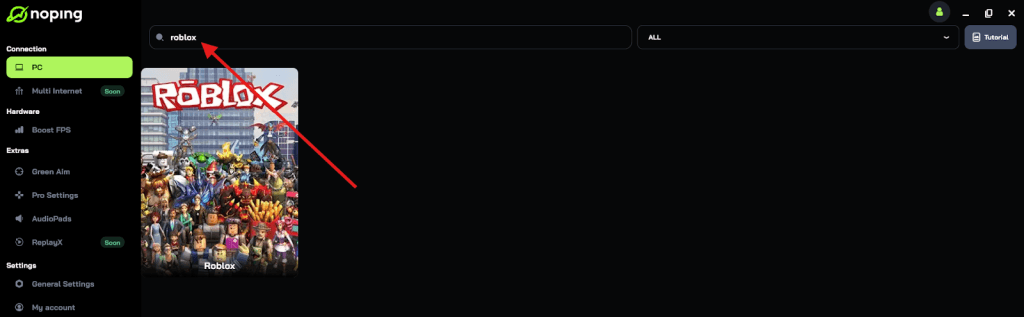
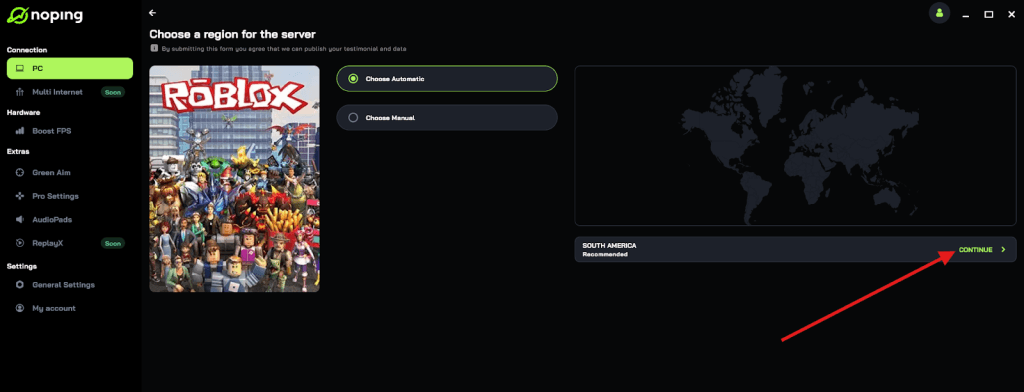
- Once you find Roblox, click on it and, on the next screen, select “Choose automatic” or “Choose manual” and click “Continue”. We recommend choosing automatic, as NoPing’s technology analyzes all routes on a global scale and automatically selects the best option for you.
- On the next screen, click on “Optimize Game”.
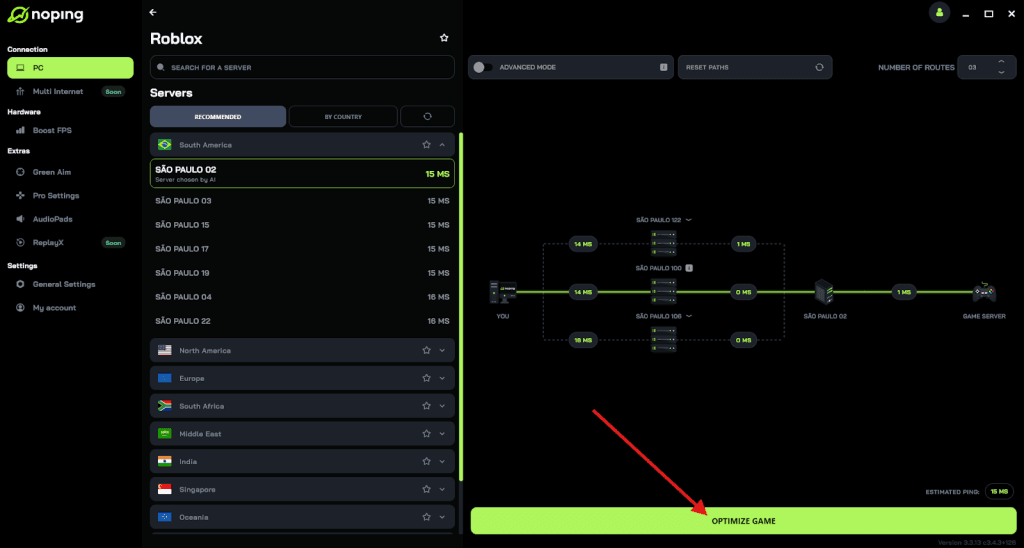
- And that’s it, you can start playing Roblox with optimized ping!
You can test different servers within NoPing to see which gives you the lowest latency.
FAQ
Q: Will setting my PC to a foreign timezone make Roblox think I’m in another country?
A: No. The server-side location and region inferences come from your IP address and other metadata, not your local timezone setting.
Q: Can Roblox see my time zone?
A: Roblox does not need your timezone to moderate or log events — they record server timestamps and network metadata. Your timezone is a client-side display preference and is not relevant to enforcement decisions.
Q: If I’m IP-banned, is it permanent?
A: IP bans vary. Some are temporary (minutes to hours), others are longer or tied to serious enforcement events.
The duration and scope depend on the reason for the block. If you suspect an IP ban was applied in error, contact Roblox support and explain the context.
Q: If my sibling got banned, will my account get banned too?
A: Roblox may tie enforcement to IPs or networks if combined abuse is detected. If a sibling’s actions violated rules from the same network, it could trigger broader measures (IP blocks), but account-level bans are applied to individual accounts for account-specific violations. If you think your account was affected unfairly, submit an appeal.
Q: How long do strikes last on Roblox?
A: Duration of strikes or suspensions depends on the violation. Some enforcement actions are temporary; others are permanent. If unsure, check Roblox’s moderation email or the appeals page for details on the specific action.
Play all Roblox experiences without lag right now! Download NoPing and start your free trial!