


If you’re playing Fortnite and noticing high ping in Fortnite on Middle East servers, this article is for you.
In recent months, many players connecting to the Middle East matchmaking region have been reporting lag, delay, and general network issues that make the game feel sluggish and unresponsive.
Ping matters a lot in Fortnite. It’s the time it takes for your device to send data to the game’s server and get a response back.
When ping is high, your actions take longer to register in the game, fights feel delayed, and building or editing feels unresponsive.
In this article we’ll unpack why this happens especially on Middle East servers and what you can actually do to fix or reduce it.
Why is your ping so high playing Fortnite on Middle East servers?
There isn’t a single cause, and the answer depends a bit on where you’re connecting from and how your internet is routed, but several common reasons explain why people see high ping to Middle East servers.
1. Server location and routing
Fortnite’s official Middle East server region is hosted in Bahrain and/or connected through infrastructure that includes locations like Mumbai for broader regional coverage.
Epic Games set it up that way to try to balance access for a wide group of players from the Middle East and nearby regions.
However there are reports from players, especially in parts of South Asia (like India, Pakistan or Nepal), that traffic is sometimes routed inefficiently, for example, going through Europe or Singapore before reaching the Middle East servers.
This can add hundreds of milliseconds to your ping.
2. ISP routing issues
Even if your server is physically close, the path your data takes matters. Your ISP’s routing decisions have a big impact on latency.
Some ISPs simply don’t have optimized peering or direct networking paths to game servers, so your traffic takes a “longer” route around the internet. This is often the biggest underlying cause of high ping.
3. Network congestion and traffic peaks
If your connection is sharing bandwidth with other devices or your ISP is congested, say during peak hours, your packets can queue up or get delayed. That shows up as higher ping and unstable latency.
4. Distance from the server
Even within the Middle East region, players in far-off countries naturally have higher base ping due to the physical distance their data must travel. That’s true of any online game: farther distance usually means higher ping.
5. Server performance and update issues
Sometimes the problem isn’t your connection at all. Fortnite’s Middle East servers have been reported by many players as unstable or underperforming after updates, leading to extremely high ping even when network conditions haven’t changed.
How does NoPing solve high ping in Fortnite on Middle East servers?
NoPing optimize the path your game traffic takes to reach Fortnite’s servers. Think of internet traffic like shipping a package: if your ISP’s default route is inefficient, NoPing tries to find a better highway for your packets.

Here’s how it helps specifically with Fortnite on Middle East servers:
Finds better network routes
Standard ISP routes aren’t always efficient. NoPing constantly checks different paths and chooses routes that reduce the number of network “hops” and delays between you and the server.
This is especially useful when your ISP’s default route isn’t optimal. For example, routing traffic via Europe or Asia instead of direct regional paths.
By choosing a route with fewer bottlenecks, you can often see a noticeable decrease in ping and more consistent latency.
Reduces spikes and variability
High ping is about stability. When routing is poor, your ping can fluctuate wildly. NoPing tries to smooth that out by maintaining a stable route, reducing sudden spikes which are especially frustrating in a competitive game like Fortnite.
Allows testing multiple servers
Inside NoPing you can test different Fortnite regions to see which gives you the best latency, even if in-game the matchmaker doesn’t pick the best one.
That can sometimes lead to lower ping and a better experience.
Here’s how to use NoPing to fix high ping in Fortnite:
- Sign-up through the website and download NoPing (you can test it for free).
- Open NoPing and search for Fortnite inside the software
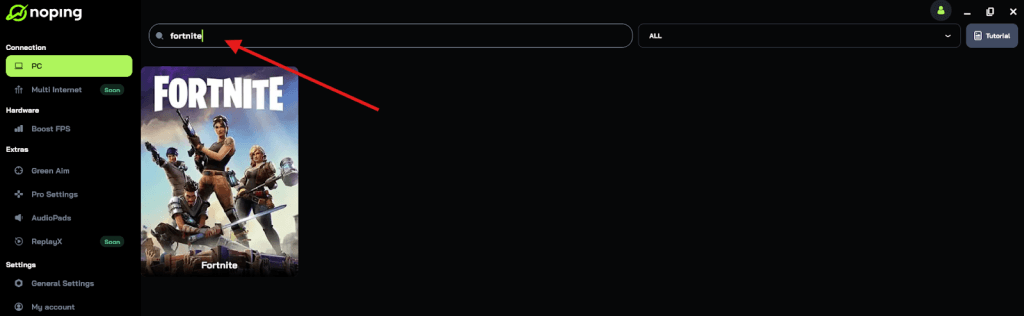
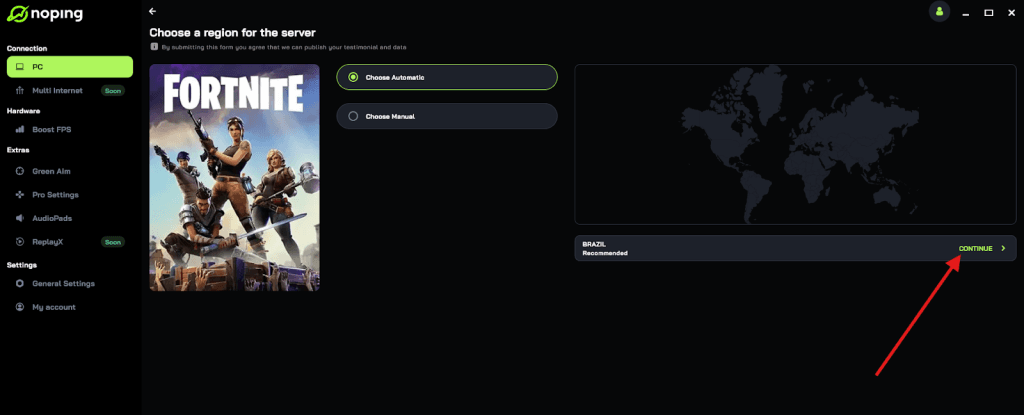
- Once you find Fortnite, click on it and, on the next screen, select “Choose automatic” or “Choose manual” and click “Continue”. We recommend choosing automatic, as NoPing’s technology analyzes all routes on a global scale and automatically selects the best option for you.
- On the next screen, click on “Optimize Game”.
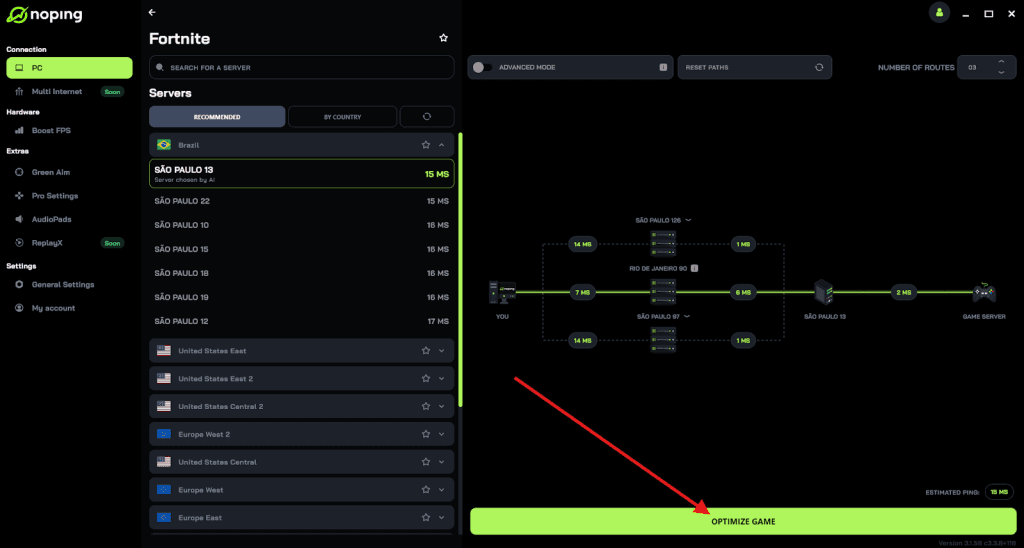
- And that’s it, you can start playing Fortnite with optimized ping!
You can test different servers within NoPing to see which gives you the lowest latency.
What are other ways to fix high ping in Fortnite on Middle East servers?
There are plenty of things you can try besides using NoPing. Some are basic adjustments, others target more structural network factors.
Wired connection instead of Wi-Fi
Wireless connections are great for convenience, but they can introduce interference, packet loss, and reconnection delays.
Switching to a wired Ethernet cable directly from your router to your PC or console is one of the most effective ways to lower ping and make it more stable.
Wi-Fi signals can be disrupted by walls, other electronics, neighbors’ networks, or even just general radio interference. A wired connection avoids those problems.
Restart your router and modem
This is one of those simple but surprisingly effective steps. Router buffers or network glitches can cause poor routing behavior or bottlenecks.
Unplug both devices for about 10 seconds, then plug them back in. Often this clears temporary issues and restores a more efficient network state.
Close background apps and downloads
If your PC or console has other apps running (like Spotify, Discord downloads, or cloud backups) they can consume bandwidth and cause latency spikes.
Closing them can reduce competition for bandwidth and free up your connection for Fortnite.
Select the correct matchmaking region
Fortnite lets you manually select the matchmaking region in the settings. Check which one has the lowest in-game ping number and choose it instead of letting the game auto-select. Sometimes the automatic choice isn’t optimal.
With Middle East servers, make sure you’re actually connected to the Middle East region and not accidentally being matched to Europe or Asia, which are farther away and usually have higher ping.
Update network drivers and firmware
On PC, outdated network drivers can cause inefficient handling of packets and contribute to instability.
Make sure your network adapter drivers are up to date. Similarly, update your router’s firmware.
Manufacturers often release updates that fix performance issues or improve routing and stability.
Optimize router settings
Some routers let you prioritize gaming traffic using Quality of Service (QoS) settings. That tells the router to give Fortnite packets priority over other traffic, which can reduce delay during congested periods.
This feature varies by model but can help if you have a lot of network usage at home.
Contact your ISP
If you’ve tried everything and your ping is still high, there might be structural issues with how your ISP routes traffic.
Contact them and ask if there’s a better route to the Middle East region or if they can adjust peering.
Some ISPs offer gaming-optimized plans or routing paths, though that isn’t universal.
For players consistently far from the physical server (like in South Asia connecting through indirect routes), complaining to the ISP about routing inefficiencies has led some communities to see improvements over time.
Test your ping
Before and after trying fixes, test your ping to confirm if changes are actually working. You can do this with built-in tools or by pinging the Fortnite Middle East endpoint directly from your command line:
ping ping-me.ds.on.epicgames.com -n 50
This gives a snapshot of latency and helps compare before/after results.
High ping in Fortnite on Middle East servers is frustrating, but there are tangible steps you can take to improve it. Some fixes are quick and simple, like switching to Ethernet or closing background apps.
And to always play Fortnite with reduced ping on Middle East servers, use NoPing! Download now and start your free trial!