

Creating a Valorant premier team is the single most important step you can take if you are tired of the unpredictable nature of ranked queues and want to see how your skills hold up in a professional environment.
In 2026, the Premier system is no longer just a side mode for bragging rights. It is the official gateway to the Valorant Champions Tour (VCT) and the primary path for any squad looking to reach the Challengers leagues.
Whether you are a group of friends aiming for local glory or a serious stack eyeing a spot in Masters Santiago, setting up your team correctly from day one is vital.
The competitive landscape has shifted significantly this year. With new agents, the introduction of the Bandit pistol, and a more streamlined path to the pro level, the stakes have never been higher.
We know that technical performance is just as important as your aim. A single lag spike during a Premier playoff match can ruin weeks of hard work.
That is why we are here to help you navigate both the in-game requirements and the technical setup needed to dominate.
What are the primary requirements for forming a Valorant Premier team in 2026?
You must have an account in good standing, completed your ranked placements at least once in your account's history, and finished the mandatory SMS verification process.
Riot Games has maintained these strict entry requirements to ensure that the Premier environment remains free from smurfs and disruptive behavior.
Your account must not have any active bans, including temporary chat restrictions or AFK penalties, as these will immediately disqualify you from participating in a Premier Stage.
Identity verification is the biggest hurdle for most new players. You need to link a unique phone number to your Riot account.
This cannot be a virtual or VOIP number, as the system is designed to tie one human to one competitive identity. If you have already verified your account in previous years, you will see the option to create a team immediately.
If not, you will see a prompt to verify your identity in the Premier hub.
Another critical factor is your MMR (Matchmaking Rating). While you do not need a specific rank like Radiant to start a team, your individual performance in ranked matches determines which division your team is placed in.
If you are aiming for the higher tiers like Contender or Invite, your top five players must have a high enough MMR to qualify.
For 2026, Riot has also integrated a more transparent MMR calculation that reflects individual skill more accurately, meaning your performance in the current Act will heavily influence your team's starting point.

How do you register your team within the game client?
The registration process is straightforward but requires the Team Owner to be proactive during the designated enrollment windows.
You cannot simply jump into a match at any time. You must follow a specific sequence of actions within the Valorant client to ensure your squad is eligible for the weekly matches.
- Navigate to the Premier Tab: Open the Valorant client and look for the Premier icon on the top navigation bar.
- Verify SMS Status: Ensure every member of your intended roster has completed their phone verification.
- Create Your Team Identity: Choose a team name (5 to 15 characters) and a unique team tag (1 to 5 characters). Note that in 2026, team branding is more visible in the Esports Hub, so pick something that looks professional.
- Design Your Logo: Customize your team colors and icon. These can be edited later, but they are what your opponents will see during the map pick and ban phase.
- Invite Your Roster: You can have a total of five to seven players. It is highly recommended to have at least one or two substitutes to avoid forfeiting matches due to real life scheduling conflicts.
- Select Your Zone: This is the most crucial step. You must pick a geographic zone (like US East, Brazil, or Western Europe) where you will play all your matches.
- Enroll for the Stage: Once your roster is set, the Team Owner must click the enroll button before the deadline. Missing this window means you cannot play for the entire Stage.
The enrollment window typically lasts about a week before the first matches begin.
If you realize you need to change your zone or significantly alter your roster after enrolling, you must unenroll, make the changes, and re-enroll before the deadline passes.
What does the 2026 division structure look like for new teams?
The 2026 Premier season features six distinct divisions: Open, Intermediate, Advanced, Elite, Contender, and Invite.
Each of these divisions, except for the top two, is further split into five numbered tiers (e.g., Elite 1 through Elite 5).
This structure ensures that you are always playing against teams of a similar skill level, preventing the frustration of being crushed by semi-pro stacks when you are just starting out.
Your team’s initial placement is based on the average MMR of your top five players. This is called your Provisional Division.
It remains provisional until you play your first match of the Stage, at which point your division is locked.
If you win your playoff tournament at the end of a Stage, your team earns a promotion. This means in the next Stage, you will be placed in a higher division regardless of minor roster changes.
The Contender and Invite divisions are where things get serious. These tiers are the proving grounds for the VCT Challengers leagues.
To join a team in these divisions, players must have Contender Eligibility. You earn this by being Immortal 3 or higher in ranked play, or by reaching the playoffs in the Elite 5 division.
These top tiers use a different scoring system and a more professional map pick/ban process that mirrors what you see in the VCT broadcasts.

Why should your team prioritize connection optimization before the first match?
Latency and packet loss are the ultimate team killers in a structured competitive environment like Premier.
Unlike a standard ranked game where a lag spike might just lose you one round, a connection issue in Premier can cost your team a playoff spot or a promotion.
In 2026, the game is faster and more precise than ever, and every millisecond of delay matters when you are holding a pixel gap with the new Bandit pistol or executing a site take.
This is where NoPing becomes an essential part of your team's toolkit. When you select your Premier Zone, you are essentially choosing a group of Riot's servers (Gamepods).
However, your internet service provider might not always use the most direct path to those servers.
This results in "jitter" or higher ping than necessary. Our software analyzes all available routes and forces your connection through the most stable and fastest path possible.
Here’s how to use NoPing to fix lag in Valorant:
- Sign-up through the website and download NoPing (you can try it for free)
- Open NoPing and search for Valorant inside the software
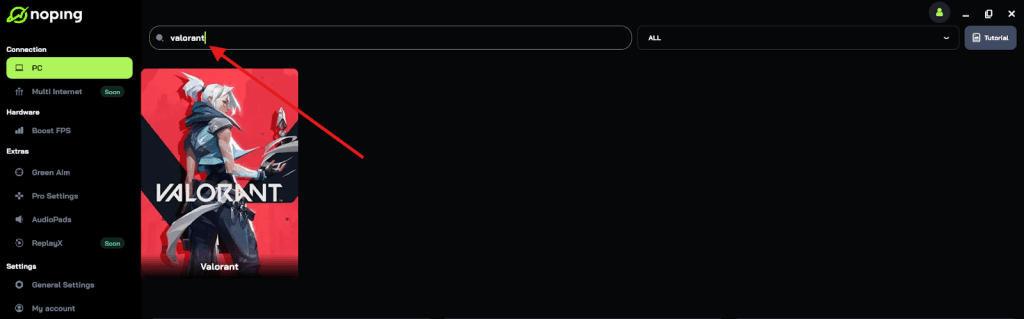
- Once you find Valorant, click on it and, on the next screen, select “Choose automatic” or “Choose manual” and click “Continue”. We recommend choosing automatic, as NoPing’s technology analyzes all routes on a global scale and automatically selects the best option for you.
- On the next screen, click on “Optimize Game”.
- And that’s it, you can start playing Valorant with optimized ping!
You can test different servers within NoPing to see which gives you the lowest latency.
How does the Path to Pro transition from Premier to Challengers work this year?
The 2026 season has fully integrated Premier into the professional ecosystem through the Path to Champions initiative.
This is no longer a separate amateur circuit. It is the literal bottom of the pyramid that leads to the world stage.
The most successful teams in the Invite division at the end of specific Stages are granted the opportunity to compete in the Challengers Promotion tournaments.
In 2026, Riot has increased the number of Challenger leagues to 14 across the globe. This expansion means there are more slots available for Premier teams than in previous years.
The top-ranked teams in the Invite division earn points throughout the season. At the end of the year, the teams with the most points are invited to face off against the bottom-seeded teams from the professional Challengers leagues.
This year, the system is even more competitive because Riot removed relegation protection for Academy teams.
This change means that even established organizations have to defend their spots against hungry Premier squads.
If your team can maintain a high win rate in the Invite division, you could find yourselves playing in televised matches against professional organizations.
The dream of qualifying for a regional Stage 2 Playoff and potentially earning a trip to Champions Shanghai starts with a solid foundation in the Premier hub.
What are the best practices for managing a 7-player roster in 2026?
Managing a roster of five to seven players requires more than just high-level mechanical skill. It requires leadership, clear communication, and a lack of ego.
Many teams fail not because they lack talent, but because they cannot coordinate their schedules or handle the pressure of a losing streak.
- Assign Clear Roles: Do not just pick five aimers. You need a dedicated IGL (In-Game Leader), a primary entry, a reliable anchor for sites, and someone who understands the complex utility of the 2026 meta.
- Utilize Your Subs: The two extra slots on your roster are not just for emergencies. Use them to bring in specialists for specific maps. For example, if one of your subs is a god-tier Breeze specialist, swap them in for that week.
- Schedule Practice Sessions: You should be scrimming against other teams at least two nights a week outside of your official Premier matches. This allows you to test out set plays and utility combos without the pressure of points.
- Record and Review VODs: Use the in-game replay system or external recording software to watch your matches together. Be honest about mistakes. Did the smoke drop too early? Was the rotation too slow?
- Maintain Technical Consistency: Ensure everyone on the team is using the same optimization tools. If four players have 15ms ping and one has 80ms with packet loss, your team's coordination will fall apart. Consistency across the whole roster is key.
Communication is the most cited reason for success in the Premier environment. Unlike ranked play, where you might rely on pings, a Premier team must have a constant flow of information.
Using a dedicated Discord server for your team to discuss strategies and post-match analysis is a standard practice for any serious squad in 2026.
How do you choose the right Zone and Pod for your team?
Choosing your Zone is a permanent decision for the duration of the Stage, so you cannot afford to get it wrong.
During the enrollment process, the Team Owner will see a list of available zones. The client will usually recommend the top two pods based on the lowest average latency of the Team Owner.
However, the owner's connection is not always the best indicator for the entire team.
You should have every member of your team check their ping to the different available regions before you lock anything in.
In 2026, many zones have multiple "pods" or sub-regions. For example, the US East zone might have pods in Virginia and Chicago.
If the majority of your players are in the Midwest, the Chicago pod will offer a much better experience than the Virginia one.
If you find that your team is split and there is no "perfect" server where everyone has low ping, this is where specialized routing becomes a game changer.
By optimizing the path each player takes to the Riot Gamepod, you can often bring a player from 70ms down to a much more manageable 40ms.
This levels the playing field and ensures that no one on your team is the "weak link" due to their physical location.
Remember, once you play your first match, your zone is locked. If you realize mid-season that you picked a zone with terrible routing for half your team, you are stuck there until the next Act starts.
What is the current match format and scoring system in 2026?
The match format in 2026 remains focused on weekly consistency. Most zones have two match windows per week, usually on Wednesday and Saturday evenings.
You can play up to two matches per week to earn Premier Score points. A win earns you 100 points, while a loss earns you 0 points. In the lower divisions, you might earn a small amount of points for participating, but in the higher tiers like Invite, it is strictly win-or-nothing.
To qualify for the Playoff Tournament at the end of the Stage, your team needs to reach a certain points threshold, typically 600 points, though this can vary slightly based on the length of the Stage. The playoffs use a high-stakes bracket system.
In the Open through Elite divisions, matches are Best-of-1 until the finals, which are Best-of-3. In Contender and Invite, the bracket is much more rigorous, often featuring double-elimination formats to ensure the most deserving teams rise to the top.
The map pool for Premier follows the active VCT rotation. Every week, a specific map is featured.
This allows your team to spend the entire week practicing strategies, lineups, and compositions for that one specific map.
This level of focus is what separates Premier from the "all-map" chaos of ranked play. For the playoffs, however, you must be prepared for the full map veto process.
Your IGL needs to know which maps are your team's strengths and which ones you need to ban immediately to avoid an early exit.
Success in the 2026 season requires a combination of tactical brilliance, mechanical skill, and a rock-solid technical setup.
By following these steps and ensuring your connection is as sharp as your aim, your Valorant premier team will be well on its way to climbing the ranks.
Play Valorant without lag. Download NoPing now and start your free trial!