

Learning how to dance in Roblox is one of the first things most players want to do once they create their avatar and jump into a popular experience.
Whether you are hanging out in Brookhaven or competing in a fashion show, showing off your moves is the ultimate way to express yourself.
Roblox is more than just a gaming platform: it is a social hub where your character's body language says a lot about your personality.
Why do people dance in Roblox?
People dance to interact with friends and celebrate victories. In a world where text chat can sometimes feel limited, animations allow you to communicate emotion instantly.
If you just won a round of BedWars or finally reached the top of a Tower of Hell, a quick dance move is the perfect celebration.
It is also a core part of roleplaying games where "vibing" with other players helps build the community atmosphere that makes the platform so unique.
What are the basic chat commands to dance?
You can dance immediately by using simple text commands in the chat box. This is the classic method that has existed since the early days of the platform. To use these, follow these steps:
- Press the / key on your keyboard to open the chat window.
- Type /e dance and press Enter to perform the standard dance animation.
- Type /e dance2 for a slightly different, more rhythmic movement.
- Type /e dance3 to see the third default variation.
These commands work in any game that has the standard Roblox chat and emotes enabled. Keep in mind that your character must be standing still for the animation to start. If you move your avatar, the dance will stop automatically.

How do you use the emote wheel on PC?
The emote wheel is a faster way to access your favorite moves without typing. Most modern games support this feature, which allows you to see a visual menu of your animations.
- Press the . (period) key or the G key on your keyboard.
- A circular menu will appear on your screen showing your equipped emotes.
- Click on the dance move you want to perform.
- Your avatar will start the animation immediately.
If the wheel doesn't appear, some games might have custom keybinds or have the feature disabled to maintain a specific atmosphere.
You can often check the game's settings menu to see if they have a dedicated emote button.
Also read: 13 Best Roblox Horror Games in 2026 (Actually Scary!)
How do you dance on mobile devices?
Dancing on a phone or tablet is just as easy as on a computer, though the buttons look a little different. Since you don't have a physical keyboard, you rely on the touch interface:
- Via Chat: Tap the chat icon in the top left corner. Type /e dance in the bar and hit the send button.
- Via the Menu: Tap the three dots (...) icon or the dedicated "Emotes" button usually located at the top of the screen. This will open the emote wheel where you can simply tap the icon of the dance you want to use.
Mobile players often find the menu much more convenient than typing, especially during fast-paced games where every second counts.
Can you dance on Xbox and PlayStation?
Yes, console players have full access to the animation system. Since you are using a controller, the process is streamlined to avoid the need for an on-screen keyboard:
- While in a game, press the B button (on Xbox) or the Circle button (on PlayStation) to bring up the emote wheel.
- Use the Analog Stick to highlight the dance you want.
- Release the button to trigger the animation.
Just like on PC and mobile, you can only perform these actions if the game creator has allowed emotes in their specific experience.
How do you get more custom dances?
If the three default dances feel a bit too basic, you can find a massive variety of new moves in the Avatar Shop. Roblox calls these "Emotes," and they range from trendy viral dances to complex acrobatic flips.
- Visit the Marketplace (formerly Avatar Shop) on the Roblox website or app.
- Select the Animations category and then click on Emotes.
- Look for free emotes or use Robux to buy premium ones.
- After acquiring them, go to your Avatar Editor.
- Click on Animations and then Emotes to equip them to your wheel.
You can have up to eight emotes equipped at once. If you find one you love, make sure to assign it to a slot so it's always ready when you enter a game. You can find more details on the official Roblox support page.
Also read: How to Change Your Name on Roblox
Why is your dance lagging or looking choppy?
Latency is the main reason why your animations might look stuttery or why other players see you "teleporting" mid-dance.
When your ping is high, the data packets that tell the server your character is dancing get delayed.
This creates a desync where you might see yourself dancing perfectly, but to everyone else, you look like you are frozen or glitching out.
Using NoPing can help stabilize your connection by finding the best route to the game servers, reducing those annoying animation delays and making sure your moves look as fluid as possible to everyone in the server.
Here’s how to use NoPing to fix lag in Roblox:
- Sign-up through the website and download NoPing (you can try it for free)
- Open NoPing and search for Roblox inside the software
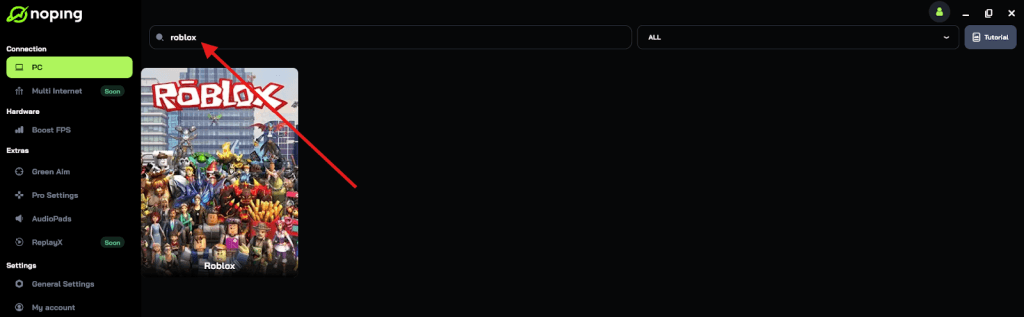
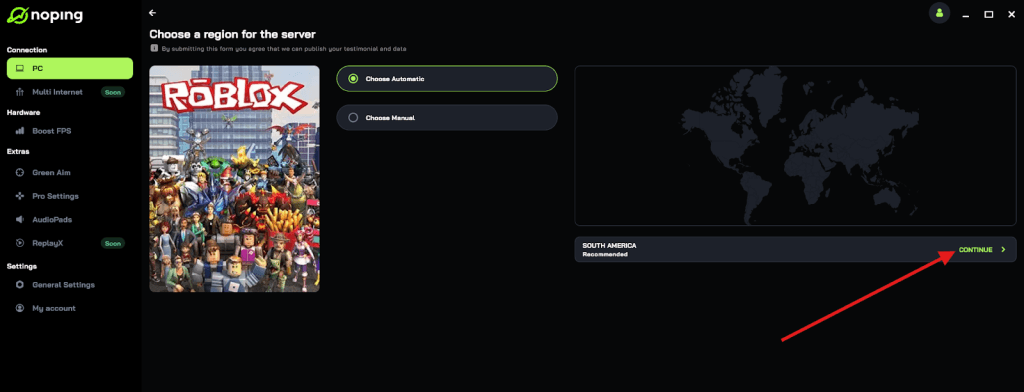
- Once you find Roblox, click on it and, on the next screen, select “Choose automatic” or “Choose manual” and click “Continue”. We recommend choosing automatic, as NoPing’s technology analyzes all routes on a global scale and automatically selects the best option for you.
- On the next screen, click on “Optimize Game”.
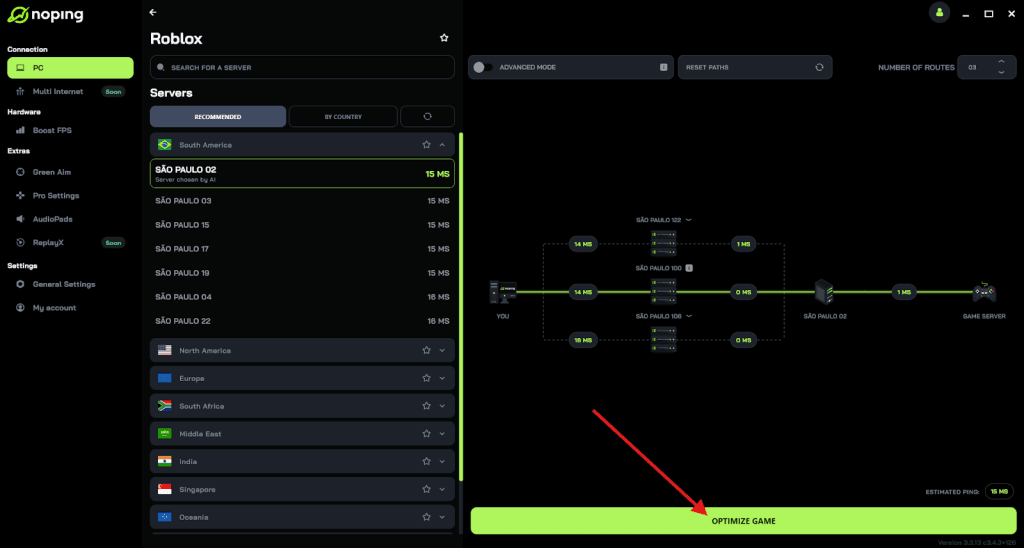
- And that’s it, you can start playing Roblox with optimized ping!
You can test different servers within NoPing to see which gives you the lowest latency.
Do all Roblox games allow dancing?
No, not every experience supports the dance commands or the emote wheel. Game developers have the power to disable these features if they feel it breaks the immersion or the mechanics of their game.
For example, in a highly competitive horror game or a strict military simulation, the creator might remove the ability to dance to keep the tone serious. If you type the command and nothing happens, it is likely that the developer has restricted animations in that specific world.
How to fix emotes not working?
If you are in a game that should allow emotes but they aren't working, there are a few things to check.
First, ensure your avatar is using the R15 body type if the emote requires it, as many modern animations do not work with the older, blockier R6 avatars.
Second, check your settings to make sure "In-Experience Chat" is not disabled, as this can sometimes interfere with chat-based commands. Finally, ensure your connection is stable: if you are experiencing heavy packet loss, the server might not even receive your request to start the animation.
Play Roblox without lag. Download NoPing now and start your free trial!