


Error code 0x3 in Black Ops 6 shows up for a bunch of players as a crash or “game won’t start” message, and it can be maddening because there isn’t a single, obvious cause.
In this 2026 guide we’ll walk you through what the error usually means, the most reliable troubleshooting steps, what tends to cause it, other codes you might see, and a short FAQ.
What is The Error Code 0x3 in Black Ops 6?
In practice, error code 0x3 is a generic crash/launch failure flagged by the game or the PC launcher (Xbox app / Steam / Epic).
It commonly appears when the game process fails to initialize or is blocked by another piece of software (anticheat, remapping tools, corrupted game files, or launcher/app issues).
Community reports and troubleshooting write-ups point to a mix of causes rather than a single root cause, which is why the fix is often “try this, then that.”

Source: Reddit
Step-by-Step Guide to Fix Error Code 0x3 in Black Ops 6
Below is a prioritized checklist. work one item at a time and test the game after each step. That way you know which action fixed it (or which next step to try).
1. Restart everything
Fully close the game, sign out of launchers, reboot your PC/console, then try again. Simple restarts clear stuck processes and are worth the two minutes.
2. Repair / verify game files
On Steam: Right-click game > Properties > Local Files > Verify integrity of game files.
On Epic: Library > three dots > Manage > Verify.
On Xbox PC app / Game Pass: In Windows Settings > Apps > find the game > Advanced options > Repair (and if Repair fails, try Reset). Many users have reported Repair/Reset fixes for 0x3.
3. Update Windows and GPU drivers
Windows Update, and then install the latest GPU drivers from NVIDIA/AMD. Outdated drivers can crash modern games during initialization.
4. Close or remove conflicting software
Anti-cheat tools (Vanguard, FACEIT, Riot Vanguard, EasyAntiCheat variants), controller remapping tools (reWASD), or third-party overlays can trigger launch crashes. Exit these from the taskbar or uninstall temporarily to test.
5. Repair Xbox / Microsoft Store / Gaming Services (for Game Pass users)
Run wsreset (resets Microsoft Store cache), repair Xbox app (Settings > Apps), and repair Gaming Services. Some Game Pass users fixed persistent 0x3 by repairing/resetting those components.
6. Run as Administrator and disable compression
Right-click the game executable or launcher and run as admin. Also check the game folder properties and uncheck “Compress contents to save disk space” — Windows compression can sometimes break games.
7. Reinstall the game/launcher if needed
If the previous steps fail, uninstall and reinstall the game. For Game Pass users, fully remove related Call of Duty folders in your user documents and AppData, uninstall Xbox app, then download the Xbox app from the official site and reinstall.
8. Try a clean boot
Boot Windows with only essential services to eliminate background software interference. If the game works under clean boot, enable services one-by-one to find the conflict.
9. Check disk configuration and antivirus exclusions
Ensure the game drive is not compressed, and add the game and launcher to your antivirus/firewall exclusions temporarily while testing.
10. If all else fails: contact support and share logs
Collect crash logs (if available) and reach out to Activision/Raven/Microsoft support; provide platform, exact error, and steps tried. Community threads sometimes point to server-side or launcher-specific issues that require a patch.
This single checklist groups the most commonly successful steps. Many community threads report that just one or two of the above (repairing Xbox services, removing a remapping app, or verifying files) solved the problem for them.
What Causes Error Code 0x3 in Black Ops 6?
There isn’t one definitive cause, but several reliable triggers keep appearing:
- Corrupted or missing game files — failed updates or disk errors. Verifying or repairing the install often helps.
- Conflicting anti-cheat or third-party tools — Vanguard, FACEIT, reWASD, controller remappers, and similar software can prevent the game from launching.
- Launcher/Xbox app problems (Game Pass) — Xbox app, Gaming Services, and Microsoft Store cache issues can stop Game Pass versions from progressing past splash screens.
- Driver or OS mismatches — outdated GPU drivers, or Windows missing updates, can cause initialization crashes.
- Background software/overlays — overlays from Discord, Steam, or recording/streaming tools sometimes conflict with the game.
Because the code is generic, troubleshooting focuses on removing those likely interference points and repairing the install.
Other Error Codes in Black Ops 6 to Know
You might see other hex-style or “game has crashed” codes.
A few commonly reported ones alongside 0x3 are: 0x0, 0x1, 0x5, 0x7, 0x9.
The fixes overlap a lot: file verification, driver updates, anti-cheat removal, and launcher repairs are common solutions across these codes. Guides and videos that address several of these together are common because the remediation steps are largely shared.

How to Play Black Ops 6 With Top Connection
NoPing is a service designed to optimize your route to Call of Duty’s servers. Sometimes, the normal path your internet provider uses isn’t the fastest. NoPing reroutes your data through a better, more direct path.
Here’s how to use NoPing to fix lag in Call of Duty:
- Sign-up through the website and download NoPing (you can try it for free)
- Open NoPing and search for Call of Duty inside the software

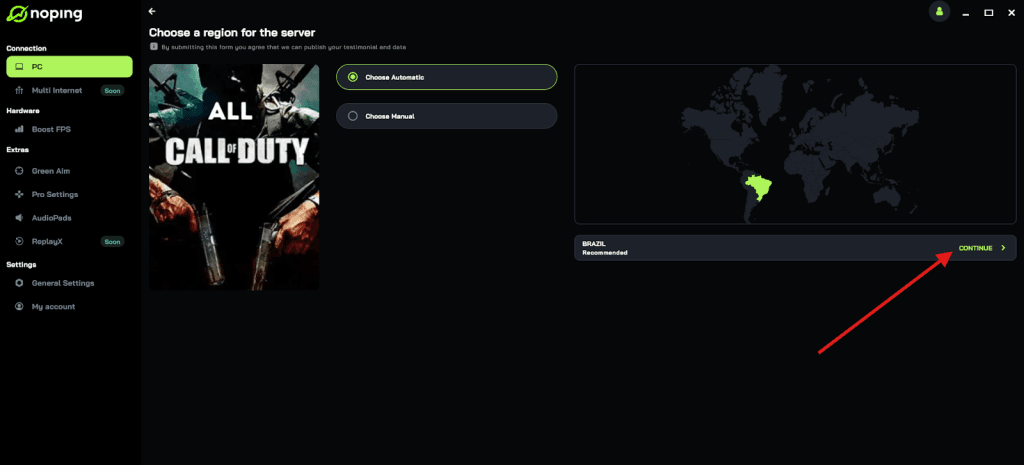
- Once you find Call of Duty, click on it and, on the next screen, select “Choose automatic” or “Choose manual” and click “Continue”. We recommend choosing automatic, as NoPing’s technology analyzes all routes on a global scale and automatically selects the best option for you.
- On the next screen, click on “Optimize Game”.
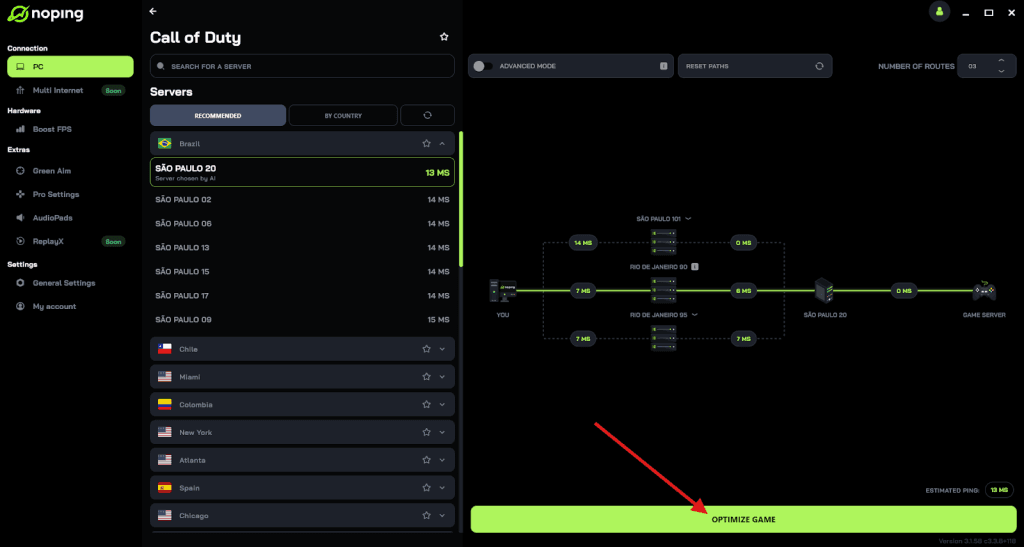
- And that’s it, you can start playing CoD with optimized ping!
You can test different servers within NoPing to see which gives you the lowest latency.
FAQ - Error Code 0x3 in Black Ops 6
Q: Is error 0x3 a server issue I can wait out?
A: Usually no. Most reports show 0x3 as a client-side crash/launch problem. If multiple players suddenly report widespread 0x3 at the same time and official channels acknowledge an outage, then it could be server-side, but that’s rare for this specific code.
Q: I use Game Pass on PC. Should I prefer Steam/Epic to avoid this?
A: Not necessarily. Each platform has its quirks. If your copy via Game Pass repeatedly gives 0x3 despite fixes, some players switched to a Steam/Epic purchase and had fewer launcher-related problems, but that’s a heavy-handed solution and depends on availability and cost. Also, switching platforms won’t help if the cause is a local anti-cheat or driver problem.
Q: Will uninstalling anti-cheat (like Vanguard) get me banned?
A: Uninstalling or exiting anti-cheat will usually prevent the game from running in online modes protected by that anticheat. Don’t attempt to remove it to bypass security: use recommended steps (exit temporarily or reinstall cleanly). Removing anticheat to cheat or to circumvent protections is a breach of terms and could lead to penalties.
Q: My game works after a reinstall, but only until I close it. Then 0x3 returns. What’s up?
A: That pattern appears in a few community reports where some background service re-registers itself after reboot or re-enabling and reintroduces the conflict (e.g., a remapper or anti-cheat reinstall). Try uninstalling the conflicting app, and also check scheduled tasks and startup apps that might re-enable software.
Q: Any safe quick tests I can run?
A: Try launching the game after a clean boot and with minimal peripherals attached. Also test on another Windows user account if possible — if it runs there, the issue is likely user-profile specific (AppData or registry entries).
Error code 0x3 in Black Ops 6 is one of those frustrating, multi-cause problems. The efficient approach is: verify files, look at anti-cheat and remapping software, repair any platform-specific runtime (Xbox/Game Pass services), update drivers, and only then reinstall if needed.
And to always play Black Ops 6 with optimized FPS and reduced ping, use NoPing! Download and start your free trial!